Text, Call & Phone number
- 194.00
- 3.3
- Installs
- 500.00K
- Price
- Free

Screenshots




Analysis by Reviewed
Have you ever found yourself in a situation where you simply needed to manage your communications more efficiently? Well, I recently stumbled upon this app called Text, Call & Phone Number, and it’s been quite the game-changer. Let me walk you through my experience using it, and maybe you'll see just how handy it can be in your day-to-day life.
Start with the number you actually need
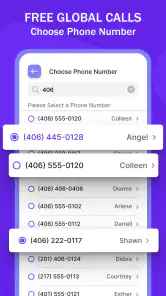
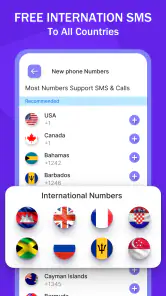
This communication app is aimed at people who want a separate local US or Canada number for texting and calls. I can see the appeal if you’d rather not give out your personal number for a short-term project, a marketplace conversation, or contact with people across the border. It is not a replacement I’d choose automatically: if everyone you contact already uses your regular number, adding another one may create more to manage rather than less.
The practical question is whether a second number solves a recurring problem for you. For example, if I were arranging a weekend pickup, I could use a separate contact point for that exchange and keep my usual number for friends and family. I would still make sure the other person knows which number to reply to, and I’d keep important ongoing conversations somewhere I can reliably reach them. A second number can separate contexts, but it does not make communication effortless by itself.
Who benefits from a second line
I see the clearest use for someone who has a repeated reason to separate conversations, not someone who merely wants another number “just in case.” A person selling items locally, coordinating a temporary project, or managing casual inquiries may value the boundary between those exchanges and personal messages. The benefit is practical: you can tell at a glance which context a conversation belongs to and decide when to engage with it.
That separation is also a small organizational commitment. I would tell regular contacts which number to use, avoid switching between lines mid-conversation, and keep a simple mental rule for what belongs on the extra number. If you do not maintain that habit, the second line can create a new problem: messages split across places, and you have to remember where someone last contacted you.
Streamlining Your Communication
One of the first things I noticed about Text, Call & Phone Number is how it seamlessly integrates all your communication needs into one single platform. Imagine having your text messages, call logs, and phone numbers all organized neatly without having to jump from one app to another. It’s like having your very own personal assistant, minus the hefty salary.
Where setup can get confusing
Before relying on a new number, I’d check that I have selected the intended country and local-number option, then test both an outgoing text and a call with someone I know. That small test helps separate a basic setup mix-up from a problem with a particular contact. I’d also confirm that the person is replying to the new number rather than an older thread associated with my regular line. Keeping those threads distinct is a simple habit that can prevent missed replies.
More From Our News Desk

Weather by Xiaomi Review: Clear at a Glance, Less Clear Up Close

X Under Pressure: Can It Recover When Posting Goes Wrong?

Clash of Clans Is Won Between the Battles

Android Auto Makes the Case for Quieter Car Software

MobiOffice: Transforming Mobile Productivity with Seamless Integration

EA SPORTS FC™ Mobile Soccer: Redefining Mobile Sports Gaming
The app is free to install, but in-app purchases range from $3.99 to $19.99 per item, so I would look carefully at any purchase prompt before committing. Its 3.3 average from around 1.2K ratings suggests experiences are mixed, which makes a low-stakes test more sensible than moving every important conversation over immediately. It is rated for Everyone, and it was released on June 9, 2022; the current version is 21275.0 and it requires Android 6.0 or later. Share File Technologies by 090 Bravo is the developer.
A useful first-day test
I would not begin by handing out the extra number to a large group. Instead, I’d choose one person I can reach another way, send a brief test message, and ask them to reply to the new thread. Then I’d place a short call and confirm that both sides know which number appeared. This is a modest check, but it catches the most consequential early confusion: believing a new contact route is ready before the other person has saved it correctly.
If a purchase prompt appears while I’m still learning whether the app fits my routine, I’d pause and read what the item covers rather than assuming every useful part is included for free. The listed purchase range makes it worth distinguishing between installing the app and paying for an item. For someone who only needs occasional separation, that distinction matters when deciding whether the convenience is worth the total cost of maintaining another communication channel.
Text Messaging Made Easy
We’ve all experienced the frustration of sifting through endless text threads to find that one important message. With this app, however, it’s a breeze. The search functionality is top-notch, allowing you to locate messages in a snap. Plus, the ability to categorize conversations into folders means your inbox is always tidy and manageable. It’s the Marie Kondo of text messaging!
For a useful everyday workflow, I’d keep the second number for one clearly defined purpose and avoid mixing those messages into conversations meant for my main line. If a reply seems to vanish, I’d first check the conversation thread and the number shown before assuming the service failed. Then I’d try a fresh message to a known contact. These checks are more useful than repeatedly sending the same text, which can leave both people unsure which message is current.
Keeping a conversation easy to follow
One non-obvious trade-off with a separate texting number is that the conversation itself may be clear while the context is not. If someone messages about a pickup or project days later, I’d include a short reminder in my reply about what we were arranging. That helps when a thread has been quiet and reduces the chance that I mistake an old inquiry for a current commitment.
I’d also avoid using the extra line as a dumping ground for every one-off exchange. A narrow purpose makes the inbox easier to interpret and makes it simpler to decide which messages deserve a prompt response. If the number is used for several unrelated groups, the separation from a personal line may still exist, but the practical benefit becomes less obvious.
Efficient Call Management
Let’s talk about calls. Whether it’s screening an unknown number or organizing your call logs, this app has you covered. I particularly love the call blocking feature. It’s so satisfying to know that pesky telemarketers won’t be bothering me anymore. Also, the call history is presented in a way that’s super easy to navigate, which makes keeping track of important calls a cinch.
If a call does not connect, I would first check that I’m placing it from the intended number and that the contact has the right one saved. A failed call is not automatically proof that the app is at fault: the other person may be unavailable, or the issue may be with the device’s connection. I’d retry once later and, if the conversation is time-sensitive, use my usual calling method as a backup rather than treating a second number as the only route.
When a call needs a backup plan
For a practical example, imagine I’m coordinating a delivery window with someone I have not met. I could use the separate number for the initial arrangement, but I would not make it the sole way to reach me if timing mattered. I’d agree on a fallback, such as contacting me through the number or channel we already know works. That is not a criticism unique to this app; it is sensible planning whenever a conversation depends on reaching a person promptly.
Call history is most useful when I know which line I used. Before returning a missed call, I’d check the recent context and make sure I’m not calling back from my personal number by habit. This small pause can prevent an awkward mix-up, especially when I am dealing with several temporary contacts at once.
All Your Contacts in One Place
Managing contacts can be a daunting task, especially if you have numerous entries. This app simplifies the process by allowing easy import and export of contacts. No more manual entries or fear of losing valuable numbers! Plus, the app provides a neat way to label and group contacts, making it effortless to find who you need, when you need them.
I would be selective about which contacts I bring into a separate-number workflow. For a short project, saving only the people involved can make the list easier to scan and reduce the chance of calling someone from the wrong line. If I were switching devices or reorganizing contacts, I’d take care to verify that the important entries are still available before relying on them. A contact list is only helpful when it points to the number I intend to use.
Choosing between this and familiar alternatives
Compared with a standard phone line, an additional number offers more separation but requires more attention. A regular number is usually easier when everyone already knows how to reach you and you do not need to divide personal and other conversations. An established messaging service may be a better fit when the people you contact already use it and you do not need a separate phone number for calls and texts. The advantage here is specifically the extra local US or Canada contact point, not a reason to move every conversation.
I would also think about the other person’s habits. If a contact is likely to keep replying to your familiar number, the new line may not create the boundary you want unless you explain it clearly. For a short exchange, that little bit of explanation may be worth it. For a long-running relationship where both people already have a dependable routine, changing channels can add friction without solving much.
When a different option makes more sense
With 500K+ installs, this app has found an audience, but popularity alone does not tell me whether a second number suits a particular routine. Compared with simply using a regular mobile number, it adds separation between personal and other conversations, while also adding another inbox and number to keep straight. If I needed dependable contact for work, travel, or an urgent matter, I would keep a familiar backup channel available. If I only want to message people who already use an established chat service, that service may be the simpler choice.
I’d skip this app if I rarely need a separate US or Canada number, dislike managing multiple threads, or cannot afford confusion over which line someone should call. It makes more sense for someone with a clear boundary to maintain, such as keeping casual buying-and-selling conversations apart from family messages. The best test is not whether a second number sounds useful in theory, but whether it removes friction from a real situation you encounter repeatedly.
When the app may not be the cause
If a text or call fails, I would avoid jumping straight to the conclusion that the app is broken. First I’d check that the phone has a working connection, that I selected the intended number, and that the recipient has not simply missed the message or call. I’d make one careful retry rather than sending several near-identical messages. If the same contact remains unreachable, trying my usual communication route can help determine whether the trouble is limited to this new line or affects contact more broadly.
That distinction matters because a second-number app cannot make the other person available, correct a number they saved incorrectly, or fix a general connection issue on my device. For anything important, I would keep the details of the conversation and a backup way to reach the person. If the problem appears limited to the app after those basic checks, I’d stop relying on it for that exchange until I can use a dependable alternative.
The flexibility and organization that Text, Call & Phone Number offers are truly remarkable. It’s like having a Swiss Army knife for your communication needs. Whether you’re an organization aficionado or just someone looking to make life a bit easier, this app is definitely worth checking out. So why not give it a try and see if it fits into your lifestyle as perfectly as it did mine?
A measured final take
My recommendation is to approach it as a focused extra line, not as a guaranteed replacement for the number and communication habits you already depend on. Start with one ordinary conversation, check that calls and texts reach the right person, and decide whether the separation is worth maintaining. If it is, the app may be handy; if the extra number creates more tracking than convenience, your regular phone setup is probably the better fit.
Text, Call & Phone number Frequently Asked Questions
What permissions does Text, Call & Phone number need to work?
Text, Call & Phone number is a communication app built around texting and calling with a local US or Canada phone number. Before installing, consider whether you are comfortable granting the permissions needed for the features you choose to use, such as access to contacts or microphone access for calls. Review permission requests on your device and allow only those that make sense for your use.
Can Text, Call & Phone number provide a local number for texting and calls?
Yes. The app’s core purpose is to provide texting and calling with a local US or Canada phone number, which can serve as a second phone number alongside your regular one. This may be useful when you want a separate number for communication. The app is free to download, while in-app purchases are available for users who want paid options.
What features does the Text, Call & Phone number app offer?
The Text, Call & Phone number app provides users with comprehensive communication functionalities. It allows for sending and receiving text messages, making voice and video calls, and managing multiple phone numbers. The app is designed to integrate seamlessly with your contacts, offering a user-friendly interface for efficient communication. Additionally, it supports international calling and comes with voicemail and call recording features.
Is the Text, Call & Phone number app free to use?
The app offers a free version with basic features, which includes standard text messaging and voice calls. However, for advanced features like international calling, multiple phone numbers, and call recording, users may need to opt for a premium subscription. The premium version often comes with a monthly or annual fee, providing an ad-free experience and additional functionalities. The app is free to download, with in-app purchases ranging from $3.99 to $19.99 per item.
How secure is the Text, Call & Phone number app?
Security is a top priority for the Text, Call & Phone number app. It uses end-to-end encryption for all communications, ensuring that your text messages and calls are secure from unauthorized access. The app also complies with data protection regulations and offers features like two-factor authentication to enhance user security. Regular updates ensure that any vulnerabilities are promptly addressed.
Pros
- User-friendly interface
- easy to navigate.
- Offers free texting and calling features.
- Supports international calls at low rates.
- Allows number masking for privacy.
- Quick registration process
- minimal steps.
Cons
- Contains in-app advertisements.
- Limited features in free version.
- Occasional call connectivity issues.
- Requires internet for most functions.
- Privacy concerns with data permissions.
- Category
- Communication
- Version
- 21275.0













