Messenger SMS & MMS
- 2.58K
- 4.1
- Installs
- 10.00M
- Price
- Free

Screenshots




Analysis by Reviewed
My first impression of Messenger SMS & MMS is that it aims to make ordinary texting easier to manage, rather than persuade everyone to move their conversations to yet another social platform. That distinction matters: SMS and MMS are still useful for contacting people who do not share a particular chat app, and for practical exchanges that do not need a separate account-based service. I find that straightforward role more appealing than another attempt to replace every way I communicate.
Why it can feel useful in the first week
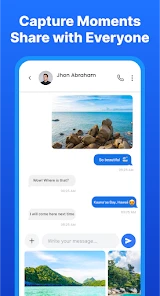
During the first few days, the appeal is simple: open one messaging app and handle text conversations and picture or video messages there. The developer is Share File Technologies by 090 Bravo, and the app sits in the communication category. Its focus is familiar enough that I would not expect a long learning period if I already use SMS regularly. The benefit is less about discovering a new way to chat and more about making a common task feel organized and accessible.
A realistic use case is coordinating a family pickup. One person sends a short text with the time, another replies with a photo showing where to meet, and someone else may only be reachable by standard messaging. Keeping those exchanges in an SMS/MMS app can be more practical than asking everyone to install the same internet-based messenger. It also suits quick messages to local services or acquaintances when a phone number is the only contact detail available.
Where the everyday value comes from
After the novelty of trying a new interface wears off, I judge a messaging app by whether it makes repeated tasks less annoying. This one has a clear reason to stay installed if SMS and MMS are already part of your routine: there is no need to make every contact adopt a new platform just to exchange a message. In that sense, its value is dependable convenience, not a stream of features I would need to keep exploring.
It is worth knowing what kind of communication that convenience covers. SMS and MMS are not interchangeable with every feature people expect from modern internet messengers. If your daily conversations depend on a particular service’s calling tools, large shared groups, or account-based features, a dedicated chat app may remain the better home for them. I would treat this app as a practical option for conventional messaging, not as a guaranteed all-in-one replacement.
How it fits into a longer-term routine
The long-term question is whether it earns its place after the first week. For me, that depends on how often I need to contact people through ordinary phone messaging and whether I prefer a focused SMS/MMS experience. A 4.1 average from around 44,000 ratings and more than 10 million installs suggest that many people have tried it, but popularity alone cannot tell me whether it suits my habits. The useful test is whether I still reach for it without thinking when a text arrives.
Small habits that make it easier to live with
I would start by using it for a few recurring conversations rather than moving everything at once. That makes it easier to notice whether the layout suits the way I scan messages and reply. For picture or video exchanges, I would also check that the recipient and conversation are correct before sending; with ordinary messaging, a quick glance at the thread is a sensible habit, especially when several conversations are active at once.
More From Our News Desk

Weather by Xiaomi Review: Clear at a Glance, Less Clear Up Close

X Under Pressure: Can It Recover When Posting Goes Wrong?

Clash of Clans Is Won Between the Battles

Android Auto Makes the Case for Quieter Car Software

MobiOffice: Transforming Mobile Productivity with Seamless Integration

EA SPORTS FC™ Mobile Soccer: Redefining Mobile Sports Gaming
Another useful habit is to decide which app should handle incoming texts and then keep that choice consistent. Switching back and forth between messaging apps can make it harder to remember where a conversation continued. If a contact’s replies seem to be appearing elsewhere, checking the phone’s messaging-app selection is a practical first step. This is not a special trick so much as a way to avoid splitting a simple exchange across two inboxes.
Where the trade-offs show up
The main limitation is also the product’s narrow focus: people who rarely use SMS or MMS may not get much lasting value from installing another communication app. Those who rely on internet messaging for features beyond texts and media should compare their existing service carefully before changing routines. I would skip this app if I wanted one shared space for every chat platform, or if my friends and family already communicate reliably through a different service.
There can also be a learning curve when replacing a familiar default, even if the new layout feels approachable. A messaging app becomes part of muscle memory: where I tap to open a thread, how I find an older exchange, and which inbox I check first. I would give myself a little time to settle into the routine instead of judging the switch after a single conversation. If that adjustment creates more friction than the organization saves, returning to the previous app is a reasonable choice.
Cost, support expectations, and fit
The app is free to install and rated for Everyone, which makes it easy to try without committing to a purchase. Optional in-app purchases range from $0.99 to $54.99 per item, so I would look at what is offered in the app and decide whether any paid option solves a real need rather than assuming it is essential. Its release date is January 9, 2020, and the current version is 19999201211.0; it requires Android 11 or later. These details matter when deciding whether it fits an older device or a household member’s phone.
One question I would ask before switching is whether this is the right choice for the people I message most. The answer depends less on their preferences than on the communication channel: SMS and MMS are useful when a phone number is enough, while internet-based services can be better when everyone wants richer shared tools. I would also consider how comfortable I am making a new app part of a daily routine. A free install makes a short trial low-risk, but changing habits only makes sense if the app feels more convenient in ordinary use.
Seamless Integration
One of the first things that caught my attention about Messenger SMS & MMS is how effortlessly it integrates with your existing messaging services. Imagine combining your SMS and MMS messages in one place without having to switch between apps. It's like having your cake and eating it too! The app neatly organizes all your messages, making it super easy to keep track of conversations, whether they're with your mom or your boss.
User-Friendly Design
I know what you're thinking: "Another messaging app?" But hear me out. The design of this app is refreshingly intuitive. With a clean interface and easily navigable menus, you'll feel right at home as soon as you open it. Plus, the customizable themes are a nice touch, allowing you to personalize your messaging experience. Who doesn't love a little flair?
Reliable Performance
When it comes to messaging, reliability is key. I can't tell you how many times I've been frustrated by other apps failing to send messages or crashing at the worst possible times. Thankfully, Messenger SMS & MMS is as reliable as they come. Whether you're sending a quick "Hello!" or a lengthy group message, you can count on it to get the job done without a hitch.
Privacy and Security
In today's digital age, privacy is more important than ever. This app takes your privacy seriously, offering end-to-end encryption for your messages. You can chat with peace of mind, knowing that your personal conversations are protected from prying eyes. It's like having your own digital fortress.
In conclusion, Messenger SMS & MMS is a fantastic choice for anyone looking to simplify their messaging life. With its seamless integration, user-friendly design, reliable performance, and top-notch security, it's no wonder this app is quickly becoming a favorite. So, why not give it a try? You might just find yourself wondering how you ever lived without it.
Messenger SMS & MMS Frequently Asked Questions
Can Messenger SMS & MMS send photos and videos, or is it limited to text?
Messenger SMS & MMS is designed for SMS and MMS messaging, and its description highlights sending text, photos, and videos in one app. MMS is the format used for multimedia messages, so sending pictures or videos may depend on your carrier plan, network connection, and the recipient’s device. Check your carrier’s messaging terms before relying on MMS for frequent or large files.
Do I need an internet connection to use Messenger SMS & MMS?
Messenger SMS & MMS handles SMS and MMS, which are generally sent through your mobile carrier’s messaging service rather than through an internet-based chat system. A working cellular connection and an active messaging service are therefore important. Internet access may be useful for downloading the app or related content, but normal SMS and MMS delivery can also involve carrier charges and coverage limitations.
Can I keep my existing conversations and contacts if I switch to Messenger SMS & MMS?
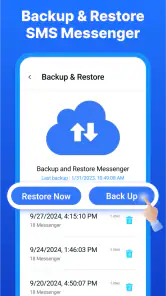
The app is intended to manage SMS and MMS conversations and integrates with existing contacts, which can make it feel familiar when you start using it. Before changing your default messaging app, check how your Android device handles message history and contact access. Keeping a backup of important conversations is sensible, especially if you are changing apps or adjusting message settings.
What devices and operating systems should I check before downloading Messenger SMS & MMS?
Messenger SMS & MMS is an Android messaging app, so it is intended for use on a compatible Android device rather than as an iOS app. Check that your device meets the app’s minimum operating-system requirement before downloading. Compatibility matters because an app may not install or work as expected on an older system, even when the phone can send ordinary text messages.
What is Messenger SMS & MMS and how does it work?
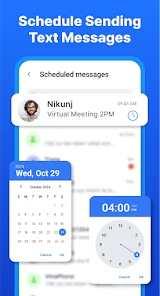
Messenger SMS & MMS is a versatile messaging app designed for Android devices that allows users to send and receive SMS (Short Message Service) and MMS (Multimedia Messaging Service) messages. It integrates seamlessly with your existing contacts, offering a rich user interface with customizable themes, emojis, and stickers. Users can manage conversations efficiently with features like message search, group messaging, and scheduled texts, making it a comprehensive tool for personal and professional communication needs.
Pros
- Supports various multimedia messages
- User-friendly interface
- Fast message delivery
- Customizable themes
- Offline messaging capability
Cons
- Contains in-app ads
- Limited free features
- Occasional notification delays
- Requires internet for multimedia
- Some features are premium-only
- Category
- Communication
- Version
- 19999201211.0













