Symbolab: AI Math Solver
- 3.84K
- 4.3
- Installs
- 10.00M
- Price
- Free

Screenshots




Analysis by Reviewed
What I value most in a math solver is not a fast final answer but a way to inspect how that answer was reached. Symbolab: AI Math Solver is built around that idea: it can turn a problem into a sequence of steps, giving me a route to question, check, and learn from rather than a result to copy blindly. That makes it especially useful when I know the topic but have lost track of a transformation or need to check my own working.
The difference is practical. With a basic calculator, I can verify arithmetic, but I usually have to supply the method myself. Here, the working can help me spot where an approach changes direction, whether a sign is carried through, or which operation appears next. I still need to judge whether the explanation fits the lesson I am studying. A displayed method is a reference, not a guarantee that I have understood it.
Where a worked solution earns its place
A realistic use is a student working through a set of algebra or calculus exercises after class. Rather than asking the app to do every question, I would try one problem first, then use a similar one to check whether I can repeat the method unaided. If a step surprises me, that is a useful signal to pause and review the underlying rule instead of treating the answer as proof that I understand it.
This approach also helps when studying away from a desk. A phone is not ideal for writing long calculations or comparing several lines of working, but it can be handy for a quick check while reviewing notes or waiting for a lesson to start. I would keep the original question visible and compare each step carefully, especially if I entered a complicated expression where a misplaced sign or bracket could change the result.
There is a useful distinction between checking an answer and checking a method. If the final result differs from mine, I can compare the intermediate lines to locate the first point where our work diverges. If the answer matches, that alone does not confirm I used a sound method; I would still look at the steps and ask whether I could explain them without the app. That is a better use of a solver than treating matching answers as a pass.
How it fits beside other math tools
Compared with a basic calculator, Symbolab is more useful when the question is not just “what is the answer?” but “how do I get there?” A calculator remains the quicker choice for routine arithmetic and a handwritten solution is still important practice. Search engines can help explain a broad topic, while a solver is more direct when you have a particular expression in front of you. I see the app as a companion to those methods, not a replacement for learning to set up and solve problems yourself.
It is also worth treating a generated explanation as a guide rather than an unquestionable teacher. If the question was typed incorrectly, a neat-looking solution may address a different problem than the one on your worksheet. I recommend checking the input before relying on the result, then asking whether each step makes sense in the context of the method you are learning.
More From Our News Desk

Clash of Clans Is Won Between the Battles

Android Auto Makes the Case for Quieter Car Software

MobiOffice: Transforming Mobile Productivity with Seamless Integration

EA SPORTS FC™ Mobile Soccer: Redefining Mobile Sports Gaming

How Microsoft OneDrive Became a Mobile Productivity Giant

How Google Translate Breaks Language Barriers Effortlessly
For a conceptual question such as why a rule works, a lesson, textbook, or teacher may do a better job than a solver focused on a particular expression. Conversely, when I already understand the topic but need to check a specific line of algebra, searching through a long general explanation can be slower than entering the expression. Choosing between these tools depends on the gap: Symbolab is strongest at working through a concrete problem, not replacing every kind of math instruction.
Getting Started with Symbolab
From the moment I opened the app, I was greeted with a sleek and intuitive interface that made me feel at home. The design is clean, and navigating through the various features is as easy as pie. You can tell Symbolab: AI Math Solver was created with the user in mind. No more fumbling around trying to figure out where everything is.
Symbolab is an education app from developer Symbolab. It is free to install, is rated for Everyone, and has reached over 10 million installs. Its average rating is 4.3 from around 145 thousand ratings, with about 3.8 thousand written reviews. It launched on January 14, 2015, and version 12.0.4 is listed for devices running Android 7.0 or later. Those details make it a well-established option, though a high rating alone cannot tell you whether its explanations match your course or teacher’s preferred notation.
That mismatch is worth keeping in mind when using any worked solution for school or college work. A method can be mathematically valid yet unfamiliar in a class that expects a particular technique or notation. If my teacher has asked us to use a specific method, I would check whether the app’s steps follow it before using the result as a model. The point is not to reject a different route, but to avoid submitting work I cannot explain or that does not demonstrate the skill being assessed.
Features Galore
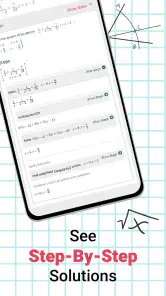
One of the standout features of this app is its ability to solve a wide range of math problems. Whether you’re dealing with algebra, calculus, or even trigonometry, Symbolab has got you covered. I was particularly impressed with how it breaks down each solution step-by-step. It's like having a personal tutor in your pocket! And let me tell you, the AI-driven explanations are a game-changer. They’re clear, concise, and incredibly helpful for those "aha!" moments.
To get more from those steps, I would use them actively: cover the next line, predict what should happen, and then reveal it to compare. That small habit turns a solution into a short practice session. If a step uses a rule you do not recognize, write down the rule separately and test it on a simpler example; a solver can show a path, but it cannot tell you whether you can reproduce that path unaided.
Another practical habit is to keep a small record of the step that caused trouble, rather than saving only the final result. For instance, I would note whether I got stuck when rearranging an equation or simplifying an expression, then try a fresh problem of the same kind without help. This makes the app a diagnostic tool: it can reveal where I need more practice, while the practice itself still happens on paper or in my notes.
When entering a problem, I would take an extra moment to inspect the expression before trusting a polished solution. In typed math, parentheses and negative signs are easy to overlook, and a small input difference can lead to a completely coherent answer to the wrong question. If the steps seem unrelated to the exercise, I would first recheck what I entered rather than assume the solver has misunderstood the mathematics.
Seeing a function, not just its answer
Another cool feature is the graphing tool. Visual learners, rejoice! You can plot functions and see their graphical representations, which is super handy when you're trying to wrap your head around complex concepts. Plus, the app supports a bunch of different languages, making it accessible to users from all over the globe.
The graph view is most useful when I already have a question to investigate: for example, whether a curve’s shape agrees with what I expect from the equation. I would use it to build intuition, then return to the algebra rather than treating the picture as a substitute for working through the problem. Graphs can clarify a pattern quickly, but they do not explain every symbolic step or settle every question about an exact value.
For a student who is learning how equations and graphs relate, I would compare the plotted curve with a prediction made before opening the graph. Does the shape fit the signs and powers in the expression? Does the visual result support the behavior expected from the classwork? That kind of check turns a graph from something to look at into evidence to interpret. If the task is specifically to draw a graph by hand, I would still practice sketching it myself before using the app to compare.
The User Experience
Symbolab isn’t just about solving problems; it’s about understanding them. The app encourages users to learn and grow, rather than just feeding them answers. I found myself actually wanting to explore more math problems just to see how the explanations would pan out. The app is pretty responsive, too, with minimal lag time when processing even the most intricate equations.
There is a practical trade-off around cost. The app is free, while in-app purchases range from $0.99 to $39.99 per item. I would start with the free experience and only consider paying if I regularly use a feature that is restricted or otherwise more useful with a purchase. The price range is broad enough that it is sensible to check the particular purchase details before confirming anything, rather than assuming every part of the solver works the same way without payment.
For an everyday example, imagine checking homework on the way home after a lesson. I might enter one problem that I have already attempted, compare the first unfamiliar step with my notebook, and mark the underlying rule to review later. If I have several questions, I would avoid letting the app solve the whole set; instead, I would use one worked example to clarify the method, then complete the rest independently. That keeps a quick phone check from taking the place of the actual assignment.
The phone format also has limits. Long expressions and multi-line work can be easier to follow on paper, especially when I need to compare several steps at once. I would not use a small screen as my only study setup for a demanding revision session. It is more comfortable as a companion for focused checks, while a notebook gives me room to organize my own reasoning and see the whole solution at a glance.
For a learner who wants guided practice across symbolic math topics, the step-by-step focus is the main reason to try it. Someone who only needs quick arithmetic, prefers a physical workbook, or wants a full lesson that introduces a topic from scratch may be better served by a calculator, textbook, or teacher. I would also avoid leaning on it during practice meant to build independent problem-solving; using it after making a genuine attempt is a more useful balance.
Who is likely to benefit most
I think the strongest fit is someone who regularly encounters algebraic expressions, functions, or calculus exercises and wants to check the reasoning between lines, not only the endpoint. It can also suit a learner who studies independently and needs a prompt to identify the next step before returning to the textbook. The app is less compelling for someone whose main need is arithmetic, a structured course from the ground up, or detailed feedback on a handwritten proof.
Parents helping with homework may find a worked route useful when they recognize the topic but cannot immediately recall a procedure. I would still compare the approach with the child’s class notes and ask them to explain the step in their own words. That makes the check a conversation about the method instead of a shortcut to filling in an answer. For younger learners especially, an adult’s guidance can help distinguish a helpful example from work that should be done independently.
Final Thoughts
In a nutshell, Symbolab: AI Math Solver is a fantastic tool for anyone looking to enhance their math skills. It's user-friendly, packed with features, and genuinely helpful for learners at all levels. Whether you’re stuck on a homework problem or just curious about the world of mathematics, this app is definitely worth checking out.
So, if you're in the market for a math app that not only solves problems but also helps you understand them, give Symbolab a whirl. Who knows, you might just find yourself enjoying math a little more than you expected!
Symbolab: AI Math Solver Frequently Asked Questions
Can I use Symbolab to check my homework without relying on it for every answer?
Yes. Symbolab can be useful for checking a result or reviewing the steps after you have tried a problem yourself. Its tailored, step-by-step solutions make it easier to compare your approach with the method shown in the app. Treat it as a study aid rather than a replacement for practice: attempting the work first is more likely to help you understand the underlying ideas.
What kinds of math problems can I enter in Symbolab?
Symbolab is an education app for solving math problems, including topics such as algebra, calculus, and trigonometry. You can enter an equation or problem and use the solution to follow how it is worked out. The range of topics makes it relevant to learners encountering different levels of mathematics, though the most useful results come when you review the reasoning instead of only copying the final answer.
Can Symbolab help me learn how to solve a problem rather than just show an answer?
Yes. Symbolab is designed to show step-by-step solutions, so you can follow how a result is reached instead of relying only on a final answer. This can make it useful for checking your work and reviewing a method when you get stuck. It works best as a learning aid alongside your own practice, since working through problems yourself helps build understanding.
What is Symbolab: AI Math Solver and how does it work?
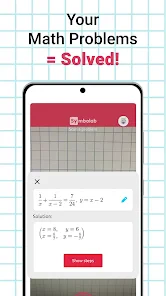
Symbolab: AI Math Solver is an advanced mathematics application designed to help users solve complex mathematical problems. It functions by allowing users to input equations or problems, and then it provides step-by-step solutions. The app supports a wide range of topics including algebra, calculus, and trigonometry, making it an invaluable tool for students and professionals alike.
Is Symbolab: AI Math Solver suitable for all levels of math learners?
Yes, Symbolab is designed to cater to a wide audience, from beginners to advanced math learners. The app provides detailed explanations and solutions, which can help beginners understand fundamental concepts, while the advanced features and problem-solving capabilities are beneficial for more experienced users tackling complex equations.
Pros
- Comprehensive math problem solver.
- Step-by-step solutions.
- Supports a wide range of topics.
- User-friendly interface.
- Accessible on multiple platforms.
Cons
- Requires internet connection.
- Ads in free version.
- Limited features without subscription.
- Complex UI for beginners.
- Occasional app crashes.
- Category
- Education
- Version
- 12.0.4











