Super Teacher
- 133.00
- 4.2
- Installs
- 500.00K
- Price
- Free

Screenshots
Analysis by Reviewed
I judge a children’s learning app less by how lively its screens look than by whether it helps an adult turn a small window of time into a calm, useful learning moment. Super Teacher is an education app from Super Teacher Inc., aimed at children from three to eight. Its focus on private tutoring makes it a different proposition from a worksheet library or a general-purpose learning game: the appeal is the possibility of guided support rather than simply handing a child a screen full of activities.
A simple routine works better than an open-ended session
For a family, I would treat the app as one part of a repeatable routine, not as something a young child is expected to navigate and manage independently. Choose a quiet moment, sit nearby, and give the session a small purpose: practice a topic, work through a sticking point, or build confidence before moving on. That makes it easier to tell whether the app is helping and keeps screen time from becoming an unstructured stretch.
A realistic use case is a caregiver fitting a short learning activity between school pickup and dinner. Rather than asking a child to “do some learning,” an adult can help set a clear goal, stay close enough to notice confusion, and finish by asking the child to explain one thing they learned. That simple ending gives the session a sense of completion without turning it into a test.
For children at the younger end of the age range, adult involvement matters especially. They may need help understanding what to do, staying on task, or putting a question into words. Older children may be more comfortable taking the lead, but I would still check in rather than assume that a tutoring app automatically replaces a parent’s attention or a teacher’s guidance.
What to check before making it part of the week
The app is free to install, but it includes in-app purchases ranging from $14.99 to $99.99 per item. I would look at the available purchase details before building a routine around a particular kind of support. That is also the practical answer to whether it can be used without spending: the initial download costs nothing, while some in-app items have a price. A family should decide what it is comfortable paying before a child is using the app regularly.
Its Everyone age rating is useful context for parents, but it is not a substitute for deciding whether the learning experience suits a particular child. I would preview the app together, explain what the child can tap or ask for, and keep purchases under adult control. With any app used by a young child, a shared first session is a better starting point than handing over a device and hoping the interface answers every question.
It is also worth checking the device before planning a session. The current version is 0.0.92 and the minimum operating-system requirement is version 9. If an older device is involved, confirming compatibility first can prevent a frustrating start. The release date was February 13, 2024, so this is a relatively recent app rather than a long-established classroom platform.
More From Our News Desk

Clash of Clans Is Won Between the Battles

Android Auto Makes the Case for Quieter Car Software

MobiOffice: Transforming Mobile Productivity with Seamless Integration

EA SPORTS FC™ Mobile Soccer: Redefining Mobile Sports Gaming

How Microsoft OneDrive Became a Mobile Productivity Giant

How Google Translate Breaks Language Barriers Effortlessly
Where tutoring differs from the usual alternatives
Many children’s education apps focus on independent games, videos, quizzes, or printable practice. Those formats can be handy when a child already knows what to work on, and they are often easier to dip into for a few minutes. A tutoring-centered option makes more sense when the child benefits from explanation, encouragement, or a chance to ask for help instead of simply repeating an exercise.
The trade-off is that a tutoring experience may ask for more attention from the adult and more commitment from the family than a casual game. If the goal is quiet entertainment with a little educational flavor, a simple puzzle or activity app may fit better. If the goal is to address a particular learning need, it is sensible to compare the app’s available tutoring arrangements with help from a school or a qualified local educator. An app can support learning, but I would not treat it as a substitute for formal assessment or specialist support when those are needed.
In choosing between this and a stack of worksheets, I would consider the child’s response to each format. Worksheets offer a visible, offline record and can be easy to tailor, but they do not provide the same kind of interactive guidance. A tutor-led digital session can feel more responsive, yet it still depends on a child being ready to engage and an adult setting reasonable expectations. The right choice is the one the child can return to without turning practice into a daily argument.
Building a useful learning habit
Small, repeatable habits make sessions easier
I would keep the routine consistent while letting the topic change. For example, use the same time and a familiar place, but begin each session by asking the child what feels easy and what feels tricky. That helps the adult notice whether the child needs practice, an explanation, or simply a confidence boost. It also gives the child a little say in the activity, which can reduce resistance.
A useful tip is to avoid judging a session only by how long the child stays on the screen. For young learners, a short period of focused participation can be more worthwhile than a longer session where attention has drifted. Watch for signs such as the child explaining an answer, asking a relevant question, or returning to a task after a mistake. Those are better clues that learning is happening than simply reaching the end of an activity.
Another practical habit is to keep a brief note outside the app about what the child found difficult and what seemed to click. This does not require a formal chart: a few words after a session can help a parent decide what to revisit next time and can make conversations with a teacher more concrete. It is especially useful if a child switches between tutoring, schoolwork, and other learning materials, since no single activity gives the whole picture.
How to make adult support helpful, not intrusive
It can be tempting to answer quickly whenever a child hesitates, but that may take away the chance to think. I would wait a moment, then use a small prompt such as asking what the child notices or which part feels confusing. If the app’s guidance does not resolve the problem, pause and explain in your own words rather than letting frustration build. This keeps the adult in the role of a supportive coach instead of a second voice competing with the lesson.
It also helps to end on a manageable success. If a child is tired or has reached a difficult point, there is no need to keep pushing just to complete a session. A calm stopping point preserves goodwill and makes it more likely the child will be willing to return. On a day when the child is energetic, the adult can let the session run naturally, while still checking that the activity remains age-appropriate and understandable.
Parents may wonder whether an app like this is suitable for every child between three and eight. I would not assume so. A child who enjoys talking through ideas and can stay with a guided activity may benefit more than one who prefers hands-on objects, movement, or face-to-face interaction. For a very young learner, the adult’s presence can make the difference between a useful experience and an unexplained sequence of taps.
Reading the signs and managing expectations
Super Teacher has an average rating of 4.2 from 919 ratings, with 133 written reviews and more than 500,000 installs. Those figures suggest that many families have tried it, but they cannot tell me whether it will suit a particular child. I would use them as a reason to take a closer look, not as a promise of results. Children differ widely in pace, interests, and comfort with screen-based learning.
The app is rated for Everyone, and its intended age range makes it relevant to early learners and their caregivers. Still, age alone is not a learning plan. A child who needs a specific curriculum sequence, a formal record of achievement, or accommodations for a learning difference may need resources chosen with a teacher or specialist. I would be careful not to infer that a general tutoring app covers every educational need simply because it is designed for children.
There is also a practical question of how much structure a family wants. If a parent is looking for a fully self-guided resource that a child can use without supervision, this may not be the best fit for the youngest users. If the household has little time for shared sessions, independent games or a familiar workbook may be easier to maintain. The strongest reason to choose a tutoring-oriented app is a willingness to take part in the learning process, even if that involvement is brief.
Who is most likely to benefit
I would consider it for a caregiver who wants an interactive way to support a young child and is prepared to sit in on at least the first sessions. It may also suit families who want to make practice feel less like a worksheet assignment, or who need a consistent activity to use when a child asks for help with learning. The value is likely to come from pairing the app with conversation and encouragement, not from assuming that digital tutoring will do all the teaching on its own.
On the other hand, I would skip it if the child dislikes screens, if the adult needs a resource with a clearly defined school curriculum, or if the family is not comfortable with paid in-app items. A free download does not mean every part of the experience is free, so checking the purchase options is part of deciding whether the app fits a household budget. Families who want wholly offline practice may be happier with books, manipulatives, or printed activities.
For children who already receive classroom support, the app could be an additional way to practice, but I would avoid piling it on without asking how the child feels. More practice is not always better if it creates fatigue. A brief conversation with the child’s teacher can help a parent decide whether home activities should reinforce a current topic or give the child a break from schoolwork.
My verdict after weighing the trade-offs
Super Teacher is an education app for early learners that is best approached as a shared tool: the child participates, while an adult provides context, encouragement, and sensible boundaries. I like the idea of a tutoring-focused experience for families who want more than a stand-alone game, and I would give it a try when a child is curious and willing to learn with a caregiver nearby.
I would not recommend choosing it solely because it is popular or because its age rating sounds broadly suitable. Think first about the child’s learning style, the time an adult can give, the need for structured school support, and the possibility of in-app spending. If those points line up, it may become a useful part of a household routine. If not, a teacher’s guidance, hands-on activities, or a simpler offline resource could be a better match.
I've always been on the lookout for ways to make learning more engaging, both for myself and for the kids around me. That's when I stumbled upon the Super Teacher app, and honestly, it has been a game-changer. Let me take you through my experience with it.
First Impressions Matter
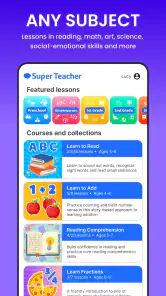
When I first opened the app, I was immediately struck by its vibrant and user-friendly interface. It's designed to be intuitive, which I really appreciate because, let's face it, nobody wants to spend ages figuring out how to navigate an app. The colors are bright without being overwhelming, and the layout is logically organized, making it a breeze to find what you're looking for.
Diving Into the Features
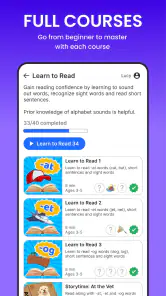
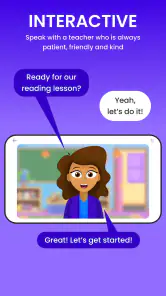
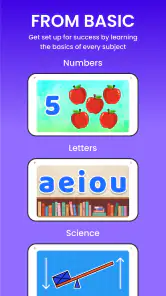
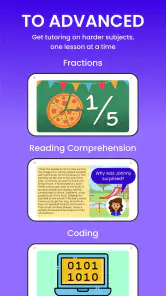
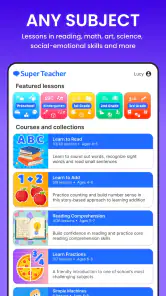
One of the biggest draws of this app is its wide array of educational content. Whether you're looking to polish up on math, science, or history, it has got you covered. The lessons are interactive, which is a huge plus. I found myself actually enjoying learning new topics because the app makes it feel less like a chore and more like a game.
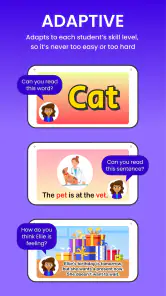
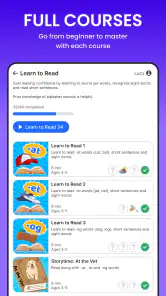
Another great feature is the personalized learning paths. The app assesses your current level and tailors the lessons accordingly. It's like having a personal tutor in your pocket, which is fantastic for keeping you motivated and challenged. Plus, the progress tracking feature is super handy to see how far you've come and what areas might need a bit more focus.
Engagement and Interaction
The developers have done a stellar job of incorporating gamification into the learning process. There are quizzes, flashcards, and even mini-games that make retaining information a lot more fun. I mean, who doesn't love a little friendly competition, right? You can also earn points and badges, giving you that extra nudge to keep pushing forward.
I also love the community aspect of the app. You can join study groups and participate in forums, which is fantastic for discussing topics and sharing insights with fellow learners. It's like having a virtual classroom at your fingertips.
Final Thoughts
All in all, this is an educational app that truly lives up to its name. It's engaging, comprehensive, and incredibly user-friendly. Whether you're a student looking to supplement your studies, a teacher searching for a resource to recommend to your students, or just someone who loves learning, this app is definitely worth checking out. The blend of personalized learning paths and interactive content makes it a standout choice in the sea of educational apps. So why not give it a try and see how it can supercharge your learning journey?
Super Teacher Frequently Asked Questions
Is Super Teacher free to download, and what might cost extra?
Super Teacher is free to download, so families can try the app without paying upfront. It also offers in-app purchases, with items ranging from $14.99 to $99.99 each. Since purchases can add up, parents may want to review the available options and decide what fits their child’s learning needs and their budget before buying.
What ages is Super Teacher intended for, and which devices can run it?
Super Teacher is an education app described as offering unlimited private tutoring for children ages 3 to 8, making that age range its clearest fit. It is rated for Everyone, and it requires iOS 9 or later on Apple devices. Before downloading, check that your device meets this requirement and consider whether the app’s early-learning focus suits your child.
What is Super Teacher and how does it work?
Super Teacher is an innovative educational app designed to enhance learning experiences for students. It offers interactive lessons, quizzes, and activities across various subjects. The app uses AI to personalize learning paths, adapting to each student’s pace and understanding. By providing engaging content and real-time feedback, Super Teacher ensures that learning is both fun and effective. It is developed by Super Teacher Inc. and focuses on private tutoring for young learners.
Is Super Teacher suitable for all age groups?
Yes, Super Teacher is designed to cater to a wide range of age groups, from elementary to high school students. The app features age-appropriate content and difficulty levels, ensuring that students of different ages and grades can benefit from its educational resources. Parents can also customize settings to align with their child’s learning needs. Its stated tutoring focus is ages 3 to 8, so families with older students should consider whether its content matches their goals.
Does Super Teacher require an internet connection to function?
While some features of Super Teacher can be accessed offline, such as downloaded lessons and quizzes, an internet connection is required for updates, accessing new content, and utilizing interactive features. It is recommended to have a stable internet connection to enjoy the full benefits of the app’s offerings. If your child will use it during travel or away from Wi-Fi, downloading materials in advance can help.
Pros
- Intuitive user interface
- Wide range of educational content
- Engaging learning activities
- Supports multiple languages
- Regular updates with new features
Cons
- Requires internet connection
- Limited offline features
- Some content may require payment
- Occasional ads interrupt learning
- May not cover all educational topics
- Category
- Education
- Version
- 0.0.92











