Sunbit
- 615.00
- 3.9
- Installs
- 500.00K
- Price
- Free

Screenshots
Analysis by Reviewed
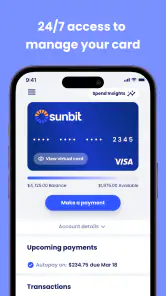
I found Sunbit most useful as a focused companion for people who already use Sunbit financing and want a simpler way to keep track of their card or payment plans. It is a free finance app from Sunbit, and its purpose is refreshingly narrow: bring account management into a mobile setting instead of making every check-in depend on a browser or a paper statement.
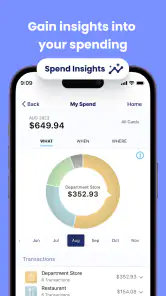
That narrow purpose is also the key to my opinion. This is not a general budgeting tool, a banking replacement, or an app for comparing loans. I would recommend it to an existing Sunbit customer who wants convenient access while away from a computer. I would not install it expecting spending charts, broad money-management tools, or a complete view of all personal finances.
What using Sunbit feels like in everyday life
My first impression was that the app is built around quick account checks rather than long financial sessions. The useful question is usually something practical: What do I owe? Which payment plan am I looking at? What should I review before making a purchase or arranging my next payment? An app designed around those moments can be more helpful than a crowded finance dashboard filled with features I may never use.
The experience makes the most sense when I treat it as a mobile control panel for an existing relationship with Sunbit. Instead of opening a general banking app and searching through unrelated transactions, I can go directly to the Sunbit card or plan that matters. That focus is valuable for users who want less clutter, particularly when they are checking an account at a store, planning a purchase, or reviewing an upcoming obligation.
Sunbit is listed as suitable for everyone, which fits the straightforward nature of the product. The app is available at no cost, so there is no separate purchase decision just to try the account-management experience. Its current version is 2.6.37, and it supports Android from version 8.0 onward, making it accessible on many devices that are not running the newest software.
I also noticed an important distinction between convenience and financial insight. The app can make access easier, but opening it does not automatically turn a payment plan into a complete budget. I still need to think about how a Sunbit obligation fits alongside rent, subscriptions, card balances, and everyday spending. That is not a flaw in a focused account app, but it is something worth understanding before treating it as a personal finance hub.
The strongest reason to keep it installed
The best argument for the app is the reduction of friction. When account information is tied to a specific card or payment plan, a dedicated mobile destination can save time and reduce the chance of looking at the wrong account. I value that most during short, slightly stressful moments: standing in a shop, checking whether a previous purchase is still being paid down, or trying to confirm what I need to remember before the next due date.
A useful habit is to open the app before making a new commitment, not after. I can review the existing Sunbit information first, consider whether another payment fits my monthly cash flow, and then decide with a clearer picture. That small change in timing is more valuable than simply having another finance icon on my phone. It turns the app into a pause button before a purchase rather than just a place to react later.
Another practical workflow is separating account checking from account management. I might use my regular bank app to understand whether money is available overall, then use Sunbit for the specific card or plan. Neither app has to do the other’s job. That division keeps the information more understandable and avoids assuming that a general checking account view will explain a financing arrangement in the same way.
The app’s audience size also suggests that it has found a real use case rather than serving only a tiny group. Sunbit has more than 500,000 installs, with an average rating of 3.9 from around 1,400 ratings and 615 reviews. I would read that as evidence of a useful but not universally smooth experience: enough adoption to make the product relevant, while the rating reminds me that convenience does not remove every possible point of friction.
Those figures are not a substitute for my own expectations. A finance app can receive mixed reactions because account access is especially sensitive to login problems, device changes, or a user’s particular payment situation. For me, the rating supports a balanced conclusion: Sunbit is worth considering for its intended task, but I would not describe it as an essential app for everyone.
Where the focused design becomes a limitation
The biggest weakness is the same thing that makes the app easy to understand: it is centered on Sunbit. If I want one place for checking accounts, unrelated credit cards, savings goals, spending categories, bill reminders, and long-term planning, this is not the right tool. Adding it to my phone would give me access to Sunbit information, not a complete picture of my financial life.
That limitation matters when someone is trying to answer a broader question such as, “Can I afford this month?” A Sunbit view may help with one payment obligation, but the answer requires context from other accounts and commitments. I would use a bank app, budgeting app, or spreadsheet for that wider calculation and keep Sunbit for the details connected to Sunbit itself.
There is also a behavioral risk with payment-plan apps. Easy access can encourage frequent checking, but frequent checking is not the same as better planning. I found the app more useful when I gave each visit a purpose: review a plan, confirm an account detail, or prepare for a payment decision. Opening it repeatedly without a wider budget can create the feeling of control without actually changing spending habits.
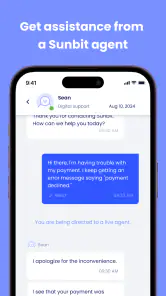
Users should also be prepared for the possibility that a mobile interface will not answer every question they have about a financial arrangement. A compact app is excellent for routine access, but complicated circumstances may require closer reading of account information or direct help from the provider. I would not make a high-stakes decision based only on a quick glance at a phone screen. For anything unclear, I would slow down and verify the relevant details through the appropriate Sunbit support or account channel.
Another trade-off is that a dedicated finance app adds one more place to protect. I would use a strong device passcode, avoid checking sensitive information on a shared phone, and sign out or secure the device if other people can access it. These are ordinary precautions, but they matter more when an app is connected to a card or payment plan. Convenience should not mean treating the app casually.
Three ways I would use it more intelligently
First, use it before a purchase conversation. If I am considering financing something, I would check my existing Sunbit position before discussing another commitment. This does not tell me whether the purchase is wise by itself, but it prevents me from making the decision with only the new item in mind. The app is most useful here as a reminder to include existing obligations in the conversation.
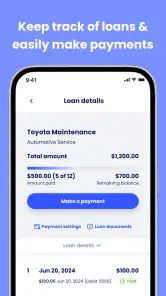
Second, give each plan its own review moment. Rather than looking at a single total and moving on, I would review payment plans separately when the app presents them. A combined glance can hide the fact that several smaller commitments are competing for the same monthly income. Thinking in individual plans helps me recognize which purchase each obligation belongs to and whether the overall pattern still feels manageable.
Third, pair the app with a broader money check. I would open Sunbit after reviewing my main bank balance and regular bills, not instead of doing that review. This creates a simple two-step routine: understand available cash first, then inspect the Sunbit obligation. The trade-off is a few extra minutes, but the result is more responsible than using a single account view as a complete affordability test.
A fourth useful habit is to check the app at a calm time rather than only when a purchase is urgent. When I am not standing at a counter or reacting to a deadline, I can read the account information more carefully and make a note of anything that needs clarification. That reduces the chance of confusing a quick approval decision with a considered financial plan.
Who will get the most from it
I think the best fit is someone who already has a Sunbit Card or payment plan and wants mobile access without navigating a general financial service. It suits people who prefer checking information from a phone, who make purchases away from home, or who want a dedicated place to revisit Sunbit-related obligations. It can also help someone who is trying to become more deliberate about financing by making existing commitments easier to inspect.
The app may be particularly practical for a user who shares household budgeting responsibilities. One person can review the Sunbit information while comparing it with the household’s wider spending plan. The app does not replace that conversation, but it can make the Sunbit portion easier to bring into it. I would still avoid assuming that a single account view represents the whole household’s financial position.
It is less suitable for someone who does not use Sunbit services, since the focused design offers little reason to install it purely out of curiosity. It is also a poor match for a user searching for investment tracking, detailed expense categorization, debt payoff modeling, or a unified dashboard across several financial institutions. In those cases, a broader finance product would be a better primary tool, with Sunbit used only if a specific account needs attention.
Someone who rarely uses a smartphone for financial tasks may not gain much from the app either. The main benefit is faster access, so the value depends on actually wanting account information while mobile. If a user is comfortable managing everything through another established method and does not need on-the-go checks, installing another finance app may add more maintenance than convenience.
How it compares with the usual alternatives
Compared with a general banking app, Sunbit has a narrower job and potentially a clearer destination. A bank app can show broader cash activity, but it may not organize Sunbit card or plan information around the way a dedicated service does. I would choose the bank app for overall cash flow and Sunbit for Sunbit-specific review.
Compared with a budgeting app, the difference is even more pronounced. Budgeting tools are usually built around categories, targets, trends, and habits. Sunbit is better understood as an account-access tool. A budget can help answer whether a payment fits the month; Sunbit can help me inspect the Sunbit side of that decision. Using both can make sense, but they solve different problems.
Compared with a browser, the app’s advantage is convenience rather than a completely different financial method. A browser may be preferable when I need a larger screen or want to manage several tasks at once. The mobile app is more appealing for a quick check while away from a desk. I would keep the browser as a fallback for moments when the phone view feels too compact or when I need to read information with extra care.
The choice therefore depends on the question I am asking. For “How are all my finances doing?” I would start elsewhere. For “What do I need to review about my Sunbit card or payment plan right now?” this app is the more direct option. That distinction is the clearest way to avoid expecting the product to become something it was not designed to be.
My verdict after weighing the convenience
Sunbit succeeds when I judge it as a dedicated mobile companion rather than a full financial command center. Its free access, focused purpose, and support for Android 8.0 and later make it easy to consider for existing customers. The developer, Sunbit, has kept the central idea understandable: manage the relevant card and payment-plan information from wherever I happen to be.
My reservation is that focused access can be mistaken for complete financial management. I would install it alongside, not instead of, whatever I use for banking and budgeting. I would also build the habit of checking the app before new commitments and pairing its information with my wider monthly obligations. Those steps make the app more useful while keeping its limits visible.
Overall, I recommend Sunbit to existing Sunbit users who value quick mobile account checks and want a dedicated place for their related payment information. I would skip it if I needed broad budgeting or multi-account analysis. The right reason to install it is convenience around Sunbit, not a promise of complete money management.
Pros
- Fast application process with clear step-by-step guidance.
- Soft credit check helps you explore options without immediate score impact.
- Useful for handling unexpected healthcare
- dental
- or auto expenses.
- Payment schedules are displayed clearly before you accept an offer.
- Available through many participating merchants and service providers.
Cons
- Only works with eligible Sunbit partner merchants and services.
- Approval
- rates
- and spending limits depend on your personal credit profile.
- Financing may cost more than paying the full amount upfront.
- Late or missed payments can lead to fees or credit consequences.
- Availability and terms may vary by location and merchant.

- Category
- Finance
- Version
- 2.6.37











