Subscription Stopper & Manager
- 2.13K
- 3.9
- Installs
- 100.00K
- Price
- Free

Screenshots



Analysis by Reviewed
I opened Subscription Stopper & Manager expecting a simple list of recurring payments, but I found a finance app aimed at a more practical problem: remembering what I am paying for and deciding which subscriptions deserve to stay. That distinction matters. A budget planner can show where money goes, while a subscription manager focuses attention on the quiet recurring charges that are easy to overlook.
My overall impression is that it works best as a regular review tool rather than a complete personal-finance system. I would recommend it to someone who has several digital memberships, trials, or app-based services and wants a dedicated place to check them. I would be more cautious about recommending it to a person who expects every bank transaction to be imported automatically or who wants detailed investment, debt, or household accounting features.
How the app feels in its current state
The app comes from InMarket Media, LLC and is available as a free finance app for Everyone. Its current version is 2.0.8, and it runs on Android devices using version 7.0 or later. Those requirements make it accessible to many older phones, which is useful for an app designed to become part of a routine rather than demand the newest hardware.
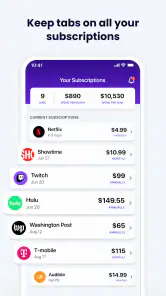
The central idea is easy to understand: collect subscription information, keep upcoming charges visible, and use that overview when deciding what to cancel or retain. In practice, the value comes less from a flashy dashboard and more from making recurring costs feel concrete. A charge that disappears into a bank statement can look different when it is placed beside every other monthly commitment.
I like that the concept is narrower than a full banking replacement. When I want to review subscriptions, I do not necessarily want to sort through groceries, fuel, transfers, and one-off purchases first. A focused tool can reduce that mental clutter. The trade-off is that I still need another method for seeing the rest of my financial life.
The store listing shows an average rating of 3.9 from about 3,600 ratings, with roughly 2,100 written reviews and more than 100,000 installs. I read those figures as signs of a useful but not universally effortless product. It has attracted a meaningful audience, yet the rating also suggests that the experience may depend heavily on how much manual organization a user is willing to do.
What I would use it for first
My first task would be a subscription audit. I would gather the services I remember using, then compare them with recent bank or card statements outside the app. That second step is important because memory is unreliable, especially with annual renewals, family plans, and services that are billed under a parent company rather than the name I recognize.
After creating an initial list, I would group decisions into three buckets: keep, investigate, and cancel. The middle group is more valuable than it sounds. A subscription may not be an obvious cancellation if I use it occasionally, share it with family, or need it during a particular season. Marking it for review prevents a rushed decision based only on the next charge.
A realistic example is a user who signs up for several entertainment services during a busy winter, forgets about one fitness trial, and keeps a cloud-storage plan because it is genuinely useful. Subscription Stopper & Manager can help turn that vague feeling of overspending into a short review session. The important habit is to check the list before renewal periods, not merely open the app after a charge has already appeared.
The practical workflow I found most useful
I would not treat the first setup as a one-minute chore. The quality of the overview depends on accurate names, billing intervals, and renewal details. If those entries are incomplete, the app may give me a tidy-looking list that still fails to warn me at the right time. The best workflow is to set it up slowly, verify each recurring payment, and then use the app for maintenance.
One useful approach is to start with the subscriptions that are easiest to forget rather than the ones I use every day. Annual services, low-cost add-ons, and memberships attached to old email addresses deserve attention because they are less visible in normal spending. This is a more effective first pass than entering only expensive services.
I would also record the reason for keeping a questionable subscription in my own notes or budgeting routine outside the app. “Used for work,” “shared with family,” and “cancel after the current project” are very different situations. The app can support the inventory, but my decision still needs context. That is one of the key trade-offs: a tracker improves visibility, while the final judgment remains personal.
What the version and release history suggest
The app was released on April 14, 2023, and its current version is 2.0.8. I see that version number as evidence of an already-maintained product rather than a first experiment. It indicates that the developer has moved beyond the initial release and continued refining the app, although a version number by itself does not prove that every part of the experience has changed.
The most sensible expectation is gradual improvement around the core subscription-management idea. I would look for smoother entry of recurring charges, clearer renewal planning, and fewer moments where I have to guess what the app expects from me. Those are the changes that would make a real difference during a monthly review, even if they are less visible than a redesigned screen.
For existing users, updating to the current version makes sense if the app is already part of their routine, but I would still review important subscription details after any major update. That is not a criticism unique to this product; financial records deserve a quick check whenever an app changes. A tracker is only helpful when its dates and amounts remain trustworthy.
New users should judge the current experience by the time required to create a reliable list, not by the promise of instant savings. The app cannot make a forgotten subscription disappear simply because it has been catalogued. Its role is to expose the decision. The actual cancellation may still require visiting the service provider, the relevant app store, or an account page.
How this affects people who already track spending
If I already use a spreadsheet, Subscription Stopper & Manager would be a companion rather than an automatic replacement. A spreadsheet offers flexibility: I can add household members, split costs, compare yearly totals, and create custom formulas. The app offers a more focused experience that may be easier to open when I only want to review recurring services.
If I already use a banking app, the comparison is different. A bank app is closer to the source of the transaction, but recurring payments may be mixed with every other purchase. Merchant names can also be inconsistent, and a subscription that bills infrequently may not stand out. The dedicated approach is useful for organization, while the bank statement remains the better place to verify that a charge actually occurred.
Budgeting apps usually go further into categories, income, goals, and spending trends. I would choose one of those when I need a complete monthly plan. I would choose this app when my main question is, “Which recurring services am I still paying for, and which ones should I examine?” The narrower focus is its strength for a subscription audit and its weakness for broader financial planning.
There is also a privacy and convenience trade-off in any financial organizer. I would avoid entering sensitive account credentials unless I fully understood how a particular workflow handled them, and I would prefer to use the app as an organized record rather than assume it replaces direct account verification. The safest routine is to compare the app with official billing pages before cancelling anything important.
Where the experience still has limits
The biggest limitation is that a list is not the same as cancellation control. The name “Stopper” may suggest that stopping a payment is immediate, but in real use, cancellation depends on where the subscription was purchased and which account owns it. I would expect to leave the app for the final cancellation step in many situations. That extra step is manageable, but it should be part of the plan.
Manual accuracy is another concern. If I forget an annual renewal or enter the wrong billing cycle, the reminder value drops sharply. This is why I would verify entries against receipts and account pages instead of relying only on memory. The app can organize information, but it cannot correct information I never supplied or supplied incorrectly.
I would also skip it if I need detailed shared budgeting. Couples and families often need to know who pays, which card is used, whether a service is reimbursed, and how a cost should be divided. A focused subscription list may help start that conversation, but it is not automatically a household accounting system.
People with only one or two subscriptions may not gain much from a dedicated manager. A calendar reminder and a quick statement check could be enough. The app becomes more worthwhile when recurring charges are spread across several services, billing schedules, and accounts, or when I repeatedly forget to revisit trials before they renew.
There are also paid elements to consider. The app is free to download, while in-app purchases range from $5.99 to $99.00 per item. I would inspect the purchase screen carefully before committing, especially if I only need a basic list. The right value calculation is not simply whether the app might save money; it is whether the paid option offers enough convenience to justify its cost for my particular number of subscriptions.
Who should use it, and who should choose something else
I think it suits people who want a dedicated recurring-payment checklist, users who regularly forget free trials, and anyone preparing to reduce monthly expenses without rebuilding their entire budget. It can also help during a move, a job change, or a period of financial tightening, when small recurring charges deserve more attention than usual.
I would recommend a full budgeting app instead for someone who needs income planning, category limits, debt payoff tracking, or detailed reports across all spending. I would choose a spreadsheet for a household with unusual sharing arrangements or highly customized calculations. I would rely on official account pages and bank records for final confirmation before cancelling a service or disputing a charge.
The app is also not a magic solution for impulse spending. It can show recurring commitments, but it does not automatically decide whether a service is worth the money. A subscription that costs little may still be valuable, while an expensive one may be essential for work. The useful question is not merely “Can I cancel this?” but “What do I lose if I cancel it, and when should I make that decision?”
What I would watch in future updates
For future versions, I would pay attention to how clearly the app handles the difference between monthly, yearly, trial, and irregular recurring charges. That distinction affects the usefulness of any forecast. I would also value a workflow that makes it obvious which details need verification and which actions still have to happen with the provider.
I would watch for improvements that reduce setup friction without encouraging careless automation. A quick import can be convenient, but financial organization should remain understandable. I would rather spend a little longer confirming a renewal date than receive a confident-looking reminder based on a mistaken entry.
Another important area is the balance between free access and paid features. Since the app is free with in-app purchases, I would want the upgrade decision to be clear before I invest time in building my list. Transparent boundaries help users decide whether they are paying for meaningful convenience or simply removing restrictions from a basic tracker.
Existing users should also watch whether updates preserve the information they have carefully entered and whether the main review flow becomes easier over time. The best evolution for this product would not be adding unrelated financial tools just to appear broader. It would be making subscription discovery, review, and follow-through more dependable.
My final take after using it as a review tool
Subscription Stopper & Manager is most convincing when I use it as a recurring-expense checkpoint. It gives a specific problem its own space and encourages a habit that many general finance apps bury beneath wider spending data. I appreciate that focus, particularly for forgotten trials, old memberships, and annual charges that do not appear often enough to stay in my memory.
At the same time, I would not hand it responsibility for my entire financial picture. I would verify important details against official billing records, expect to complete some cancellations elsewhere, and treat the app as one part of a broader money routine. That honest workflow avoids the disappointment of expecting a tracker to act like a bank or universal cancellation button.
With an average rating of 3.9 and more than 100,000 installs, it has enough practical appeal to be worth trying for people who recognize the subscription problem. The Everyone age rating and older Android compatibility make it approachable, while the paid items mean I would review the upgrade terms before spending anything. My recommendation is straightforward: try it if recurring charges are getting hard to remember, but choose a broader budgeting solution if your needs go beyond subscription control.
Pros
- Tracks recurring subscriptions in one organized dashboard.
- Helps identify forgotten services and potential savings.
- Provides reminders before upcoming renewal dates.
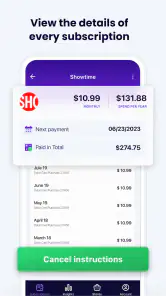
- Simple interface makes subscription details easy to review.
- Useful overview of monthly and yearly spending commitments.
Cons
- May require manual entry for subscriptions not detected automatically.
- Some features may be limited behind a paid plan.
- Does not cancel every subscription directly from the app.
- Accuracy depends on keeping prices and renewal dates updated.
- Privacy concerns may arise when entering financial subscription details.

- Category
- Finance
- Version
- 2.0.8











