Stocks: Realtime Quotes Charts
- 4.31K
- 4.8
- Installs
- 1.00M
- Price
- Free

Screenshots

Analysis by Reviewed
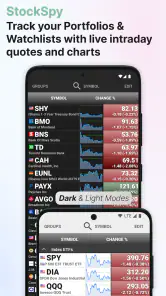
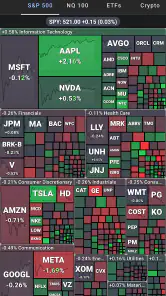
I installed Stocks: Realtime Quotes Charts expecting a quick way to check markets, and that is exactly where it makes its best first impression. It is a free finance app from StockSpy Apps Inc. focused on keeping stock quotes, charts, news, and portfolio watchlists together instead of making me jump between several tools. The basic idea is simple: build a personal market screen, glance at the symbols that matter to you, and open a chart or news item when a move deserves attention.
The app is aimed at people who want more than a single price ticker but less than a full professional trading terminal. I found it most useful as a monitoring companion rather than a place to carry out every part of an investment decision. That distinction matters. It can help me notice what changed, organize a group of companies, and decide what deserves deeper research. It does not remove the need to verify information elsewhere before acting.
What makes the first week appealing
The first few sessions are satisfying because the app gives a clear purpose almost immediately. I can create a watchlist around a personal theme, such as companies I already own, businesses I am researching, or a group of market leaders I want to follow. That separation is more practical than putting every symbol into one endless list. A short list for daily attention and a broader list for occasional research makes the app much easier to live with.
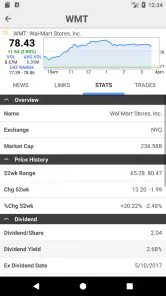
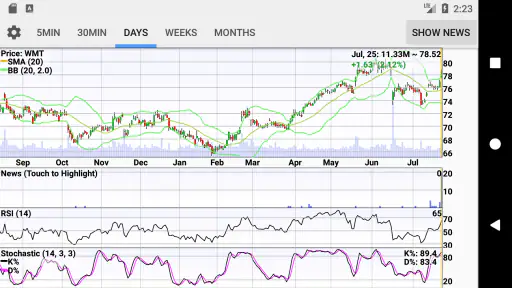
The combination of live quotes and charts is the main reason to keep opening it. A price alone tells me what is happening now, while a chart gives that movement some context. When a stock suddenly appears stronger or weaker than usual, I can move from the quote to its chart rather than relying on a vague impression. I still treat the chart as a visual aid, not a prediction machine, but the transition from overview to detail feels natural.
News tracking adds another useful layer. A sharp move without any surrounding information is easy to misread, especially when I am checking markets between other tasks. Opening related news can help me form a better question: is this a company-specific development, a sector reaction, or simply broader market noise? I appreciate that the app encourages that pause before I turn a price change into a story.
One practical workflow worked particularly well for me during the first week. In the morning, I checked a compact watchlist rather than browsing every holding individually. I then opened charts only for symbols showing an unusual change and used the news view to decide which ones deserved further reading. This reduced casual scrolling and made the app feel like a filter instead of another stream competing for my attention.
The interface is also approachable for someone who is comfortable with investing but does not want a complicated terminal. The content rating is Everyone, and the app runs on Android devices using at least version 6.0. Its current version is 13.5, which makes it accessible to many older phones as well as newer ones. That broad compatibility is helpful if I use an older spare device as a dedicated market screen.
Its popularity gives the product some useful reassurance without settling the question of quality by itself. The app has passed one million installs, carries an average rating of 4.8 from roughly twenty-seven thousand ratings, and has about four thousand three hundred written reviews. I read those figures as evidence that the basic concept works for many people, not as a guarantee that every workflow will suit me.
How I would set it up for useful checking
I would not begin by adding every ticker that catches my eye. The better approach is to create a small first watchlist with the holdings or companies I genuinely need to follow, then add a separate research list for possible future purchases. This keeps the opening screen actionable. A crowded watchlist may look comprehensive, but it makes meaningful changes harder to spot.
I also recommend deciding what each list is for before using it every day. A holdings list answers, “What needs my attention?” A research list answers, “What am I learning about?” Mixing those purposes encourages impulsive checking and makes ordinary market movement feel more important than it is. The app becomes more useful when I use its organization to impose a little discipline on myself.
Another less obvious benefit is the ability to compare the same symbol across different moments of attention. I might first notice an intraday move from the quote screen, inspect the chart for direction and scale, and then read the news before making a note elsewhere. That sequence is more reliable than opening a news headline first and allowing it to dictate how I interpret the chart.
Why it can remain useful month after month
The lasting value comes from repetition, not novelty. Once the initial setup is finished, I am not opening the app to discover a new feature every day. I am opening it because the same small routine remains convenient: check the watchlist, investigate meaningful movement, and leave. For a long-term investor, that can be enough. A tool does not need to be exciting if it consistently answers a recurring question quickly.
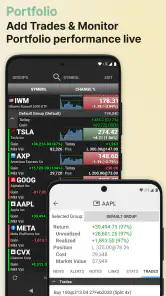
For me, the strongest recurring use case is portfolio awareness without constant portfolio management. I can check how familiar names are behaving, notice when a company deserves a closer look, and then return to my broader research process. This is especially useful for people who do not want to stare at market screens all day but still want a dependable snapshot when they choose to look.
It also works for learning. Someone building familiarity with a sector can create a watchlist of related companies and observe how prices and news react to the same broad conditions. That does not turn the app into an educational course, but it makes repeated observation easier. Over time, I can start asking better questions about why two similar companies respond differently to the same market mood.
The app is less compelling for users who need a complete investment workstation. If I want advanced portfolio accounting, tax-lot management, detailed fundamental research, order execution, or a highly specialized charting environment, I would look to a brokerage platform or a dedicated research service instead. This app is strongest as a focused market-monitoring layer, not as a replacement for every financial tool.
Compared with checking prices through a general search engine, it offers a more persistent workspace. A search is excellent when I need one quick fact, but it does not give me the same sense of continuity across a personal group of symbols. Compared with a brokerage app, it may feel lighter and less tied to transactions. That separation can be a strength for investors who want to research without constantly being shown a path to trade.
Compared with a professional terminal, the advantage is simplicity. I can open it without preparing a complex dashboard. The trade-off is depth: people who depend on advanced analysis may quickly encounter the limits of a streamlined mobile experience. I would choose this app when fast awareness matters more than exhaustive market tooling.
A realistic everyday routine
Imagine that I have a busy workday and only a few minutes before lunch. I open the app, scan my holdings watchlist, and see that one company is moving differently from the rest. Instead of reacting immediately, I open the chart to judge whether the move is a tiny fluctuation or part of a broader pattern. I then check the news tracker. If the explanation is unclear, I close the app and continue researching later rather than treating the first headline as a complete answer.
That routine shows where the app earns its place. It compresses the first stage of investigation into one convenient visit. It does not tell me what to buy or sell, and I would be wary of anyone using it as an automatic decision-maker. Its value is helping me notice, organize, and investigate with less friction.
For a more patient investor, I would use it at a fixed time rather than every few minutes. A scheduled check makes the watchlist serve the investment plan instead of allowing every price movement to interrupt the day. The app supports frequent monitoring, but that does not mean frequent monitoring is wise. The best long-term workflow is often the one that limits unnecessary exposure to market noise.
The maintenance burden after the novelty fades
Setup is not the end of the work. Watchlists need occasional cleaning because the reasons for following companies change. A research idea may no longer matter, a holding may be sold, or a symbol may remain on screen simply because I forgot why I added it. The app cannot decide which items still deserve attention, so the quality of the experience depends partly on my willingness to edit.
I found a simple monthly review helpful: remove symbols I no longer follow, move serious candidates into a more focused list, and keep the everyday screen short. This is one of the app’s hidden trade-offs. Its flexibility makes it easy to build useful lists, but that same flexibility can produce clutter. The maintenance is modest, yet skipping it gradually turns a practical dashboard into a noisy archive.
News can create another maintenance problem. The more symbols I follow, the more stories compete for attention. A broad watchlist may be valuable for occasional research, but it is not automatically a good daily news feed. I prefer to separate “interesting” from “important” and open the broader list only when I have a specific reason.
There is also a personal maintenance burden around interpretation. Live information feels authoritative because it changes in front of me, but a real-time quote is still only one piece of context. I need to remember the difference between monitoring and acting. The app makes observation convenient; it does not make financial judgment effortless.
The app is free to download and use, with in-app purchases ranging from $0.99 to $11.99 per item. That makes it easy to try without committing money at the start, but I would still check which extras I actually need before paying. For a casual user who only wants a few watchlists and occasional checks, the free starting point may be sufficient. A heavier user should judge any purchase by whether it removes a recurring annoyance rather than by the appeal of unlocking more.
Where fatigue can set in
The main source of fatigue is the market itself. An app built around live quotes and news naturally invites repeated checking, and repeated checking can make ordinary fluctuations feel urgent. I noticed that the tool is most pleasant when I open it with a question. Without a question, I can drift from one symbol to another and finish with more anxiety than understanding.
Another possible frustration is the gap between a clean mobile overview and the complexity of real financial research. A chart and a news item can point me in the right direction, but they do not replace reading company documents, checking broader financial context, or understanding the risks of an investment. Users expecting a complete decision system may find the app too lightweight, while users wanting only a single quote may find it more involved than necessary.
News is useful, but it can also distort priorities. The most visible story is not always the most important long-term development. I try to use the news section as a prompt for investigation rather than a ranking of what deserves action. That habit is essential if the app is going to support patient investing instead of short-term emotional reactions.
There is a subtler form of fatigue in maintaining multiple lists. Separating holdings, research ideas, and sector comparisons is powerful, but it creates more places to look. If I build too many categories, the organization starts working against me. I would keep the structure deliberately small: one list for current responsibility, one for active research, and perhaps one temporary list for a specific comparison.
People who require trading directly inside the same interface should probably choose their brokerage app first. People who need sophisticated technical studies or detailed financial statements may be happier with specialized tools. And people who are trying to reduce all market exposure may want fewer notifications and fewer opportunities to check prices, not a dedicated market dashboard. The right question is not whether the app can show more information, but whether it helps you use information more calmly.
My long-term verdict
After the first-week curiosity wears off, Stocks: Realtime Quotes Charts still has a clear reason to exist. Its recurring value comes from bringing quotes, charts, news, and watchlists into one focused place. I would recommend it to an investor who wants a convenient monitoring habit, especially someone who finds a brokerage app too transaction-oriented or a general search tool too temporary.
I would not recommend treating it as a complete financial command center. Its best role is earlier in the process: notice a change, check the visual context, read around the event, and decide whether deeper research is justified. That limited role is not a weakness when expectations are set correctly. In fact, keeping the app separate from execution may help some users create a healthier pause between seeing a move and responding to it.
The developer, StockSpy Apps Inc., has kept the product relevant through a long-running presence in the finance category. It was released on March 4, 2013, and the current version is 13.5. Those details do not guarantee a perfect experience, but they do make the app feel like an established tool rather than a short-lived experiment.
My final recommendation is to install it if you want a free, approachable market watchlist and are willing to maintain your lists. Start small, use charts and news together, and set a checking schedule that matches your investment approach. If you need execution, deep research, or advanced analysis in the same package, pair it with a more specialized service or choose a different primary tool.
For me, it earns lasting space because it turns a vague intention—“I should keep an eye on these companies”—into a repeatable routine. It does not eliminate the work of investing, and it can encourage too much checking if I let it. Used with restraint, though, it is a practical finance app whose usefulness survives the initial novelty.
Pros
- Real-time quotes make it easy to monitor price movements throughout the day.
- Interactive charts help compare trends across different time periods.
- Watchlists keep selected stocks organized for quicker access.
- Clean interface makes essential market data easy to find.
- Useful for checking markets without opening a full brokerage platform.
Cons
- Quote delays may apply to some exchanges or securities.
- Advanced technical analysis tools may be limited for experienced traders.
- Frequent price updates can consume battery and mobile data.
- Market coverage may vary depending on the region and exchange.
- It is not a substitute for brokerage tools or professional financial advice.
- Category
- Finance
- Version
- 13.5











