Step: Instant Cash and Rewards
- 7.67K
- 4.5
- Installs
- 1.00M
- Price
- Free

Screenshots
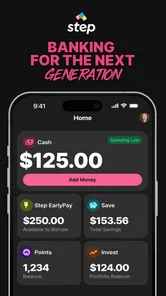
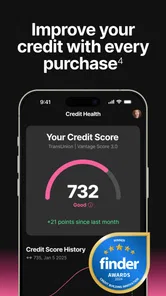
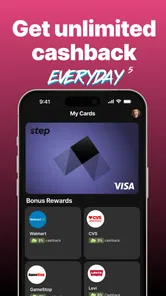
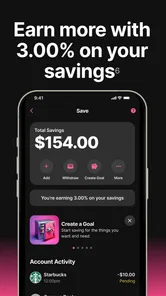

Analysis by Reviewed
I think the most useful way to judge a money app at home is to ask whether it fits neatly into one person’s routine or is likely to become a shared-device tangle. Step is a finance app from Step Mobile, Inc, and its appeal is tied to quick access to cash rather than household budgeting. That makes it worth considering for someone who wants a personal tool, but I would treat the account as belonging to one user—not as a family pool or a way for several people to coordinate spending.
A personal account works better than a shared phone
If a parent and teenager share a phone, or a tablet moves between family members, I would be careful about signing into a financial account on it. Keep the account holder’s access and notifications private, and make sure other users cannot casually open the app. I would also avoid treating one person’s account as a household shortcut: financial activity and account decisions should stay with the person who set it up.
That boundary matters even when the practical goal is simple, such as checking whether cash is available before paying for an everyday expense. A shared device can make it less clear who is looking at account information or using a session. I’d use an individual device where possible and sign out or secure access when that is not practical. This is ordinary account hygiene, not a special family feature.
Think through the cash need before relying on it
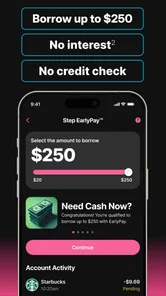
The phrase “up to $250” is a ceiling, not a promise that every person can get that amount or receive it in every situation. I would open the app and review the terms shown for my own account before planning around any advance. If the need is urgent, compare the amount offered, timing, and repayment conditions with other options rather than assuming the headline figure settles the decision.
That is also why I would not use a possible advance as regular income in a household budget. A one-off gap—say, an expense landing before payday—is different from depending on borrowed money to cover recurring bills. If the app’s offer does not fit the need, a bank account, a conversation with the bill provider, or another established source may be a better next step.
A Fresh Take on Earning
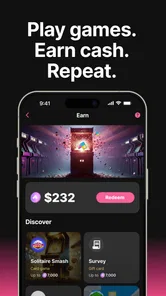
Gone are the days when making a few extra bucks required grueling tasks or mind-numbing surveys. Step: Instant Cash and Rewards brings a refreshing twist to the table. It's not just another app; it's an ecosystem where every step you take, quite literally, brings you closer to tangible rewards. Yes, you heard that right! By simply walking, completing engaging tasks, or participating in fun challenges, you can earn points that translate into cash or gift cards.
How It Works
The app is incredibly user-friendly. After a quick sign-up process, you’re greeted with a vibrant interface that’s intuitive and easy to navigate. You can track your steps, join challenges, and even invite friends to earn extra points. The best part? The rewards are not just limited to cash. You can snag some cool gift cards from your favorite brands, making every step you take worth the effort.
More From Our News Desk

 Bolt: Request a Ride
Bolt and the Shift from One-Tap Rides to More Legible Trips
Bolt shows how ride-hailing is shifting from a one-tap taxi request toward a more legible, choice-driven trip, while leaving the hardest questions of price and reliability unresolved.

 Farm Land - Farming life game
Farm Land Review: A Small Island Farm with a Satisfying Loop
A bright, breezy island farm turns a few quick chores into a satisfying cycle of planting, harvesting, expanding, and deciding what to build next.

 Android Auto
’s Community Takes Shape in the Passenger Seat
Its most valuable network is not a public feed but a shared set of routes, voice habits, app integrations, and advice that make driving less isolating—and sometimes more complicated.

 My Talking Angela
 Makes the Virtual Pet Feel Personal
A polished pet-raising game built on small rituals, playful customization, and a character who gives everyday screen time a surprisingly personal rhythm.

 Google Translate
 Review: A Pocket Tool for the Small Frictions of Travel
From menus and signs to quick conversations, Google Translate earns its place by cutting the little delays that make unfamiliar language feel like a barrier.

 Shazam: Find Music & Concerts
Shazam’s Best Trick Is Turning a Song Into a Night Out
A few seconds of recognition can settle an argument, rescue a half-remembered chorus, and point toward a live show. Shazam’s real trick is what happens after the match.
Latest News



The app syncs seamlessly with your smartphone's step counter, ensuring that every movement is accounted for. It's like having a fitness tracker with a bonus! And the tasks? They're super fun and varied, ranging from simple surveys to interactive games. There’s never a dull moment with this app.
My Personal Take
If you’re anything like me, the idea of earning while having fun is a major win. I was initially skeptical, but after a few weeks of using Step: Instant Cash and Rewards, I found myself looking forward to my daily walks and challenges. It’s a great motivator to stay active and the extra cash is a sweet bonus.
What truly sets this app apart is its community aspect. You can challenge friends, share achievements, and even give each other a nudge when motivation dips. It’s this social feature that keeps the app engaging and makes the journey to rewards even more enjoyable.
Choosing it for a real household routine
For an individual, Step is easiest to assess when the expected job is clear: check whether a cash option is available, review the terms, and decide whether it makes sense for that particular moment. I would not install it on several family members’ phones simply because one person is curious. Each person considering a financial account should understand whose information is being entered and who will be responsible for decisions made through it.
Imagine a household where one person notices a small expense before payday while another is using the shared tablet to watch a show. The useful move is not to hand over an unlocked financial app or ask everyone to treat its balance as household money. The account holder can check the offer privately, compare it with the bill’s due date and other choices, then tell the household what they can contribute. That separates coordination from account access and helps avoid confusing a possible advance with money already set aside for shared expenses.
Small habits that make the experience clearer
I would decide what counts as a successful outcome before opening the app: perhaps the offered amount covers a specific short-term gap, or perhaps the available terms make another option preferable. That simple check keeps the decision tied to a real need instead of the excitement of seeing an offer. It also makes it easier to stop if the amount, timing, or repayment arrangement does not suit the situation.
For any rewards activity, I would treat walking or completing a task as optional engagement, not as dependable earnings. A practical habit is to look at the effort required and the reward shown before spending time on an activity. If a task takes attention away from work, school, rest, or a more valuable errand, the points may not be worth pursuing. The app’s appeal is strongest when the activity fits naturally into a routine rather than creating a new obligation.
Another useful boundary is to keep personal finance checks separate from group challenges. A friend or family member can provide motivation without needing access to the account itself. If people in a household want to encourage one another to walk more, they can agree on a shared goal while leaving financial details private. That preserves the social element without turning a personal account into a shared record or implying that everyone’s rewards and cash options work alike.
How it differs from a bank or budget tool
Compared with a regular banking app, Step is interesting for the possibility of quick access to cash and activity-based rewards, while a bank app is usually the more natural place to review established account activity and manage day-to-day money. I would not replace a bank’s own tools with Step if my priority were a full view of deposits, bills, and balances. The right choice depends on the task: a cash option is not the same thing as a financial home base.
A budgeting app serves a different purpose again. If several people need to plan rent, groceries, or shared subscriptions, a tool designed around categories and a household record is a better fit than relying on individual accounts. Step may interest one person in that household, but it should not be expected to settle who owes what or provide a shared spending picture. A small note or a dedicated budget workflow can handle coordination more cleanly.
It is also worth comparing a possible advance with non-app alternatives before acting. If a bill is due, asking the provider about timing or payment arrangements may address the immediate problem without adding another financial commitment. For a recurring shortfall, a budget review or a conversation with a trusted adviser is more useful than repeatedly hoping for a short-term option. I would use Step as a decision point, not as a plan for covering regular expenses.
Household fit and final thoughts
Step is free, rated for Everyone, and has a 4.5 average from around 30,000 ratings; more than a million installs show that it has reached a substantial audience. It was released on January 30, 2019, and version 25.21.0 lists Android 7.1 as the minimum operating system. Those details make it easy to check whether an older phone can run it, though an age rating is not a substitute for an adult deciding whether a young person should use a finance app.
For coordination, I would keep any household plan outside the account: agree who is responsible for a bill or shared purchase, then let each person manage their own finances. That avoids confusing app activity with a shared ledger. Compared with a conventional banking app, Step’s stated draw is the possibility of accessing cash quickly; compared with a budgeting app, it is not the tool I’d choose to map household categories or track everyone’s spending. Those are different jobs, and a dedicated bank or budget tool may be more suitable when oversight and record-keeping matter most.
My practical verdict is that Step may suit an individual who wants to explore a possible short-term cash option and is comfortable checking the terms before acting. It is less suitable as a shared family account, a substitute for a household budget, or a dependable answer to repeated cash shortfalls. I’d keep expectations cautious, protect account access on shared devices, and make the decision based on the actual offer visible in the app—not on the maximum amount in its summary.
Who should take a closer look
I can see the strongest fit for someone who is comfortable managing their own financial account, wants to inspect a possible short-term cash offer, and is curious about rewards activities that can sit alongside ordinary routines. It is less compelling for someone who needs predictable income from an app, detailed spending plans, or a central place for several people’s money. If those are the priorities, a bank’s account tools, a budgeting method, or direct communication with a bill provider will usually be more relevant.
For a younger user, the Everyone rating only describes the app’s content classification; it does not answer whether opening a financial account is suitable for that person or how an adult should supervise the decision. I would have a parent or guardian review the account setup and terms with them, while preserving clear ownership and privacy. A shared phone does not make an account shared, and a family’s encouragement to join a challenge should not be mistaken for permission to use someone else’s financial access.
Before relying on an offer, I would check the amount actually presented, when it can be used, and the repayment details shown for that account. I would also consider what happens if the timing changes or the offer is smaller than expected. This is the practical follow-up that matters most: the headline maximum is not a personal guarantee, so the decision belongs after reviewing the real terms, not before.
Conclusion
In a world where apps come and go, Step: Instant Cash and Rewards stands out with its unique approach to earning. It’s not just an app; it's a lifestyle change that encourages you to stay active and be rewarded for it. Whether you’re a fitness enthusiast or someone looking to make a few extra bucks on the side, this app is a must-try. So why not take a step in the right direction and give it a whirl? Trust me, your wallet will thank you!
Step: Instant Cash and Rewards Frequently Asked Questions
Is Step: Instant Cash and Rewards free to download?
Yes, Step: Instant Cash and Rewards is free to download. Before installing, it is still sensible to review the app’s terms and any details shown for individual features or transactions, since a free download does not automatically mean every service has identical conditions. The app is designed around money management and rewards, so read the relevant information before using it for your finances.
Who develops Step: Instant Cash and Rewards, and how established is it?
Step: Instant Cash and Rewards is developed by Step Mobile, Inc. It has been available since Jan 30, 2019, and has more than 1 million installs, giving prospective users a sense of its reach. Its average rating is 4.5 from around 30,000 ratings, with about 7,700 reviews. Those figures can offer context, but your own experience will depend on which features you use.
Who is Step: Instant Cash and Rewards intended for?
Step: Instant Cash and Rewards is a finance app for people interested in managing money and exploring cash rewards in one place. Its content rating is Everyone, making it suitable for a broad audience. Before downloading, consider whether the app’s budgeting and reward features fit the way you prefer to handle your finances.
What is Step: Instant Cash and Rewards?
Step: Instant Cash and Rewards is a financial app designed to help users manage their money efficiently. It offers features such as instant cash rewards, budgeting tools, and financial insights to help users make better financial decisions. The app is user-friendly and aims to provide a seamless financial management experience. The app is developed by Step Mobile, Inc.
How does Step: Instant Cash and Rewards help with budgeting?
The app includes a variety of budgeting tools that allow users to track their spending and set financial goals. Users can categorize expenses, monitor their income, and receive personalized financial insights. This helps users stay on top of their finances and make informed decisions to achieve their financial goals.
Pros
- Quick rewards for small tasks
- Earn cash without investment
- User-friendly interface
- Variety of tasks available
- Low payout threshold
Cons
- Limited earning potential
- Frequent ad interruptions
- Requires personal information
- Tasks may feel repetitive
- Cashout takes time