Star Tracker - Mobile Sky Map
- 13.92K
- 4.5
- Installs
- 10.00M
- Price
- Free
Screenshots
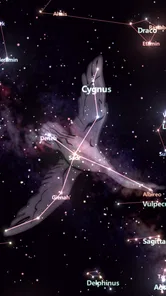
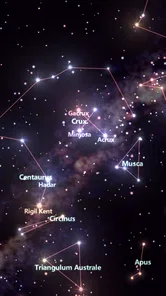
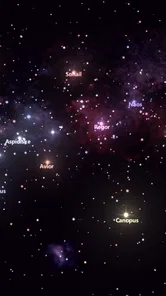
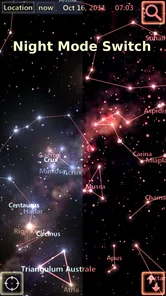
Analysis by Reviewed
I find a sky map most satisfying when it answers one small question: what am I looking at right now? Star Tracker - Mobile Sky Map is designed for that moment, turning a phone toward the heavens into a way to explore stars, constellations, and planets. It is approachable for a first try, but it works best when I treat the screen as a guide rather than expecting it to do the observing for me.
What to expect from a pocket sky guide
This is an education app from PYOPYO Studio, built around identifying what you can see overhead rather than teaching astronomy through a formal course. It has a 4.5 average from around 80,000 ratings, and more than 10 million installs suggest it has found a broad audience. It is free to install, rated for Everyone, and offers optional in-app purchases ranging from $0.99 to $2.99 per item. I’d treat it as a friendly observing aid, not a replacement for a telescope or a detailed observing handbook.
That distinction helps set expectations before the first launch. A map can make a bright point less mysterious and give a beginner somewhere to start, but it cannot make a faint object visible through cloud or city glare. I like this kind of app most when I have a little time to look around, rather than when I expect a complete astronomy lesson or a guaranteed answer to every question about the sky.
Exploring the Universe: One Swipe at a Time
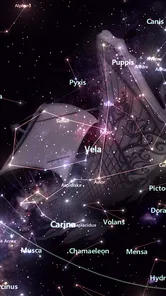
Right off the bat, the Star Tracker - Mobile Sky Map app feels like a magic window to the universe. As soon as I fired it up, I was greeted by a beautifully designed interface that’s as intuitive as it is informative. Just point your phone towards the sky, and voila! The app overlays constellations, stars, and even planets with pinpoint accuracy. It’s like having a pocket-sized planetarium right at your fingertips.
Getting ready for your first look
For a first outing, I’d open the app before heading somewhere dark and make sure I’m comfortable moving the phone around. A sky map is most useful when you can pause, orient yourself, and compare the screen with the real sky; rushing to scan every direction can make the display feel busier than the view. The app works offline, which is handy away from Wi-Fi or mobile coverage, but offline access doesn’t remove the need for a clear view of the sky. Buildings, trees, clouds, and city glow still limit what you can spot.
For a newcomer, there’s no need to prepare a list of targets or know constellation names in advance. I’d begin somewhere with an open patch of sky, let my eyes adjust, and keep the first session short enough to stay enjoyable. If I’m at home, even a balcony or garden can work for a quick identification; a wide, dark location simply gives me more sky to compare against the map.
Astronomy Made Easy
One of the standout features of this app is its user-friendly design. You don’t need to be an astronomy buff to get the hang of it. The app provides detailed information about celestial bodies, so even if you're a newbie like me, you can quickly learn the ropes. I found it incredibly satisfying to finally put names to the stars I’ve been admiring for so long.
More From Our News Desk

 Bolt: Request a Ride
Bolt and the Shift from One-Tap Rides to More Legible Trips
Bolt shows how ride-hailing is shifting from a one-tap taxi request toward a more legible, choice-driven trip, while leaving the hardest questions of price and reliability unresolved.

 Farm Land - Farming life game
Farm Land Review: A Small Island Farm with a Satisfying Loop
A bright, breezy island farm turns a few quick chores into a satisfying cycle of planting, harvesting, expanding, and deciding what to build next.

 Android Auto
’s Community Takes Shape in the Passenger Seat
Its most valuable network is not a public feed but a shared set of routes, voice habits, app integrations, and advice that make driving less isolating—and sometimes more complicated.

 My Talking Angela
 Makes the Virtual Pet Feel Personal
A polished pet-raising game built on small rituals, playful customization, and a character who gives everyday screen time a surprisingly personal rhythm.

 Google Translate
 Review: A Pocket Tool for the Small Frictions of Travel
From menus and signs to quick conversations, Google Translate earns its place by cutting the little delays that make unfamiliar language feel like a barrier.

 Shazam: Find Music & Concerts
Shazam’s Best Trick Is Turning a Song Into a Night Out
A few seconds of recognition can settle an argument, rescue a half-remembered chorus, and point toward a live show. Shazam’s real trick is what happens after the match.
Latest News



Another cool aspect is the night mode feature. It prevents the screen from blinding you in the dark, which is a thoughtful touch when you’re out stargazing. Plus, the app works offline, so you don't need an internet connection to explore the cosmos.
One practical trade-off is that a phone is both the map and a source of light. Night mode helps, but I still avoid leaving the display bright while I’m trying to make out dimmer points overhead. I check the map, lower the phone, and give my eyes a moment to return to the real sky. That simple rhythm makes the app more useful and keeps a casual look from turning into a long session of screen-watching.
Making the first identification count
When I’m showing a newcomer how to use a sky map, I start with one bright object rather than trying to identify a whole constellation. Point the phone steadily, let the display settle, and check whether the object’s position makes sense relative to nearby stars. That small comparison is more reliable than trusting a single label at a glance, especially when you’re holding the device at an awkward angle. It also turns a quick lookup into a useful little lesson in how objects sit together in the sky.
A practical evening could be as simple as stepping into the yard after dinner, picking out a bright planet or star, and using the map to work outward from it. If the screen seems confusing, lower the phone briefly, choose a landmark in the sky, then raise it again and compare. The app is best when it helps you look up more, not when you spend the whole evening staring at your screen.
For example, if a bright point catches my eye while I’m walking home, I can pause somewhere safely out of the way, open the map, and use its position among nearby stars to make a first identification. I don’t need to learn everything displayed at once. Naming one object and then finding it again without looking at the phone is a more useful first success than scrolling through every label.
When the map seems out of step
Phone-based sky maps can be sensitive to how the device is held and oriented, so I wouldn’t assume every mismatch means the object is missing. Slowly turn your body and phone, then compare several nearby points instead of making a quick snap judgment. A compass or orientation sensor can be affected by the surroundings, and crowded urban skies make faint stars difficult to confirm even when the map is clear. For serious observing, a dedicated astronomy chart or telescope-planning tool may be a better companion; this app’s strength is quick recognition and casual learning.
If the screen and sky still seem out of alignment, I find it useful to stop moving for a moment and reorient using a broad pattern rather than one star. Nearby buildings or other sources of magnetic interference can make phone orientation less dependable, and a rushed sweep can compound the confusion. I also separate two questions: “Is the map pointing the right way?” and “Can I actually see that object here?” A correct map cannot overcome haze, clouds, or bright street lighting.
The Personal Touch
What sets this app apart is the ability to track satellites and even set reminders for celestial events. I set a reminder for the next meteor shower, and I’m already planning a night out with friends to watch it. It’s these little personal touches that make the Star Tracker app more than just a tool; it’s a companion for your stargazing adventures.
Additionally, the app offers multilingual support, which is great if English isn't your first language. It’s clear that the developers have put a lot of thought into making this app accessible to as many people as possible.
Those planning an evening with other people can use a reminder as a prompt to make time for the sky, but I would still check conditions and visibility before setting off. A calendar alert is a planning aid, not a promise that an event will be easy to see from every location. For a relaxed group outing, I’d agree on one or two things to look for and let conversation take over instead of treating the app as a strict checklist.
Choosing the right tool for the job
Compared with a printed star chart, a phone map is quicker to consult when I don’t yet know which direction to look. A chart can be easier to read without a glowing screen and can encourage learning the sky’s larger patterns, but it takes more effort to orient at first. Compared with a general astronomy reference, this app is more immediate for matching the phone’s view to the sky; a reference or specialist planning tool is preferable when I need deeper explanations or a deliberate observing plan.
I’d recommend it to curious beginners, families introducing children to the night sky, and casual observers who want to identify a bright object without turning the outing into homework. It is less suitable for someone who wants a structured astronomy course, precise preparation for telescope work, or detailed astrophotography planning. Those users may be happier with a dedicated chart or planning application alongside, or instead of, a quick sky locator.
Taking the next step
Once you can recognize a few familiar objects, use the app to build a simple routine: choose one constellation or planet to look for, check its position, then put the phone down and try to find it unaided. That approach makes the information stick and preserves the pleasure of observing. Satellite tracking and event reminders can help you plan ahead, but they don’t guarantee ideal viewing; weather, local visibility, and timing still shape the experience. If your main goal is precise planning for astrophotography or detailed telescope sessions, specialist tools are likely a better fit.
After a few short sessions, I’d keep a simple mental note of what was easy to find and what remained unclear. Returning to the same patch of sky on another evening can make the layout feel more familiar, even without trying to memorize a full constellation. This is where the app’s educational value becomes more than a quick label: it gives me a reference point, while the repeated act of looking helps me recognize the pattern myself.
Wrapping Up the Starry Experience
In conclusion, the Star Tracker - Mobile Sky Map is a fantastic app for anyone with even a passing interest in the stars. Whether you’re a seasoned astronomer or just someone who enjoys a quiet night under the sky, this app offers something for everyone. With its intuitive design, educational features, and personal touches, it’s a must-have for your mobile device. So, grab your phone, step outside, and let the universe unfold in your hands!
My honest recommendation is to try it if your goal is simple, immediate curiosity: point, compare, learn one name, and keep watching. Its strongest use is making an unfamiliar sky feel approachable, especially when I’m away from a connection or sharing the view with someone new. I’d skip it as a primary tool for technical observation, but for an unhurried first look upward, it gives me a clear and inviting place to begin.
Star Tracker - Mobile Sky Map Frequently Asked Questions
What devices and conditions are best for using Star Tracker - Mobile Sky Map?
Star Tracker - Mobile Sky Map is intended for use on a mobile device while you look toward the sky. For the most comfortable experience, hold your device steadily and point it in the direction you want to explore, then compare the map with what you can see overhead. A darker viewing spot can make real stars easier to notice, while the app’s map can still help you explore when the sky is difficult to view.
Can Star Tracker - Mobile Sky Map help me find constellations and planets?
Yes. The app is designed to help you explore constellations, planets, and stars, with a sky map that connects objects shown on your screen to the direction you point your device. It can make it easier to begin identifying what is overhead and to explore the sky at your own pace. It is a useful starting point for curious beginners and casual sky-watchers.
What kind of learning experience does Star Tracker - Mobile Sky Map offer?
Star Tracker - Mobile Sky Map is an education app for exploring constellations, planets, and stars. It turns looking at the night sky into an interactive experience: you can point your device upward and use the map to connect what appears on screen with celestial objects overhead. It can be a useful companion for casual discovery as well as learning basic astronomy.
Is Star Tracker - Mobile Sky Map free to download?
Yes, the app is free to download. It also offers optional in-app purchases, priced from $0.99 to $2.99 per item, so you can try the basic experience before deciding whether to buy anything. The app is rated for Everyone, making it suitable for a broad audience, including families interested in exploring the night sky together.
What is Star Tracker - Mobile Sky Map and how does it work?
Star Tracker - Mobile Sky Map is an astronomy app designed to help users explore the night sky. It utilizes your device's GPS, gyroscope, and compass to accurately display a map of the stars, constellations, and celestial bodies in real-time. Simply point your device towards the sky, and the app will identify and provide information about the stars and planets visible from your location.
Pros
- Easy to use interface
- Accurate star mapping
- Real-time sky tracking
- Offline mode available
- Customizable settings
Cons
- Ads can be distracting
- Battery consumption is high
- Limited free features
- Occasional bugs in app
- Requires precise calibration