Star Roam Sky Map Planet
- 1.36K
- 4.3
- Installs
- 1.00M
- Price
- Free
Screenshots
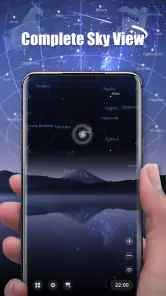
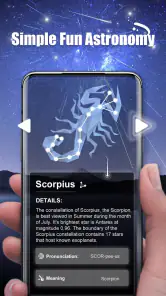
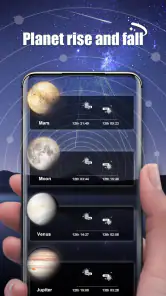
Analysis by Reviewed
I approached Star Roam Sky Map Planet as a learning app rather than a serious astronomy instrument, and that distinction matters from the first use. Its purpose is to make the night sky approachable for children, families, classmates, or friends who want a more enjoyable way to look upward. The experience sits in the education category, but it avoids feeling like a textbook. I found the appeal in the combination of exploration and conversation: instead of simply reading about space, you can use the app as a prompt to identify things, ask questions, and turn a quiet evening into a small discovery session.
Findout World Inc is the developer behind the app. It is free to install, rated for Everyone, and has attracted more than a million installs, which gives it the feel of an established introductory tool rather than an obscure experiment. The average rating is 4.3 from roughly sixteen thousand ratings, with about one and a half thousand written reviews. Those figures do not replace personal testing, but they do suggest that the basic idea connects with a broad audience.
What I like most is that the app does not demand prior knowledge. You do not need to recognize constellations, remember planet names, or understand astronomical terminology before opening it. That makes it especially suitable for a parent introducing space to a child, a teacher looking for a visual starting point, or an adult who has always been curious but never found a comfortable entry point. At the same time, experienced sky-watchers may find the educational presentation too light if they want detailed observation tools.
How Star Roam feels during ordinary use
Quick starts and realistic speed expectations
For a casual educational app, the important performance question is not whether it behaves like a professional observatory program. It is whether I can open it, begin exploring, and keep a child interested without long interruptions. In that role, I expect the experience to feel most comfortable on a reasonably modern device running Android 10 or later. The minimum operating-system requirement is Android 10, so anyone using an older phone or tablet should treat compatibility as the first practical checkpoint.
The app’s visual subject naturally encourages movement and looking around. That means perceived speed is shaped by more than launch time. Switching attention between sky objects, reading explanations, and moving through the interface should feel clear enough for a shared session. When an app is used with children, even small delays can break the moment: the child points at something, asks what it is, and the answer needs to arrive while curiosity is still active. Star Roam Sky Map Planet makes the most sense when used in short, focused bursts rather than as a long technical study.
I would also keep expectations realistic about visual richness. A sky map designed to be friendly and accessible has a different priority from a demanding simulation that fills the screen with specialist information. That is a strength for first-time learners, because excessive detail can make the sky feel less understandable. The trade-off is that users who want a dense catalog, advanced controls, or highly precise planning may prefer a dedicated astronomy alternative.
What happens during heavier use
The most demanding situation is not opening the app for a quick look. It is using it continuously while changing orientation, moving between objects, showing it to several people, and repeatedly returning to explanations. A family might pass one tablet around after dinner, with one person searching, another asking questions, and a child jumping between topics. That kind of use tests responsiveness more than a single glance at the screen.
My advice is to treat Star Roam as a guided discovery tool. Choose one theme or a small group of objects before beginning, then let the conversation develop around those choices. This workflow reduces aimless tapping and helps the app’s educational purpose come through. It also makes the device work less like an endless visual toy and more like a shared lesson. A useful trick is to let the child lead the search while the adult asks them to describe what they notice before supplying an answer. The app then becomes a starting point for observation rather than a substitute for it.
For classroom or group use, a larger tablet is likely more comfortable than a small phone because several people can see the display at once. The phone remains convenient for personal exploration, but a crowded screen can make small labels and explanations harder to share. This is not a flaw unique to the app; it is a practical trade-off between portability and visibility. If the goal is a calm family activity, one shared tablet may work better than several people trying to follow the same content on separate small screens.
Stability, interruptions, and recovery
Reliability matters more in an educational app than many people expect. If a child is absorbed in a discovery and the session is interrupted, the value of the moment can disappear quickly. I would therefore use Star Roam in a setting where the device is charged, notifications are quiet, and the app is not competing with several other demanding tasks. That simple preparation is particularly useful when the app is being used outdoors, where attention is already divided between the screen and the actual sky.
The current version is 1.5.1, and the app has been available since August 2020. Those details indicate that it is not a brand-new release, which can be reassuring for users who prefer an app with some history. They also mean I would keep the normal maintenance habits in place: install updates when offered, restart the app if a session becomes unresponsive, and reopen the activity rather than repeatedly tapping through a stalled screen. I would not build a carefully timed lesson around it without first trying the exact device and network conditions I plan to use.
Recovery is easiest when the app is treated as a flexible activity instead of a one-shot presentation. If a child loses interest or the session is interrupted, it is simple to return later with a narrower goal: one planet, one constellation, or one question. That approach is more forgiving than expecting everyone to complete a fixed sequence. It also suits younger users, whose attention may change quickly.
Device limits and resource-conscious use
The Android 10 minimum is the clearest device constraint. Users on older operating systems should not assume that a compatible installation will be available. For supported devices, the next consideration is screen size and general age. A newer phone with a bright display will usually be easier to use for visual exploration than an older budget handset with limited space, especially when the app is shared.
I would avoid judging the app only by how it behaves on a powerful phone. The real audience includes families using an older spare device, schools sharing tablets, and children borrowing a parent’s handset. Those situations make battery condition, available storage, background apps, and display visibility more important than headline specifications. Closing unrelated apps before a group session is a sensible precaution, particularly if the device is already prone to slowing down.
Outdoor use introduces another constraint: the screen can compete with darkness and reflections. A bright display may make it harder for eyes to adjust to the night, while a dim display may be difficult to share. I recommend beginning indoors to learn the controls, then taking the device outside for a short observation rather than trying to discover everything in the dark. This two-step routine is more comfortable and reduces the chance that the app becomes the entire focus instead of helping people look at the real sky.
Where it fits among astronomy alternatives
Compared with a printed star chart, Star Roam is more inviting for beginners because it can turn abstract names into an interactive visual experience. A book remains better for quiet reading, offline reference, and a child who enjoys browsing pages without screen distractions. Compared with a general educational video, this app offers more room for personal exploration, while a video may explain a topic more smoothly when the learner wants a guided story.
Dedicated astronomy applications are the better choice for users who need advanced planning, extensive object information, or a serious observing workflow. I would not choose Star Roam as my only tool for preparing a detailed night-sky session. Its value is different: it lowers the barrier to curiosity. That makes it particularly effective before moving to a more technical app. Someone who begins with a complex interface may feel lost; someone who begins here can build enough confidence to understand what they want from a specialist tool.
The app is also a better match for social learning than for solitary precision. A parent can use it to answer a child’s question, friends can compare what they recognize, and a teacher can use it to introduce a lesson. If you want exact observation planning, advanced controls, or a comprehensive reference experience, look elsewhere. If you want an approachable way to make the sky less intimidating, its simpler design is an advantage rather than a limitation.
Practical ways to get more from it
My first tip is to create a question before opening the app. “What can we find tonight?” is too broad for a young learner, while “Can you find the object we talked about earlier?” gives the session direction. The app works best when it supports a question that already exists, even a very simple one. This keeps exploration purposeful and prevents the screen from becoming a sequence of disconnected taps.
My second tip is to use it before and after looking at the sky, not only during the observation. Start with a short indoor preview, take the device outside, and then return to discuss what was easier or harder to recognize. That workflow turns the app into a bridge between digital learning and real-world observation. It also answers a common concern from parents: the activity does not have to keep a child staring at the display for the entire session.
My third tip is to separate discovery from memorization. Rather than asking a child to remember every name immediately, ask them to group objects by what they find interesting, such as color, size, or connection to a story. This makes the experience more personal and gives the educational content a better chance of sticking. Adults can use the same method when returning to astronomy after years away.
There is also a financial point worth considering. The app itself is free, but in-app purchases range from ninety-nine cents to sixty-nine dollars and ninety-nine cents per item. I would review purchase settings before handing the device to a child, especially during an unsupervised exploration session. The free starting point makes it easy to try, but families should decide in advance whether any optional spending fits their needs rather than making that decision in the middle of an excited discovery.
Who should install it, and who should skip it?
I would recommend Star Roam Sky Map Planet to families, beginners, and educators who want a friendly introduction to the night sky. It is also a good choice for an adult who feels embarrassed by not knowing basic astronomy. The Everyone rating supports its broad audience, while the educational focus gives parents a clear reason to try it together with children rather than leaving the app as an isolated game-like distraction.
I would be more cautious about recommending it to an experienced amateur astronomer who expects precise planning or deep technical reference material. I would also skip it if your main goal is to reduce all screen use during outdoor activities; a physical chart or direct observation may suit you better. Users with devices below Android 10 should check compatibility before planning around it, and anyone using a very small or aging phone should consider whether the display will be comfortable for the intended group.
For me, the strongest use case is a short shared session: a child asks about the stars, an adult opens the app, everyone explores one subject, and the device is then put down so the group can look upward. That balance captures what the app does well. It does not need to replace books, teachers, outdoor observation, or specialist astronomy software. It simply gives beginners a more approachable first step.
My performance verdict
Star Roam Sky Map Planet succeeds when I judge it by accessibility, not by the standards of a professional observatory tool. Its free entry point, Everyone rating, established release history, and educational focus make it easy to recommend as a first astronomy companion. The reported 4.3 average and broad install base reinforce that it has found an audience, while the current 1.5.1 version shows that the app remains an active product rather than a forgotten download.
The limitations are equally clear. Device compatibility begins at Android 10, shared use is more comfortable on a larger screen, and sustained sessions may demand more preparation than a quick indoor activity. Optional purchases also deserve attention before children use the app independently. Most importantly, the app’s approachable style will not satisfy people looking for advanced astronomical precision.
My final recommendation is to use it as a launchpad for curiosity, not as the final word on the sky. I would install it for a family evening, a beginner’s lesson, or a child who keeps asking questions about planets and stars. I would pair it with real observation and, once interest grows, move to a more specialized reference tool. Used in that role, it feels focused, welcoming, and genuinely useful without pretending to be something more technical than it is.
Pros
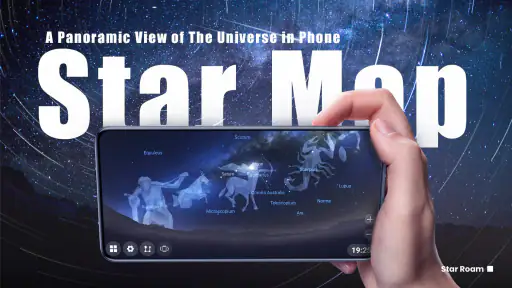
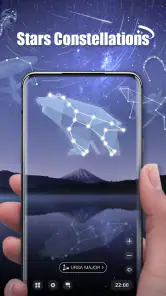
- Clear star labels make constellation spotting easy for beginners.
- Time controls let you preview celestial events and planetary movements.
- Works well as a quick reference during outdoor observing sessions.
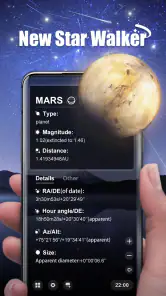
- Educational descriptions add useful context to stars and planets.
- The interface is simple enough for casual
- non-technical users.
Cons
- Some advanced astronomy details may be missing for experienced observers.
- Bright screen output can reduce night vision without a red-light mode.
- Location and sensor accuracy affect the reliability of sky alignment.
- Ads or locked features may interrupt the otherwise smooth experience.
- Small text and controls can be difficult to use on compact phone screens.
- Category
- Education
- Version
- 1.5.1











