Sony | Music Center
- 3.29K
- 4.5
- Installs
- 10.00M
- Price
- Free

Screenshots
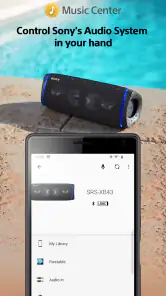
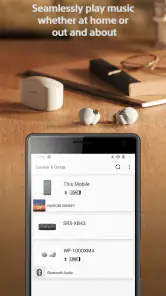
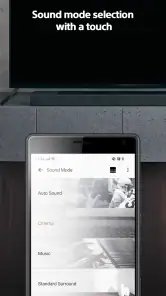
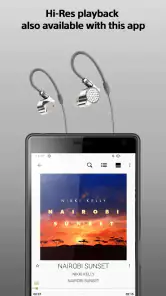
Analysis by Reviewed
I judge Sony | Music Center by a simple question: does it make the Sony audio gear I already own easier to manage? That is a more useful test than asking whether it can replace a music player. I find Sony | Music Center most useful when I want my phone to act as a practical control panel for compatible Sony audio gear, rather than as another place to discover music. Its value depends on owning supported equipment, and the experience is less compelling if I mainly need a general-purpose player for headphones or speakers from different brands.
Where it fits in a current setup
Sony Corporation’s free Music & Audio app is rated for Everyone and has more than ten million installs. Its average rating is 4.5, based on roughly 272,000 ratings, which suggests that many people find a use for it, though popularity cannot tell me whether a particular speaker or sound system will expose the controls I want. I see it as a hardware companion first: the right reason to install it is having compatible Sony equipment and wanting to manage that equipment from a phone.
That distinction also helps set expectations. If I want recommendations, a searchable catalogue, or one library shared across unrelated brands, I start with a dedicated music or streaming app. If I want to adjust or manage a Sony listening setup, Music Center has a clearer role. Keeping those jobs separate can make daily use less confusing: I can browse and choose music in the service I prefer, then turn to Sony’s app when the audio device itself needs attention.
What it does well in a Sony setup
At its best, the app reduces the little interruptions that come with listening at home. Instead of walking over to a speaker or searching for a physical remote, I can use my phone to manage playback and available device settings. If I’m moving between rooms or adjusting the sound while doing something else, having those controls together is genuinely convenient.
A useful way to approach it is to treat the app as a companion to the hardware, not as a replacement for every music app on your phone. I would first connect the Sony equipment I use most, then check which playback and sound options are available for that particular device. Different devices can expose different controls, so it is sensible to explore the menus once before relying on a setting during a busy moment.
A more practical everyday workflow
Picture a quiet evening at home: music is playing through a Sony speaker, and you move from the kitchen to another room. The phone gives you a way to manage the listening setup without repeatedly handling the speaker itself. For a small gathering, that same convenience can help when you need to adjust playback while talking with guests. I would still prepare the playlist and check the connection before people arrive; an app cannot make a weak or mismatched setup dependable by itself.
There is a small but worthwhile habit here: set your preferred sound adjustment while listening to a familiar track, then compare it with the default before keeping the change. That makes it easier to tell whether an adjustment actually helps your music or merely sounds impressive for a minute. It also avoids the common frustration of changing several settings at once and later forgetting which one made the difference.
More From Our News Desk

Weather by Xiaomi Review: Clear at a Glance, Less Clear Up Close

X Under Pressure: Can It Recover When Posting Goes Wrong?

Clash of Clans Is Won Between the Battles

Android Auto Makes the Case for Quieter Car Software

MobiOffice: Transforming Mobile Productivity with Seamless Integration

EA SPORTS FC™ Mobile Soccer: Redefining Mobile Sports Gaming
Who benefits, and who may not
I’d recommend it to someone who already owns compatible Sony audio equipment and often controls listening from across a room. It is also a reasonable choice for households where one person wants to manage the system from a phone instead of passing around a remote. The app was released in 2014, so it has been around long enough to become an established part of Sony’s audio software, but that history does not mean every model has identical menus or capabilities.
If you use speakers and headphones from several manufacturers, or simply want one app to organize and play music everywhere, a platform-neutral player or the controls built into your preferred streaming service may suit you better. Those options are usually more direct for browsing playlists; this app’s stronger reason to stay installed is managing supported Sony hardware. I would not choose it just because I want a new music library or a substitute for a streaming subscription.
Using Music Center in practice
First off, let's talk about what this app can do. The Sony | Music Center app is designed to give you the power to control your Sony audio devices right from the palm of your hand. It's like a universal remote for your music, and trust me, once you start using it, you'll wonder how you ever lived without it.
The app lets you seamlessly browse your music collection, adjust settings, and even play tunes across multiple devices. Imagine having a party and being able to control the music in every room without having to leave your spot. It’s the kind of thing that makes you feel like a DJ superstar in your own home!
Ease of use and sound adjustments
One of the first things I noticed about this app is how user-friendly it is. Sony has done an impressive job at making sure even the least tech-savvy among us can navigate through the app with ease. The interface is clean, intuitive, and quite responsive. Whether you're connecting to a wireless speaker, soundbar, or even headphones, the process is as smooth as butter.
For those who love to tinker with sound settings, this app offers comprehensive control. You can tweak the equalizer to get that perfect sound, ensuring your favorite songs hit just the right notes. And for audiophiles craving that extra depth, the app supports Hi-Res audio, delivering crystal-clear sound quality that’s sure to impress.
Connectivity and music sources
Now, let’s talk about connectivity. The Sony | Music Center app connects effortlessly with a variety of Sony devices. Whether you're using a Bluetooth connection or Wi-Fi, the app maintains a stable connection that keeps your music flowing without a hitch. This is crucial, especially when you're hosting an event and can't afford any interruptions.
Moreover, the app supports integration with various music streaming services. So, whether you're a Spotify addict or a Deezer devotee, you can easily access your playlists and enjoy them with enhanced sound quality. It's like having your personal concert at home, minus the crowd.
Making the first connection less frustrating
For a first setup, I’d keep the phone and audio equipment close together and follow the connection options presented for the device, rather than assuming every model uses the same route. If a device does not appear immediately, checking that both are ready to connect and reopening the app is a sensible first step. For everyday use, I’d also test playback and the controls I care about before moving the speaker or starting a gathering. That quick check is more useful than discovering a setup issue when everyone is waiting for the music.
A helpful way to troubleshoot is to separate the possible causes instead of changing everything at once. First check whether the audio device itself is available and playing; then check whether the phone can reach it through the connection method shown for that model. If playback works but a particular adjustment is missing, that may be a device-specific control rather than a failed connection. This little distinction can save time and keeps me from treating every difference between models as an app problem.
Version history and what it means for existing users
The app’s long presence in the music-and-audio category makes it an established companion rather than a newly introduced experiment. That history is useful context, but it should not be mistaken for proof that every current menu or device behaves exactly as it once did. The version installed on your phone and the Sony product you pair it with shape the experience, so I’d judge it by the controls available in my own setup.
For someone who already uses a Sony device, the practical effect of an app change is less about chasing a particular release and more about checking whether familiar tasks still feel straightforward. Before relying on the app for a routine—say, changing sound settings before a film or handing music control to someone else—I’d try that exact workflow after an update. That is a better test than assuming that an update necessarily adds a control or changes how an older device behaves.
Useful habits for a shared home
When several people use the same audio system, I would agree on a simple handoff: one person chooses the music in their usual player, while whoever is nearest to the phone handles device adjustments in Music Center. This avoids repeatedly searching through different apps for the same job. It also makes clear that the app is most helpful when the household treats it as the control layer for supported Sony gear, not as the only place everyone must manage their listening.
For a gathering, I’d test the intended room and device combination before guests arrive rather than assuming that a control that works beside one speaker will behave the same way from elsewhere in the home. If multiple-device playback is available in the setup, I would try the exact grouping I plan to use and listen for whether it suits the space. This is a practical trade-off: more ambitious arrangements can be convenient, but a simple, tested setup is often the safer choice when uninterrupted music matters.
Where the trade-offs show
The main limitation is also the app’s purpose: it is centered on Sony equipment. If your household’s audio gear is mixed-brand, you may end up switching between manufacturers’ apps instead of gaining one control center for everything. And when all you want is to pick a playlist, the streaming service’s own app may be quicker. I’d keep this installed for device management and sound adjustments, then use the player that best fits my listening habits for browsing and recommendations.
Another practical consideration is that “control” does not mean every device offers the same choices. Before buying Sony hardware specifically for an app feature, check that the feature is available with the model you intend to use. The same caution applies to multi-device listening: it can be handy where supported, but I would not plan a whole-home setup around an assumption that every speaker can be grouped in the same way.
There is also a difference between a control app and a complete listening solution. Music Center can make supported hardware easier to operate, but it does not remove the need to choose a source for music or make unrelated audio products behave as one system. If my priority is a single interface for a mixed-brand home, I’d look first at the options built into the devices or music services I already use. If my priority is getting more convenient access to Sony-specific controls, the extra app is easier to justify.
What to watch as your setup changes
If you add a different Sony product later, I would revisit the menus instead of assuming the new device offers the same options as the first one. I’d also check that the controls I rely on remain available after changing phones or reorganizing the listening area. These are modest checks, but they help distinguish a genuine limitation of the setup from a temporary connection hiccup, and they keep expectations grounded in the equipment actually in use.
For prospective buyers, the useful question is not simply whether Music Center supports Sony audio equipment in general; it is whether it supports the exact device and the control you care about. Someone who mainly wants quick volume and playback adjustments may be satisfied with a basic connection and the controls already on the phone. Someone expecting detailed sound changes or coordinated playback should verify those specific needs against the intended hardware before making the app central to a room.
My recommendation
In conclusion, if you're using Sony audio equipment, the Sony | Music Center app is a must-have. It offers a seamless blend of convenience, control, and connectivity that elevates your music listening experience to a whole new level. From its user-friendly interface to its robust connectivity options, this app has everything you need to enjoy your music like never before.
So, if you haven't already tried the Sony | Music Center app, give it a go! It's available for download on both Android and iOS, and it’s bound to become your favorite music companion in no time. Happy listening!
Sony | Music Center Frequently Asked Questions
Does Sony | Music Center work on both Android and iPhone?
Sony | Music Center is a smartphone companion app for controlling compatible Sony audio equipment. Before downloading, check that the version offered in your device’s app store supports your phone and operating system. The app’s main purpose is to put audio controls on your phone, while the exact features you can use depend on the Sony equipment you want to manage.
Do I need a Sony audio device to use Sony | Music Center?
Sony | Music Center is designed to control Sony audio systems, so its most useful features depend on having compatible Sony audio equipment. It is not a general-purpose music player that replaces your phone’s audio apps or hardware. If you do not own a Sony device, the app may have limited value; check compatibility for the equipment you plan to use before installing.
Who makes Sony | Music Center, and is it intended for beginners?
Sony | Music Center is a Music & Audio app developed by Sony Corporation for controlling Sony audio systems from a smartphone. Its purpose is straightforward: use your phone as a convenient way to manage compatible audio equipment and music playback. The app is free and rated for Everyone, so it may suit people looking for a simple companion to their Sony audio setup.
What is Sony | Music Center and what can it do?
Sony | Music Center is an application designed for controlling Sony audio devices directly from your smartphone. It allows you to browse your music library, control playback, and adjust sound settings. Additionally, it supports browsing music on USB devices and accessing online music services. It is compatible with a variety of Sony's audio products, enhancing your music listening experience with ease.
Is Sony | Music Center compatible with all Sony audio devices?
Sony | Music Center is compatible with a wide range of Sony audio devices, including wireless speakers, soundbars, and home audio systems. However, it's important to check the specific compatibility of your device model with the app. Compatibility details are usually listed on the device's product page or within the app's description on app stores.
Pros
- User-friendly interface.
- Seamless device connectivity.
- High-quality audio enhancements.
- Customizable sound settings.
- Supports multiple audio formats.
Cons
- Limited compatibility with non-Sony devices.
- Requires stable internet connection.
- Occasional app crashes.
- Limited free features.
- May drain battery quickly.
- Category
- Music & Audio
- Version
- Varies with device












