Sololearn: Learn to code
- 22.27K
- 4.6
- Installs
- 10.00M
- Price
- Free

Screenshots
Analysis by Reviewed
Choosing a coding app comes down to what you want to do with your spare minutes. If you need a gentle first introduction, a way to keep fundamentals fresh, or a low-friction place to try short code exercises, Sololearn is a convenient option. I’d treat it as a learning companion rather than a replacement for building substantial projects on a computer: short lessons can get you moving, but deeper programming skill takes practice beyond any lesson feed.
Who will get the most from it
I’d recommend it most to curious beginners who want to explore programming without first choosing a full course or setting up a desktop environment. It can also suit someone who already knows a little code and wants a structured nudge to revisit concepts. The app is an education product from Sololearn - Learn to Code, and its focus on Python, JavaScript, Java, and HTML gives newcomers several familiar starting points.
A realistic routine might be to open a lesson while waiting for a bus, answer a few questions, then use a playground exercise later to test whether the idea stuck. That’s more useful than treating a streak or quiz score as proof of mastery. I find it helps to keep a note of anything that feels unclear and return to it when I have time to write a small program from scratch.
Choosing between lessons, tutorials, and projects
Compared with video-first tutorials, this format puts more emphasis on reading, answering, and trying code in short bursts. That makes it easier to pause and resume, though people who learn best by watching a teacher explain a complete project may prefer a course built around demonstrations. Compared with documentation, Sololearn is more guided and approachable, but documentation is usually the better reference once you need precise details about a language or tool.
The useful middle ground is to pair the app with a real task. After a lesson on a concept, try using it in a tiny script or webpage of your own; then consult a more detailed reference when the exercise leaves questions unanswered. This avoids a common trap in bite-sized learning: recognizing an answer in a quiz but struggling to produce the same idea without prompts.
Small habits that make practice more effective
When a lesson introduces a new rule, I’d change one detail in the example rather than simply move on. Try a different input or add a second condition, then observe what changes. If the playground lets you experiment with the code at hand, this is a practical way to turn a quick exercise into active practice instead of passive tapping.
Community discussion can help when a concept is confusing, but I’d first describe what I expected the code to do and what happened instead. A specific question is more useful than posting only that an answer seems wrong. I’d also use quizzes as checks for recall, not as a substitute for explaining the idea in my own words or applying it outside the app.
More From Our News Desk

Weather by Xiaomi Review: Clear at a Glance, Less Clear Up Close

X Under Pressure: Can It Recover When Posting Goes Wrong?

Clash of Clans Is Won Between the Battles

Android Auto Makes the Case for Quieter Car Software

MobiOffice: Transforming Mobile Productivity with Seamless Integration

EA SPORTS FC™ Mobile Soccer: Redefining Mobile Sports Gaming
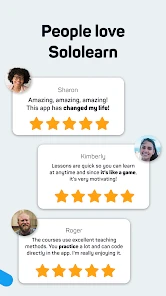
Sololearn is free to start, with optional in-app purchases ranging from under a dollar to around eighty-five dollars per item. I’d explore the learning flow before paying and decide whether the additional value fits how often I use it. The app is rated for Teen users, and its current version is 4.121.0; it needs Android 8.0 or later on Android. Its average rating is 4.6 from around 725,000 ratings, and it has over 10 million installs, which suggests it has reached a broad audience without telling you whether its teaching style will suit you personally.
One trade-off is that a phone encourages brief sessions, while coding often involves debugging and connecting several ideas over a longer stretch. If you’re aiming for a job-ready portfolio, preparing for a formal exam, or learning a framework in depth, use a more project-heavy course or desktop setup alongside it. Sololearn can help you build a habit and get comfortable with fundamentals, but it cannot make sustained problem-solving optional.
Sololearn is a fantastic app that has taken the world of coding education by storm. It's one of those apps that you start using and wonder how you ever lived without it. Whether you're a complete newbie or a seasoned developer looking to brush up on some new languages, Sololearn has something for everyone. Let's dive into what makes this app a must-have for anyone interested in coding.
Getting Started with Sololearn
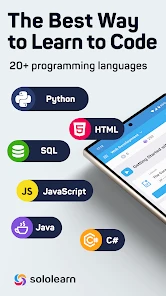
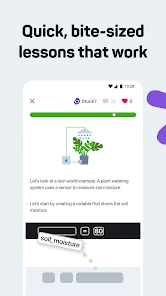
One of the first things you'll notice when you open Sololearn is its user-friendly interface. It's designed to be intuitive, so even if you're completely new to coding, you won't feel overwhelmed. The app offers a variety of courses in different programming languages like Python, JavaScript, C++, and more. Each course is broken down into bite-sized lessons, making it easy to fit learning into your schedule, no matter how busy you are.
What's really cool is the community aspect of Sololearn. There's a vibrant community of learners and experts who are more than willing to help you out if you get stuck. You can post questions, share your progress, and even take quizzes to test your knowledge. It’s like having a whole coding community in your pocket!
Hands-On Learning
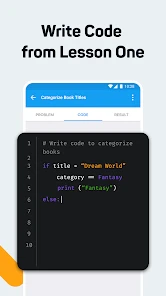
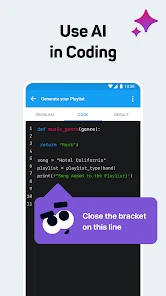
Sololearn is all about learning by doing, which is the best way to learn coding, in my opinion. The app provides a code playground where you can practice what you've learned right away. This hands-on approach helps reinforce the lessons and ensures that you don’t just understand the theory but can actually apply it.
Plus, the app tracks your progress, so you can see how much you've learned over time. It’s incredibly satisfying to watch your skills grow and know that you’re getting closer to mastering a new language.
Interactive and Fun Quizzes
Who said learning to code has to be boring? Sololearn makes it fun with interactive quizzes and challenges that test your knowledge and keep you engaged. These quizzes are a great way to break up the lessons and ensure that you’re retaining the information. Plus, they add a bit of a competitive edge, as you can compare your scores with other users.
It's this gamification of learning that really sets Sololearn apart from other coding apps. It keeps you motivated and coming back for more, which is crucial when you're trying to learn something as complex as coding.
Conclusion
In conclusion, Sololearn is an invaluable resource for anyone looking to learn how to code. Its comprehensive courses, supportive community, and hands-on learning approach make it a standout choice for both beginners and experienced developers. The app manages to make learning to code fun and accessible, which is no small feat. If you're ready to dive into the world of coding, I highly recommend giving Sololearn a try. You won't be disappointed!
How I’d decide whether to keep using it
My practical test would be simple: after a few sessions, can you explain one concept without looking at the lesson, and can you adapt it to a slightly different problem? If yes, the short format is doing useful work. If you’re mostly tapping through familiar answers, slow down and spend more time changing code in the playground or writing a small example elsewhere.
The app is also a reasonable choice for sampling languages before committing to a longer course. A few introductory lessons can help you discover whether you enjoy the logic of programming, but they won’t tell you everything about the day-to-day work of building software. For a learner who wants structure and small wins, I’d start here; for someone who already has a clear project and needs detailed debugging help, I’d choose a project-led resource as the main tool and keep Sololearn as a lightweight supplement.
Making practice fit a real day
For a more deliberate routine, I’d give each short session one job instead of trying to finish as much material as possible. On a commute, that might mean reading a lesson and answering its questions; at home, it could mean returning to the playground and changing the example until I can predict the result. That split respects the strengths of a phone-sized learning session while leaving room for the slower thinking that code requires.
If you have a particular reason to learn, connect each lesson to it. Someone curious about automating a repetitive task can keep a list of small problems to try later, while a student refreshing basic concepts can use the app to identify what needs another pass. The key is not to assume that every topic immediately solves a practical task; the app is useful for building vocabulary and familiarity before you tackle a larger goal.
What the short format can and cannot teach
Short exercises are especially helpful when you want repeated contact with the basic building blocks of a language. They can make syntax feel less alien and give you quick chances to check your understanding. The limitation is that a sequence of small prompts may not reproduce the uncertainty of a blank editor, where you must decide how to break a problem down and diagnose mistakes without being guided toward the next step.
I’d therefore use the playground as a bridge, not a finish line. After a topic, try writing a tiny example from memory, then deliberately change an input or condition and explain the outcome. When you hit a question that needs context beyond the lesson, that is a good point to switch to documentation or a longer tutorial rather than repeatedly guessing in a quiz.
Picking a starting language without overthinking it
It is easy to spend more time debating which language to learn than actually learning anything. I’d choose based on the kind of thing that interests me: Python or JavaScript are approachable entry points for many beginners, while HTML can be a direct way to understand the structure of a webpage. Java is another option if its concepts or use cases appeal to you. None of these choices needs to be permanent; an introductory course can help you test your interest before committing to a deeper path.
There is a trade-off in sampling several courses too quickly. Switching languages can make early progress feel lively, but it can also leave you with fragments of syntax and little confidence applying any one set of ideas. I’d pick one starting point, stay with it long enough to practise the fundamentals, and use a second course only when there is a clear reason to compare or broaden that foundation.
When a different learning tool is the better fit
If you need a guided explanation of a complete app or website, a project-led course may be more satisfying than a run of short lessons. If you are already debugging a specific program, a technical reference or a development environment on a computer is better suited to examining the full context. And if you learn best by hearing someone talk through decisions on screen, video instruction may hold your attention more effectively.
Those alternatives do not make this app pointless; they answer different needs. I’d use Sololearn to get started, refresh a concept, or keep a small learning habit alive, then move to a more suitable tool when my questions become specific and project-shaped. This handoff is a strength of a lightweight app when used intentionally, not a failure to make it do everything.
Questions I would settle before paying
Can you learn without purchasing anything? Yes: it is free to start, so I’d first see whether its lesson style and practice flow suit me. The optional purchases have a broad per-item range, so I would check the current in-app offer and decide based on the value I personally expect rather than assume a purchase is needed to begin.
Will it work on an older Android device? The minimum Android requirement is version 8.0, so I’d check the operating system before planning to install it there. The app is also available in the iOS context, though device compatibility should be checked for the particular phone or tablet being used.
Is it suitable for a child? Its Teen content rating gives a useful starting point for that decision, but I’d still consider the learner’s age, readiness to use a learning community, and whether an adult should help choose how to participate. For a younger beginner, a supervised, structured course may be a more comfortable first step.
My recommendation after weighing the trade-offs
I’d try Sololearn if I wanted an approachable way to begin with code, revisit fundamentals, or make use of small pockets of free time. The mix of lessons, quizzes, a playground, progress tracking, and community activity gives me several ways to stay engaged, though I would judge progress by what I can explain and create rather than by activity alone.
I would not make it my only resource for a serious project, a portfolio, or detailed debugging. In those situations, a computer-based workflow and project-focused instruction deserve the central role. For everyone else, the practical recommendation is to start with one language, practise beyond the answer prompts, and keep the app only if it helps you return to coding regularly. That makes it a useful first step or companion, rather than a promise that learning happens automatically.
Sololearn: Learn to code Frequently Asked Questions
Is Sololearn free to download, and what should I know about optional purchases?
Sololearn is free to download, so you can try its coding lessons without paying upfront. The app also offers optional in-app purchases, with prices ranging from $0.99 to $84.99 per item. If you are considering a purchase, check its details and price before confirming, and decide whether the included features suit your learning needs.
Who develops Sololearn, and how popular is the app?
Sololearn is developed by Sololearn - Learn to Code and is an education app focused on coding. It has over 10 million installs, around 725,000 ratings, and about 22,000 reviews, with an average rating of 4.6. These figures suggest it has reached a broad audience, though your experience will depend on your goals and preferred way of learning.
What is the app’s age rating, and is it suitable for younger learners?
Sololearn has a Teen content rating, so families may want to consider that guidance before downloading it for a younger learner. The app focuses on coding education, and its community features let learners interact and share ideas. Parents and teens can review those features together and decide whether the lessons and social aspects are a good fit.
What devices and operating systems can I use Sololearn on?
Sololearn is an education app for learning to code on mobile devices. Before downloading, check that your device runs Android 8.0 or later if you are using Android. The app is free to download, and you can explore its lessons and practice activities at your own pace. Your experience may vary depending on your device and how you prefer to study.
Which programming languages can I study with Sololearn?
Sololearn offers courses in several programming languages, including Python, JavaScript, Java, and HTML. Its store description highlights these options for learners who want to start coding through the app. You can focus on one language or explore others as your interests develop, keeping in mind that learning several at once may require extra time and consistency.
Pros
- Interactive coding exercises enhance learning
- Wide range of programming languages offered
- Community support for collaborative learning
- Frequent updates with new content
- Gamified learning keeps engagement high
Cons
- Limited advanced topics for experienced coders
- Some features require a paid subscription
- Mobile app may lag on older devices
- Occasional bugs in code execution
- Ads can be intrusive for free users
- Category
- Education
- Version
- 4.121.0











