Skyward Mobile Access
- 4.57K
- 3.0
- Installs
- 1.00M
- Price
- Free

Screenshots
Analysis by Reviewed
When I look at a school app, I care less about how impressive the feature list sounds and more about whether it removes a small piece of daily friction. Skyward Mobile Access, an education app from Skyward, Inc., is built around that practical idea: giving students, parents, and school staff a mobile route into information connected with school life. It is free, rated for Everyone, and has passed the one-million-install mark, so it is clearly intended for broad household and school use rather than a narrow specialist audience.
My main focus with this app is its central capability: mobile access to a school’s Skyward information. That sounds simple, but the effect can be meaningful when the alternative is opening a desktop browser, searching through a school website, or waiting until you are back at a computer. The app does not replace the school’s broader systems or a teacher’s personal communication style. Its value is being a convenient doorway into the information your school has made available through Skyward.
The experience is not universally identical for every user, because the usefulness of a school-connected app depends heavily on how that school has configured and adopted the platform. Still, the purpose is clear. Instead of treating school information as something tied to a desk, Skyward Mobile Access puts it within reach on a phone or tablet. In my view, that makes it most interesting as a routine-checking tool, not as an app you open for entertainment or extended study.
Why mobile access matters more than it first appears
The real capability is removing the desktop step
The strongest idea here is not a flashy learning system. It is the removal of an extra step between a family and school information. Parents often check school details while moving through a busy day, and students may need to look at their own information between classes, after practice, or while preparing for the next morning. A mobile entry point is useful precisely because those moments are short.
I found it helpful to think of the app as a school information checkpoint. I would not open it expecting a complete replacement for every school communication channel. Instead, I would use it when I want to check what is already organized inside the Skyward environment. That distinction matters: the app’s strength is access and convenience, while the quality and completeness of what appears still depend on the school’s setup.
This also explains why the average rating of 3.0, based on roughly nineteen thousand ratings, should be read with some caution. A school app can feel excellent when the connected school uses it consistently and frustrating when information is delayed, incomplete, or organized differently than a family expects. A rating in this category reflects not only the app itself, but also the user’s relationship with the institution behind it.
Who is likely to use it most
Parents are the obvious audience, especially those managing information for more than one child. A phone-based account can make it easier to switch from one school-related context to another without keeping several browser tabs open. Students can also benefit when they want a direct, familiar place to check their own school information rather than relying on a parent to relay it.
School staff are another important audience. For them, mobile access can be useful when they are away from a workstation but still need to stay connected with the information their school system provides. I would not describe it as a full mobile office based only on its core purpose, but the staff audience explains why the app is broader than a parent portal.
The app is less compelling for someone whose school does not actively use Skyward or whose school communicates almost everything through another platform. In that situation, installing it may not solve the actual problem. The first practical question is not whether the app is free; it is whether your school’s Skyward setup is part of your everyday routine.
What using it feels like in an ordinary week
Imagine a parent checking school information on a weekday afternoon. A child has just mentioned a change to the next day’s routine, but the parent wants to verify the information rather than depend on a hurried conversation. Opening the mobile app is more natural than waiting to get home and remembering to visit a desktop portal. If the relevant information is available through the school’s Skyward connection, that quick check can prevent a needless message or a forgotten task.
Another realistic situation is a student preparing for the next morning. Rather than treating the app as a place to spend a long session, the student can use it as a quick reference point before leaving school or while organizing the evening. The benefit is small in each individual moment, but repeated small checks are exactly where a mobile portal earns its place.
For a staff member, the value is similar but the context changes. A phone can be more convenient than a computer when moving between rooms or handling a school-day interruption. The trade-off is that a smaller screen is not ideal for every administrative task. I see mobile access as a useful complement to the main system, not automatically the best way to perform detailed work.
A practical workflow I would recommend
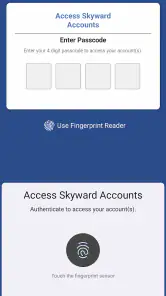
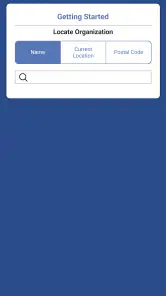
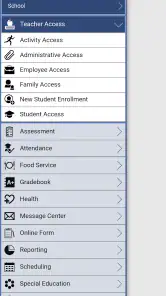
I would begin by installing the app only when I know my school uses Skyward for the information I need. After signing in, I would spend a few minutes learning where the most frequently checked areas are rather than tapping through every available screen. That small investment makes later checks faster and reduces the temptation to use the app as a general-purpose substitute for every school message.
For families, I would also decide who is responsible for checking what. If a parent checks everything while a student checks nothing, the app may become another source of reminders rather than a shared tool. A better arrangement is to let the student use it for personal school information while the parent uses it for household oversight. The exact division will vary, but agreeing on it avoids duplicated checking.
One useful habit is to treat the app as a confirmation tool. If a teacher, school message, or child mentions something important, I would use the Skyward access point to verify the information when possible, then use the school’s preferred communication method for questions. This keeps the app in the role it handles best instead of expecting it to become a messaging replacement.
Where the experience can become frustrating
The biggest limitation is the dependence on the connected school. A mobile portal can only be as current and useful as the information being maintained behind it. If a school posts updates elsewhere, updates irregularly, or uses Skyward for only selected tasks, the app may feel inconsistent even when it is functioning normally.
There is also a difference between having access and having clarity. A family may be able to reach school information but still need to interpret unfamiliar labels, separate old details from current ones, or remember which area contains a particular item. That is not necessarily a defect in the app, but it affects how quickly a first-time user feels comfortable.
Small-screen use brings another trade-off. Phones are excellent for short checks, but less comfortable for comparing several pieces of information or handling a long administrative process. If I needed to study a detailed record, organize extensive information, or work for a prolonged period, I would usually prefer the school’s web access on a larger screen when available.
That is why I would avoid judging Skyward Mobile Access as though it were competing with a full learning platform. It is not the same kind of product as a classroom app designed for lessons, assignments, video instruction, or collaborative study. A dedicated learning platform may be better for coursework, while a school portal can be better for checking institution-managed information. The right choice depends on the task.
Compatibility and getting started
The current version is 3.0.4, and the app supports Android 7.0 and later. That gives it a reasonably broad reach for people using older Android devices, although anyone with a very old phone should still expect the experience to depend on the device’s performance and the school’s current configuration. The app is free, which removes a financial barrier for families and staff who need access.
The age rating is Everyone, which fits an app intended for students, parents, and school personnel. That rating should not be confused with universal suitability for every child to manage independently. A younger student may still need a parent or school guidance when handling account information or interpreting school records.
One point I would keep in mind before troubleshooting is the difference between an app problem and an account or school problem. If the app opens but expected information is missing, the issue may relate to the school’s setup or the account’s access rather than the installation itself. Checking that distinction first can save time and prevent repeated reinstalling when the real solution is contacting the school or confirming account details.
Three details that make the choice easier
First, the app makes more sense for people who check school information in short bursts. If your routine involves several quick checks during the day, mobile access has a clear advantage over a desktop-only habit. If you check once every few weeks, the convenience may be less noticeable.
Second, households with multiple school responsibilities may gain more than individual users. The app’s value grows when it reduces the need to remember separate web addresses, navigation paths, or school-specific routines. It does not eliminate the need for organization, but it can make the checking step more accessible.
Third, I would not install it as a replacement for every school communication channel. Keep using the channel your school identifies for urgent questions, teacher conversations, or announcements that are not part of the Skyward system. The app works best when it is one reliable reference point among the tools your school already uses.
Those trade-offs also explain why the app can receive mixed reactions. Someone who wants a fast view of school information may find it practical, while someone expecting a polished all-in-one education hub may be disappointed. The product’s usefulness is narrower, but that narrowness can be a strength when the specific access it provides is the thing you need.
Who should choose it, and who should skip it
I would recommend Skyward Mobile Access to parents whose schools actively rely on Skyward, students who want a convenient mobile route to their school information, and staff members who occasionally need access away from a computer. It is especially suitable for people who prefer quick checks and want to reduce dependence on a desktop browser.
I would be more hesitant to recommend it to families whose school rarely uses Skyward or spreads information across several unrelated systems. In that case, adding another app may increase confusion rather than reduce it. I would also suggest that users who need detailed, extended administrative work choose the larger-screen web experience when that is available and more comfortable.
The app has a substantial audience, with more than a million installs and around four thousand six hundred written reviews, but popularity alone does not guarantee that it will fit your school routine. The deciding factor is practical: does your school place the information you need inside Skyward, and do you want to reach it from a mobile device?
My final view after weighing the everyday value
I see Skyward Mobile Access as a useful, focused education app rather than a complete school-life replacement. Its best quality is straightforward: it makes school-connected information easier to reach when I am away from a computer. That can matter a lot for busy parents, students who want more independence, and staff members moving through a working day.
At the same time, I would keep expectations realistic. The app cannot make an inconsistent school process feel perfectly organized, and mobile access does not automatically make detailed work comfortable. Its experience depends on the school’s use of Skyward, the information connected to the account, and the task I am trying to complete.
For me, the recommendation is conditional but positive. If your school already uses Skyward as a meaningful part of its information system, the free mobile app is worth trying because it can turn occasional desktop chores into quick phone checks. If your school uses another platform for nearly everything, I would skip it and focus on the tool your school actually maintains. Its real advantage is not doing everything; it is making the right school information easier to reach at the moment you need it.
Pros
- Quick access to school information from a mobile device.
- Supports communication between schools
- students
- and families.
- Useful for checking announcements and important updates on the go.
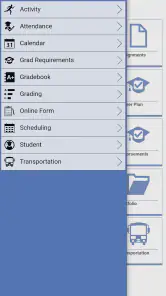
- Centralizes multiple school services in one application.
- Available for both Android and iOS devices.
Cons
- Features may vary depending on the school or district configuration.
- Requires an active account provided by the participating institution.
- Some content may load slowly with a weak internet connection.
- Notifications can become excessive if many services are enabled.
- The interface may feel less useful outside the school year.

- Category
- Education
- Version
- 3.0.4











