Sky Map
- 35.87K
- 4.1
- Installs
- 50.00M
- Price
- Free

Screenshots
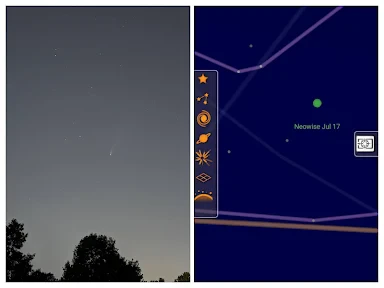
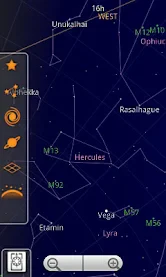
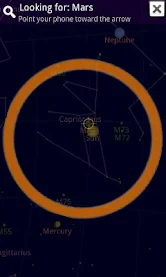
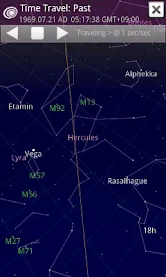
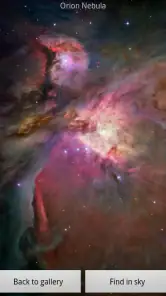
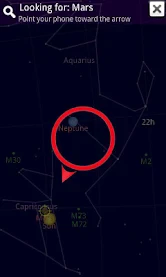
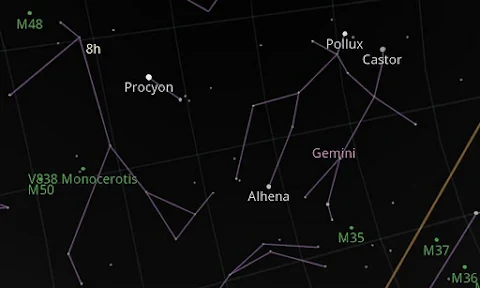
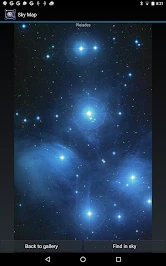
Analysis by Reviewed
I find a sky map most useful when it turns a shared moment into a small discovery. On a clear evening, someone can point at a bright object, and I can use the phone to identify what is in that direction rather than guessing from memory. Sky Map is a free Android reference app from Sky Map Devs, and its appeal is this direct link between looking up and finding a name. It suits curious beginners and families who want to explore together more than people seeking a full observatory toolkit.
A simple outing can become a shared discovery
The app is easiest to appreciate when there is a real question to answer, not when everyone is expected to learn astronomy at once. Imagine stepping outside after dinner because a child has noticed an unusually bright point above the rooftops. One person can hold the phone steady, another can compare the map with the sky, and a third can suggest what to look at next. That small back-and-forth makes the device useful without turning the evening into a lesson.
I also like the idea of using it in short bursts. Identify one object, put the screen away, and see whether the group can find the same patch of sky again. This gives younger users a chance to connect a name to an actual view instead of remembering only a glowing screen. If clouds move in or nearby buildings block the view, the app may still help explain where an object belongs, but it cannot make the object visible; that distinction keeps expectations sensible.
Passing the phone around without losing the moment
In a household, the app works well as a shared-device activity: one person aims the phone, another chooses a point to inspect, and everyone can follow the map. That makes it easy to involve children or visitors without asking them to learn a complicated interface first. I would still take turns holding the device rather than passing it around while people are walking; checking the display can distract from uneven ground, and the actual sky is better enjoyed when everyone gets a chance to look up between screen checks.
A practical routine is to choose one question before opening the app: “What is that bright point?” or “Where should we look for this constellation?” That keeps the screen from taking over the outing. After identifying an object, I like to lower the phone and try to find it again with the naked eye. The app then becomes a guide for attention, not a substitute for looking at the sky.
Setup, orientation, and a useful workaround
The experience depends on the map matching the direction the phone is pointed, so location and compass behavior matter. If the display seems misaligned, I would first move away from nearby metal objects and recalibrate the phone’s compass using the device’s usual motion rather than assuming the stars have shifted. A quick comparison between the screen and a recognizable bright object can also help reveal whether the issue is orientation or simply a limited view of the sky from your spot.
For a first session, I recommend trying the app outdoors where you have a clear view, then testing the direction of the map slowly instead of sweeping the phone around. This makes it easier to notice how the display responds and avoids turning the first attempt into a frustrating search. Like other phone-based sky guides, it can be less satisfying in a bright city or under clouds: identifying objects on a map does not make them visible through haze, buildings, or light pollution.
You May Like

Clash of Clans Is Won Between the Battles

Android Auto Makes the Case for Quieter Car Software

MobiOffice: Transforming Mobile Productivity with Seamless Integration

EA SPORTS FC™ Mobile Soccer: Redefining Mobile Sports Gaming

How Microsoft OneDrive Became a Mobile Productivity Giant

How Google Translate Breaks Language Barriers Effortlessly
Shared-device boundaries and coordination
On a family phone or tablet, it helps to decide whose turn it is before heading outside. The app’s purpose is easy to understand, but the phone itself may also contain personal messages, photos, or other apps. I would keep the activity focused on the sky map and have an adult manage any device-level settings that matter to the household. There is no need to treat the app as a family-management tool; it is simply one activity on a device the household already shares.
Coordination matters most when the group is in a dark place. Rather than having several people crowd around a small display, one person can describe the direction and another can look up from a safe spot. If the phone changes hands, pause first and pass it while stationary. This is a small practical habit, but it prevents the familiar problem of everyone watching the screen while nobody watches where they are stepping.
Who will get the most from it
It is a good fit for a casual evening, a camping trip, or a child’s first questions about stars, especially when the goal is recognition rather than technical observing. Compared with a printed star chart, it can orient itself to the phone’s direction and offer an immediate way to inspect a point. Compared with more advanced astronomy tools, its approachable presentation is a strength, while users planning telescope sessions or needing detailed observing plans may prefer a specialist resource alongside it.
The app is rated for Everyone, which makes it comfortable to introduce across age groups, but that rating is not the same as a family account or supervision feature. I would treat a shared phone like any other household device: agree who is using it, keep it in view during an outdoor activity, and avoid handing it over near roads or dark steps. Its popularity is substantial, with over 50 million installs and an average rating of 4.1 from around 489,000 ratings; that broad reach is reassuring, though it does not guarantee that every phone’s compass will behave perfectly.
Choosing it over a chart or a specialist tool
For a beginner deciding between this and a paper chart, the key difference is convenience versus context. A printed chart encourages you to learn a fixed view and can be easier to consult without juggling phone orientation, but you have to interpret it and account for where you are looking. A phone-based map reduces that first hurdle by responding to the direction of the handset. I would choose the chart for a deliberate learning session and this app when someone wants an answer quickly while standing outside.
There is a similar trade-off with more technical astronomy apps. A specialist tool is a better match if your plan depends on detailed observing information or preparing a telescope session. Sky Map is more appealing when you want to identify a point, explore the surrounding sky, and keep the process approachable for a mixed-age group. Those options are not mutually exclusive: a casual guide can help you get oriented, while a more detailed reference can take over when your questions become specific.
Getting Started with Sky Map
First things first, setting up Sky Map is a breeze. You simply download it from the app store, and you’re ready to explore the cosmos. The app uses your phone’s GPS and compass to pinpoint your location, which means it can show you a real-time map of the sky above you. Pretty neat, right?
Functionality & Features
Now, let’s talk about what this app can do. With a swipe of your finger, you can explore constellations, stars, planets, and even distant galaxies. It’s like having a tour guide for the universe. One of the coolest features is the time travel option, where you can see how the night sky looked in the past or how it will look in the future. So, if you’ve ever wanted to see the stars on your birthday a few decades ago, this app’s got you covered!
I’ve spent countless nights outdoors with Sky Map, and I must say, the experience is always enlightening. Whether you’re a seasoned astronomer or just a curious mind, the app provides valuable insights. You can tap on any celestial body to get detailed information, including its name, distance from Earth, and more. It’s like taking an astronomy class without the boring lectures.
Making the first session less fiddly
For a smoother first try, I would start with a bright, easy-to-spot object rather than trying to identify a faint star. Hold the phone still, compare its map with the direction you are facing, and make small movements. If the pointer appears to drift or the map does not line up, pause and check the compass before deciding the app is showing the wrong part of the sky. In practice, calm adjustments are more useful than swinging the phone around quickly.
One trade-off worth remembering is that the screen can compete with your night vision and attention. I use it to answer a question, then lower it and give my eyes time to adjust while looking back up. That makes the experience more enjoyable than reading labels continuously, and it also helps a group stay engaged with the sky itself. For a child, I would keep the explanation simple: the phone helps us orient ourselves, but the actual view is still outside.
User Experience
One thing I appreciate about Sky Map is its user-friendly interface. It’s intuitive, meaning you won’t be fumbling around trying to figure out how to use it. The screen is clutter-free, letting the beauty of the night sky take center stage. Plus, the app is lightweight and doesn’t take up much space on your device, which is always a bonus.
For those of you who love to share your newfound knowledge, the app allows you to take screenshots of the night sky and share them with friends. Imagine impressing your pals with your stellar knowledge at your next backyard barbecue!
What it is—and what it is not
I would recommend it to someone who wants a low-pressure way to answer everyday questions about the sky, especially if they enjoy learning by looking rather than reading a long guide first. It also suits a household where one person is curious and others are only mildly interested: the map can give the group a common starting point without requiring everyone to study the same material.
I would skip it as the only resource for a planned observing project, a telescope setup, or a night when precise technical details are the main goal. I would also choose a non-screen activity if the group is walking through an unfamiliar or hazardous area. The most satisfying use is stationary and curious: take a look, learn one thing, and return your attention to the real sky.
Age, trust, and practical expectations
The Everyone age rating makes it a reasonable app to introduce to children, but age suitability does not answer every household question. I would still supervise younger children outdoors, keep the device with the responsible adult when needed, and avoid assuming that a shared handset creates separate accounts or child-specific controls. That boundary is useful: the app can support a family activity, while rules about device access remain the household’s responsibility.
For anyone wondering whether the app is suitable for a quick visit outside, yes, that is where its immediate orientation is most valuable. For anyone wondering whether it replaces a book, printed chart, or telescope guide, I would say no. It can make the first identification less intimidating, while those other resources are better for structured learning or more demanding observing. Its free price also makes it easy to try without turning a casual curiosity into a purchase decision.
Final Thoughts
In conclusion, Sky Map is a fantastic tool for anyone with even a remote interest in astronomy. It’s engaging, educational, and most importantly, fun to use. Whether you’re lying in a field or chilling on your balcony, it brings the universe a little closer to home. So, if you haven’t already, give Sky Map a try. Trust me, your nights will never be the same again. Happy stargazing!
Sky Map Frequently Asked Questions
Does Sky Map help identify objects while you are outside stargazing?
Yes. Sky Map turns your Android device into a window on the night sky, so you can point it upward and explore the celestial view on your screen. It is intended as a reference while looking at the sky, making it easier to connect what appears on your device with what you are observing outdoors.
What does Sky Map do when I point my phone at the sky?
Sky Map displays celestial information on screen as you aim your device toward the sky. This interactive approach can help you explore stars, planets, and constellations rather than relying only on a printed guide. The experience is most useful when you can see the night sky and want a convenient reference as you look around.
Is Sky Map suitable for someone new to astronomy?
Yes. Sky Map is designed to make exploring the night sky approachable, including for people who are just beginning to learn about stars and constellations. Pointing your device toward the sky lets the app show celestial information on screen, turning a casual look upward into an opportunity to discover what you are seeing. Its Books & Reference category also reflects its educational, information-focused purpose.
What is Sky Map and how does it work?
Sky Map is a powerful application designed to help users explore the night sky. It utilizes your smartphone's GPS and accelerometer to pinpoint your location, allowing you to identify stars, planets, and constellations by simply pointing your device at the sky. The app overlays celestial information on your screen, providing users with an interactive stargazing experience.
Is Sky Map available for free, and are there any in-app purchases?
Sky Map is available as a free download. The app does not include any in-app purchases, making it entirely free to use. This accessibility allows users to explore the universe without worrying about hidden costs or the need to purchase additional features.
Pros
- Highly accurate star mapping.
- Simple and intuitive interface.
- Offline mode available.
- Free to download and use.
- Detailed celestial information.
Cons
- Requires device sensor access.
- Limited features for advanced users.
- Occasional app crashes.
- No night mode available.
- Ads can be intrusive.

- Category
- Books & Reference
- Version
- Varies with device