Skrill - Fast, secure payments
- 3.72K
- 4.6
- Installs
- 10.00M
- Price
- Free

Screenshots

Analysis by Reviewed
In a shared household, the useful question is not only how quickly a payment can be sent, but whose account is being used and who is responsible for checking it. I’d treat Skrill as a personal finance app, not a shared family wallet: a parent, partner, or housemate can use their own account to handle a payment, while everyone else agrees on the amount and purpose separately. That simple boundary helps avoid confusion over who authorized a transfer.
Keep accounts and devices clearly separate
When more than one person uses the same phone or tablet, I would avoid leaving a financial account open for the next person. Sign out when you finish, keep your access details private, and use the app only from a device you trust. Those habits matter more than convenience: a shared screen can make it easy to mix up who is viewing or sending money, even when the payment itself is straightforward.
For household costs, decide who will make the transfer before opening the app, then confirm the recipient and amount together. If someone else needs to contribute, agree on how they will send their share rather than passing around one person’s login. Skrill is most useful here as the account holder’s payment tool; it should not be mistaken for a shared ledger that automatically settles everyone’s portion.
Where it fits among payment choices
Compared with paying directly by bank transfer or using a bank’s own app, Skrill may feel more convenient when you already use it for online payments or need a digital account for sending money. A direct bank option may be simpler if the people involved all use the same bank and want their payments handled in one familiar place. For an occasional household bill, I’d compare the available funding and withdrawal choices before deciding which route is easiest, rather than assuming a fast in-app transfer is automatically the cheapest overall.
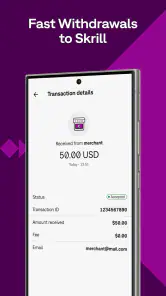
A practical tip is to check the full transaction details before confirming, especially when the recipient is new or the payment is in another currency. Keep a separate note of what a household transfer is for, such as a utility contribution or a shared purchase. That small step makes later checks easier and helps prevent a correct payment from becoming a confusing one.
If you’re choosing a payment app for everyone at home, Skrill is a better fit when each adult can manage their own account and coordinate payments directly. It is less suitable if you want one jointly managed household balance, a built-in family approval process, or automatic tracking of shared expenses. In those cases, a bank account designed for joint use or a dedicated budgeting tool may serve the household more clearly.
If you’ve ever found yourself needing to send money quickly and securely, you’ve probably heard of Skrill. This app is not just another payment service; it’s a fast, secure payment solution that’s making waves in the world of digital finance. Let me take you through my experience with it and why it might just become your new favorite financial tool.
More From Our News Desk

Weather by Xiaomi Review: Clear at a Glance, Less Clear Up Close

X Under Pressure: Can It Recover When Posting Goes Wrong?

Clash of Clans Is Won Between the Battles

Android Auto Makes the Case for Quieter Car Software

MobiOffice: Transforming Mobile Productivity with Seamless Integration

EA SPORTS FC™ Mobile Soccer: Redefining Mobile Sports Gaming
Getting Started with Ease
Jumping into the world of Skrill is a breeze. I downloaded the app and within minutes, I was setting up my account. The interface is intuitive, guiding you step by step, ensuring that even if you’re not tech-savvy, you won’t feel lost. It requires the usual details like your email, a strong password, and some identity verification. The whole process felt as secure as Fort Knox.
Smooth Sailing with Transactions
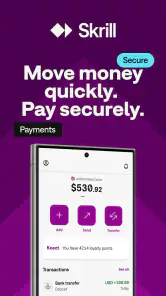
So, how does it perform when you’re actually moving money around? Let me tell you, it’s as smooth as a hot knife through butter. Whether you’re sending cash to a friend, paying for goods online, or even dabbling in a bit of forex trading, Skrill has got you covered. The app supports a multitude of currencies, making it a great choice for those of us with an international network or business.
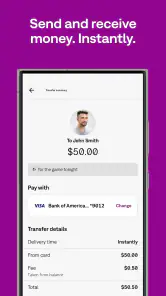
One of the standout features is how lightning-fast transactions are. Within a few taps, your money is on its way, and the recipient gets it almost instantly. Plus, the notification system keeps you in the loop every step of the way, which is super reassuring.
Security You Can Count On
Now, let’s talk security, because no one wants to worry about their hard-earned cash disappearing into the digital ether. Skrill employs top-notch encryption and two-factor authentication to ensure your funds are safe. I felt confident using it, knowing that they take security seriously. It’s like having a personal financial bodyguard, minus the sunglasses and earpiece.
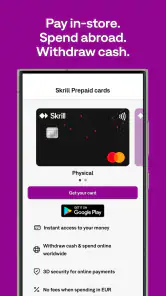
Moreover, the app offers a prepaid card option, which is a neat feature for those who prefer not to link their primary credit card directly to the app. It’s these little touches that make Skrill stand out in a crowded market.
User Experience and Customer Support
Let’s be real, no app is perfect, and sometimes things can go awry. But with Skrill, if you do run into a hiccup, their customer support is responsive and helpful. I had a minor issue with a transaction (totally my fault, by the way), and their team was quick to assist and resolve it. It’s nice to know that help is just a message away.
Overall, the user experience is seamless. The app is regularly updated, squashing any bugs and adding new features that enhance usability. It’s clear that the developers are committed to making Skrill as user-friendly as possible.
To wrap it up, if you’re in the market for a reliable and efficient way to handle your digital transactions, give Skrill a shot. It’s a robust tool that blends ease of use with top-tier security, and I, for one, am glad I gave it a try. Whether you’re sending money to family overseas or managing your online business finances, Skrill is equipped to handle it all with finesse.
Who should use it, and what to check first
I’d consider Skrill if I regularly pay online, send money to people who are comfortable using a digital payment service, or need a convenient way to keep some transactions apart from everyday banking. It is a finance app from Paysafe Holdings UK Limited, and its broad currency support can be useful when friends, relatives, or work contacts are in different countries. The app is free to download, but that does not mean every way of funding, converting, sending, or withdrawing money is free. I’d check the charges shown for the specific route I plan to use before moving a meaningful amount.
That distinction is worth making before relying on it for an urgent payment. “Fast” describes the experience the app aims to provide, but a transfer can still depend on the payment method, recipient details, and the steps required for an account. I would not promise someone a precise arrival time until the app has shown the transaction status. For recurring household contributions, agree on a backup plan too, so a delayed or incorrectly addressed payment does not leave a bill unresolved.
A realistic routine for shared costs
Imagine I’m buying a shared grocery order while a housemate is away. We agree on the amount and recipient in a message, I review the payment details in Skrill, and then I send the request or transfer through the available option. I keep the confirmation and note what it covered; my housemate handles their own account and sends their share separately. This is more deliberate than passing around a phone, but it gives both people a clear record of who paid and why.
For an international family payment, I would also compare the amount the recipient is expected to receive with the amount I will pay, including any conversion or funding costs displayed during the process. A multi-currency service can reduce friction when currencies differ, but it does not remove the need to check the exchange and final totals. If the recipient needs cash in a particular form or wants a bank deposit, a direct bank transfer or another service may be a better match.
Age, trust, and practical expectations
The app is rated for Everyone, but that content label should not be confused with permission for a child to manage money independently. Skrill is a financial service, so I would keep account access with the adult who is responsible for the funds and discuss any payment with younger household members without handing over credentials. Its strong average rating of 4.6 from around 228,000 ratings and more than 10 million installs suggest it is widely used, but popularity is not a substitute for checking the recipient, terms, and transaction details yourself.
The app first appeared in 2014, and version 3.174.0-2025112415 is listed for devices running Android 7.0 or later. Those details are useful when checking whether an older Android phone can install it; they do not guarantee that every feature or payment route will suit every user. If you mainly want shared budgeting, household approvals, or a common account balance, I would choose a tool built around those jobs instead. Skrill makes more sense when the priority is an individual’s digital payments and the people involved can coordinate outside the app.
My household verdict is that Skrill can be a practical option for an adult who already has a clear reason to use it, especially for online payments or transfers involving different currencies. I would not make it the center of a family money system: account ownership and expense tracking need to stay explicit, and costs should be checked before each kind of transaction. Used with those boundaries, it can make a payment routine more convenient; without them, a shared device or vague agreement can create avoidable confusion.
Small habits that make payments easier to review
For a household that sends several small contributions over time, I would settle on a consistent note format before the first payment: what it covers, the date, and who paid. The note can live in whatever shared place the household already uses; the point is not to turn Skrill into a bookkeeping system, but to make its payment confirmations easier to interpret later. This is especially helpful when one person pays upfront for groceries or a booking and others reimburse them days afterward.
I’d also avoid treating a notification as the whole record. Before closing the app, check that the transaction details match the agreement, then retain whatever confirmation is available and tell the other person the payment has been made. If a recipient name or amount looks unfamiliar, pause and verify it through a separate channel rather than relying on a hurried message. That extra check is a small inconvenience compared with trying to untangle a mistaken transfer.
When another option is the better choice
Skrill is most compelling when it solves a specific gap in an adult user’s payment routine, such as keeping online spending distinct from a main bank account or making a payment across currencies. If all household members already use one bank and their transfers are easy to track there, adding another account may create more administration than convenience. Likewise, someone who wants a shared pot with visible contributions should look for a service designed for group budgeting rather than assume a personal payment account can fill that role.
For a one-off payment, I’d compare the final amount and expected recipient outcome across the routes available to me. The in-app path may feel faster to start, while a bank transfer may be more familiar or clearer for a particular recipient. The right choice depends on the payment’s destination and how the recipient needs to use the money, not simply on which app has the shortest checkout flow.
Making a careful first transfer
If you are new to the service, I would begin with a modest, non-urgent payment to a recipient whose details you can verify. That gives you a chance to learn how the app presents funding choices, charges, confirmation, and status without making your first experience depend on an urgent household bill. Read each screen rather than tapping through on habit, particularly when changing currencies or choosing a different way to add or withdraw money.
Before relying on it for repeat payments, decide how you will handle a failed, delayed, or incorrectly addressed transaction. Keep the recipient’s correct details somewhere you can check them, and do not send a second payment simply because the first confirmation is taking longer than expected. Check its status first, then use the available support route if the transaction needs attention. That cautious workflow is useful with any money app, but it matters most when other people are waiting on your payment.
What the app does—and does not—organize for a household
A common question is whether Skrill can coordinate a family’s shared spending by itself. I would not use it on that assumption: the account holder can make individual payments, but the household still needs its own agreement about contributions, reimbursement, and records. This is a sensible arrangement for adults who communicate clearly, but it can feel cumbersome if several people expect one place to show the whole bill, each person’s share, and whether everyone has paid.
Another practical question is whether a free download means a transfer will have no cost. It does not; I’d review the charge and exchange details shown for the exact transaction before confirming. And while the app’s Everyone content rating may reassure a parent browsing an app store, it is not a substitute for adult oversight of a financial account. The responsible account holder should keep credentials private and decide how any payment involving a younger family member is handled.
Overall, I’d recommend Skrill to an adult who has a clear payment use for it and is willing to check transaction details instead of relying on speed alone. For shared household expenses, it works best as one person’s payment tool within a separate, agreed routine—not as a substitute for a joint account, family controls, or expense tracker. That distinction keeps the convenience while avoiding the kind of account-sharing and record-keeping confusion that can make a simple transfer feel like a household chore.
Skrill - Fast, secure payments Frequently Asked Questions
Who develops Skrill, and what is the app intended for?
Skrill is a finance app developed by Paysafe Holdings UK Limited. Its focus is handling payments on a phone, including sending and receiving money and paying online. If you are looking for a mobile wallet rather than a general banking app, Skrill may be worth considering. Before using it, take time to review the payment options and terms that apply to your needs.
Can I use Skrill without creating an account?
Skrill is designed around a user account, which is where you manage payments and your wallet activity. You should expect to set up an account and sign in before using its payment features. This makes it important to be comfortable with maintaining a digital wallet and protecting your sign-in details. Read the registration steps in the app so you know what is required before you begin.
Can I send money to someone who does not use Skrill?
Skrill is intended for sending and receiving money, but the available transfer options depend on the recipient and the payment route you choose. If the person you want to pay does not have a Skrill account, check the app’s current transfer choices before relying on it for that payment. Confirm any applicable charges and delivery details in advance, especially when sending money across borders.
Is Skrill free to download, and which devices can run it?
Skrill is a free finance app from Paysafe Holdings UK Limited, with an Everyone age rating. It requires Android 7.0 or later, so check your device’s operating system before installing. The app is designed for managing payments on your phone, and its store summary describes it as a way to transfer money with your phone.
What is Skrill and how does it work?
Skrill is a digital wallet and online payment system designed for fast and secure transactions. It allows users to send and receive money, make online purchases, and manage their finances from a single app. Users can fund their accounts through various methods, including bank transfers and credit cards, and use the balance for online payments or transfers to other Skrill users.
Pros
- User-friendly interface
- easy to navigate.
- Supports multiple currencies and languages.
- Quick and secure transactions.
- 24/7 customer support available.
- Low transaction fees compared to competitors.
Cons
- Limited availability in certain countries.
- Verification process can be time-consuming.
- Not all merchants accept Skrill.
- Occasional technical glitches.
- Fees for currency conversion may apply.
- Category
- Finance
- Version
- 3.174.0-2025112415











