Skillshare: Online Classes App
- 4.79K
- 4.1
- Installs
- 1.00M
- Price
- Free

Screenshots


Analysis by Reviewed
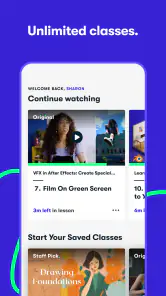
I approached Skillshare: Online Classes App as a learning tool rather than just another video catalog. Its focus is creative education: photography, drawing, sketching, illustration, design, and related skills that are easier to understand when someone demonstrates the process. After spending time with it, I think its main appeal is the feeling of having a large collection of guided projects available whenever I have the energy to learn.
The app is made by Skillshare, Inc and belongs to the education category. It is free to install, rated for Everyone, and has passed the point where an app feels untested: it has more than a million installs, with an average rating of about 4.1 from roughly 59 thousand ratings. Those figures suggest a substantial audience, but they do not automatically make it suitable for every learner. The real question is whether you want flexible creative lessons badly enough to work around the app's limits and any paid access that may appear during use.
What using Skillshare feels like in everyday learning
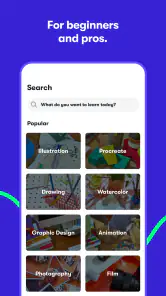
The first thing I noticed is that this is not designed like a traditional course with one fixed route from beginner to final exam. It feels more like browsing a creative library and choosing a class that matches my current interest. One day I can look for a drawing exercise, another day for photography guidance, and later return to sketching. That freedom is useful when motivation comes in short bursts, although it also means I need to create my own structure.
For example, imagine having half an hour after dinner and wanting to improve at taking photos with a phone. I would not begin by opening a long, general photography curriculum. I would choose a focused lesson, watch enough to understand the exercise, and then try it immediately around the house or outside. The value comes from moving between explanation and practice instead of passively watching a creator talk for a long time.
That same approach works well for drawing. I can keep a notebook nearby, pause when a technique is demonstrated, and repeat the movement before continuing. This is one of the better ways to use the app: treat each class as a prompt for making something, not as entertainment to consume from beginning to end. If I only watch lessons, I get the impression of progress without developing much control over the skill itself.
Skillshare is especially comfortable for people who already know what they want to explore. A beginner who searches for a specific creative problem can find a starting point without buying a physical textbook or committing to a scheduled workshop. Someone who prefers a strict syllabus, regular tests, or personal correction may feel less supported. The app's flexibility is its strength, but it also places responsibility on me.
Choosing classes without getting lost
The broad range can become distracting. Creative learning often produces a familiar temptation: I start a lesson about sketching, notice another class about photography, and then collect several ideas without finishing any of them. My practical solution is to choose one small outcome before opening a class. That might be a page of gesture drawings, a set of deliberately framed photos, or a finished illustration draft.
I also find it helpful to judge a class by the activity it leads to rather than by how attractive the topic sounds. A lesson that gives me something specific to make is more useful than one I save because its subject seems interesting. This is a non-obvious advantage of the app's format: it can support short creative experiments, but only if I impose a stopping point and a result.
Another useful habit is to separate inspiration from skill practice. I can browse when I want ideas, but browsing should not replace learning. When I open the app with a clear question—how to build a simple sketch, how to approach a photo, or how to begin a creative project—the large catalog feels manageable. Without that question, the experience can turn into endless selection.
Because the app covers several creative fields, it is more valuable to curious generalists than to people seeking one narrow professional qualification. I can use it to sample areas before committing to a more specialized course elsewhere. That makes it a reasonable first step for someone wondering whether illustration, photography, or another creative direction is worth pursuing.
Where the free download fits into the decision
The application itself is free to download, but in-app purchases range from $9.99 to $167.99 per item. That distinction matters. I would install it to inspect the learning experience, discover whether the teaching style suits me, and understand which material is available before deciding whether paid access makes sense. I would not treat the free installation as proof that the entire learning library is free.
This is also where careful account behavior becomes important. Before agreeing to a purchase, I would read the offer shown in the app, check its duration and renewal terms, and confirm the account being used on the device. A creative app can become expensive when a user taps through a trial or subscription screen quickly. The safest approach is to decide what I am willing to spend before I start exploring.
I would also keep purchase management in the relevant Android or iOS account settings rather than assuming that deleting the app cancels anything. Removing an application and ending a billing arrangement are separate actions in many mobile workflows. Skillshare's free entry point is convenient, but it should be approached with the same attention I would give any app offering paid digital content.
The current Android version is 5.4.81 and it supports devices running Android 5.0 or later. That makes it accessible to people using older Android hardware, although actual comfort will still depend on the phone's screen, storage, battery condition, and connection. Watching lessons on a small display is possible, but I personally prefer a larger screen when I need to follow detailed drawing or design work.
Trust, controls, and moments that deserve attention
My trust in a learning app does not come only from its rating or install count. I look at what I can control: the account I use, the purchases I approve, the information I choose to share, and the way I leave the service. With Skillshare, I would review the account and privacy choices presented during setup and in the app's settings instead of accepting every prompt automatically.
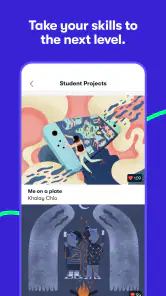
That is particularly relevant for creative learners because the work can become personal. A drawing, photograph, or project may reveal a home, a family member, a workplace, or a developing professional identity. Before uploading or sharing anything through a learning workflow, I would remove unnecessary personal details and consider whether the project needs to be visible to anyone beyond myself.
I would also distinguish between using the app for private practice and using it as part of a public portfolio. Those are different situations with different risks. A rough exercise can be harmless when kept for personal reference, while a finished project may include recognizable people, locations, client material, or copyrighted elements. The app can help me learn, but it does not remove the need to make sensible decisions about what I publish.
Account access is another practical consideration. I would use a password I do not reuse elsewhere and keep track of which sign-in method I chose. If I later stop using the service, I would look for account-management and cancellation controls before uninstalling it. This is not exciting advice, but it protects the work and payment decisions that matter more than the act of downloading the app.
I am careful not to confuse a polished lesson interface with a complete privacy guarantee. The responsible way to evaluate the app is to read its current privacy notice and the permission prompts shown on my own device, because those are the places where the active choices and explanations appear. I would deny access that is not necessary for the way I plan to use the app and revisit settings if my use changes.
In data-sensitive moments, I would be most cautious when creating an account, starting any paid arrangement, uploading a project, or interacting with social features if they are presented to me. Each moment involves a different decision. Account creation concerns identity and access; payment concerns authorization; uploads concern ownership and personal content. Treating them separately makes the app easier to use responsibly.
How I would build a useful routine
My preferred routine would be short and concrete. I would choose one class, write down the skill I want to practice, and set aside a limited session for watching and making. I would keep the first attempt deliberately small. For photography, that could mean testing one composition idea. For drawing, it could mean repeating one form several times rather than trying to complete a polished illustration immediately.
The most effective workflow is to pause frequently. Video lessons can make a technique look effortless because the instructor already knows the movement. Pausing exposes the real work: checking proportions, trying the step myself, and noticing where my result differs. I would save a photo or scan of each attempt privately so I can compare progress later, rather than relying on memory.
I would also avoid starting several classes in the same subject at once. If one lesson explains a foundation clearly, I would finish its exercise before jumping to another teacher's method. Different explanations can be helpful when I am stuck, but switching too early can make it difficult to tell whether I need a new explanation or simply more practice.
For a busy person, the app works best as a flexible appointment rather than an emergency cure for lost time. A regular short session is more realistic than expecting one weekend of intense viewing to create a lasting skill. Skillshare can supply direction and demonstrations, but the improvement still comes from work away from the screen.
It is also worth keeping expectations realistic about feedback. A class can show a process, but watching an instructor does not necessarily give me personal diagnosis of my mistakes. If I need detailed critique, accountability, or a credential recognized for a specific career path, I would compare this app with a live teacher, a specialized course, or a platform built around assessments and instructor feedback.
Who should use it and who should look elsewhere
I would recommend trying Skillshare to a beginner who wants to explore creative skills without planning a formal academic program. It is also a good fit for a self-directed learner who enjoys learning through demonstrations and can turn a lesson into a personal project. The variety is useful for someone whose interests move between photography, drawing, sketching, and other creative work.
I would be more cautious about recommending it to someone who needs a fixed sequence and external pressure. If missed assignments are your main problem, an open library may not solve it. You might do better with a scheduled class, a study group, or a teacher who reviews your work. Likewise, a professional seeking narrowly defined technical certification should verify that the learning format matches that goal before paying.
Compared with free tutorial videos, the advantage is organization around classes and creative practice rather than relying on a random search result. Compared with a traditional course, the advantage is convenience and breadth, while the trade-off is less personal supervision. Compared with a single specialized learning app, Skillshare offers more room to explore but may feel less focused when you already know exactly which advanced skill you need.
The app is also not the best choice if I want to learn entirely offline, avoid account-based services, or never encounter paid content. Those preferences do not make the app bad; they simply point toward books, downloaded materials, local workshops, or a different service with a pricing model that better matches the way I want to study.
My cautious verdict after using it
Skillshare, Inc has created an approachable education app for people who learn by seeing a process and then trying it themselves. I like its usefulness as a creative starting point and as a source of structured prompts when I feel stuck. Its strongest role is not replacing a dedicated teacher; it is helping me begin, experiment, and maintain contact with creative skills in ordinary spare time.
My recommendation comes with conditions. I would install the free app, inspect the available learning experience, and decide on a clear project before considering any in-app purchase. I would review account, privacy, and payment choices carefully, especially before sharing creative work. The Everyone age rating makes it broadly approachable, but responsible use still depends on what a learner uploads, buys, or reveals through an account.
After weighing the convenience against the need for self-discipline and the possibility of paid access, I see it as a worthwhile option for curious beginners and creative hobbyists. I would skip it in favor of a specialist or instructor-led alternative when I needed formal progression, personal critique, or a tightly controlled study plan. For everyone else, the best test is simple: choose one class, make one small thing, and judge the app by whether it helps you continue after the video ends.
My final advice is to use Skillshare as a practical workshop, not as a substitute for practice. That mindset makes the catalog less overwhelming, keeps spending decisions deliberate, and turns the app's broad creative range into something genuinely useful.
Pros
- Wide range of creative
- business
- and technology classes
- Short lessons make it easy to learn at your own pace
- Projects provide practical ways to apply new skills
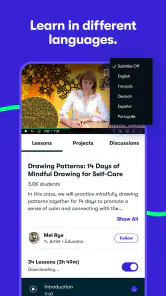
- Offline downloads support learning without an internet connection
- New classes and updated content are added regularly
Cons
- Most courses require a paid membership after the trial
- Class quality and teaching style can vary significantly
- Some lessons feel too basic for advanced learners
- Offline content can use considerable device storage
- The app may encourage browsing instead of completing courses

- Category
- Education
- Version
- 5.4.81











