Sign Language ASL Pocket Sign
- 2.69K
- 4.8
- Installs
- 1.00M
- Price
- Free
Screenshots
Analysis by Reviewed
Before choosing an ASL app, I’d ask what I need it to do: show how a sign moves, help me review between lessons, or give me feedback in a real exchange. Those are different jobs. ASL Pocket Sign is an education app from MobiReactor built around video lessons and a dictionary, so it makes the most sense as a visual study companion. I would not treat any phone-based course as a shortcut to fluent conversation, but for someone looking for a manageable place to begin, its format is appealing.
Pick a tool that matches your goal
If I were starting from scratch, I’d want to see signs demonstrated rather than rely on written descriptions alone. If I already knew some ASL, I’d care more about finding a useful reference and practising accurately. And if my main goal were to communicate comfortably with a particular person or community, I’d make regular interaction and feedback part of the plan from the start. This distinction matters because a lesson app can support all three aims to some degree, but it cannot do the same work as a responsive teacher or conversation partner.
That is the lens I use for Pocket Sign: it can help turn a small pocket of free time into focused practice, but progress depends on what I do between videos. I would choose it for a low-pressure introduction and ongoing review, not as my only source if I needed individualized correction or a formal course structure.
Learning ASL in small, useful steps
Imagine having a handy tool right in your pocket that can help you learn and communicate using American Sign Language (ASL). That’s exactly what ASL Pocket Sign offers, and I’ve had the chance to dive into this app to see what it's all about. Whether you're keen on learning a new skill, or you have friends, family, or colleagues who use sign language, this app could be a game-changer for you.
Getting Started with the Basics
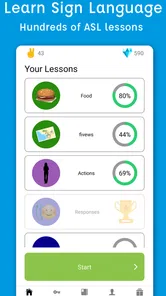
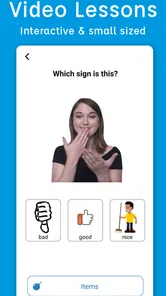
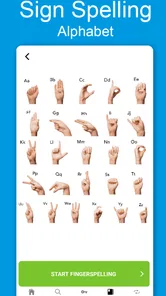
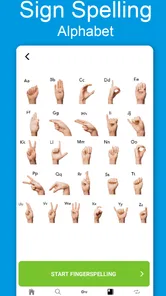
When I first opened ASL Pocket Sign, I was greeted with a clean and intuitive interface. It’s designed to get you up to speed with ASL in a way that’s both engaging and straightforward. The app starts with simple lessons that focus on the basics of sign language, such as the alphabet and common phrases. One of the things I appreciated was the use of videos to demonstrate each sign. This visual aid is crucial for ensuring that you understand the motions and expressions that accompany each sign.
For a realistic routine, I’d use a brief break to study a few signs, then return later and try to recall them before replaying their videos. That extra pause matters: it can reveal whether I remember the movement or only recognize it while watching. A useful habit is to practise in front of a mirror, paying attention to handshape, orientation and where the sign happens in relation to the body. A phone video can also help me compare my own attempt with the lesson, though it cannot replace feedback from another signer.
Interactive Learning Experience
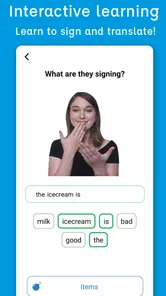
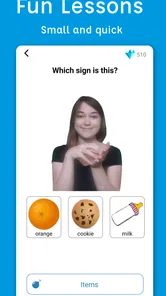
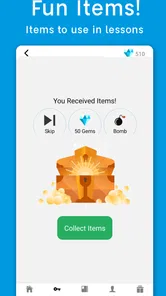
The app isn’t just about watching videos. It actively involves you in the learning process through quizzes and interactive exercises. I found the quizzes particularly effective; they test your knowledge and reinforce what you’ve learned. Plus, receiving immediate feedback on these quizzes helped me correct my mistakes on the spot, which is a huge plus when learning something new.
More From Our News Desk

 Bolt: Request a Ride
Bolt and the Shift from One-Tap Rides to More Legible Trips
Bolt shows how ride-hailing is shifting from a one-tap taxi request toward a more legible, choice-driven trip, while leaving the hardest questions of price and reliability unresolved.

 Farm Land - Farming life game
Farm Land Review: A Small Island Farm with a Satisfying Loop
A bright, breezy island farm turns a few quick chores into a satisfying cycle of planting, harvesting, expanding, and deciding what to build next.

 Android Auto
’s Community Takes Shape in the Passenger Seat
Its most valuable network is not a public feed but a shared set of routes, voice habits, app integrations, and advice that make driving less isolating—and sometimes more complicated.

 My Talking Angela
 Makes the Virtual Pet Feel Personal
A polished pet-raising game built on small rituals, playful customization, and a character who gives everyday screen time a surprisingly personal rhythm.

 Google Translate
 Review: A Pocket Tool for the Small Frictions of Travel
From menus and signs to quick conversations, Google Translate earns its place by cutting the little delays that make unfamiliar language feel like a barrier.

 Shazam: Find Music & Concerts
Shazam’s Best Trick Is Turning a Song Into a Night Out
A few seconds of recognition can settle an argument, rescue a half-remembered chorus, and point toward a live show. Shazam’s real trick is what happens after the match.
Latest News



I’d treat a correct quiz answer as a checkpoint, not proof that a sign is ready for conversation. Recognition questions can make a learner feel confident before they can produce the movement smoothly. When a sign is difficult, I’d replay it slowly in my own study rhythm, then practise it in a short phrase rather than memorizing it as an isolated gesture. That approach is especially useful for expressions and transitions, where timing and facial cues can contribute to meaning.
Progress at Your Own Pace
One of the best aspects of ASL Pocket Sign is the ability to learn at your own pace. Whether you have five minutes or an hour, you can fit the lessons into your schedule. The app tracks your progress, so you always know where you left off. This feature makes it super convenient for those of us with busy lives.
For instance, if I wanted to prepare for a visit with an ASL-using friend or relative, I’d use the app to practise a small set of relevant basics beforehand, then focus on remembering them without staring at the screen. I would also ask that person what they prefer me to learn, rather than assuming a list of common phrases covers their needs. The app works best as preparation and a prompt to keep practising; real conversation will expose gaps that solo study cannot.
Choosing the right kind of practice
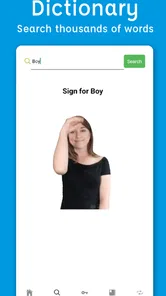
Compared with a text-heavy language guide, video is a better fit for learning visible movement, and the built-in dictionary gives learners a place to look up signs while studying. Compared with in-person instruction or conversation with fluent signers, though, an app cannot respond naturally to a learner’s signing or explain every context-specific nuance. I see Pocket Sign as a convenient companion, not a replacement for human practice. If your goal is to communicate confidently with a Deaf community, pair app study with respectful opportunities to learn from people who use ASL.
The dictionary also suggests a useful workflow: look up a sign when a question comes up, watch its demonstration, then return to a lesson or quiz to reinforce it. I wouldn’t use a dictionary entry as a reason to assemble a sentence from individual signs without learning how ASL conveys meaning. The trade-off is convenience versus context: quick reference is handy, but language is more than a collection of hand movements.
Why ASL Pocket Sign Stands Out
There are tons of language apps out there, but few focus on sign language, and even fewer do it well. ASL Pocket Sign stands out due to its comprehensive approach and user-friendly design. The app doesn’t just teach you signs; it immerses you in the culture and nuances of ASL, which is essential for effective communication.
Another feature I loved was the community aspect. Within the app, there’s a section where you can connect with other learners. Sharing tips and practicing with others can enhance your learning experience and keep you motivated.
That peer connection is most useful when it leads to specific practice: I’d choose a few signs or a short exchange to work on, rather than treating casual discussion as a substitute for structured learning. It can help sustain motivation, but learners should still check that their understanding of a sign’s use is accurate and respectful. For someone who prefers complete privacy or wants formal instruction with direct correction, a peer-oriented feature may be less valuable than a class or tutor.
Making practice work in an ordinary day
A practical example: before a family visit, I might use a short session to review a few greetings and everyday signs, then close the app and rehearse what I can remember. At the visit, I’d keep the exchange simple, watch how the other person responds, and ask what would be useful to learn next. That approach makes the app a preparation tool rather than a script. It also prevents a common beginner mistake: assuming that memorizing a handful of signs is enough to carry a conversation.
For a learner with a busy schedule, I’d attach practice to a routine that already exists, such as a quiet break or the end of the day. I’d keep a small note of signs I repeatedly forget and revisit those deliberately instead of browsing at random. The aim is not to maximize screen time; it is to notice which movements still feel uncertain and give them another focused attempt.
Where a different learning route may work better
The usual alternatives solve different problems. A dictionary or text-based guide can be quick when I need to check a word, but it is less helpful for seeing movement and expression. A class or tutor can watch my hands and offer tailored correction, which an app cannot provide in the same way. Conversation with fluent signers adds context and natural turn-taking, while a video course may suit someone who prefers longer, planned lessons. Pocket Sign’s advantage is the combination of visual demonstrations, practice activities and reference in one mobile learning experience; its limitation is that convenient solo study remains solo study.
I’d especially recommend looking beyond the app if the stakes are high—for example, if you need ASL for work, healthcare, interpreting, or reliable communication in situations where misunderstanding could matter. In those cases, a beginner resource can be a helpful supplement, not a substitute for appropriate instruction and practice with qualified people. On the other hand, someone who is curious, learning a few basics for personal reasons, or trying to establish a regular habit may appreciate the lighter commitment.
Practical fit, cost and commitment
The app is free to download, with in-app purchases listed from $5.99 to $129.99 per item. I’d start with the free experience and decide whether I’m using it consistently before spending anything. The range means it is sensible to check the purchase details in the app before confirming, and to judge any paid option by whether it supports a clear learning goal rather than by assuming more content automatically means better progress.
It has a 4.8 average from around 31,000 ratings, and more than a million installs, so it has attracted a sizable audience. Those figures can be reassuring when choosing a learning tool, but they don’t tell me whether its teaching style suits my needs. It is rated for Everyone, first appeared in 2020, and version 3.2.3 runs on Android 5.0 or later. That makes it accessible to many Android users; people on iOS should check their own store’s compatibility before planning a course around it.
What I would check before committing
One sensible question is whether I need to pay at all to build a habit. I’d try the available learning experience first, see whether I return to it and whether the video-led approach clicks, then consider a purchase only if its specific contents address something I want to study. Since purchases range widely in price, I would read each in-app description carefully and avoid treating the most expensive option as automatically the right one.
I’d also think about the device and setting I’ll use. Sign demonstrations need to be visible, so a small screen or a distracting environment can make careful observation harder. If I’m studying in a brief break, I’d choose a few signs rather than rush through a longer session; if I want to inspect hand position closely, I’d give myself enough room and attention to watch more than once. These small adjustments make video practice more deliberate without pretending the app can correct my form.
ASL Pocket Sign is a good fit if you want a flexible introduction, visual demonstrations and a way to revisit signs between lessons. I’d skip relying on it alone if you need immediate fluency, individualized correction or a structured credential. My recommendation is to use it as a steady first step: practise actively, use the dictionary with context in mind, and seek real interaction alongside the app. That combination makes the lessons more useful than simply watching a sequence of videos.
Final Thoughts
In a world where communication is key, having the ability to use ASL can open up new avenues for interaction and understanding. ASL Pocket Sign is a fantastic tool for anyone looking to learn ASL, whether for personal or professional reasons. The app’s blend of video content, interactive exercises, and community support creates a well-rounded learning environment. So, if you’re eager to add a valuable skill to your repertoire, give ASL Pocket Sign a try. It’s like having a personal ASL tutor at your fingertips!
Sign Language ASL Pocket Sign Frequently Asked Questions
Can I use ASL Pocket Sign as a quick reference when I need to look up a sign?
The app’s store summary highlights an ASL dictionary alongside interactive video lessons, so it can be useful when you want to look up a sign as part of your study. Seeing a sign demonstrated in a video can give you a visual reference while you learn. It is best treated as a learning aid, rather than a substitute for practicing with other people.
Does ASL Pocket Sign teach American Sign Language rather than another sign language?
ASL Pocket Sign is focused on American Sign Language, or ASL. That makes it relevant if you specifically want to study ASL, but sign languages differ between communities and regions, so learning ASL may not meet a goal focused on another sign language. Before downloading, consider where and with whom you hope to communicate, then decide whether ASL is the right fit.
Can ASL Pocket Sign be a useful choice if I want to learn at my own pace?
ASL Pocket Sign is an educational app developed by MobiReactor, with interactive video lessons and a dictionary for learning ASL. Its lesson-based format can suit learners who prefer to study in short sessions and revisit signs as needed. The app is free to download, with in-app purchases available, so check the purchase options before deciding whether its learning approach fits your needs.
What is ASL Pocket Sign and how does it work?
ASL Pocket Sign is an educational app designed to help users learn American Sign Language (ASL) conveniently from their mobile devices. The app offers a comprehensive library of signs, interactive lessons, and practice exercises. It uses video tutorials to demonstrate each sign clearly, allowing users to learn at their own pace and track their progress. Ideal for beginners and those looking to improve their signing skills, the app also provides quizzes to test your knowledge and retention.
Is ASL Pocket Sign suitable for beginners?
Yes, ASL Pocket Sign is perfectly suitable for beginners. The app is designed with a user-friendly interface that guides new learners through the basics of American Sign Language. It starts with fundamental signs and gradually introduces more complex ones, ensuring a smooth learning curve. The video tutorials and interactive lessons are crafted to make the learning process engaging and informative, providing a solid foundation for those new to ASL.
Pros
- User-friendly interface for beginners.
- Comprehensive lessons and quizzes.
- Offline mode available.
- High-quality video demonstrations.
- Regular updates with new content.
Cons
- Limited advanced content.
- Requires in-app purchases.
- Occasional technical glitches.
- No community interaction features.
- Ads can be intrusive at times.