Seesaw
- 3.06K
- 3.9
- Installs
- 5.00M
- Price
- Free

Screenshots
Analysis by Reviewed
I spent time with Seesaw as a classroom-focused education app, and my first impression was that it is less about delivering a fixed course and more about making learning visible. Students can use it as a place to respond, create, and share work, while teachers use it to organize that activity and families can follow along. That difference matters: this is not the kind of app I would open for a ready-made lesson library or independent study plan. Its value depends heavily on how a teacher sets up the learning experience.
Developed by Seesaw Learning, the app is free and aimed at everyone, which makes it approachable for younger learners as well as adults supporting them. It has been available since June 24, 2015, and its current version is 10.139.0. The service has passed five million installs and holds an average rating of 3.9 from roughly twenty-six thousand ratings, so it is clearly established without being universally loved. That mixed impression matches my experience: the idea is useful, but the day-to-day quality depends on classroom organization, device conditions, and how much guidance students receive.
How Seesaw feels in everyday classroom use
A learning workspace rather than a conventional course app
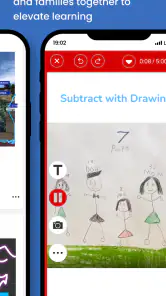
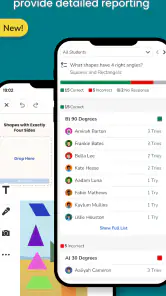
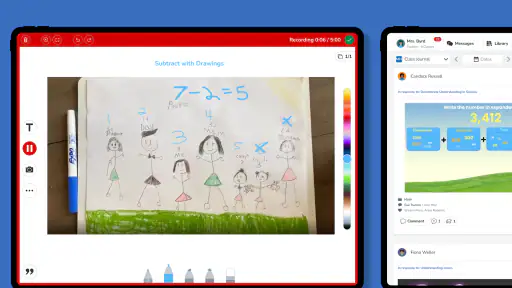
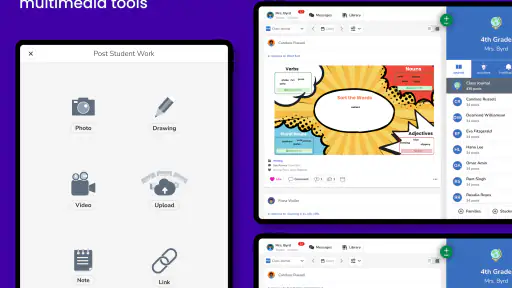
The easiest way to understand Seesaw is to think of it as a digital classroom notebook with communication built in. Instead of simply reading a lesson and answering automatically graded questions, a student may be asked to submit a drawing, record an explanation, complete a worksheet, or respond to a teacher prompt. That gives the work more personality than a conventional quiz app, particularly for children who express themselves better through images, handwriting, audio, or short recordings.
I like that this approach can make the process of learning visible. A teacher is not limited to seeing whether a final answer is right or wrong; student work can show the steps, the explanation, and the effort behind it. For younger learners, that is especially valuable because a finished page does not always reveal how they reached an answer. Seesaw gives the classroom a place where those pieces can be collected instead of disappearing into an exercise book or a series of disconnected messages.
The trade-off is that Seesaw is only as clear as the classroom structure around it. A well-prepared class can feel focused and welcoming, while a crowded stream of activities can become confusing. Students may know how to open an assignment but still be unsure which part to complete, where to add their response, or whether they should submit again after making changes. In my view, the app works best when teachers use consistent instructions and predictable routines rather than treating it as an open-ended noticeboard.
What the app does well for different users
For students, the strongest benefit is flexibility. A child who struggles to type a long answer may be more comfortable drawing or explaining an idea aloud. A student who is proud of a project can present it in a more personal format than a plain text field allows. This does not replace careful teaching, but it gives teachers more ways to ask for evidence of understanding.
For teachers, the useful shift is from collecting work to reviewing a stream of work in context. Feedback can be connected to a particular activity instead of being separated from the original task. That can make a response easier for a student to understand, especially when the teacher refers to something visible in the submission. It also supports a more continuous view of progress than occasional paper hand-ins can provide.
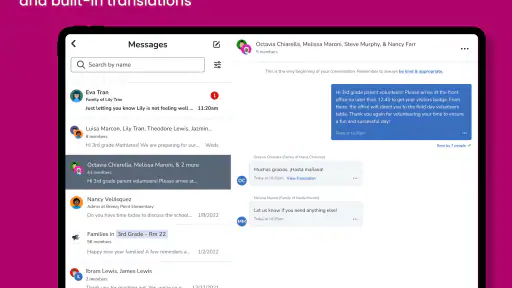
Families may appreciate the visibility, but I would not describe Seesaw as a substitute for a conversation with a teacher. Seeing classroom activity can help a parent understand what a child is working on, yet a feed can also encourage overchecking. The best use is to ask the child about a project or celebrate improvement, not to turn every uploaded task into another source of pressure.
A realistic morning with the app
Imagine a student arriving at school and opening Seesaw to find a reading activity. The child reads a short passage, adds a written response, and records a brief explanation of one answer. Later, the teacher reviews the submission and leaves feedback. At home, a parent sees the completed work and asks why the student chose that answer. In this situation, the app connects classroom work, teacher response, and family discussion without requiring each person to use a different system.
That workflow also shows where friction can appear. If the student forgets to submit, records audio in a noisy room, or opens the wrong activity, the learning value is reduced even though the app itself may be working normally. A useful habit is to have students check three things before leaving an activity: that the response is complete, that the correct assignment is selected, and that the submission has actually gone through. This small routine prevents a surprising amount of confusion.
Perceived speed and the moments that feel heavier
In ordinary use, Seesaw feels like an app for short, repeated interactions rather than one long session. Opening a task, reading directions, adding a response, and checking feedback are separate moments. That makes perceived speed important: a brief delay feels more noticeable when it interrupts a child who is already trying to stay focused.
I would expect simple navigation and text-based activities to feel lighter than work involving several media elements. A student moving between written instructions, drawings, photos, audio, or other submitted material is asking more of the device and connection than someone only reading a prompt. I would not treat every pause as a performance fault, because classroom networks and older hardware can contribute, but the difference is noticeable in how smoothly a lesson flows.
Heavy-use moments are also likely to happen at the same time for many users: the beginning of a class, a deadline, or the period when families check work after school. Those are the moments when a small delay can become a practical problem, particularly for younger children who need immediate reassurance that their work was saved. Teachers can reduce stress by allowing a little submission time instead of ending an activity at the exact minute students are expected to finish.
One practical tip is to separate creation from uploading when the task is demanding. A student can prepare an answer carefully, review it, and then submit rather than repeatedly editing while trying to navigate between screens. I also recommend avoiding unnecessary duplicate submissions. Multiple versions may make it harder for a teacher to identify the intended final response, and they can make a student think the first attempt failed when it may simply have taken time to appear.
Stability, recovery, and what to do when a task goes wrong
My view of Seesaw is that reliability is less about whether the app can display a screen and more about whether users can recover calmly when something interrupts the process. A classroom app has to cope with children switching between activities, losing focus, and occasionally leaving a task before it is finished. The experience is much better when the teacher has a simple recovery routine instead of expecting students to troubleshoot independently.
If an upload seems stuck, I would first avoid tapping submit over and over. Repeated attempts can create uncertainty about how many copies were sent. A better sequence is to check whether the work appears in the relevant activity, confirm the connection, and then reopen the task only if needed. If the device has become unresponsive, closing and reopening the app may be reasonable, but students should know whether their unfinished work is still visible before trying anything drastic.
Teachers can make recovery easier by giving students a backup instruction in plain language. For example, they might tell the class to keep the original work available, note what was completed, and report the issue rather than starting from scratch. This is a non-obvious strength of a well-managed Seesaw workflow: the app becomes less stressful when the classroom treats technical interruptions as manageable events instead of personal mistakes.
There is another reliability issue that is not purely technical. A teacher may post several activities with similar names, or feedback may arrive after a student has moved on to another task. Clear titles, short directions, and a consistent order help more than adding extra messages. I found that good organization has a greater effect on perceived stability than people often expect, because users interpret confusing navigation as an app failure even when the underlying service is available.
Device constraints and the importance of the minimum system requirement
Seesaw supports devices running operating system version 9 or newer. That is helpful for people using older hardware, but compatibility alone does not guarantee a comfortable experience. An older device may open the app while still feeling slow when several classroom items are involved. Storage pressure, a weak battery, a crowded background workload, or an aging camera can all affect the practical experience without being problems unique to Seesaw.
For a student, the most important device qualities are not necessarily premium specifications. A responsive touch screen, a reliable microphone for spoken work, and enough free space for ordinary school activity matter more than having the newest model. Families should also consider the physical setting. A microphone may capture a child clearly at a desk but poorly in a busy room, and a small screen can make detailed drawing or reading instructions tiring.
On older devices, I would keep the workflow simple. Text responses and basic visual work are likely to be less demanding than repeatedly handling larger media submissions. It is also sensible to update the operating system when the device supports it, keep unnecessary apps closed during class, and avoid beginning a complicated submission with a nearly empty battery. These are ordinary precautions, but they make a real difference when a child has only a short period to complete an activity.
Seesaw is available for everyone in terms of its content rating, but that should not be confused with being equally easy for every age group. Younger children may need help signing in, interpreting directions, choosing the correct response method, or understanding teacher feedback. The app can support independence, but independence usually develops through repeated classroom routines rather than appearing automatically after installation.
Where it compares well with usual alternatives
Compared with a standard learning management system, Seesaw feels more centered on student-created evidence. A traditional system may be stronger for formal course structure, long documents, calendars, or complex grading workflows. Seesaw is more appealing when the teacher wants children to show thinking through a mixture of media and receive feedback close to the work itself.
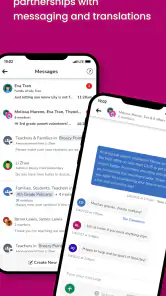
Compared with a messaging app, it offers a more education-specific space. A general chat tool can be quick for announcements, but it is not designed around the careful presentation of student tasks. Seesaw gives classroom activity a clearer home and reduces the temptation to mix schoolwork with unrelated conversations. That separation is important for younger learners and for families trying to understand what requires attention.
Compared with paper folders, the app makes sharing and feedback more immediate, and it can give families a closer view of the learning process. Paper still wins for instant reliability, tactile activities, and situations where a device or connection is inconvenient. I would not replace every paper task with Seesaw. The strongest classroom is likely to use the app for work that benefits from recording, sharing, or response, while keeping offline methods for activities where technology adds little.
Compared with a self-paced educational game, Seesaw is less entertaining by design and more dependent on a real teacher. A child looking for instant rewards, automatic progression, and solo practice may prefer another category of app. Someone who wants a digital place to respond to meaningful classroom prompts will find Seesaw a better match. That distinction is one of the most important things to understand before installing it.
Small workflow choices that improve the experience
I would begin by learning the classroom’s naming and submission habits before exploring every available option. Students often lose time not because the task is difficult, but because they are unsure whether to respond with text, a drawing, a recording, or an attachment. A teacher who demonstrates one complete activity from opening to submission can remove that uncertainty much faster than a long written explanation.
For teachers, it helps to design activities around one clear learning goal. If a single post asks students to read, draw, record, photograph, and write all at once, the app can feel heavier than necessary and the resulting work may be difficult to review. Separating the essential response from optional enrichment makes the activity more accessible and reduces the load on both devices and people.
For families, I recommend using the app as a conversation starter. Ask the child to explain a choice, describe a revision, or show how feedback changed the work. This makes the digital record useful without turning the home into a second classroom. It also reveals whether the child understands the task or has merely completed the required taps.
A further tip is to treat feedback as part of the assignment cycle. Students should know when to look for a teacher response and what they are expected to do with it. If feedback is only read once and forgotten, the app becomes a storage place. If students revise, reflect, or discuss the response, it becomes a more meaningful learning tool.
Who should use it and who should skip it
I would recommend Seesaw to schools and teachers who want a child-friendly way to collect varied work and keep families connected to classroom activity. It is particularly suitable for early learners, project-based tasks, portfolios, and lessons where an explanation matters as much as a final answer. It also makes sense for classrooms that already have a clear routine for digital submissions and feedback.
I would be more cautious if you are an individual learner looking for a complete education platform without teacher involvement. The app does not replace a curriculum, a tutor, or a structured self-study plan. It can hold learning activities, but the quality and purpose of those activities come from the classroom using it.
It may also be the wrong choice for a school that needs highly formal administration, advanced reporting, or a single system for every institutional process. In that case, a larger learning management platform may be a better foundation, with Seesaw used only where creative student responses are especially valuable. Choosing it for the wrong job can create extra duplication rather than simplifying schoolwork.
My performance verdict after weighing the trade-offs
Seesaw succeeds when it is treated as a shared workspace for learning rather than a magic solution for teaching. Its strongest quality is the way it gives students more than one way to demonstrate understanding and gives teachers a closer look at the work behind an answer. The experience can feel quick and dependable for focused activities, while media-heavy tasks, busy classroom periods, older hardware, or unclear organization can make it feel slower and less predictable.
At no cost, it is easy for a teacher or family to consider, and its everyone age rating makes it approachable. Still, free access does not remove the need for planning. A successful setup requires clear activity names, sensible response formats, time for submissions, and a backup plan for interruptions. Those details are not glamorous, but they determine whether children experience the app as a helpful notebook or as another confusing digital chore.
My final recommendation is positive, with a specific condition: use Seesaw when the goal is to make student thinking visible and connect classroom work with feedback. I would choose a more conventional course or learning management app when formal structure, independent study, or extensive administration is the priority. For the right classroom, this education app can make everyday work feel more personal and easier to discuss, provided the people using it supply the organization that technology alone cannot.
Pros
- Simple interface makes classroom activities easy for young students.
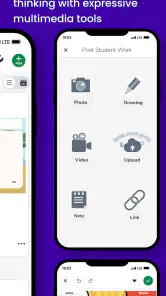
- Supports photos
- videos
- drawings
- notes
- and voice recordings.
- Parents can follow their child’s learning progress from home.
- Useful for documenting portfolios and showcasing student work.
- Works across Android
- iOS
- and web browsers for flexible access.
Cons
- Some features depend on the teacher’s school or subscription plan.
- Requires reliable internet for uploading and viewing classroom content.
- Frequent notifications may become distracting for parents and students.
- Privacy depends on how each school manages accounts and shared content.
- Older devices may struggle with media-heavy lessons and uploads.

- Category
- Education
- Version
- 10.139.0











