Seeking Alpha: News & Analysis
- 11.79K
- 4.3
- Installs
- 1.00M
- Price
- Free

Screenshots

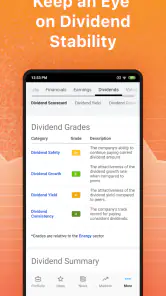
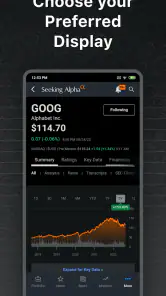
Analysis by Reviewed
When I first stumbled upon the Seeking Alpha: News & Analysis app, I was on the lookout for a tool that could keep me updated on the latest in the stock market and provide some sharp insights. And let me tell you, this app didn’t just meet my expectations; it practically blew them out of the water. If you're as obsessed with the market as I am, you’ll want to check this out.
Getting oriented without information overload
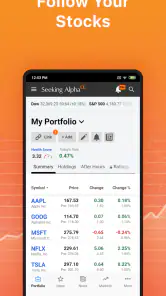
Seeking Alpha is a free finance app from SeekingAlpha, and its mix of market coverage and company-focused commentary makes it different from a basic quote tracker. The first useful choice is deciding which companies or sectors deserve a place in your feed. I would start with a short watchlist rather than following everything that catches my eye: a smaller stream makes it easier to spot a meaningful development instead of scrolling through unrelated headlines.
This is also where expectations matter. It is an information and analysis tool, not a substitute for a brokerage account or a complete personal-finance app. I would use it to research a stock, follow market discussion, and keep an eye on prices, then make any trade through a service designed for that purpose. The distinction helps prevent a busy news feed from turning into an impulsive buying or selling prompt.
Where readers can get stuck
The most common point of friction is not a complicated menu; it is deciding what deserves attention. A company headline, an opinion piece, a price move, and a comment thread can all compete for the same moment of your attention. I find the app most useful when I arrive with a question—such as why a stock is moving or what changed in a business—rather than opening it simply to scroll until something feels urgent.
It also helps to distinguish between finding a story and evaluating it. A detailed analysis can be valuable, but its confidence and depth do not make it a neutral verdict. I read the author’s reasoning, look for the evidence behind it, and note what information would weaken the argument. If you are new to investing, this approach can make the material more approachable without treating every article as a recommendation.
First Impressions
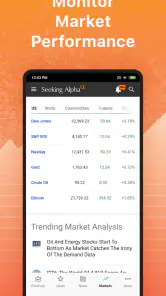
Right off the bat, the app's design is sleek and user-friendly. Navigating through the various sections is a breeze, which is crucial when you're looking to grab quick updates during a busy day. I loved how the main screen displays a neat summary of the latest news, analysis, and stock prices. It's like having a mini Wall Street journal right in your pocket.
One thing that really caught my eye was the customizable feed. You can tailor it to follow specific stocks or sectors you’re interested in. This feature is a game-changer because, let’s face it, who has time to sift through heaps of irrelevant information these days?
More From Our News Desk

Clash of Clans Is Won Between the Battles

Android Auto Makes the Case for Quieter Car Software

MobiOffice: Transforming Mobile Productivity with Seamless Integration

EA SPORTS FC™ Mobile Soccer: Redefining Mobile Sports Gaming

How Microsoft OneDrive Became a Mobile Productivity Giant

How Google Translate Breaks Language Barriers Effortlessly
Diving Deeper into Features
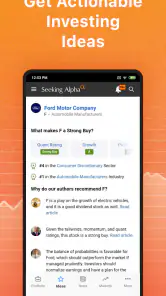
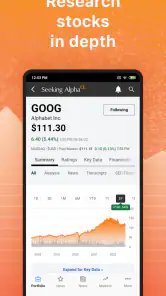
So, let’s talk about the content. Seeking Alpha offers a mix of both news and in-depth financial analysis. The articles range from quick takes to detailed reports that dissect market trends and individual stock performance. For someone like me who loves to get into the nitty-gritty, this was a goldmine.
Another highlight is the community aspect. The app allows users to comment on articles, which often leads to some lively debates and diverse opinions. It's like being part of a financial think tank, where you can learn from other users' insights and perspectives.
For those who like to dig even deeper, the app offers premium services with extras like exclusive analysis and ad-free browsing. While I didn’t initially spring for the premium version, the free content was already quite robust. The app is free to download, but optional in-app purchases range from $0.99 to $2,400 per item, so I’d check the purchase details carefully before committing. Its average rating is 4.3 from around 49,000 ratings, and it has over a million installs. It’s rated for Everyone and has been around since August 21, 2012.
Making the feed work for a real routine
A practical way to use the app is to separate routine checking from deeper reading. During a commute or a short break, I’d scan the headlines and price updates for companies already on my list. Later, when I have time, I’d open an analysis piece and compare its reasoning with the news that prompted me to read it. That small pause is useful: commentary can be persuasive, but it is still one interpretation, not a guarantee about what a stock will do.
Notifications are best treated as a signal to review something, not an instruction to act. If an alert arrives while I’m busy, I’d save the company name mentally or return to the feed when I can read the full context. A headline alone can leave out the difference between a short-term market reaction and a change that matters to a long-term plan. Keeping alerts focused on a manageable set of interests can also make them less distracting.
A realistic day with the app
Imagine checking the market during a lunch break after noticing a price move in a company you follow. I would first read the related headline, then look for analysis that explains the possible causes, and only afterward scan the comments to see which assumptions readers are challenging. That order matters: starting with the loudest reaction can anchor your view before you have understood the underlying event.
Before making a decision, I would write down the specific claim I want to verify—perhaps whether a report describes a new development or merely repeats an existing concern. Then I would check a primary company announcement or filing for the exact details. Seeking Alpha is helpful for discovering questions and interpretations, while original documents are better for confirming what a company actually reported. This division of labor is a practical way to use the app without asking an article to do every research task.
When setup or updates feel confusing
If the feed looks irrelevant, I’d first review which stocks and sectors I chose to follow before assuming the app is malfunctioning. If prices or articles do not appear to refresh, I’d check that the device has a working internet connection, reopen the app, and try again later. A brief delay can come from connectivity or a wider service interruption, and repeatedly changing account or notification settings is unlikely to solve either one.
If alerts are missing, I’d check both the app’s own notification preferences and the phone’s notification settings. Those are separate places where a preference can be turned off. If an article will not load, returning to it on a stable connection is a sensible first step; offline reading can be useful for material already available on the device, but I would not count on it to supply fresh prices or new stories without internet access.
Practical checks before changing settings
When something seems wrong, I would isolate the problem instead of adjusting several things at once. If a particular article fails, I would try another story; if the whole feed appears stale, I would check the connection and reopen the app. That simple comparison helps tell a single content-loading issue from a broader refresh problem, and it avoids losing a useful notification or feed preference while troubleshooting.
For a quiet notification screen, I would check whether the alert relates to something I follow and whether notifications are enabled at both the app and device levels. I would also consider timing: an alert that arrives during a busy stretch may be easy to miss, so the feed can serve as a calmer place to catch up later. If the same issue continues after these basic checks, waiting and trying again is more sensible than assuming a market alert is guaranteed to arrive instantly.
Performance and Usability
In terms of performance, the app runs smoothly without any noticeable lags. Whether you’re on Wi-Fi or mobile data, the articles load quickly, which is crucial when you’re trying to catch up on the go. I also appreciated the offline reading feature, perfect for those times when you're stuck without an internet connection.
The push notifications are another handy feature. They keep you updated with important news and alerts tailored to your preferences. It's like having a personal assistant waving a flag every time something significant happens in the market.
Compared with a brokerage app, this is more useful for reading and following market discussion than for managing transactions. Compared with a simple finance-news feed, its appeal is the combination of stock-focused analysis and reader comments, though that same volume of opinion can make it harder to separate evidence from confident speculation. I’d use it alongside a primary source for company announcements and financial filings when a decision depends on exact details.
When the app is not the cause
A market can move without a story appearing at the same moment, and a headline can arrive without explaining every reason for a price change. That gap does not necessarily mean the app has failed. Prices reflect many participants and influences, while an article is one account of events; I would avoid using either a brief delay or a single explanation as the whole basis for a decision.
It is also worth remembering that community comments can be useful for spotting questions, but they are not a substitute for checking facts. If readers disagree sharply, I treat that as a cue to inspect the assumptions on both sides rather than a sign that the most popular view is correct. When I need exact figures or official wording, I leave the discussion and consult a company’s own materials.
Who will get the most from it
I think the app suits investors who already have a few companies in mind and want a convenient way to follow related coverage, as well as curious beginners willing to read critically. Someone who only wants a clean price display may find a dedicated quote app less busy. Likewise, anyone who prefers a neutral stream without user debate may be better served by a straightforward news reader. The comment section is valuable for seeing how other people interpret a story, but disagreement is not proof that either side is right.
For a beginner, I’d use articles to build questions rather than treat them as ready-made answers: What is the author’s central claim? Which business facts support it? What could make the argument wrong? That habit makes the app’s analysis more useful and reduces the risk of mistaking a persuasive opinion for personalized financial advice.
Choosing it over simpler alternatives
If your main goal is to glance at a quote and move on, a pared-down market app may be easier to live with. If you want transaction tools, account balances, or order management, a brokerage app is the more direct choice. Seeking Alpha occupies a different middle ground: it brings company coverage, analysis, prices, and discussion together, which is useful when you want to understand a story rather than only see a number.
The trade-off is that more commentary creates more work for the reader. I would not follow every available topic or treat a stream of articles as a complete research process. A focused list, a deliberate reading order, and a habit of checking primary information make the app more valuable than simply increasing the amount of content on screen.
Final Thoughts
All in all, the Seeking Alpha: News & Analysis app is a must-have for anyone serious about staying informed on market trends and stock analysis. Its blend of real-time news, comprehensive analysis, and interactive community features make it a standout choice among financial apps.
Whether you’re a seasoned investor or just starting out, this app offers valuable insights and a platform to sharpen your market acumen. So, if you're looking to stay ahead in the financial game, give it a try. You might just find it as indispensable as I did!
Seeking Alpha: News & Analysis Frequently Asked Questions
Do I need an investment account to use Seeking Alpha?
Seeking Alpha is a finance app for following stock-market information, including news, analysis, portfolio tools, alerts, and real-time prices. Its features can help you keep track of companies and market developments, but using the app is distinct from placing trades. You can use its research and tracking tools as part of your own routine without treating the app itself as a brokerage account.
What should I know about Seeking Alpha’s audience and user feedback before downloading?
Seeking Alpha is intended for people interested in stocks, financial news, and investment analysis. It has been downloaded over one million times and has an average rating of 4.3 from around 49,000 ratings, giving prospective users a broad indication of its reach and feedback. Individual experiences can still vary depending on which features and types of coverage matter most to you.
Is Seeking Alpha suitable for beginners who are just learning about investing?
Seeking Alpha can be useful for beginners who want to follow financial news, read analysis, and keep an eye on stock prices in one app. Its articles and varied opinions can introduce different ways investors think about companies and markets. Some of the material is detailed, so newcomers may find it helpful to check unfamiliar terms and compare perspectives before acting.
Can I use Seeking Alpha to follow stocks and market movements?
Yes. Seeking Alpha is built around stock-market information, with portfolio tools, alerts, financial news, analysis, and real-time prices. You can use it to follow market developments and keep relevant coverage close at hand. The app can support your research routine, but following a stock or receiving an alert does not replace deciding whether an investment suits your goals.
What is Seeking Alpha: News & Analysis?
Seeking Alpha is a comprehensive app designed for investors, offering news, analysis, and market insights. It provides access to articles, earnings reports, and expert opinions, making it a valuable tool for informed investment decisions. The app is available on both Android and iOS platforms.
Pros
- Comprehensive financial insights.
- Real-time stock updates.
- Personalized watchlists.
- User-friendly interface.
- Expert analysis articles.
Cons
- Limited features in free version.
- Ads can be intrusive.
- Occasional app crashes.
- Delayed notifications.
- Subscription can be pricey.

- Category
- Finance
- Version
- Varies with device











