Screen Recorder Video Recorder
- 11.44K
- 4.4
- Installs
- 50.00M
- Price
- Free

Screenshots

Analysis by Reviewed
I usually reach for a screen recorder when I need to explain something that is awkward to describe in a message: where a setting lives, what happens during a game, or which steps led to a problem. Screen Recorder Video Recorder is aimed at that straightforward job, with screen capture for gameplay at its core. It is a free Tools app from Video Player & Cast to TV, and its broad appeal is reflected in an average rating of 4.4 from around 598,000 ratings and more than 50 million installs. That reach makes it easy to consider, though popularity alone cannot tell you whether its workflow suits your phone or the kind of recording you want.
When a recording is the clearest explanation
I find screen capture most useful when the person watching needs to see the exact sequence, rather than just hear a description. A short clip can show which menu to open, what changes after a tap, and where to stop. That makes this app a practical fit for casual gameplay clips, simple tutorials, and troubleshooting handoffs between people who use the same app or device. It is less compelling if you only want to capture a single still image or make a polished video with a complex edit; those jobs call for different tools.
One small but useful planning habit is to decide what the viewer needs to learn before recording. If the goal is to show a setting, close unrelated screens and make the route easy to follow. If the goal is to capture a game moment, think about whether live commentary helps or distracts. That choice affects the recording more than adding effects afterward, and it can keep a quick task from turning into several retakes.
From a quick capture to a shareable clip
My first practical question with any recorder is not how many controls it has, but how quickly I can get from a blank screen to a useful file. The app’s simple dashboard is intended to keep that first step uncomplicated: open it, choose settings that fit the task, then begin recording. That is a better approach for an occasional user than burying the record control among elaborate editing tools. I would still make a short test clip before an important recording, especially if I need narration, so I can check that the finished result captures the sound I expect.
Set up for the recording, not just the app
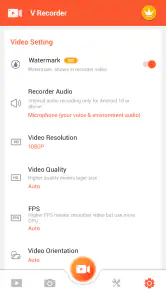
The best settings depend on what someone will do with the clip. A gameplay recording that needs to look clear on a larger screen calls for a different balance than a quick demonstration sent in a chat. The original review describes a range from 240p up to 1080p, microphone audio and a facecam option. Those choices can make a recording more personal and easier to follow, but they also add decisions before you start. I’d choose the intended destination first, then record a brief sample and check whether the picture, voice and framing are all usable.
For a tutorial, I’d keep the narration focused and move through the steps at a pace a viewer can copy. For gameplay, I’d avoid talking over every moment if the game audio is the important part. A facecam can help make commentary feel direct, but it is not automatically an improvement: if the camera overlay hides a key part of the action, leaving it out is the cleaner choice. These small choices matter more than selecting the highest available quality by habit.
Make a test clip work harder
A short sample is useful for more than checking whether the microphone is audible. I’d use it to see if the recording begins at the moment I expect, whether the phone’s on-screen controls intrude on the view, and whether a viewer can follow the taps without me slowing down. If the result feels rushed, I can repeat just that short section before committing to a longer session. This is especially helpful for gameplay: a quick test can reveal whether the screen remains readable when action is moving quickly, while saving time and storage compared with recording a whole session first.
More From Our News Desk

Weather by Xiaomi Review: Clear at a Glance, Less Clear Up Close

X Under Pressure: Can It Recover When Posting Goes Wrong?

Clash of Clans Is Won Between the Battles

Android Auto Makes the Case for Quieter Car Software

MobiOffice: Transforming Mobile Productivity with Seamless Integration

EA SPORTS FC™ Mobile Soccer: Redefining Mobile Sports Gaming
It is also worth matching the capture quality to the handoff. A clip that will be watched on a phone in a chat may not benefit much from the largest image setting, while a tutorial meant to be viewed on a bigger display needs small labels and interface details to remain legible. I would treat the quality menu as a practical choice, not a contest to select the top option every time.
Review, trim and pass the clip along
Once a take is finished, the described editing tools let you trim or cut it and add music or text without switching immediately to another editor. I find that most useful for removing the few seconds before a demonstration begins or the pause after it ends. Text can also point out a button or clarify a step, although a short label is usually more helpful than covering the screen with decoration. Keeping the edit modest makes the recording easier to watch and leaves less work for whoever receives it.
Sharing is the next handoff, and the original review mentions options for sending work to video and social platforms. Before passing a clip on, I’d play it back once and check the beginning, ending and audio. That simple review catches common annoyances such as recording a long wait before the useful action or leaving a voice instruction cut off. If the recipient only needs to understand a setting, a short, tightly trimmed clip is often more considerate than a full session.
Choose the right destination before you record
The intended destination should shape the clip from the start. A private how-to for one person can be concise and include a small text cue; a public gameplay post may need a cleaner opening and a more deliberate ending. Thinking ahead also avoids the awkward handoff of sending a long file and asking someone else to search for the important moment. I’d keep the recording focused on one task, then make a second clip if a separate point needs explaining.
For an everyday example, imagine a family member cannot find a privacy setting. I would open the relevant screen, capture only the route to the control, pause long enough for each menu to be visible, and stop once the setting is clear. After trimming the lead-in and adding a brief label if needed, I could send the clip instead of trying to describe several taps by text. This workflow is more useful than a long screen recording because the viewer can replay the exact step without sorting through unrelated activity.
Where convenience has limits
A dedicated recorder can be more comfortable than relying on a phone’s built-in screen capture when you want recording controls and a basic edit in one place. The built-in option may be the better choice for someone who wants the fewest extra steps or does not need to edit. A separate video editor makes more sense when the final clip needs detailed polishing; this app’s compact editing workflow is most appealing when trimming and simple additions are enough.
There is also a practical trade-off between quality and file size. The original review says the app optimizes video sizes, but I would still check available storage before capturing a long game session and review the saved file before deleting anything else. Recording a short section first is a useful way to judge the result without committing to a lengthy take. It also helps reveal whether the chosen quality is worth the space for the particular screen and viewing destination.
Getting Started with Ease
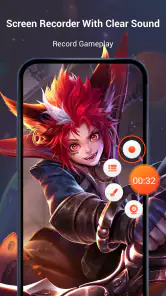
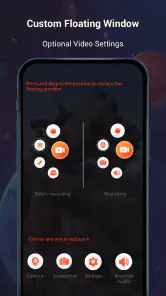
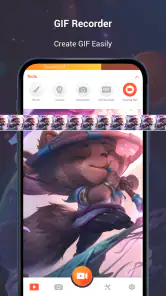
Installing Screen Recorder Video Recorder is a breeze. Once you’ve got it on your device, you'll notice how intuitive the interface is. No need to fumble through complicated settings. Just open the app, and you're greeted with a simple, user-friendly dashboard. It takes just a couple of taps to start recording, and you can customize your settings according to your needs.
Feature-Packed Performance
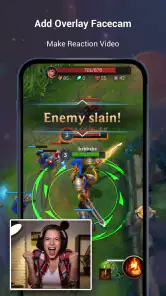
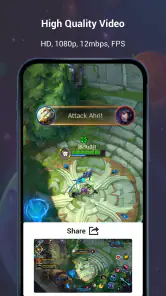
Now, let's talk about the features. This app isn't just about recording your screen; it's about doing it in style. You can choose the quality of your recordings, from 240p all the way up to 1080p, ensuring crystal-clear videos. There's an option to record audio from your mic, which is perfect if you're doing voiceovers or narrations. Plus, you can even add a facecam to personalize your recordings.
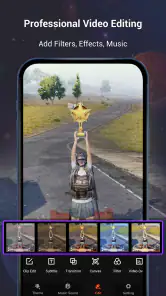
One feature I found particularly handy is the ability to edit videos post-recording. You can trim, cut, and add music or text to your videos without needing any third-party software. It’s like having a mini editing studio right in your pocket.
A Seamless Experience
In terms of performance, the app runs smoothly on both Android and iOS devices. I didn't notice any lag or crashes during my testing, which is always a plus. The app also supports different languages, making it accessible to a broader audience. And if you’re worried about those pesky ads, you’ll be pleased to know that they’re minimal and non-intrusive.
When it comes to storage, the app optimizes video sizes without compromising quality, so you won’t have to worry about eating up your device’s memory. And sharing your masterpieces is just as easy, with direct links to upload to platforms like YouTube or social media.
Everyday fit and practical cautions
A realistic use for me would be helping a relative change a setting: I could record the taps, add a brief text cue, trim off the setup, and send only the relevant segment. The same flow can work for a short gameplay highlight or a quick how-to. It is less suitable for someone who needs a full production timeline, detailed audio mixing or extensive visual effects; in that case, a dedicated editor is the sensible next step rather than expecting a phone recorder to do everything.
Before recording a call, lesson or any screen that may show private details, I’d pause to consider what will appear in the clip and who will receive it. A recorder captures what is on screen, so notifications or account information can distract from the explanation and expose more than intended. Turning attention to the screen contents before pressing record is a simple, useful habit, particularly when the finished video is going to be shared beyond the phone.
Who benefits most from this workflow
I’d recommend trying it if you often explain phone steps, capture casual gameplay, or need a quick way to make a clip more understandable before sending it. The combination of capture and light editing is convenient when the job is small and the finished video does not need a polished production style. Someone who only records occasionally may also appreciate having a straightforward path from starting a capture to trimming it for a message.
I would steer a creator toward a more capable editor if they need layered timelines, careful audio balancing, elaborate transitions or consistent branding. Likewise, if the phone’s built-in recorder already produces the right result and you never need to trim or label clips, adding another app may not improve the process. The useful distinction is not whether one tool has more features, but whether its extra steps solve a problem you actually have.
Practical checks before sharing
Even a clear capture can become confusing if the viewer cannot tell where to look. I’d avoid tapping too quickly, leave a moment for menus to load, and keep important controls visible before moving on. If a label is needed, use it to clarify one decision rather than narrate everything already obvious on screen. That restraint makes the clip easier to watch on a small display and keeps the actual interface visible.
For a longer game recording, I’d decide in advance whether I need the entire session or just a particular stretch. Capturing only the relevant part makes review and sharing less cumbersome. If I do record a longer take, I’d check the saved clip before clearing storage or starting another capture, so I know the useful moment is intact. This simple habit is a better safeguard than assuming a recording is ready just because the capture process ended.
The app is free to install, with in-app purchases listed from $5.99 to $19.99 per item, so I’d check the purchase screen carefully before paying for anything. It is rated for Everyone, and version 1.5.5.0 requires Android 6.0 or later. Its sizeable audience and 11,000 reviews give prospective users plenty of feedback to weigh, but the right test is still a short recording on your own device: confirm the controls make sense, the file is saved as expected, and the edit is enough for your purpose.
Wrapping Up
So, if you're on the lookout for a reliable screen recording app that packs a punch, Screen Recorder Video Recorder is definitely worth checking out. With its range of features and ease of use, it's an app that caters to both casual users and professionals alike. Whether you're capturing a quick tutorial or recording an epic gaming session, this app has got you covered.
Overall, I’d say it’s a solid 9 out of 10. Give it a try and see how it fits into your digital life.
Screen Recorder Video Recorder Frequently Asked Questions
Is Screen Recorder Video Recorder available for iPhone and iPad?
Screen Recorder Video Recorder is an Android app, so check your device’s app store and operating system before downloading. The Android version requires Android 6.0 or later. If you are looking for a screen recorder on an iPhone or iPad, you will need to check the options made for Apple devices rather than assuming this app is available there.
How much storage space should I leave for recordings?
Screen recordings can take up noticeable storage, particularly when they run for a long time or capture gameplay at high quality. Before starting a recording, it is sensible to check that your device has room both for the video and for any edits or copies you plan to keep. Removing unwanted clips afterward can help you manage your available space.
When was Screen Recorder Video Recorder released, and what is its current version?
Screen Recorder Video Recorder was released on June 7, 2023, and its current version is 1.5.5.0. These details can help you identify the app when comparing it with other screen recorders or checking whether the version installed on your device is current. Before downloading, confirm that your Android device meets the minimum operating-system requirement.
What should I check before downloading Screen Recorder Video Recorder?
Screen Recorder Video Recorder is a Tools app for capturing what happens on your screen, including gameplay. It is free to download, rated for Everyone, and has a 4.4 average from around 598,000 ratings. It requires Android 6.0 or later, so check your device’s software version before installing. The app is developed by Video Player & Cast to TV.
Is Screen Recorder Video Recorder suitable for recording gameplay and tutorials?
Its focus is screen capture, and its store summary describes it as a screen recorder with audio and high-quality capture for gameplay. That makes it a relevant option if you want to save gameplay or demonstrate what is happening in an app. Before recording, consider whether the content includes private information, notifications, or account details that you would not want to share.
Pros
- High-quality video recording
- User-friendly interface
- Supports audio recording
- No watermark on videos
- Free to use with premium features
Cons
- Contains in-app ads
- Limited editing tools
- May drain battery quickly
- Requires Android 5.0+
- Occasional app crashes
- Category
- Tools
- Version
- 1.5.5.0









