

Video Player All Format HD
- 2.47K
- 4.4
- Installs
- 50.00M
- Price
- Free

Screenshots

Analysis by Reviewed
I use a mobile video player most when I want a file to open without first converting it or sending it to another device. That practical job is where Video Player All Format HD aims to help: it is a free video player and editor app from Video Player & Cast to TV, with support for high-resolution playback, floating playback, background playback and subtitles. I would treat it as a handy local-video option rather than a replacement for every streaming app, because its value depends on how often you watch files stored on your phone.
A simple routine for everyday viewing
My most useful habit with a player like this is to check the file and subtitle together before settling in. If I have a downloaded film or a clip shared by a friend, I open it, confirm that the picture and sound are in sync, then turn subtitles on if needed. That small check matters more than chasing every playback control: it catches a mismatch early, while there is still time to choose another copy or adjust what is displayed.
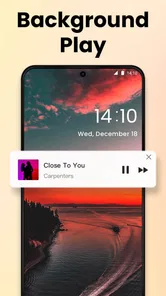
A realistic example is watching a downloaded episode during a commute, then continuing at home. Popup playback can keep a video visible while I use another app, while background playback is useful when listening matters more than seeing the screen. They solve different problems, so I would choose between them deliberately rather than leave a video running in the least suitable mode. For a quiet scene or a screen with small text, full-screen viewing is still the better choice.
Seamless Video Playback
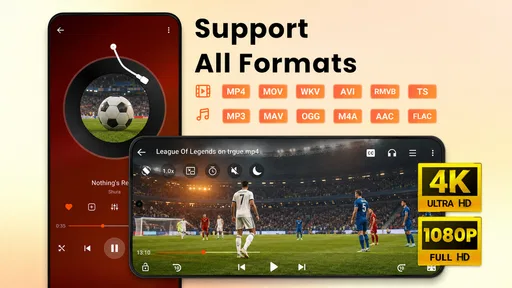
The first thing I noticed about the Video Player All Format HD is its seamless playback capability. Whether it’s MP4, AVI, MKV, or any other format you can think of, this app handles it all with ease. No more frustrating moments of downloading a video only to find out your player can’t support it. The playback is buttery smooth, even with large HD files, which is a huge plus for binge-watchers like myself.
Settings that make a difference
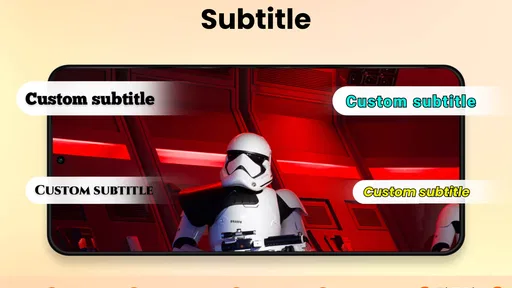
Before relying on any player for a long watch, I would check the subtitle controls and decide whether the picture should stay in a floating window or fill the screen. Subtitle support is more than a convenience for foreign-language films: it can also help when listening in a noisy place or keeping the volume low. A useful trade-off is that subtitles need to be readable at the size you are watching; if a line is hard to follow in a popup, switching to full screen is a better fix than struggling through the scene.
The app’s store summary highlights 4K and 1080p playback, but that should not be read as a promise that every large file will play equally well on every phone. The device and file both matter. If a high-resolution video stutters, I would first try a lower-resolution copy or close other demanding apps, rather than assume the player can overcome a hardware limit. That is a sensible check before judging its everyday performance.
User-Friendly Interface
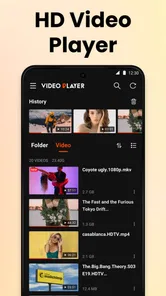
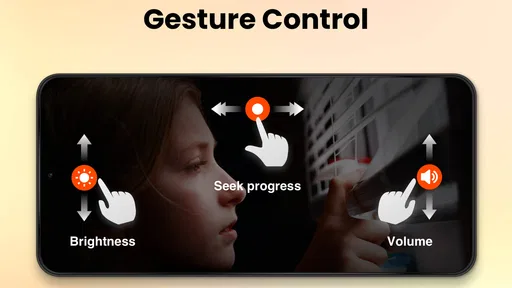
One of the standout features of this app is its intuitive interface. Right from the get-go, the app is easy to navigate, with all the controls you need right at your fingertips. Volume, brightness, and playback speed adjustments are all just a swipe away. The developers have clearly put a lot of thought into making the user experience as seamless as possible, which I appreciate immensely.
More From Our News Desk

 Gmail
GmailGmail in a Busy Inbox: Who Benefits Most?
From first account to crowded workday, Gmail earns its place through dependable search and flexible sorting—but its best fit depends on how much inbox maintenance you can tolerate.

 Prime Video
Switching to Prime Video: What Changes in Your Viewing Routine
Prime Video can make a compelling second home for streaming, but switching means learning a different catalog, rental layer, and route from browsing to playback.

 Universal TV Remote Control
Universal TV Remote Control Works Best as a Reliable Backup
A phone remote earns its place through quick setup and reliable habits. Here is how to get more from Universal TV Remote Control—and where its limits show.

 Weather - By Xiaomi
Weather by Xiaomi Review: Clear at a Glance, Less Clear Up Close
Xiaomi’s weather app makes everyday forecasts quick to scan, but its calm surface can leave useful details and recovery paths harder to find than they should be.

 X
XX Under Pressure: Can It Recover When Posting Goes Wrong?
A resilience-focused review of X, examining setup, mistaken posts, interruptions, weak connections, and the gaps that matter when recovery needs to be dependable.

 Clash of Clans
Clash of Clans Is Won Between the Battles
Its raids are quick; its community is a long-term project of coordination, teaching, rivalry, and shared responsibility—with all the friction that entails.
Latest News



Faster habits and better fit
Once I know a file works, I can make the next viewing session quicker by choosing the playback mode that fits the moment before pressing play: full screen for focused watching, popup for a quick check while messaging, or background playback when the audio is the point. This is a small workflow improvement, but it avoids repeatedly interrupting a video to change how I use it. For subtitles, I would also test them on a short section first, especially if I am watching on a smaller phone.
Compared with a phone’s built-in gallery player, a dedicated player is appealing when downloaded files, subtitles, and different playback modes are part of regular use. Compared with streaming services, though, this app is for watching video files, not browsing a licensed catalogue. If most of what I watch comes from subscriptions, I would stick with those services; if I often receive or keep video files, a dedicated player is more relevant.
Advanced Features Galore
Beyond the basics, the app offers a treasure trove of advanced features that make it a cut above the rest. You can cast your videos to larger screens with Chromecast support, which is perfect for movie nights. There's also a handy equalizer feature that lets you tweak the audio settings to your liking, ensuring you get the best sound experience possible. Plus, the app supports subtitles, making it easy to enjoy foreign films or shows without missing a word.
Limits to keep in mind
Casting can be convenient when I want to share a video with others, but it depends on having a compatible setup and is not a reason to choose the app if I mainly watch alone on my phone. Likewise, background playback is useful for audio-led content, but it is not a substitute for a screen when the action or subtitles matter. Those distinctions make the feature set feel more useful: each option suits a particular situation rather than improving every kind of viewing at once.
The app is free to download, though it offers in-app purchases priced from $9.99 to $16.99 per item. It is rated for Everyone, and its current version is 2.2.0, with Android 6.0 as the stated minimum operating-system requirement. I would check the purchase options before buying anything and consider whether the free experience already covers my needs. With an average rating of 4.2 from around 130,000 ratings, over 50 million installs and about 2,100 written reviews, it has clearly reached a broad audience, though popularity alone cannot tell me whether it suits my particular phone and files.
Performance and Reliability
Performance-wise, the app is a powerhouse. It runs like a dream on both Android and iOS devices, showing no signs of lag or crashes during my testing. It’s also light on resources, so you don’t have to worry about it draining your battery or hogging your device’s memory. It’s reliable and efficient, exactly what you want from a video player app.
In conclusion, the Video Player All Format HD is a fantastic app for anyone who consumes a lot of video content on their mobile devices. With its extensive format support, user-friendly design, and robust performance, it’s a must-have for any video enthusiast. Give it a try; it just might become your go-to video player app!
Who I would recommend it to
I would recommend it most to people who keep videos on their device, regularly need subtitles, or appreciate having a choice between ordinary viewing and popup or background playback. I would skip it if I rarely open local files, prefer one integrated streaming library, or need a player whose performance is guaranteed on older or less capable hardware. My advice is to try it with a typical file you already watch, check subtitle legibility and the playback mode you use most, and only then decide whether it deserves a place in your regular routine.
Video Player All Format HD Frequently Asked Questions
Is Video Player All Format HD compatible with my phone or tablet?
Video Player All Format HD is an Android app that requires Android 6.0 or later. Check your device’s operating system before downloading so you can avoid compatibility problems. The app is in the video player and editing category, and its focus is local video playback with features such as high-resolution support, popup play, background play, and subtitles.
Who makes Video Player All Format HD, and what do users think of it?
The developer is Video Player & Cast to TV. Video Player All Format HD has an average rating of 4.2 from around 130,000 ratings, with about 2,100 written reviews and over 50 million installs. Those figures suggest it has reached a large audience, but individual experiences can vary depending on the device and the way someone uses the app.
What can Video Player All Format HD do beyond basic video playback?
Its headline features include support for 4K and 1080P video, popup play, background play, and subtitles. Popup play lets you keep a video in a floating window while using other apps, while background play is useful when you mainly want to listen. Together, these options make it more flexible than a player used only for full-screen viewing.
Is Video Player All Format HD suitable for children and families?
Video Player All Format HD has an Everyone content rating, which makes it broadly suitable for general audiences. That rating describes the app rather than the videos played through it, so parents should still consider the content their children choose to watch. The app is free to download, with optional in-app purchases, so it may also be worth reviewing purchase settings on a shared device.
Can Video Player All Format HD play videos in a floating window while I use other apps?
Yes. Video Player All Format HD includes popup play, so you can keep a video in a floating window while switching to other apps. This can be useful for following a clip while messaging or browsing. The window lets you keep watching without making the video occupy the entire screen, though your experience will depend on how your device handles multitasking.
Pros
- Supports all major video formats.
- High-definition playback.
- User-friendly interface.
- Quick loading times.
- Customizable playback settings.
Cons
- Contains ads.
- No offline mode.
- Limited free features.
- Occasional playback lags.
- No subtitle support in free version.













