Cast to TV - Screen Mirroring
- 857.00
- 3.9
- Installs
- 1.00M
- Price
- Free

Screenshots
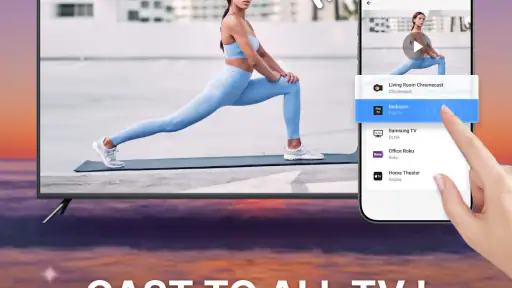



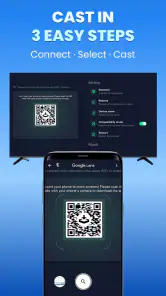
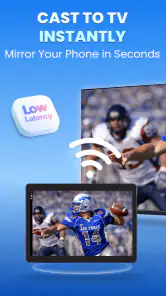


Analysis by Reviewed
Wireless casting can feel effortless when everything is on the same network, and surprisingly fiddly when it isn’t. I find Cast to TV - Screen Mirroring most useful as a bridge between things already on my phone and a television: it gives me a way to share video, photos, or a phone screen without reaching for a cable. It is a free video player and casting app from Video Player & Cast to TV, aimed at people who want a quick route from a mobile screen to a larger one.
Where the network makes the difference
The first thing I would check before settling in is that the phone and receiving device can see one another over the local network. A TV that is switched on but absent from the app’s device list can turn a simple plan into troubleshooting, so I’d confirm the connection before guests arrive rather than while everyone is waiting. The app’s appeal is convenience, not a replacement for a wired setup when a presentation or show absolutely cannot be interrupted.
In an ordinary evening, I might find a clip on my phone, connect to the living-room television, and pass the phone around to choose what comes next. That is an easy fit for casual viewing and family photos. For a long film, I’d first test a short clip: a strong, steady connection matters more than the promise of a fast setup, and the phone may need to stay nearby and awake depending on how the session works.
Better suited to some mobile routines
The app makes sense if you often keep videos or photos on your phone and want to show them to people nearby. Mirroring can also help when a small screen makes a page or image awkward to discuss. For work, though, I’d rehearse the exact sequence before presenting: switch off distracting notifications, open the material in advance, and make sure the TV is receiving the intended screen. Mirroring shows more than the one item you meant to share, so it is not always the best choice for private or sensitive content.
Compared with plugging in an HDMI adapter, casting avoids a cable and can be more comfortable across a room, but it depends on compatible equipment and network conditions. A TV’s built-in casting option may be simpler if it already handles the content you need. On the other hand, a separate casting app can be handy when you want one place to start sharing different media. I would choose the method that behaves most predictably with my own television rather than assuming one approach is universally better.
When connection fails, keep the recovery simple
If the television does not appear, I’d check the basics in order: confirm both devices are on the same usable network, reopen the app, and restart the connection on the TV before changing more settings. This avoids wasting time on random taps. If a cast starts but stutters, moving closer to the router or reducing other network activity may help; if it still struggles, lowering expectations and watching on the phone is often less frustrating than repeatedly reconnecting.
For a one-off gathering, a useful precaution is to connect before the moment you want to share and keep the original photo or video ready on the phone. That way, a failed discovery does not become the event. I also would not assume that every TV or media format will behave alike: casting is a chain involving the phone, app, network, and receiver, and any link can shape the result.
More From Our News Desk

Clash of Clans Is Won Between the Battles

Android Auto Makes the Case for Quieter Car Software

MobiOffice: Transforming Mobile Productivity with Seamless Integration

EA SPORTS FC™ Mobile Soccer: Redefining Mobile Sports Gaming

How Microsoft OneDrive Became a Mobile Productivity Giant

How Google Translate Breaks Language Barriers Effortlessly
Data-conscious viewing and sensible expectations
Because this is about sending media to a TV, I’d distinguish local sharing from playing something that is itself streaming online. The app does not make an online video independent of its source: internet use can still come from the service providing that video. If I’m watching on mobile data, I’d check the source app’s settings and prefer a trusted Wi-Fi connection when practical. Photos stored on the phone may be a better choice for a gathering where I want to avoid starting a data-heavy online stream.
It is free to install and is rated for Everyone; optional in-app purchases are listed from $6.99 to $36.99 per item. I would try the basic workflow before considering any purchase, especially if I only cast occasionally. The app has a 3.9 average from around 12,000 ratings, with about 857 written reviews and over 1 million installs. Those figures suggest a widely tried utility, but they cannot tell me whether it will discover a particular television in my home.
How I’d decide whether to use it
The current version is 1.7.5, and it runs on Android 7.0 or later. The practical question is less about its version number than whether your phone, TV, and network cooperate. If you mainly want straightforward sharing from a phone and are comfortable doing a quick connection check, it is worth trying. If you need guaranteed playback, a stable wired connection or the TV’s own app may be a better fit.
What to expect from a short test
Before relying on the app for a movie night or a work meeting, I’d treat the first attempt as a compatibility check rather than a verdict on every future session. Try the exact television you plan to use, start with a short clip or a photo, and then disconnect and reconnect once. That small rehearsal tells you whether device discovery is straightforward in your home and gives you a chance to notice delays before anyone is waiting.
If you are deciding whether a separate casting app adds value, think about the content you actually share. A built-in TV feature is a sensible first choice when it already handles your usual videos or photos. This app is more appealing when you want to initiate sharing from the phone and move among different kinds of material. An HDMI adapter remains the safer option for a predictable presentation, though it means carrying and connecting extra hardware.
Small habits that make sharing easier
I would also prepare the phone before connecting, not just the television. Close unrelated pages, queue the item you want to show, and keep the screen from being crowded by notifications. This is especially helpful when mirroring, since the audience may see the phone’s broader activity rather than only the media itself. For family photos, I’d choose the album first and hand over the phone only if I’m comfortable with what else could appear.
For a group setting, one person should stay in charge of the phone while others suggest what to view. Passing it between people can interrupt the session or lead to accidental taps, whereas a designated person can keep the connection steady and select each item. It is a simple practical distinction, but it makes casual sharing feel less chaotic and reduces the chance that someone exits the cast by mistake.
Who will get the most from it
I can see this being useful for someone who regularly has pictures, short clips, or other phone content they want to show in the same room. It also suits people who prefer wireless convenience and are willing to spend a moment checking that the receiver is available. The store summary points to casting to Smart TV and Fire TV, but I would still test the actual device at home rather than treating a device label as a guarantee of a smooth connection.
It is less suited to anyone who needs a dependable, no-surprises display for a high-stakes meeting, or who mainly watches through services already available on the TV. In those cases, opening the content directly on the television or using a wired connection can remove a step and avoid exposing the phone screen. I would also skip screen mirroring for anything private unless I had checked what is visible and silenced interruptions first.
How I’d handle a rough session
When a session behaves inconsistently, I would avoid changing several things at once. First check whether the phone and receiver are still on the same network, then retry discovery, and only after that consider moving closer to the router or reducing other network use. Making one adjustment at a time helps identify whether the issue is device discovery or playback quality. If the connection remains unreliable, switching to the TV’s own playback option is a reasonable fallback, not a failure of the evening.
A useful question is whether a brief interruption matters more than convenience. For showing holiday pictures, a pause to reconnect is usually tolerable; for a presentation with a fixed start time, it may not be. I would decide based on the cost of a hiccup, not just on whether wireless casting worked once. That is the key trade-off: a cable is less flexible but more direct, while an app-based route depends on several devices and the network cooperating together.
Making a sensible choice about data
For media already saved on the phone, the main concern is the network connection needed to reach the television; for online content, the source service may still use internet data. I would check whether the video is coming from a streaming service before assuming that casting changes its data use. If I’m away from a trusted Wi-Fi connection, I’d avoid starting a long online video until I know how the source app handles mobile data.
That distinction also helps when sharing with a group. A locally stored photo collection can be a practical choice for a gathering, while an online clip may depend on both a stable connection and the service loading properly. Keeping a few intended items ready on the phone gives me a fallback if the online source takes too long, without suggesting that the casting app itself provides offline viewing.
Seamless Connectivity
First things first, what impressed me about Cast to TV - Screen Mirroring is how seamlessly it connects to different devices. Whether you have a smart TV or a Chromecast, pairing your phone with your TV is as easy as pie. I simply followed the on-screen instructions, and within seconds, I was ready to roll. No more fiddling with cables or dealing with complex setups!
High-Quality Streaming
Once connected, the streaming quality is top-notch. I was worried about potential lags or buffering issues, but the app handles everything smoothly. I could watch my favorite shows in high definition without any interruptions. It really felt like I had transformed my living room into a mini home theater.
User-Friendly Interface
Another highlight of this app is its user-friendly interface. Even if you’re not tech-savvy, you’ll find navigating the app a breeze. Everything is laid out clearly, making it easy to find what you’re looking for without any hassle. Plus, the app is lightweight, so it doesn’t hog your phone’s resources.
Versatile Features
Beyond just streaming videos, this app offers a plethora of features. You can mirror your entire phone screen, which is perfect for presentations or sharing photos with friends and family. I also appreciate the app’s ability to stream different media formats, so you’re not limited to just videos.
One of my favorite moments using this app was casting a video call to the TV. It was oddly satisfying to see my friend’s face on the big screen, almost like they were right there in the room with me.
Final Thoughts
In a world where everything is getting smarter, Cast to TV - Screen Mirroring is a must-have app that brings your mobile and TV experiences together. Whether you want to enjoy a family movie night or showcase a presentation, this app is a versatile tool that enhances your digital life. So, if you’re looking to elevate your viewing experience, give this app a try – you won’t be disappointed!
Cast to TV - Screen Mirroring Frequently Asked Questions
Does Cast to TV - Screen Mirroring work on my phone’s operating system?
Before downloading, check that your device runs Android 7.0 or later, which is the minimum operating system requirement. The app is in the Video Players & Editors category and is developed by Video Player & Cast to TV. If your phone meets the system requirement, you can try its casting features, keeping in mind that successful mirroring also depends on your TV or streaming device.
What can I cast with Cast to TV - Screen Mirroring?
The app is intended for casting video and photos to a TV, and it can also mirror your smartphone screen so that other activities, including games, appear on a larger display. Its store summary highlights casting to Smart TV and Fire TV. The precise experience can vary with your phone, network, and receiving device, so it is worth checking compatibility before relying on it for a particular use.
What is Cast to TV - Screen Mirroring and how does it work?
Cast to TV - Screen Mirroring is an application that allows you to mirror your smartphone's screen to a TV or other compatible devices. By using this app, you can stream videos, photos, and even play games from your phone on a larger screen. It connects via Wi-Fi, ensuring a seamless experience without the need for cables. Simply ensure both devices are on the same network, and you'll be able to cast your screen effortlessly.
Is Cast to TV - Screen Mirroring compatible with all types of TVs?
While Cast to TV - Screen Mirroring is designed to work with most smart TVs, it may not be compatible with older models that lack screen mirroring capabilities. It is important to check if your TV supports DLNA or Miracast, as these technologies are often required for the app to function properly. Additionally, some streaming devices like Chromecast are fully supported.
Are there any subscription fees or in-app purchases for Cast to TV - Screen Mirroring?
Cast to TV - Screen Mirroring is free to download, with in-app purchases priced from about seven to thirty-seven dollars per item. The available purchase options may unlock additional features, so consider what you need before buying. You can start with the free app and decide whether its casting and mirroring tools suit you before spending anything.
Pros
- Easy setup and user-friendly interface.
- Supports a wide range of devices.
- High-quality video streaming with minimal lag.
- Allows screen mirroring for games
- videos.
- Compatible with most smart TVs and streaming devices.
Cons
- Ads can be intrusive during use.
- Some features require in-app purchases.
- Limited support for older device models.
- Occasional connection drops in busy networks.
- Audio sync issues in some instances.
- Category
- Video Players & Editors
- Version
- 1.7.5













