Screen Recorder - AZ Recorder
- 56.92K
- 4.8
- Installs
- 100.00M
- Price
- Free

Screenshots


Analysis by Reviewed
I often use screen recordings to explain something that is awkward to describe in a message: where to tap, what a menu looks like, or how a game sequence plays out. Screen Recorder - AZ Recorder is built for that kind of practical sharing, with a direct record-and-review workflow rather than a complicated production setup. Its approachable controls make it worth considering if you want to capture activity on an Android screen and add sound or make a quick edit afterward.
Readable controls and a straightforward start
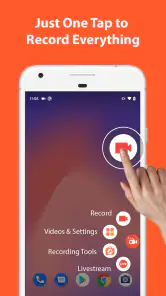
When I first downloaded the Screen Recorder - AZ Recorder, I was immediately impressed by its user-friendly interface. It’s like having a personal recording studio right in your pocket. The app is easy to navigate, and setting up your first recording session is a breeze. You simply tap the record button, and voilà! You’re on your way to creating your first screen recording masterpiece.
That simplicity matters when someone is trying to follow a demonstration while also learning the app. I’d use it to make a short walkthrough of a phone setting, then watch the clip before sharing it so I can catch a missed tap or an unnecessary pause. A recording is often clearer than a long set of instructions, especially for a relative who is more comfortable seeing each step than reading it.
The Latest on Screen Recorder - AZ Recorder
AZ Screen Recorder is a free app in the video-recording and editing category, and it has an average rating of 4.8 from around 1.9 million ratings. It has been installed over 100 million times, which makes it a familiar choice for Android users looking for a dedicated recorder. The app is rated for everyone, and its current version is 6.7.9; it requires Android 6.0 or later. The developer is AZ Screen Recorder, and optional in-app purchases range from $2.49 to $17.99 per item.
Recording, editing, and sharing in everyday situations
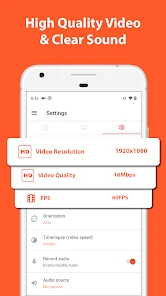
What truly stands out is the app’s flexibility. Whether you’re recording a tutorial, capturing a gaming moment, or simply saving a video call, AZ Recorder handles it all without breaking a sweat. It supports HD recording, which means your videos will look crisp and professional every time.
One practical trade-off is that a screen capture is not automatically a polished lesson. Before sending a tutorial, I’d record a focused sequence, replay it, and use the built-in trimming tools to remove the awkward start and finish. That small check can make a clip easier to follow, and it is more useful than trying to explain a long process in one unedited take.
Sound, editing, and details that affect usability
One of the coolest features of this app is its ability to record audio simultaneously with video. This feature is a game changer for those who want to add commentary or background music to their recordings. No more silent movies!
More From Our News Desk

Weather by Xiaomi Review: Clear at a Glance, Less Clear Up Close

X Under Pressure: Can It Recover When Posting Goes Wrong?

Clash of Clans Is Won Between the Battles

Android Auto Makes the Case for Quieter Car Software

MobiOffice: Transforming Mobile Productivity with Seamless Integration

EA SPORTS FC™ Mobile Soccer: Redefining Mobile Sports Gaming
For a quick how-to, I find spoken instructions more helpful than adding a soundtrack: they tell the viewer what to notice while the screen shows the steps. It’s also worth checking a short test clip before recording a longer explanation, since the usefulness of audio depends on the sound being clear in the finished video. If the recording is meant to be watched without sound, concise on-screen directions can be a better fit than relying on narration.
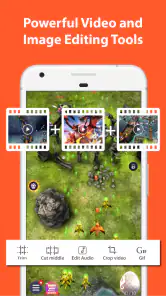
Another noteworthy feature is the editing suite included within the app. You can trim and cut your videos directly after recording, making it super convenient to polish your content before sharing it. It’s like having a mini editing studio at your fingertips.
I’d treat those editing tools as a way to tidy up a clip, not as a replacement for a full video editor. For a quick crop of dead time at the beginning or end, staying in the recorder keeps the workflow simple. If I wanted a more elaborate edit with several carefully arranged scenes, I’d move to a dedicated editor instead of trying to turn a screen recorder into a complete production suite.
Oh, and did I mention the overlay feature? You can add text and logos to your recordings, giving them a personalized touch. This is particularly useful for YouTubers or anyone looking to brand their content.
Making recordings easier to follow in different contexts
Overlay text can do more than brand a video. A short label can point out which screen or setting matters, which helps when a viewer has difficulty following fast taps or when the phone display is small. I’d keep wording brief and place emphasis on the important step rather than covering the interface with decoration. The goal is to make the action clearer, not to compete with it.
For someone with limited dexterity, a one-tap start is a welcome kind of simplicity, but recording still asks the user to begin and stop at the right moments and then review the result. I would plan the demonstration first, keep it to a few steps, and make a second take if the first one becomes confusing. That is less frustrating than trying to perform a long sequence perfectly in real time.
In a noisy place, narration may be hard to understand, while in a quiet shared room, speaking aloud may not be comfortable. In those situations I’d record the visual steps and use concise text overlays where they help. For a visually focused tutorial, slow, deliberate navigation also gives viewers more time to recognize each control. These are practical ways to adapt a recording; they do not remove every access barrier in the app or in the phone content being captured.
Planning a useful capture before you press record
A small amount of preparation can save more time than editing afterward. I’d decide which screens the viewer needs to see, close unrelated apps, and rehearse any sequence that involves several menus. That is especially helpful when demonstrating a setting that is easy to overlook: pausing briefly on the relevant screen gives the viewer a chance to orient themselves, instead of making them guess where the tap landed.
For a longer capture, I’d also think about what the finished file is for. A quick clip meant for a friend can tolerate a natural pause, while a public tutorial benefits from a tighter beginning and ending. Splitting a complicated explanation into separate short recordings can be easier to follow than one long take, and it limits how much unrelated screen activity gets captured.
These habits matter for privacy as well as clarity. Notifications, private chats, and account details can appear while recording, so I’d prepare the phone and replay the clip before sharing it. A screen recording preserves what was visible, not just the action I intended to demonstrate. Reviewing the whole file is a useful final check even when the recording itself went smoothly.
Where it fits among screen-recording choices
Compared with relying only on a phone’s built-in screen recorder, a dedicated app can be more appealing when you want recording, trimming, and simple overlays in one place. That convenience is most useful for short explainers and gameplay clips that need a quick clean-up. The built-in option may be the better choice if you only need an occasional raw capture and prefer not to install another app.
Against a full desktop capture setup or a more capable mobile editing workflow, AZ Recorder is the lighter choice: it suits recording directly on the phone and making modest changes without moving the file elsewhere. It is not the right pick if your main goal is a heavily produced video, detailed post-production, or a workflow that depends on tools beyond screen capture and basic edits. As a free app with optional purchases, it is easy to try, though I’d check which capabilities I actually need before paying for anything.
The choice also depends on where the recording will be watched. A phone-first clip is convenient when the viewer needs to repeat a setting sequence on their own device, because the capture can be shared without first moving to a computer. If I were preparing a presentation with multiple sources, precise sequencing, or extensive captions, I’d rather use a fuller editing workflow. AZ Recorder makes most sense when the screen itself is the subject and a quick, understandable result matters more than elaborate finishing.
Access in different situations—and what still takes effort
For someone who relies on spoken guidance, audio can make a demonstration feel more personal and easier to follow. But narration is not ideal in every setting, and it may not suit viewers who watch with sound off. I’d decide which audience matters most before recording: speak through the steps when audio is practical, or keep the action slow and use short text labels when silent viewing is likely.
There is a similar trade-off for people who find touch controls tiring or difficult. A simple recording flow can reduce setup decisions, but it does not make every tap easier or remove the need to manage the recording. I’d keep the capture short, place the phone securely, and avoid trying to navigate and explain too many steps at once. Someone who needs a particular accessibility control or a highly customized recording process should test the app with that workflow before relying on it.
Screen content itself can also create barriers. A recording of small text or a crowded menu may remain hard to read, even if the video is clear. I’d zoom in where the phone allows it, pause on key screens, and avoid moving quickly between options. These choices improve the clip for many viewers, but they cannot fix an app or webpage whose controls are already difficult to perceive.
My Experience and Final Thoughts
Using the Screen Recorder - AZ Recorder has been a delightful experience. I found it incredibly reliable with no noticeable lag or crashes, which is often a concern with screen recording apps. The video quality is top-notch, and the variety of features it offers means you can do much more than just basic screen recording.
For an everyday example, I’d record a brief guide for a friend who keeps getting lost in a settings menu: show the route once, trim the pauses, add a small label if one step needs extra attention, and send the finished clip. A gamer could use the same process to preserve a useful sequence, while a teacher or support worker could make a visual explanation that is easier to replay than a live demonstration.
There are still reasons to choose something else. If you need extensive editing, a carefully scripted course, or a setup designed around accessibility controls that you already rely on, compare the recorder with tools that match that workflow before committing. People who find small interface controls difficult may also prefer a simpler built-in capture option, if it meets their needs. And because an on-screen recording can include private messages or account details, I’d close sensitive screens and review the clip before sharing it.
One question I’d ask before recording is whether the sound and picture need to be captured together. For a spoken walkthrough, a brief test lets me hear whether my explanation is understandable and check that the important screen details remain visible. For a clip that will be watched silently, I’d keep the sequence self-explanatory and add only the text needed to guide attention. Either way, a short trial is less costly than discovering a problem after capturing a long session.
I’d also consider the viewer’s device and attention. A friend following instructions on the same phone may have to switch back and forth between the recording and the setting being explained, so concise steps and deliberate pauses help. A clip for a larger screen can show more detail, but it still benefits from a clear route and a clean ending. The recorder is most useful when I treat the capture as a practical explanation rather than assuming the app will make every recording clear automatically.
In conclusion, if you’re in the market for a screen recording app that offers more than just the basics, the AZ Recorder should definitely be on your radar. It’s perfect for gamers, educators, and anyone who needs to share what’s happening on their screen. Give it a try, and you might just find yourself wondering how you ever lived without it!
Screen Recorder - AZ Recorder Frequently Asked Questions
Is AZ Screen Recorder available for iPhone and iPad?
AZ Screen Recorder is an Android app, so these details apply to Android devices rather than iPhone or iPad. If you are choosing a screen recorder, check that the app you download is made for your device’s operating system. On Android, AZ Screen Recorder is intended for capturing screen activity, with audio included in its all-round screen-recording focus.
What Android version do I need before downloading AZ Screen Recorder?
The app requires Android 6.0 or later. Check your device’s Android version before installing, especially if you have an older phone or tablet, since devices below that minimum cannot meet the stated requirement. AZ Screen Recorder is a screen-recording app in the video players and editors category, designed to capture activity on a compatible Android device.
Can AZ Screen Recorder capture audio while recording my screen?
Yes. AZ Screen Recorder is described as an easy-to-use, all-round screen recorder with audio, making it suitable when you want sound included with your screen capture. The published feature information also describes an option to record audio from the microphone. Before recording, consider what sound you want to capture and check the app’s audio settings so the result suits your needs.
What devices can run AZ Screen Recorder?
AZ Screen Recorder is an Android app in the Video Players & Editors category. It supports devices running Android 6.0 or later, so check your device’s operating system before downloading. The app is designed for screen recording, and its store summary describes it as an easy-to-use, all-round screen recorder with audio. Its content rating is Everyone.
What features does AZ Screen Recorder offer?
AZ Screen Recorder provides a comprehensive suite of features for capturing and editing screen activities on your Android device. It offers high-quality screen recording without a watermark, includes options for recording audio from the mic, and supports HD resolution recording. Additionally, it features a built-in video editor, GIF maker, and allows for live streaming to platforms like YouTube and Facebook.
Pros
- Easy to use interface
- High-quality video recording
- No watermark
- Flexible settings
- Supports live streaming
Cons
- Contains ads
- Consumes a lot of battery
- No internal audio recording on some devices
- Limited video editing features
- May lag on older devices
- Category
- Video Players & Editors
- Version
- 6.7.9











