Schwab Mobile
- 12.87K
- 3.1
- Installs
- 5.00M
- Price
- Free

Screenshots




Analysis by Reviewed
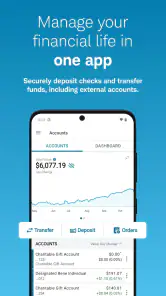
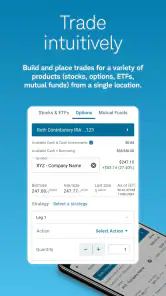
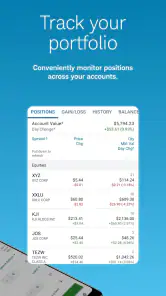
I found Schwab Mobile most useful when I treated it as a personal control panel for investing and banking rather than as a simple stock-watching tool. It brings research, trading, account information, and everyday money tasks into one finance app, which can save time when I want to move from checking cash to reviewing an investment without changing services. The developer is The Charles Schwab Corporation, and the app is free to download with an Everyone age rating.
My overall impression is mixed in a useful way. The breadth is its biggest strength, but that breadth also means the experience can feel more serious and less immediately friendly than a lightweight budgeting or beginner-investing app. It suits someone who already has, or intends to use, a Schwab relationship. It is less compelling for a person who only wants a colorful spending dashboard, a basic savings tracker, or a very simple way to buy a single type of asset.
How Schwab Mobile fits into a shared household
A realistic shared-device routine
Imagine a household using one tablet in a kitchen or home office. One person checks whether enough cash is available before paying a bill, another reviews a watchlist during a lunch break, and later the account owner looks over a trade or transfer. Schwab Mobile can support that kind of coordination because it gathers several money activities in one place. The practical benefit is not that everyone gets a separate household dashboard; it is that the account holder can handle different parts of a financial routine without opening several unrelated apps.
That convenience needs a firm boundary. I would not leave the app open on a shared device, and I would not hand an unlocked phone to another household member simply because the task seems harmless. A finance app is different from a shared calendar: the visible screen may expose balances, positions, transaction details, or other sensitive information. Shared use should mean taking turns with the device while the account owner remains in control of the session.
This is also where the app’s wide scope changes the household conversation. A partner might ask to see whether money arrived in a bank account, while the owner may want to keep investing decisions private. Those are different needs, even when both people live in the same home. I found it better to agree on which tasks require the account owner and which information can be discussed verbally, rather than treating the app as a family noticeboard.
Setting boundaries before anyone signs in
Before using Schwab Mobile on a shared phone or tablet, I would decide who owns the device, who knows its unlock method, and who is allowed to handle financial actions. The app is designed for account access, not for creating an informal household permission system. That means the safest arrangement is simple: the account holder signs in, completes the task, and signs out or locks the device before passing it on.
I would also avoid saving access details where another person can casually see them. Notifications deserve the same attention. Even a short alert appearing on a lock screen can reveal that a transaction, transfer, or account event occurred. The exact wording of alerts can vary by device and settings, so I would review notification visibility at the phone level instead of assuming the finance app alone solves privacy.
For a child using the same device, my boundary would be even clearer. An Everyone age rating describes the app’s store classification, not a recommendation that children should operate an investment account. A young person might sit beside an adult during a learning conversation, but I would not let a child make decisions or tap through account actions independently. The app does not become a teaching game simply because it is available on a family device.
Coordinating money without mixing responsibilities
Schwab Mobile can make coordination faster when the household has a clear division of labor. For example, one adult can review available cash while the other gathers documents or discusses a planned contribution. In that situation, the app works as a place to verify information while the actual decision remains a shared conversation. That distinction matters because seeing a balance is not the same as agreeing on what to do with it.
A useful habit is to separate observation from action. I might open the app to check an account, research an investment, or review activity, then close it before discussing the next step. Only after both people agree would the account owner return to complete a transaction. This two-stage workflow reduces the chance that a quick glance turns into an accidental trade or transfer, especially when several accounts appear within the same overall Schwab experience.
The app’s research and trading functions are valuable here, but they can also encourage rushed decisions. A household conversation that begins with “what is happening in the account?” can quickly become “should we buy or sell?” I prefer using the research material as preparation rather than as a substitute for a personal plan. Schwab Mobile gives me access to information and actions; it does not remove the need to understand risk, timing, taxes, or the household’s cash needs.
Another practical tip is to keep a separate household note for agreed goals instead of relying on memory or on whichever screen was last viewed. The app can show account activity, but it is not the same thing as a shared financial plan. Writing down whether money is intended for emergencies, near-term spending, or long-term investing helps prevent a visible balance from being mistaken for spare cash.
Age, trust, and the meaning of access
The Everyone label makes Schwab Mobile broadly available from an age-classification perspective, but finance still demands adult judgment. I would be comfortable showing an older teenager how market research works in a supervised, educational setting, while keeping credentials, account actions, and personal information under adult control. That approach respects curiosity without confusing access to an app with authority over money.
Trust between adults needs care as well. A shared household does not automatically mean shared account access. If two people need independent control, they should use whatever account arrangement and permissions Schwab provides for their situation rather than sharing one login informally. I would not invent a permission structure inside the app or assume that a spouse, roommate, or relative can safely use the account just because the relationship is close.
This is one area where a basic budgeting app may be a better household tool. Budgeting services often focus on categories, goals, and shared spending conversations, while Schwab Mobile focuses more directly on Schwab accounts, investing, research, banking, and trading. If the main family problem is “where did our grocery money go?” rather than “how do we manage investments and cash held with Schwab?”, the lighter tool may be easier for everyone to understand.
What daily use feels like
In everyday use, I would open the app with a specific question. Do I need to review account activity, check cash, research an investment, or handle a trade? That approach keeps the experience manageable. Opening it without a purpose can lead to too much information, especially for someone who is still learning the difference between a portfolio view, research screen, and banking task.
The all-in-one design is convenient when I already know what I need. I do not have to jump between a separate brokerage app and a separate bank app within the Schwab ecosystem. That continuity is a real advantage for an existing customer who wants one familiar place to monitor several aspects of money management. It is less of an advantage for someone who prefers specialized apps with narrower, simpler interfaces.
Research is another area where I would slow down. Having market information close to a trade button is efficient, but efficiency is not automatically clarity. I would read beyond a headline, consider whether the investment fits my objective, and avoid treating a short-term price move as a complete reason to act. The app makes the workflow available; the quality of the decision still depends on the user.
For a shared household, I would use the app at a planned time rather than passing the phone around during a busy moment. A quiet review makes it easier to notice which account is selected and what action is being prepared. That small change in routine is more valuable than trying to make the app serve as a multi-user family dashboard when it is fundamentally centered on the account holder.
Where the experience may frustrate
The average rating is 3.1 from around 29 thousand ratings, with roughly 13 thousand written reviews, so the public response is clearly not uniformly enthusiastic. I do not treat that score as a complete technical verdict, but it does match my broader caution: an app that handles investing, banking, research, and trading has more opportunities for confusion than a single-purpose finance tool.
My main friction point is the mental load created by having so many functions together. A beginner may not know whether to start with account information, research, or a banking task. A seasoned Schwab customer may appreciate the density, while a casual user could find it busy. This is not a reason to reject it outright; it is a reason to approach it with a defined task and enough time to review what is on screen.
I also would not choose it as my only source of financial education. The app can help me investigate investments and manage accounts, but it is not a replacement for learning basic financial concepts or getting qualified advice when circumstances are complicated. A person managing debt, irregular income, shared finances, or major life changes may need a broader plan than any mobile interface can provide.
There is a trade-off between convenience and concentration. Keeping investing and banking together may reduce app switching, but it also places more sensitive activity behind one access point. On a personal phone that may be perfectly reasonable. On a device used by several people, the convenience is worth accepting only when the household has disciplined habits around locking, notifications, and account boundaries.
Who should choose it, and who should look elsewhere
I would recommend Schwab Mobile to an existing Schwab customer who wants to review investments, research opportunities, manage related banking activity, and trade from one mobile destination. It is particularly suitable for someone who prefers having a broad set of financial tools available rather than maintaining separate specialist apps. The fact that it has passed five million installs also shows that it is used at substantial scale, although popularity alone should not decide whether it fits a particular household.
I would be more cautious recommending it to a first-time investor who wants a guided, minimal interface. A beginner-focused investing app may offer a gentler introduction, while a dedicated budgeting app may make shared spending easier to discuss. Someone who only needs bank balances could also prefer a simpler banking experience. Schwab Mobile makes the most sense when its wider account and investment context is genuinely useful.
It is free, which removes a direct download-cost barrier, but free access should not be confused with risk-free use. Trading and investing decisions can have financial consequences even when the app itself costs nothing. I would judge it by whether it helps me act carefully, not by whether installing it requires payment.
My household verdict
Schwab Mobile is a capable finance app with a clear purpose: put Schwab investing, research, banking, and trading tasks within reach from one mobile experience. I like it most when I use it deliberately, keep account decisions with the account owner, and treat research as a tool for preparation rather than a prompt to act impulsively.
For household use, my verdict is conditional but positive. It can support coordination when adults communicate clearly and protect each other’s account boundaries. It should not be treated as a shared family account, a child-friendly money game, or a substitute for a household budget. On a personal device, it is easier to recommend. On a shared device, the app is workable only with careful locking and a strict rule that convenience never outranks privacy.
After being available since May 25, 2011, the app has had plenty of time to become a familiar mobile doorway into Schwab services. I would choose it when I want that broad connection and already value the Schwab ecosystem. I would skip it in favor of a simpler alternative when my real need is basic budgeting, beginner education, or uncomplicated shared spending. The best reason to use it is not that it does everything, but that its particular mix of investing and banking tasks matches the way I already manage money.
For me, that makes it a practical recommendation for focused account owners, with one final rule: keep the app personal even when the financial goals are shared.
Pros
- Clear portfolio overview with balances
- positions
- and performance data.
- Supports stock
- ETF
- mutual fund
- and options trading on the go.
- Customizable watchlists help track selected investments efficiently.
- Secure login options include biometrics on compatible devices.
- Useful research tools provide quotes
- charts
- news
- and analyst insights.
Cons
- Some advanced trading features are easier to use on the desktop platform.
- Options trading may feel complex for beginners.
- Market data and quotes can vary by subscription or account type.
- The app requires a Schwab brokerage account for full functionality.
- Occasional updates may change menus and require users to relearn navigation.

- Category
- Finance
- Version
- Varies with device











