Schoox Classic
- 230.00
- 3.8
- Installs
- 500.00K
- Price
- Free

Screenshots

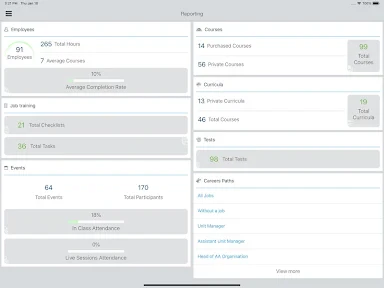
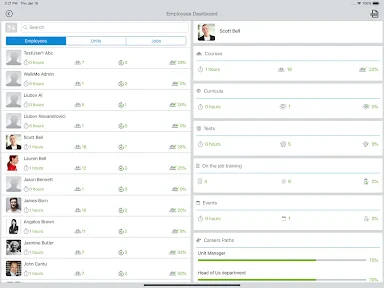
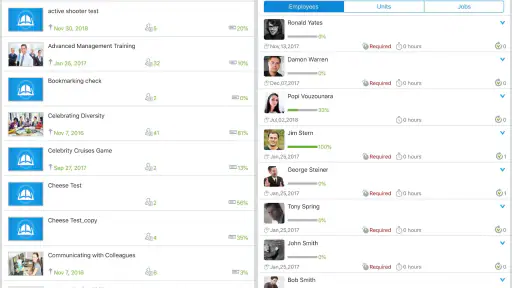
Analysis by Reviewed
I would look at Schoox Classic differently from a general-purpose course marketplace: it is an education app developed by Schoox, Inc., with a focus on learning connected to work. That distinction matters if you want training to fit around a shift or a busy day, rather than building a separate study routine. I find that kind of setup potentially useful, though how much it helps depends on the learning material and how your workplace uses the platform.
Reading, finding your way, and learning at your pace
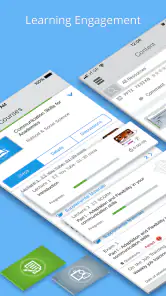
First off, let’s talk about the user interface. I found the interface of Schoox Classic to be pretty user-friendly. Everything is laid out in a way that makes navigation a breeze. From signing up to finding courses, it’s all straightforward. The app does a fantastic job of not overwhelming you with too many options at once, which is crucial for a seamless learning journey.
That uncluttered approach can help when you are opening a lesson between other responsibilities: fewer competing choices make it easier to focus on the next step. Still, I would not assume that every learner will find the screens equally comfortable. People who need larger text, strong visual contrast, or a very simple navigation path should try the app on their own device before relying on it for regular study. Clear organization is useful, but it is not the same as a guarantee that every screen will suit every reading need.
Course flow and useful checkpoints
The range of courses available is quite extensive. Whether you’re interested in business, technology, or even creative arts, they’ve got something for you. What caught my attention was the way these courses are structured. Each course is broken down into manageable sections, making it easy to digest complex topics. Plus, the inclusion of quizzes at the end of each module really helps to reinforce what you’ve learned.
For a practical routine, I would treat those sections as stopping points rather than trying to complete a whole course in one sitting. If you are learning a procedure you will need on the job, pause after a module and note the step you expect to use; the quiz can then serve as a quick check before you return to work. This is more useful than tapping through lessons just to reach the end, especially when you may need to recall the material later.
Different ways to take in a lesson
One of the standout features for me was the interactive learning aspect. The app incorporates various multimedia elements like videos, audios, and interactive charts. This keeps the learning process engaging and dynamic. I believe this is a huge plus for anyone who finds traditional learning methods a bit dry. It’s like having a teacher with you, guiding you every step of the way.
That variety can make a difference for learners who find a spoken explanation easier to follow than a long block of text, or who benefit from seeing information represented visually. It also creates a trade-off: video and audio are less convenient when you are in a noisy workplace, sharing a room, or unable to use sound. In those situations, a quiet moment with text-based material may work better than trying to follow media on the move. I would choose the format to match the setting, not assume every lesson is equally convenient everywhere.
More From Our News Desk

Clash of Clans Is Won Between the Battles

Android Auto Makes the Case for Quieter Car Software

MobiOffice: Transforming Mobile Productivity with Seamless Integration

EA SPORTS FC™ Mobile Soccer: Redefining Mobile Sports Gaming

How Microsoft OneDrive Became a Mobile Productivity Giant

How Google Translate Breaks Language Barriers Effortlessly
Progress, motivation, and realistic pacing
Another thing that I found really helpful is the progress tracking feature. You can easily monitor how far you’ve come with each course. This feature is not only motivational but also helps in managing your time effectively. You get a clear picture of what’s left to be conquered, which is super handy for setting learning goals.
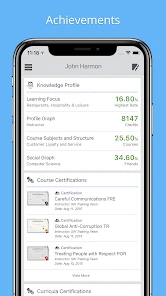
Additionally, the app offers badges and certificates upon course completion, which adds a nice touch of achievement. Who doesn’t like a little reward after putting in the hard work, right?
In an everyday scenario, I can see a learner checking progress during a break, choosing one small section to finish, and returning to the next task later instead of losing track of where they stopped. The practical tip is to use progress as a planning aid, not a deadline: a visible course bar can show what remains, but it cannot tell you how much time a difficult section will take. Short sessions may be easier to sustain, while a complex topic may deserve a quieter, uninterrupted stretch.
Learning with other people—and knowing when to choose another tool
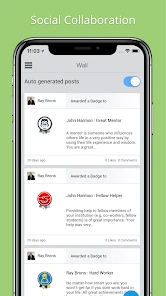
Lastly, let’s not forget about the community aspect. Learning doesn’t have to be a solo journey. With the community forums and support features, you can connect with fellow learners, discuss topics, and share insights. It’s a great way to build connections and even collaborate on projects, making the learning process not just educational but also social.
This social element is most valuable when a question benefits from another learner’s perspective or when discussion helps make a lesson stick. If you mainly want open-ended conversation, independent research, or a broad catalogue of public courses unrelated to workplace learning, a general education platform may be a better fit. Schoox Classic makes the most sense when the available training is relevant to your role; the app itself cannot make an unrelated course useful.
There is also a situational limit worth keeping in mind. A phone is convenient for checking a short lesson, but it is not always the best tool for extended reading, detailed note-taking, or concentrating in a busy environment. I would use it for bite-sized training and progress checks, then choose a larger screen or a quieter setting when the material calls for sustained attention. That small adjustment can make the experience more comfortable without expecting the app to solve every access challenge.
Who is likely to get the most from it?
The app is free, rated for Everyone, and has an average rating of 3.8 from around 1,100 ratings, with roughly 230 written reviews and over 500,000 installs. It was released on December 13, 2013, and its current version is 11.8.6, with Android 8.0 as the minimum operating system. Those details give a sense of its established presence, but they do not replace checking whether the course content available to you matches your goals.
I would recommend it most to someone whose employer or learning program already uses Schoox and who wants to fit training into the day in manageable pieces. Someone choosing a platform entirely for personal study may prefer an app with a clearly self-directed catalogue or more control over learning topics. And if reading or navigation feels uncomfortable on your phone, test a short lesson first; a tool that is easy for one person may still create friction for another.
My inclusive verdict
In conclusion, the Schoox Classic app is a solid choice for anyone serious about advancing their knowledge and skills. Its wide range of courses, interactive elements, and supportive community make it stand out in the crowded world of educational apps. So, if you’re on the hunt for a comprehensive learning platform, give this one a go!
My recommendation comes with a clear condition: it is strongest when the training fits your work and the way you prefer to learn. Its course sections, progress view, and mix of media can support steady learning, while workplace noise, screen comfort, and the relevance of available lessons may affect how well it works for you. I would try it with one useful course and a realistic study routine before making it part of a regular learning plan.
Schoox Classic Frequently Asked Questions
What devices and operating system versions can run Schoox Classic?
Schoox Classic is an education app from Schoox, Inc. for learning wherever work happens. Before downloading, check that your device runs Android 8.0 or later, the stated minimum operating system requirement. The app is also available for iOS devices. Its compatibility and availability across these platforms make it possible to access learning materials from a supported phone or tablet.
Is Schoox Classic free, and is it suitable for all ages?
Schoox Classic is free to download and has an Everyone age rating, so its listed age classification does not restrict it to adult users. It is an education app intended for workplace learning, which may be most relevant to employees and organizations using Schoox for training. The app has a 3.8 average rating from around 1,100 ratings, giving prospective users a general sense of how it has been received.
What is Schoox Classic and what are its main features?
Schoox Classic is a comprehensive learning management app designed to streamline employee training and development. Its main features include an intuitive user interface, customizable learning paths, course authoring tools, and performance analytics. The app supports a variety of content formats, such as videos, documents, and quizzes, making it versatile for different learning styles.
Is Schoox Classic available for both Android and iOS devices?
Yes, Schoox Classic is available for both Android and iOS devices. Users can download the app from the Google Play Store for Android devices and the Apple App Store for iOS devices. This cross-platform availability ensures that users can access their learning materials conveniently from any device.
How does Schoox Classic enhance employee training and development?
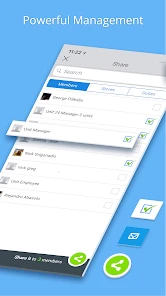
Schoox Classic enhances employee training by providing a flexible and user-friendly platform for creating and managing training programs. It allows trainers to design courses tailored to specific roles and skills, track progress through detailed analytics, and engage learners with interactive content. This leads to more effective training outcomes and improved employee performance.
Pros
- User-friendly interface enhances navigation
- Comprehensive training modules available
- Supports multiple languages for global users
- Offline access to courses is possible
- Customizable learning paths for flexibility
Cons
- Limited integration with third-party apps
- Occasional glitches in video playback
- Advanced features behind paywall
- Notifications can be overwhelming
- Mobile app lacks some desktop features
- Category
- Education
- Version
- 11.8.6











