SchoolStatus Connect
- 674.00
- 4.8
- Installs
- 1.00M
- Price
- Free

Screenshots
Analysis by Reviewed
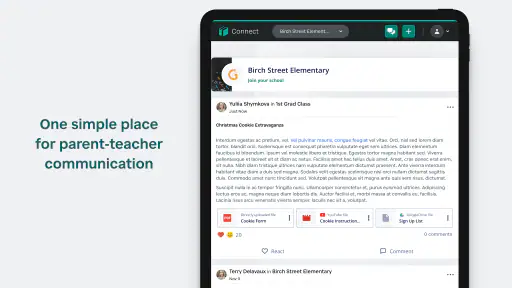
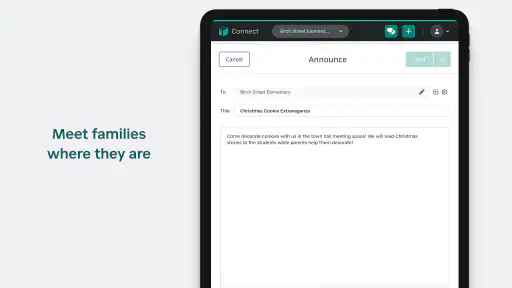
SchoolStatus Connect is the kind of education app that makes sense when school communication is scattered across paper notes, emails, phone calls, and separate classroom tools. I found its main appeal in bringing family-teacher messaging into one place rather than trying to become a complete learning platform. That distinction matters: this is primarily a communication tool, not a replacement for lessons, assignments, grading, or a school information system.
Developed by SchoolStatus, LLC, the free app is aimed at everyday contact between families and educators. It is listed for Everyone, works on Android 5.0 and later, and has reached more than a million installs. Its average rating is 4.8 from roughly 7,500 ratings, which suggests that the basic idea is working well for many people. I would still judge it by the communication habits of your particular school, because an app like this is only useful when teachers and families actually use it consistently.
How SchoolStatus Connect fits into a normal school day
A straightforward starting workflow
The most practical way to use SchoolStatus Connect is to treat it as a focused inbox for school conversations. After joining the relevant school or classroom communication setup, I would use it for messages that need a clear record: a question about a child’s day, a reminder from a teacher, a clarification about an activity, or a quick update that does not justify a phone call.
That focus is one of its strengths. Traditional email can bury a teacher’s message beneath unrelated work, newsletters, receipts, and personal mail. Text messaging is quicker, but it can mix school conversations with everything else on a phone and may not provide the same classroom context. A dedicated family-teacher app gives the conversation a more obvious home.
A realistic example is a parent discovering that a child is unsure about a classroom instruction late in the afternoon. Instead of sending a message through several possible channels, the parent can open the school communication app, find the relevant conversation, and ask a concise question. The teacher can then answer in the same thread or channel used for other school contact. The important benefit is not dramatic technology; it is reducing uncertainty about where the conversation belongs.
I also like the possibility of using the app as a boundary between urgent and non-urgent communication. A message about a forgotten permission form can remain in the school messaging stream, while a genuine emergency should still use the school’s established emergency contact process. SchoolStatus Connect should not be treated as a substitute for every official route simply because it is convenient.
What it does better than ordinary alternatives
Compared with email, a classroom messaging app can make school-related conversations easier to identify and revisit. Compared with paper notices, it avoids the familiar problem of a form remaining in the bottom of a backpack. Compared with informal group chats, it offers a more appropriate setting for teacher-family communication and keeps the subject tied to the school relationship.
There is also a useful psychological difference. When communication is separated from personal messaging, I am less likely to lose a school note among social conversations. That makes the app particularly suitable for families managing several children, provided the school’s organization makes those relationships easy to distinguish.
However, it is not automatically better than email for every situation. Email remains more comfortable for long explanations, attachments, formal records, and communication with people outside the school’s connected network. If a school rarely sends messages through SchoolStatus Connect, families may end up checking multiple systems anyway. In that case, the app becomes an additional inbox rather than the single reliable one people hope for.
Settings I would check before relying on it
My first recommendation is to review notification behavior immediately after setup. A messaging app can be technically useful and still frustrating if alerts are too quiet, too frequent, or delivered at inconvenient times. I would make sure important school messages are visible, then adjust the phone’s notification controls so that routine updates do not create unnecessary interruptions.
It is worth checking which classroom, teacher, or family connection each conversation belongs to. A rushed setup can create confusion later, especially when several children attend the same school or when a parent has more than one school relationship. Before sending a sensitive question, I would confirm the recipient and conversation context rather than assuming the last open thread is the correct one.
This is one of the less obvious habits that improves the experience: use the app’s structure as an organizational aid, not merely as a place to type messages. Keep school conversations in their intended context, and avoid turning one thread into a running discussion about unrelated children or subjects. Clear context saves teachers time and makes later searching or rereading more meaningful.
I would also decide as a family who is responsible for checking messages. If two adults both assume the other person is watching the app, an important note can be missed. A simple routine—one parent checks during the afternoon, or both review the inbox at a chosen time—can be more effective than enabling every possible alert on every device.
Small habits that make messaging faster
The fastest users of a communication app are not necessarily the people who write the shortest messages. They are the people who repeat a dependable process. Before contacting a teacher, I would gather the child’s name, class, relevant date, and the exact question. A message such as “Could you clarify whether the reading task is due tomorrow or Friday?” is easier to answer than a vague request for help.
For routine situations, I would prepare a personal checklist rather than repeatedly reconstructing the same information. If a child is absent, for example, the parent can remember to include the reason, the expected return, and any immediate question about missed work. This is not a special feature of the app; it is a practical way to make its messaging workflow more efficient.
Another useful pattern is to separate one issue from another. If a teacher needs to respond about attendance and a project, combining both topics can make the answer harder to follow. Sending a clear message for the immediate issue, then a second concise question when appropriate, keeps the conversation easier to scan. The trade-off is that excessive messages can create noise, so I would combine related points while avoiding a long paragraph with several unrelated requests.
I would also avoid using the app as a live chat unless the school explicitly expects that. Teachers may read messages in blocks rather than continuously. Writing with the assumption that a response may come later leads to better questions and reduces the temptation to send repeated follow-ups. If something is urgent, the school’s phone or emergency procedure is the safer choice.
Where experienced use meets real limits
The app’s central limitation is its dependence on adoption. A family cannot create a complete communication system alone. The teacher, school, and other relevant staff need to use the same channel, and they need to keep their contact information and classroom relationships organized. If one person uses email, another uses paper, and a third uses SchoolStatus Connect, the family still has to monitor several places.
That means I would ask the school a few practical questions before making it the main channel: Which messages belong here? How quickly are teachers expected to respond? Should absences go through the app or through the office? Are formal documents delivered elsewhere? These answers are more important than any individual interface detail because they define what the app can reliably handle.
It is also not the right tool for every educational need. Students looking for video lessons, interactive practice, detailed grade analysis, or a full assignment planner should look for a learning management or study app designed for those jobs. SchoolStatus Connect is better when the problem is communication between families and educators, not when the problem is learning content itself.
Families who prefer one-to-one email may find a dedicated app unnecessary, especially if their school already has a well-organized email process. Likewise, people who need extensive document management or formal archival workflows may prefer a system built around files and records. The app’s advantage is everyday contact, and its value decreases as the conversation becomes more formal, lengthy, or technically complex.
Privacy-minded communication habits
Because the app deals with school and family communication, I would keep messages focused on the child’s educational situation and avoid including unnecessary personal details. A concise note is usually safer and more useful than a complete family history. If a topic is sensitive, I would ask whether it should move to a private meeting or a more appropriate official channel.
I would also remember that a message thread is not the same thing as a guaranteed official record for every purpose. Keep copies of documents or decisions that matter, follow the school’s instructions for formal requests, and do not assume that a quick chat replaces required paperwork. This is a sensible precaution with any messaging platform, not a criticism unique to this one.
On a shared family device, checking who is signed in before sending a message is another small but important habit. It prevents a parent from accidentally using the wrong account or confusing one child’s conversation with another. The more children and caregivers involved, the more valuable deliberate account and conversation checks become.
Version, access, and everyday practicality
The current Android version is 1.36.3, and the app supports devices running Android 5.0 or newer. That broad operating-system range is helpful for families using older phones, although the experience can still vary with the phone’s notification settings, battery-saving rules, and general performance.
Since the app is free, the main cost is not a purchase price but the attention required to maintain another communication habit. I would install it only after confirming that the child’s school or teacher actually uses it. A free app that no one in the school community checks is still wasted space and another source of possible confusion.
The Everyone content rating also makes it suitable in terms of the listed age classification, but that does not mean every conversation is intended for children to manage independently. In many families, a parent or guardian will remain the primary account holder and communicator. Whether a student should read or send messages depends on the school’s expectations and the family’s judgment.
My verdict after looking at the complete workflow
After using SchoolStatus Connect as a school communication tool rather than expecting it to be a full education suite, I see a clear and useful purpose. It can give family-teacher contact a dedicated place, reduce dependence on paper notes, and make routine questions easier to direct. The best results come from pairing it with simple habits: verify the recipient, write specific questions, check notifications, and agree on who in the family monitors messages.
Its high average rating and broad install base show that the concept has found a substantial audience, but those figures should not replace a local check of how actively your school uses it. The app is strongest when the whole communication chain is aligned. It is weaker when families must constantly switch between email, paper, phone calls, and several unrelated platforms.
My recommendation is simple: choose SchoolStatus Connect if your school has made it a regular family-teacher channel and you want a focused place for everyday questions and updates. I would skip relying on it as the only education app if you need assignments, lessons, grades, or formal document management. For its intended job, though, it is a practical free option from SchoolStatus, LLC, and its usefulness grows noticeably when experienced users combine careful settings with repeatable messaging routines.
Pros
- Keeps school
- teacher
- and district messages in one convenient place.
- Supports timely alerts for attendance
- grades
- events
- and urgent notices.
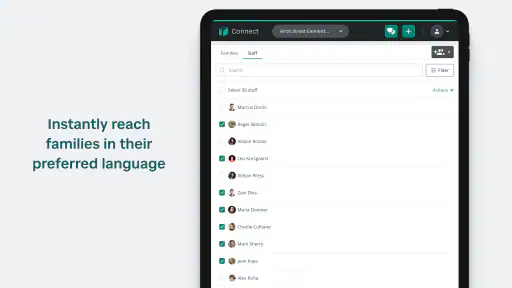
- Offers translation tools that can help multilingual families stay informed.
- Allows families to manage communication preferences and notification settings.
- Useful for tracking updates without relying solely on paper notices or email.
Cons
- Message volume can become overwhelming when several schools send frequent updates.
- Some features depend on whether the local school district has enabled them.
- Requires a stable internet connection for timely delivery of new information.
- Account setup may be confusing when families have multiple students or guardians.
- Notifications may arrive late if phone permissions or background access are restricted.

- Category
- Education
- Version
- 1.36.3











