SchoolCafé
- 1.38K
- 3.4
- Installs
- 500.00K
- Price
- Free

Screenshots
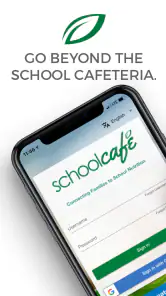

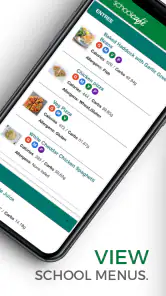
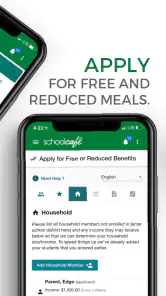
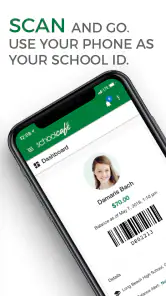

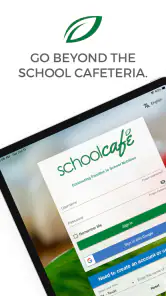

Analysis by Reviewed
SchoolCafé is an education app from Cybersoft PrimeroEdge that I found most useful as a practical bridge between families and school nutrition information. It is free to download, aimed at Everyone, and built for a very specific everyday need: helping parents and guardians stay connected with meals and related school food services without relying entirely on paper notices or scattered conversations.
That focused purpose is both its strength and its limitation. I would not install it expecting a broad family-management platform, a learning tool, or a general school communication hub. I would consider it when my child’s school district uses SchoolCafé as part of its nutrition system and I want a more convenient way to keep track of the information that matters around breakfast, lunch, and school meal planning.
How SchoolCafé fits into family routines
A focused education app rather than a complete school portal
The first thing I noticed is that SchoolCafé feels like a service companion, not an all-purpose school app. Its role is centered on school nutrition, so the experience makes the most sense for families whose schools or districts are connected to the platform. That distinction matters because many parents already use a separate student-information system for attendance, grades, assignments, and messages. SchoolCafé is not a replacement for all of that.
In my view, the app is best understood as a dedicated place for food-related school information. Keeping that purpose narrow can make a routine easier: instead of searching through email threads or trying to remember a notice sent home, I can open the relevant service when I need it. The benefit is not excitement; it is reducing small bits of daily friction.
The developer, Cybersoft PrimeroEdge, has positioned the app around the connection between families and school nutrition. That makes the quality of the experience depend partly on how actively a particular school or district uses the system. If the local program keeps its information current and supports the app consistently, SchoolCafé can become a useful part of a parent’s routine. If local adoption is limited, the app’s practical value can drop quickly.
What the free cost means in practice
SchoolCafé is free, so there is no purchase decision to make before trying it. That is important for a household deciding whether a specialized nutrition app deserves space on a phone. I can test whether it fits my school’s setup without committing money, and families do not have to weigh a subscription against occasional use.
Free access does not automatically make every experience equally valuable. The real question is whether the school or district connected to my child is using the service in a meaningful way. A free app that does not connect me to relevant local information is still not useful, while a free tool that replaces repeated calls, paper reminders, or manual checking can earn its place quickly.
More From Our News Desk

Clash of Clans Is Won Between the Battles

Android Auto Makes the Case for Quieter Car Software

MobiOffice: Transforming Mobile Productivity with Seamless Integration

EA SPORTS FC™ Mobile Soccer: Redefining Mobile Sports Gaming

How Microsoft OneDrive Became a Mobile Productivity Giant

How Google Translate Breaks Language Barriers Effortlessly
I also appreciate that the price does not encourage me to treat the app as a paid premium product. My expectations are more practical: it should make school nutrition tasks clearer and easier, not provide a large collection of extras. For this kind of service, that is a sensible arrangement. I would judge it by reliability and convenience rather than by entertainment value or the number of features presented on screen.
Who should try it first
I would start with parents and guardians who have children enrolled in a participating school and who regularly need nutrition-related information. It can also suit caregivers who share responsibility for school routines and want a single place to check the same information instead of depending on another family member to forward messages.
It is less compelling for someone whose school does not use the platform, someone who rarely needs school meal information, or someone looking for grades, homework, transportation updates, and teacher communication in one application. In those cases, the school’s main portal or a direct district communication channel may be a better first choice.
A realistic morning use case
Imagine a weekday morning when I am preparing two children for school and one of them has a changing lunch preference. Rather than searching through old notices, I would open SchoolCafé to check the information available for the school’s nutrition service. If I need to plan ahead, I can use that information while preparing a lunch or deciding whether a school meal fits the day’s schedule.
The value here is modest but real. The app does not need to transform the morning to be worthwhile. It only needs to remove one avoidable question at a moment when parents are already handling uniforms, bags, transport, and time pressure. A nutrition-focused tool can be especially helpful when several adults share pickup and meal responsibilities, because everyone can refer to the same service instead of relying on memory.
That workflow also shows why local participation matters so much. The app can only be useful when the school-side information is available and maintained. I would check the connection during setup and use the first few visits to confirm that the school details match my child’s situation. If the information is incomplete or outdated, I would keep the school’s usual backup method rather than depending on the app alone.
Small habits that make it more useful
One useful habit is to check SchoolCafé at a calm time rather than waiting until the busiest part of the morning. I would review the relevant nutrition information while planning the week, then use the app for quick confirmation on individual days. This turns it from an emergency lookup tool into part of a simple household routine.
A second practical tip is to treat the app as a shared reference point. If another caregiver is responsible for a child on certain days, I would make sure that person knows where the information is found and understands which school profile applies. This avoids a common problem with family apps: one person knows how to use the service, while everyone else continues using old notes.
A third trade-off is worth keeping in mind. A specialized app can be easier to navigate for nutrition matters than a large school portal, but it also means I may need to switch between applications. I would accept that extra step if SchoolCafé provides clearer meal-related information, but I would not expect it to consolidate every school task.
How it compares with the usual alternatives
The most obvious alternatives are paper menus, school emails, district websites, phone calls, and a general school portal. Paper notices can be convenient when they arrive on time, but they are easy to lose and difficult to consult when plans change. Email can contain useful information, yet finding one specific notice among many messages is not always quick. A district website may be authoritative, but browsing it on a phone can feel slower than using a dedicated service.
A general school portal may be better if I want grades, attendance, assignments, and messages in the same place. However, broad portals often serve many purposes, and nutrition information may not be their main focus. SchoolCafé has a clearer reason to exist: it concentrates on the family-school connection around meals.
For me, the choice comes down to frequency and local support. If I check meal information often and the school actively uses SchoolCafé, the dedicated app is more convenient than repeatedly searching a website. If I only need a menu once in a while, a district page or printed notice may be enough. There is no reason to add another app simply because it is free if the existing school channel already works well.
Where the experience can become frustrating
The main friction is the dependence on the school or district environment. A family can install the app, but the usefulness still depends on the information and services connected to the local program. That means two parents in different districts may have noticeably different experiences with the same application.
I would also be cautious about treating any school nutrition app as the only source of time-sensitive information. If a school changes a meal arrangement or sends a direct notice, I would still read that communication. A dedicated app is helpful for routine reference, but families should keep paying attention to the school’s established announcements, especially when plans change unexpectedly.
Another limitation is scope. SchoolCafé is not the right choice for a parent who wants a complete picture of a child’s academic and administrative life. Using it alongside a main school portal may be perfectly reasonable, but some people will prefer fewer applications even if that means nutrition information is less specialized.
The app’s average rating is 3.4 from around three thousand ratings, with roughly one and a half thousand written reviews. I read that as a sign to keep expectations realistic rather than as an automatic rejection. A middling average can reflect differences in district setup, account situations, device experiences, or expectations about what the app should do. I would evaluate it against my school’s actual use instead of assuming every family receives the same level of value.
Compatibility and app maturity
SchoolCafé supports Android devices running version 6.0 or newer, which makes it accessible to many older phones as well as newer models. That is useful for families who do not replace devices frequently. The current version is 16.4, and the app has been available since July 31, 2016, so this is not a newly launched experiment.
Its long availability suggests that the service has had time to become established, but age alone does not guarantee a smooth experience. What matters to me is whether the current app works cleanly with the school’s service and whether the information I need is easy to reach. I would update it when prompted and confirm the device requirement before installing on an older phone.
The Everyone content rating also makes the app suitable for a broad household audience. Still, the person using it will usually be an adult managing school routines, even though the subject is children’s nutrition. I would keep account and school details organized carefully, particularly in a household where more than one child attends school.
The value for different kinds of families
SchoolCafé offers the most value to families who interact with school nutrition regularly and want a dedicated reference point. It can be particularly helpful when schedules are busy, caregivers share duties, or school meal information is otherwise easy to overlook. In those situations, the free price removes the biggest barrier to testing it.
Families with one child and a stable routine may still appreciate it, but the benefit could be smaller if a printed menu or occasional website visit already answers every question. I would not describe installation as essential for everyone. Its usefulness grows with the number of times it saves me from searching, calling, or asking someone else to confirm information.
I would skip it, at least for now, if my school does not actively support it or if I need a single app for academics, attendance, transport, and communication. I would also skip it if I am satisfied with the school’s existing nutrition notices and do not want another login or service to maintain. Free access is a reason to try it, not a reason to keep an app that does not improve my routine.
What I would check before relying on it
Before making SchoolCafé part of my daily planning, I would confirm that the correct school or district appears during setup and that the information shown matches the child I am managing. I would then use it for a few ordinary school days, comparing what I see with the school’s other communication channels. This quick check tells me whether it is a dependable local tool or merely an app that happens to be available.
I would also decide which tasks belong in SchoolCafé and which belong elsewhere. Nutrition planning can live here, while grades, attendance, teacher messages, and emergency announcements should remain in the school’s designated systems. That separation prevents disappointment and makes it easier to notice when an important message has arrived through another channel.
For shared households, I would establish one simple routine: the adult responsible for the next school day checks the relevant information, and any unusual change is communicated directly to the other caregiver. The app can support that process, but it should not replace clear family communication.
My verdict on the free download
After looking at what SchoolCafé is designed to do, I see it as a sensible, specialized option rather than a must-have app for every parent. Its strongest point is the focus on connecting families with school nutrition services. Because it is free, trying it carries little financial risk, and families can quickly decide whether their school’s participation makes it worthwhile.
The deciding factor is not the download price; it is the quality of the local school connection. When the service is actively used, SchoolCafé can make meal planning and routine checking more convenient than paper notices, scattered emails, or repeated website searches. When local support is weak, the app cannot compensate for missing or unhelpful information.
I would recommend SchoolCafé to a parent whose school already relies on it for nutrition communication, especially if that parent manages several children or shares caregiving duties. I would not recommend installing it solely because it belongs to the education category or because it is free. First confirm that the school is connected, then judge whether the app saves enough time to deserve regular use.
Overall, my opinion is cautiously positive. SchoolCafé delivers clear value in the narrow situation it targets, and its free access makes that value easy to test. It is not a replacement for a complete school portal, and it should not become the only channel I trust for changing announcements. For the right family, though, this focused approach is exactly what makes it useful: fewer searches, a more direct nutrition reference, and one less small school task to reconstruct from memory.
SchoolCafé Frequently Asked Questions
Who can use SchoolCafé, and is it suitable for children to use on their own?
SchoolCafé is an education app designed to connect families with school nutrition services. Parents and guardians are likely to find it most useful for checking meal-related information and managing a student’s cafeteria account. The app is rated for Everyone, but families should decide whether a child should use it independently, especially when account details or payment options are involved.
What devices can I use to install SchoolCafé?
SchoolCafé is available for Android devices running version 6.0 or later. Before downloading, check your device’s operating system in its settings to make sure it meets that requirement. Keeping the device and app up to date can also help with compatibility and security. The app is free to download, so you can install it and explore its available features without an upfront purchase.
What is SchoolCafé, and what can I use it for?
SchoolCafé is a school-services platform that helps families manage everyday school-related tasks in one place. Depending on the district, you may be able to view cafeteria menus, check meal balances, add funds, review purchase history, apply for meal benefits, and receive notifications. Available features can vary by school district, so the options shown after registration may not be identical for every family.
How do I create a SchoolCafé account and connect my child’s school information?
To use SchoolCafé, you generally need to create an account with an email address and password, then select your school district. After that, the app may ask for details such as your child’s name, student identification number, or other information required by the district. Enter the details carefully, because incorrect information can prevent you from linking the student account or viewing the correct meal and payment records.
Can I add money to my child’s school meal account through SchoolCafé?
In participating districts, SchoolCafé allows parents or guardians to add money to a student’s cafeteria account using an available payment method, such as a debit or credit card. Processing fees, minimum payment amounts, and payment options may differ by district. Before confirming a transaction, review the total cost and ensure that the funds are being added to the correct student account.
Pros
- Quickly view cafeteria menus
- balances
- and meal purchase history.
- Convenient low-balance alerts help prevent missed school meals.
- Supports payments and account management from a mobile device.
- Useful for families managing meal accounts for multiple students.
- Menu details can help parents plan meals before the school day.
Cons
- Availability depends on whether the school district supports SchoolCafé.
- Some account features may require separate district-provided credentials.
- Payment processing times can vary between schools and banking providers.
- Menu information may be incomplete or change without immediate updates.
- The interface can feel less intuitive when managing several student accounts.
- Category
- Education
- Version
- 16.4











