Root: Better car insurance
- 21.95K
- 3.2
- Installs
- 1.00M
- Price
- Free

Screenshots
Analysis by Reviewed
When I compare car insurance options, I want to know whether an app can make the process clearer without asking me to change how I manage my car. Root: Better car insurance takes a driving-focused approach, so it may suit people who want their habits behind the wheel to play a larger role in their insurance experience. It is a free finance app from Root, Inc, and its central idea also creates a practical question: what should you expect when getting started, and what can you do if the process feels stuck?
Before you begin, decide what you need from a quote
I would start by treating Root as one route in a car insurance comparison, not as a shortcut that guarantees an instant saving. Its driving-based evaluation asks you to give the process time, so it makes most sense when you are exploring options ahead of a renewal or have room to compare without rushing. If your current policy is about to end, first make sure you have a dependable coverage plan; do not assume an unfinished assessment is the same as an active policy.
It also helps to decide what matters most to you before installing any insurance app. Is your priority a lower bill, a particular level of coverage, a convenient way to manage policy information, or avoiding a driving assessment? Root’s approach is relevant if you are open to having driving habits considered. If you mainly want to compare coverage terms quickly, a conventional insurer quote or an independent comparison process may be a more direct first step.
Getting Started with Root
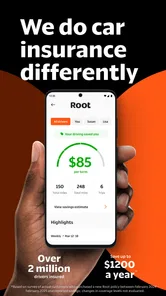
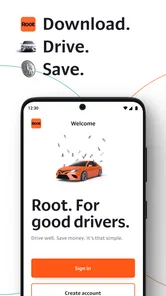
Jumping into the world of Root: Better car insurance is as easy as pie. The app is available on both Android and iOS, making it accessible to pretty much everyone with a smartphone. Once downloaded, it prompts you to take a test drive. Yup, no mountains of paperwork to fill out initially. The app uses your phone's sensors to track your driving habits over a period of a few weeks. It’s pretty cool how it turns your driving data into a personalized insurance quote. Safe drivers get rewarded with lower rates, skipping the usual criteria like age and credit score.
Where the process can feel stuck
The test-drive period is the key difference from getting a quote through a conventional insurer. If you need coverage immediately, a process that evaluates driving over time may not fit your schedule. I’d treat the initial drive as an assessment stage rather than assume that installing the app instantly produces a final price. Before relying on a quote, check what the app is asking you to complete and whether the next step is available for your situation.
There is also a trade-off in sharing driving information. A driver who is comfortable having habits assessed may find this approach appealing; someone who prefers to compare policies without a driving evaluation may be happier starting with traditional quote tools. I wouldn’t choose based on the promise of a lower rate alone. Compare the coverage and final cost you are offered with what you already have, and make the decision on the full policy rather than the driving score by itself.
Setup checks that save time
If the test drive does not seem to progress, I’d first check the simple things: confirm that the app is current, that the phone is with you when driving, and that the app can use the phone sensors it relies on. Keep the phone in a stable, safe place rather than handling it on the road. If you use more than one vehicle or share driving duties, take a moment to make sure the trip you expect to count is actually the one being recorded. These checks are useful because an incomplete or misidentified trip can make the assessment feel confusing.
More From Our News Desk

 Bolt: Request a Ride
Bolt and the Shift from One-Tap Rides to More Legible Trips
Bolt shows how ride-hailing is shifting from a one-tap taxi request toward a more legible, choice-driven trip, while leaving the hardest questions of price and reliability unresolved.

 Farm Land - Farming life game
Farm Land Review: A Small Island Farm with a Satisfying Loop
A bright, breezy island farm turns a few quick chores into a satisfying cycle of planting, harvesting, expanding, and deciding what to build next.

 Android Auto
’s Community Takes Shape in the Passenger Seat
Its most valuable network is not a public feed but a shared set of routes, voice habits, app integrations, and advice that make driving less isolating—and sometimes more complicated.

 My Talking Angela
 Makes the Virtual Pet Feel Personal
A polished pet-raising game built on small rituals, playful customization, and a character who gives everyday screen time a surprisingly personal rhythm.

 Google Translate
 Review: A Pocket Tool for the Small Frictions of Travel
From menus and signs to quick conversations, Google Translate earns its place by cutting the little delays that make unfamiliar language feel like a barrier.

 Shazam: Find Music & Concerts
Shazam’s Best Trick Is Turning a Song Into a Night Out
A few seconds of recognition can settle an argument, rescue a half-remembered chorus, and point toward a live show. Shazam’s real trick is what happens after the match.
Latest News



Root has a 3.2 average from around 38,000 ratings, with roughly 22,000 written reviews, so experiences are mixed rather than universally smooth. That doesn’t tell me what any individual driver will be offered, but it is a reason to approach the evaluation with realistic expectations. The app has more than a million installs, is rated for Everyone, and its current version is 339.0.0; those details describe the product, not a guarantee that every phone or insurance situation will work the same way.
Recovering when a trip or task goes missing
For an interrupted workflow, I’d avoid repeatedly changing settings while driving. Once parked, reopen the app, check whether the task or trip has updated, and follow any on-screen prompts before trying again. If the app still appears out of sync, a normal close-and-reopen or a phone restart is a sensible basic troubleshooting step. Keep notes about when the issue happened and what you were trying to do; that makes it easier to explain the problem if you contact support.
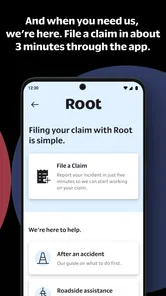
For a claim or policy question, use the relevant in-app route when it is available and keep any related documents close at hand. Digital access can be convenient, but it is still wise to know where your policy information is before an urgent moment. If you are dealing with an accident or immediate roadside danger, prioritize personal safety and appropriate emergency help rather than troubleshooting the app from the roadside.
User-Friendly Interface
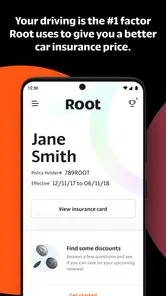
The app's interface is super intuitive. I mean, I’m not a tech whiz, but navigating through the app felt like a breeze. The dashboard is clean, giving you a clear view of your driving score, insurance policy, and any claims you've made. And if you need to make a claim, it’s just a tap away. No need to call an agent and wait on hold forever. Plus, all your documents are stored digitally, so no more digging through drawers to find that insurance card!
When the app may not be the cause
A delayed update is not automatically a sign that the app has failed. A phone that is not with the driver, a trip taken in a different car, or a task that has not finished processing can all make progress less obvious. I’d check the app’s own status and instructions before assuming a technical fault. If the issue continues, contacting Root through its available support options is more useful than reinstalling repeatedly, especially if you need to preserve access to policy or claim details.
It is also worth separating an app problem from an insurance mismatch. A clear interface cannot make a policy suitable if its coverage does not meet your needs. If you have a complicated household driving arrangement, need an immediate policy decision, or simply do not want driving behavior to factor into the process, an insurer with a more conventional quoting route may be easier to compare. Root is most compelling when you are willing to try its driving-based approach and judge the actual offer on its terms.
Making the evaluation fit everyday driving
A realistic way to approach the assessment is to use your ordinary routine rather than trying to stage “perfect” drives. Think about the trips you actually make—commuting, errands, school runs, or weekend visits—and keep your phone with you as instructed. The point is to let the app evaluate normal driving, not to handle the phone or alter a trip in a way that creates a safety risk. If your routine changes during the evaluation, such as a car being shared or a week spent away, check the app’s guidance instead of guessing how that affects progress.
One useful habit is to separate the driving assessment from your policy comparison notes. Write down the coverage limits and other details that matter on your existing policy, then compare them with any offer you receive. A lower premium can look persuasive until you discover the protection is not equivalent. This simple side-by-side check is especially valuable when an app makes the price easy to focus on: it keeps the decision about insurance, rather than the convenience of the interface.
Incredible Features
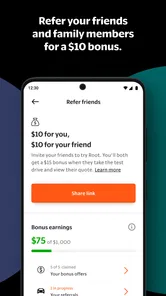
One feature that stands out is the ability to pause your insurance coverage. Going on a long vacation? Just pause your coverage and avoid paying for the time you won’t be driving. This is a game-changer for those of us who don’t drive daily or own multiple vehicles. Another neat aspect is the "Referral Program," which lets you earn credits by referring friends. It’s a win-win situation; your friends get better insurance, and you save some bucks.
For someone who drives only occasionally, the idea of flexible coverage can sound especially attractive, but I’d check the exact terms and make sure the arrangement fits the vehicle’s real use before relying on it. A car left at home may still be driven unexpectedly, and a household member might need it. The useful habit here is to plan around the policy rather than make a last-minute assumption about what a pause means.
Root also offers roadside assistance, which is a lifesaver if you ever find yourself stranded with a flat tire or a dead battery. It gives peace of mind knowing help is just a tap away, without needing a separate membership with those pricey auto clubs.
That convenience is most valuable when you know what assistance is included and how to request it. I’d review the policy details before a long trip, rather than wait until a breakdown to learn which situations are covered. Drivers who already have roadside help through another arrangement should compare the overlap before treating this as a reason to switch.
Questions worth settling before switching
Does completing the driving assessment mean you must choose Root? I would treat the assessment and the final insurance decision as separate steps: review whatever offer is presented, then decide whether its price and coverage work for you. If you are comparing several insurers, keep each quote’s details together so you are not judging one by its headline price and another by its broader protection.
What if your household shares a car or uses more than one vehicle? That is exactly the kind of situation where I would read the app’s instructions carefully and check that the driver and trip details make sense before relying on the assessment. Household arrangements can affect how useful a driving-based process feels, so do not assume one person’s routine represents everyone who may use the vehicle.
And if a trip does not appear, should you reinstall immediately? I would first check the app after parking, follow any prompts, and give the workflow a chance to update. Repeated reinstalling is not a good first response when policy or claim information may be important. If the problem persists, write down the circumstances and contact the available support route.
Final Thoughts
In a nutshell, Root: Better car insurance is a breath of fresh air in the insurance sector. It’s not just an app but a new way of looking at car insurance. By rewarding safe drivers with lower premiums and offering flexible coverage options, it’s clear why so many people are making the switch. The app is straightforward, efficient, and incredibly user-friendly. If you're a good driver tired of paying for others' bad habits, Root might just be the answer you’ve been searching for.
So, why not give it a spin? It could be a step towards saving money and getting the insurance coverage you actually deserve. Remember, it’s all about how you drive!
Who is likely to get the most from it?
I can see Root working best for a driver who has time to complete the evaluation, is comfortable with a phone-based assessment, and wants to compare a driving-focused option against their current policy. Picture a person who mostly commutes on familiar roads and checks insurance costs before renewal: they can complete the process without treating a quick estimate as a final decision, then weigh the offer against the coverage they already understand. It is less suitable for someone shopping under pressure or unwilling to have driving behavior considered.
Compared with the usual alternatives, Root puts more emphasis on how you drive than a quote process based mainly on conventional profile questions. That distinction may be a genuine advantage for some careful drivers, but it also means the experience is not a simple like-for-like price check. I’d gather a comparable quote from another insurer, line up the coverage details, and only then decide whether Root’s approach is worth continuing. The app is free to download, but the insurance choice should still come down to the policy and price offered to you.
Root was released on March 30, 2017, and runs on Android 9 or later. Those basics are worth checking before installation, particularly if you rely on an older phone. My practical verdict is that it is worth considering as an alternative route to car insurance, not as an automatic replacement for every driver. Use it if the driving assessment suits you, verify the policy details for your own circumstances, and keep another option in view if the timing, evaluation, or final offer does not work for you.
Root: Better car insurance Frequently Asked Questions
Do I need to be a Root customer to download the app?
No. You can download Root: Better car insurance and explore the app before deciding whether to pursue a policy. The app is free, but getting it on your phone is separate from applying for or purchasing insurance. If you continue, Root’s process focuses on your driving habits to create a personalized rate, so consider whether you are comfortable with that approach before starting.
Who makes Root: Better car insurance, and what kind of app is it?
Root: Better car insurance is a finance app from Root, Inc. It brings the company’s car insurance service to your phone, with an emphasis on assessing driving and offering personalized rates. The app is intended for people interested in exploring Root’s insurance, rather than a general-purpose driving tool, so its main purpose is connected to getting and managing car insurance.
Is Root: Better car insurance free to download?
Root: Better car insurance is a free finance app from Root, Inc. You can download it to your phone and explore its car insurance service, but downloading the app does not mean you have purchased a policy. Root’s app is built around assessing driving and offering personalized insurance rates, so expect to share driving-related information if you choose to continue through the process.
What should I check before installing Root on my phone?
Before downloading, check that your device runs a compatible operating system and that you are comfortable allowing an insurance app to monitor driving activity. Root is designed to use smartphone technology to assess how you drive, so the phone needs to be available during your driving evaluation. The app is for everyone, but the ability to use its insurance service also depends on where you live.
What is Root: Better car insurance and how does it work?
Root: Better car insurance is an innovative app that offers personalized car insurance rates based on how you actually drive. By utilizing smartphone technology, Root tracks your driving habits over a test period to determine your premium. Safe drivers can potentially save up to 52% on their insurance. It eliminates the need for lengthy forms and bases rates on real data rather than demographics.
Pros
- User-friendly interface
- Quick quote retrieval
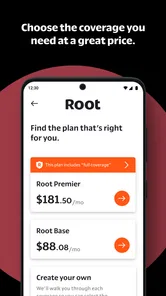
- Customizable coverage options
- Competitive pricing
- Easy claims process
Cons
- Limited to certain regions
- Requires personal data
- App glitches occasionally
- Limited customer support
- No offline access