Rocket Mortgage
- 15.06K
- 4.7
- Installs
- 1.00M
- Price
- Free

Screenshots

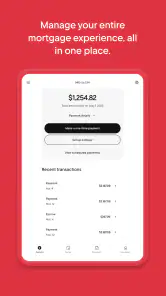
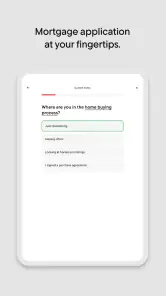

Analysis by Reviewed
Managing a mortgage from a phone sounds simple until you need to check a payment, review an account detail, or deal with a question while away from a computer. Rocket Mortgage is built for that specific kind of financial housekeeping. I found it most useful as a mobile companion for people who already have a mortgage with Rocket Mortgage and want a convenient way to keep an eye on it. It is free, aimed at everyone, and comes from Rocket Mortgage rather than from a general-purpose budgeting company.
My overall impression is that the app makes mortgage administration feel less tied to a desk, but its value depends heavily on a reliable internet connection and on your relationship with the developer’s mortgage service. This is not a broad personal-finance dashboard for comparing every loan, bank account, and investment in one place. It is a focused finance app for handling your Rocket Mortgage relationship from a mobile device.
How the app feels when your mortgage is only a few taps away
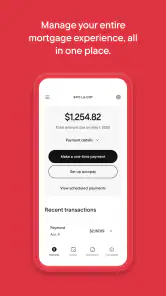
The first thing I noticed is the difference between checking a mortgage through a dedicated app and searching through email, browser bookmarks, or paper statements. A focused app gives the mortgage its own space. That matters when you are trying to confirm what is happening with a large, long-term financial commitment rather than casually checking a small purchase.
The app’s store summary presents it as a way to manage an entire mortgage from one comprehensive mobile experience. In practical terms, I would approach it as a central access point for account-related tasks, not as a replacement for understanding the terms of a loan. The convenience is strongest when you already know what you want to check and need a quick route to the relevant account information.
Rocket Mortgage has been available since August 6, 2011, and the current version is 10.35.0. That long presence helps explain why the app feels like an established part of a mortgage-servicing ecosystem rather than a newly released experiment. It is available at no cost, which removes an obvious barrier for existing customers who want mobile access.
The audience is also fairly clear. If your mortgage is handled by Rocket Mortgage, the app may reduce the need to use a desktop browser for routine account management. If your loan is with another provider, the app is unlikely to become your main financial tool simply because it is well designed. Its usefulness is tied to the mortgage relationship, and that is an important distinction from independent budgeting apps.
Where a live connection changes the experience
Connectivity is central here. Mortgage information is account-based, so the useful parts of the experience depend on reaching the service rather than merely opening a static calculator. When the connection is good, the app can serve as a convenient doorway into current account activity. When the connection is weak, the same convenience can turn into waiting, retrying, or postponing the task.
I would be especially conscious of this during a commute, in a basement, inside a large building, or while traveling between areas with inconsistent coverage. A mortgage app is not the kind of tool I want to repeatedly refresh without knowing whether the request went through. For financial actions, uncertainty is more frustrating than a simple error message because the user may be checking whether something has already been submitted or recorded.
That makes a stable connection more important than raw speed. A fast network is pleasant, but reliability is what matters when reviewing account information or completing a time-sensitive task. My practical habit would be to use the app before leaving home when I know I will need to deal with mortgage administration, rather than waiting until I am standing somewhere with questionable reception.
This is also why I would not treat the app as a substitute for keeping important mortgage records elsewhere. A dedicated mobile account is convenient, but a phone should not be the only place where I remember payment dates, loan terms, or documents that matter to my household. The app can make access easier; it does not remove the need for sensible financial organization.
Useful mobile situations, and the awkward ones
The best mobile scenario is ordinary and realistic: I am away from my desk, receive a reminder that I need to check something related to the mortgage, and want to handle it without opening a laptop. A phone is already close at hand, so a dedicated app can turn a task that might otherwise be delayed into something I address immediately.
Another useful situation is a household conversation. If two people are reviewing monthly finances together, one person may want to check the mortgage while the other works through the rest of the budget. A mobile app makes that division of attention easier than passing a laptop around. It is a small convenience, but mortgage tasks often become stressful when they are postponed because access feels inconvenient.
Travel creates a more mixed experience. Checking an account from a hotel or another familiar location can be helpful, but I would avoid doing anything important on an unfamiliar or shared device. On my own phone, I would still pause before confirming a financial action, verify that the connection is trustworthy, and make sure the screen shows the expected account context. Convenience should not encourage rushed decisions.
The app is less appealing for long reading sessions. Mortgage documents, explanations, and account details can be easier to understand on a larger screen, especially when comparing several pieces of information at once. My preference would be to use the phone for quick checks and straightforward administration, then move to a desktop or larger display when I need to study details carefully.
That division of labor is one of the more important trade-offs. A mobile interface is excellent for access, but a bigger screen is often better for comprehension. People who expect a phone app to replace every mortgage-related conversation, document review, and planning session may find the format limiting.
What happens when the connection fails
Failure recovery matters more in a finance app than in an entertainment app. If a video pauses, I can simply try again. If a mortgage-related request stalls, I want to know whether the action was received, whether the account view is current, and what I should do next. My advice is to avoid repeatedly submitting the same action when the network is unstable. First confirm the account state through the app again or use another trusted route before trying once more.
A sensible routine is to take note of what you intended to do before tapping a confirmation control. If the screen stops responding afterward, that memory helps you distinguish between an unfinished attempt and a possible completed request. I would also keep any confirmation details that appear, rather than closing the app immediately and assuming everything is fine.
Restarting the app or moving to a stronger connection can resolve ordinary loading problems, but patience is important. Repeatedly switching between mobile data and Wi-Fi while an account page is loading can make it harder to tell whether the problem is the network or the session. I prefer to stop, reconnect deliberately, and then reopen the relevant account area.
There is another kind of recovery that has nothing to do with signal strength: losing access to the phone itself. Because this app concerns a mortgage, I would protect the device with a screen lock and avoid leaving the account open where someone else can casually view it. The app is convenient precisely because it brings sensitive financial information closer to everyday life, so the phone’s basic security habits matter.
If you are helping a family member manage a mortgage, it is also worth agreeing in advance on who checks what and how unusual activity will be handled. A mobile app can make shared awareness easier, but it can also create confusion if several people act without communicating. The app should support a household routine, not replace one.
Using it without wasting mobile data
Mortgage management is not normally a data-heavy activity in the way video streaming is, but that does not mean network use is irrelevant. Account pages, document areas, and repeated refreshes all depend on connectivity. If I were using the app on a limited mobile plan, I would avoid repeatedly opening and closing the same screen just to see whether anything changed.
My preferred approach would be to check the account when I already have a dependable connection, especially before a planned payment-related task or a careful review. That reduces the temptation to keep retrying in a weak-signal area. It also makes the experience calmer because I am less likely to mistake a delayed response for a financial problem.
Travelers should be particularly deliberate. Roaming conditions can make mobile access less predictable, and a mortgage check is rarely improved by rushing through a poor connection. If I needed to use the app while abroad, I would choose a trusted connection, allow extra time, and avoid making an important decision based on a page that looks incomplete or has not clearly refreshed.
There is a useful distinction between conserving data and conserving attention. Even when data use is modest, constant checking can become a bad habit. A mortgage balance or account status does not usually need the same compulsive refresh cycle as a social feed. I would use the app at planned moments, keep records of anything important, and leave deeper financial planning for a setting where I can concentrate.
How it compares with browser access and broader money apps
The usual alternative is a mobile browser. Browser access can be more flexible, particularly when I need to view several services in separate tabs or work from a computer. It may also feel better for reading longer material. The dedicated app’s advantage is focus: it keeps the Rocket Mortgage relationship in a purpose-built mobile space instead of making me navigate through a general browser session.
Compared with a budgeting app, the difference is even clearer. Budgeting tools are generally designed to bring multiple financial accounts together, categorize spending, and show a wider household picture. Rocket Mortgage is more specialized. That specialization can be a strength when I want mortgage access without sorting through unrelated accounts, but it is a weakness if I am looking for a complete financial overview.
A bank app may also be better for someone whose main goal is to see checking, savings, cards, and mortgage payments together. On the other hand, a bank app may not provide the same focused relationship with a mortgage servicer. The better choice depends on the task: use a broad financial app for the household snapshot and this one for direct mortgage administration when Rocket Mortgage is the relevant provider.
That is why I would not judge the app by asking whether it replaces every other finance tool. The more useful question is whether it removes friction from the specific mortgage tasks I need to handle. For an existing Rocket Mortgage customer, the answer may be yes. For someone comparing lenders or building a complete financial plan, a browser, lender website, spreadsheet, or broader finance app may be more suitable.
Who should use it, and who should look elsewhere
I would recommend trying it if you have a Rocket Mortgage account and want mobile access for routine checks. It is especially sensible for people who are often away from a desk, households that prefer handling administration from a phone, and users who want a dedicated place for mortgage-related activity rather than mixing it with general spending tools.
The app has a 4.7 average from around thirty-two thousand ratings, with more than fifteen thousand written reviews and over one million installs. Those figures suggest that it has reached a substantial audience and that many users find the concept useful. They do not guarantee that every mortgage workflow will feel effortless for every person, so I would still judge it by the tasks you actually perform and by the quality of your connection.
I would be more cautious if you are not a Rocket Mortgage customer, if you need detailed cross-account budgeting, or if you prefer doing serious document work on a large screen. People who rarely use their phones for financial matters may gain little from installing another account app. Likewise, anyone who expects a mortgage app to offer independent loan comparisons or broad financial coaching should look toward a different category of service.
The age rating is Everyone, which makes the app broadly accessible from a content perspective. That should not be confused with making mortgage decisions suitable for casual use. The app may be easy to open, but the financial choices connected to it still deserve careful attention, especially when a household is changing its budget or dealing with a major life event.
My final view on connectivity and everyday usefulness
Rocket Mortgage works best when I treat it as a focused, connected access point for an existing mortgage relationship. Its strongest quality is not that it turns mortgage management into something exciting; it is that it can make a normally desk-bound responsibility easier to reach during an ordinary day. That convenience is meaningful when a quick check prevents a task from being forgotten.
The connection-dependent nature of the experience is also its clearest limitation. I would not rely on it casually from an unstable network, and I would never respond to a stalled screen by blindly repeating a financial action. A reliable connection, a secure phone, and a habit of checking confirmations make the app much more practical.
My recommendation is therefore specific rather than universal: existing Rocket Mortgage customers should find the free app worth considering, particularly if mobile access fits their routine. I would pair it with careful record-keeping and a larger screen for complicated reviews. If you want an all-in-one budget manager, a lender-neutral comparison tool, or a service that works independently of Rocket Mortgage, this is not the right destination.
After using it as a mortgage-focused finance tool, I see Rocket Mortgage as most valuable when it reduces access friction without encouraging rushed decisions. The app brings the account closer, but good mortgage management still depends on context, attention, and a dependable connection.
Pros
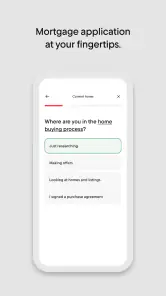
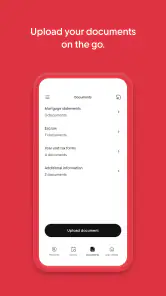
- Fully digital mortgage application with convenient document uploads.
- Clear loan calculators help estimate payments and affordability.
- Wide range of mortgage options for different buyer situations.
- Secure account tools make it easy to track application progress.
- Helpful educational resources explain key steps in the mortgage process.
Cons
- Rates and fees can vary
- so comparing with local lenders is important.
- Not every loan type or borrower situation may be supported online.
- Customer service experiences can differ during busy application periods.
- Preapproval does not guarantee final approval or a specific interest rate.
- The app is mainly useful in the United States and requires personal data.

- Category
- Finance
- Version
- 10.35.0











