Rocket Money - Bills & Budgets
- 41.89K
- 4.5
- Installs
- 10.00M
- Price
- Free

Screenshots
Analysis by Reviewed
I would approach Rocket Money - Bills & Budgets as a way to spot money patterns and take a few practical actions, rather than as a replacement for careful financial decisions. It is a free finance app from Rocket Money - Bills & Budgets, and its focus is on bringing spending, budgets, bills, and subscriptions into one place. The app has a 4.6 average from around 118,000 ratings, and more than 10 million installs. That level of use may be reassuring, but it does not make every feature right for every person.
Getting started and finding your first win
When you first open it, expect the useful picture to build as you set things up and review the activity it brings together. The app is rated for Everyone, runs on Android 9 and up, and version 12.5.0 is the current release. I would begin by checking the app’s account-connection steps and deciding which financial accounts you actually want to include. Connecting everything at once can make the first review feel cluttered; starting with the accounts you use most often gives you a clearer baseline.
Make setup manageable
After linking accounts, take a few minutes to inspect transaction categories instead of assuming every purchase has landed in the right place. A shared household purchase, a refund, or an unusual one-off payment can make a category look misleading. Correcting those early helps budgets reflect your real habits rather than a rough first impression. If you prefer not to connect accounts to a finance app, that is a good reason to skip this style of tool and use a manual spreadsheet or your bank’s own transaction view instead.
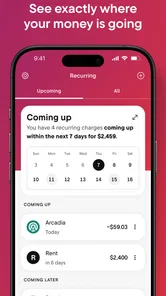
For a first meaningful result, I would check the recurring charges before building a complicated budget. Look for services you recognize but no longer use, then confirm the account and cancellation details before taking action. That simple review can turn the app from another dashboard into something useful. Subscription detection can point you toward a charge, but you should still verify what it is and whether cancelling it affects a plan or service you want to keep.
Use budgets as signals, not verdicts
Budgets are most helpful when you treat an alert as a prompt to look again, not proof that you have failed. If a grocery limit is nearly reached early in the month, check whether a larger stock-up or a shared purchase explains the jump. You might adjust the category for a real change in routine, or simply plan the remaining weeks more carefully. I would avoid setting very tight limits on day one: a budget based on a short slice of spending can create noise instead of useful guidance.
A realistic use case is a person who notices several small recurring charges while checking their monthly spending. They can review each one, decide which still earns its place, and use the app’s subscription tools where available. Then they can watch the relevant category over the next few weeks rather than trying to overhaul every habit at once. That sequence—inspect, decide, and follow up—is more sustainable than treating one alert as a complete financial plan.
Where it fits among finance tools
Compared with a bank app, Rocket Money is aimed at a broader view across spending and recurring bills, while a bank’s own tools may be simpler if you only need to monitor one account. Compared with a spreadsheet, it can reduce manual transaction entry, but a spreadsheet offers more control over the structure and does not require you to bring accounts into an additional app. I think this app suits people who want help noticing patterns and managing subscriptions; it is less suitable for someone who wants highly customized bookkeeping or prefers to keep all tracking offline.
More From Our News Desk

 Bolt: Request a Ride
Bolt and the Shift from One-Tap Rides to More Legible Trips
Bolt shows how ride-hailing is shifting from a one-tap taxi request toward a more legible, choice-driven trip, while leaving the hardest questions of price and reliability unresolved.

 Farm Land - Farming life game
Farm Land Review: A Small Island Farm with a Satisfying Loop
A bright, breezy island farm turns a few quick chores into a satisfying cycle of planting, harvesting, expanding, and deciding what to build next.

 Android Auto
’s Community Takes Shape in the Passenger Seat
Its most valuable network is not a public feed but a shared set of routes, voice habits, app integrations, and advice that make driving less isolating—and sometimes more complicated.

 My Talking Angela
 Makes the Virtual Pet Feel Personal
A polished pet-raising game built on small rituals, playful customization, and a character who gives everyday screen time a surprisingly personal rhythm.

 Google Translate
 Review: A Pocket Tool for the Small Frictions of Travel
From menus and signs to quick conversations, Google Translate earns its place by cutting the little delays that make unfamiliar language feel like a barrier.

 Shazam: Find Music & Concerts
Shazam’s Best Trick Is Turning a Song Into a Night Out
A few seconds of recognition can settle an argument, rescue a half-remembered chorus, and point toward a live show. Shazam’s real trick is what happens after the match.
Latest News



There are trade-offs to keep in mind. Account connections and automatic categorization save effort, but they still deserve occasional review, and a category label should not be mistaken for a full explanation of a purchase. Subscription cancellation is convenient when the listed service is correctly identified, yet it is worth checking the service’s own terms and confirming the cancellation took effect. The app also offers in-app purchases ranging from $0.99 to $59.99 per item, so I would check what a paid option includes before choosing it; the free download does not mean every possible feature is necessarily free.
What I would do next
Once the first review is done, I would pick one specific goal for the next month: reduce a category that feels too high, remove a charge I no longer want, or simply understand where a regular bill is coming from. Revisit the relevant activity after a few weeks and adjust only if the pattern is real. This keeps the app focused on decisions you can act on instead of encouraging you to watch every number constantly.
Have you ever felt like your finances are spiraling out of control? Enter Rocket Money, the app that promises to reign in your spending and put you back in the financial driver’s seat. I decided to give it a whirl and here’s what I found.
First Impressions
Upon downloading Rocket Money, I was immediately struck by its sleek and user-friendly interface. The app is designed to be intuitive, with a simple navigation system that even the least tech-savvy among us can manage. Signing up was a breeze, requiring just a few taps and swipes, and I was ready to dig into my financial habits.
Tracking Your Bills
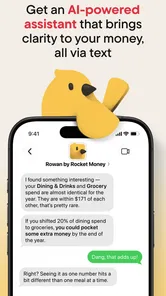
One of the standout features of Rocket Money is its ability to track your bills automatically. The app connects securely to your bank accounts and credit cards, pulling in all of your transactions. It then categorizes these transactions, so you know exactly where your money is going. I found this incredibly useful; no more guessing or manually entering expenses. It’s like having a personal accountant in your pocket!
Setting Budgets
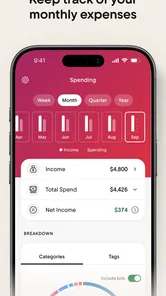
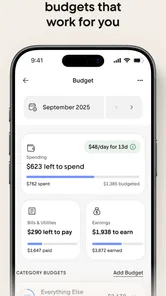
Setting up budgets was another feature I loved. Rocket Money allows you to set limits on different categories, such as groceries, dining out, and entertainment. The app sends you alerts when you’re nearing your limits, helping you stay on track. I was pleasantly surprised by how much I saved just by being aware of my spending habits. It turns out those little coffee runs add up!
Cancel Unwanted Subscriptions
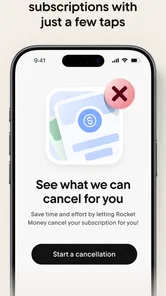
Another nifty feature is the ability to cancel unwanted subscriptions directly through the app. We’ve all signed up for a trial and forgotten about it, only to be charged the next month. Rocket Money identifies these sneaky subscriptions and offers an option to cancel them with a simple tap. It’s a game-changer for those of us who have a habit of forgetting to cancel unused services.
Security and Privacy
Now, I know what you’re thinking. An app that connects to your bank accounts must be a security risk, right? Well, Rocket Money takes security seriously. It uses bank-level encryption to protect your data and doesn’t store your banking credentials. This gave me peace of mind while using the app.
Rocket Money - Bills & Budgets is a comprehensive tool for anyone looking to manage their finances better. Its combination of bill tracking, budgeting, and subscription management makes it a must-have for anyone trying to get a handle on their money. If you’re ready to take control of your finances, give Rocket Money a try. You might just find it’s the financial assistant you never knew you needed.
Build a useful first-week routine
For a first-time user, the best approach is not to inspect every screen in one sitting. I would connect the accounts that show ordinary spending, review a short stretch of transactions, and note any recurring charges that deserve a closer look. Then I would leave the app alone for a few days and return when new activity gives the overview more context. This makes it easier to distinguish a genuine pattern from a single unusual purchase.
One practical detail is to treat recurring charges as leads rather than final answers. A familiar merchant name can appear differently from the service name you remember, and a household member may have started or renewed the plan. Before cancelling, check who uses it and whether the charge belongs to a bundle or annual arrangement. The small pause is worthwhile: a quick cancellation can save money, but an incorrect one can create hassle or interrupt something the household still needs.
When automatic tracking helps—and when it does not
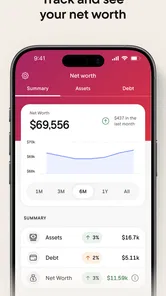
Automatic transaction imports are most valuable when you have several regular purchases and do not want to enter each one by hand. They can help you notice that takeout, transport, or small digital charges are adding up, especially when those expenses are spread across more than one account. But automation is not the same as bookkeeping. If you split purchases between personal and work expenses, share costs with other people, or need precise records for a business, you may need to review entries carefully or choose a tool built for detailed accounting.
There can also be a delay between a purchase and the moment it makes sense in a spending overview. A pending transaction, refund, or corrected charge may change what you first see. I would avoid making a major budget decision based on one fresh transaction; check again once the activity has settled. That habit is particularly useful after travel or a large household shop, when several unusual expenses can briefly distort a normal category.
Who is likely to get the most from it
I think the app is a good fit for someone who wants a gentle nudge to review subscriptions and spending without maintaining a detailed spreadsheet. It can also help a person who has recently started paying their own bills and wants a clearer view of regular outgoings. If you are trying to make one modest change—such as finding an unused service or understanding why a category keeps running high—the focused tools are more approachable than building a complete financial system from scratch.
On the other hand, I would skip it if linking financial accounts feels uncomfortable, if you want every transaction entered and categorized manually, or if you need advanced planning for investments, taxes, or business cash flow. A bank app may be enough for someone with one main account and simple spending. A spreadsheet is better for someone who wants complete control over formulas and categories. The right choice depends less on which tool has the most features than on whether you will trust and maintain the view it gives you.
Use the overview to ask better questions
Instead of asking only, “Where did my money go?”, I would use the app to investigate a specific decision. Is a recurring payment still worth keeping? Did a change in routine push one category up? Is a regular bill predictable enough to plan around? Those questions turn the dashboard into a practical review rather than a stream of numbers to check whenever you have a spare moment.
For example, imagine that a person’s monthly spending looks unexpectedly high after a busy week. They could inspect the transactions, correct a miscategorized purchase, and see whether the increase came from a one-off expense or a repeated habit. If it was a one-time cost, there may be no reason to lower the budget permanently. If the same kind of purchase appears regularly, they can decide on a realistic limit and check back later. The useful insight is not simply that spending rose; it is whether the change is likely to happen again.
Keep expectations grounded
Rocket Money can make review easier, but it cannot decide which expenses matter to you or guarantee that every account entry tells the whole story. A subscription tool can help surface charges, while the final choice still depends on the service, the plan, and the people who use it. Likewise, a budget alert can highlight a category that needs attention without telling you whether the right response is to spend less, change the limit, or accept a temporary exception.
I would also keep the cost decision separate from the first download. The app is free to install, while optional in-app purchases are listed from $0.99 to $59.99 per item. Before paying for anything, I would identify the specific task I expect the paid option to solve and compare that with what I can already do in the free experience. If I only want to review charges and get a basic sense of spending, I would start there and decide later whether an added option is worthwhile.
A sensible next step
After the initial review, choose one action that is small enough to finish: confirm whether a recurring service is still wanted, correct a transaction that is distorting a budget, or set a category limit based on a more representative stretch of spending. Then give yourself time to see whether the change makes the app more useful. That keeps the process manageable and avoids turning financial tracking into another source of pressure.
My overall view is that Rocket Money works best as a practical check-in for people who want a clearer picture of bills, subscriptions, and everyday spending in one place. Its value comes from following through on what you notice, not from watching every transaction or expecting an app to make financial choices for you. If that kind of guided review sounds helpful, it is worth trying; if you need offline control or detailed accounting, a spreadsheet or a more specialized tool will likely suit you better.
Rocket Money - Bills & Budgets Frequently Asked Questions
What does Rocket Money help me manage in one place?
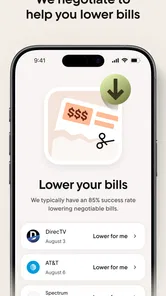
Rocket Money is a finance app for handling several everyday money tasks together. Its tools cover subscription management and cancellation, bill-lowering options, expense tracking, and budgets. That combination may be useful if you want to review recurring costs alongside your regular spending, rather than keeping those tasks separate. The app’s short description is simply “Rocket Money.”
Do I need to connect financial accounts to use Rocket Money?
Rocket Money can help organize financial activity, but think about your comfort level with sharing account information before you begin. The app is designed to track expenses, manage subscriptions, and support budgeting, and connecting accounts can help bring relevant activity into view. Review the permissions and connection steps presented in the app, and proceed only if you are comfortable with them.
Can I use Rocket Money just to track expenses without managing subscriptions?
Yes. Subscription management is one of Rocket Money’s features, but it also supports expense tracking and budgeting. You can focus on the tools that fit your needs, such as reviewing spending or planning a budget, rather than treating every feature as necessary. Before relying on a particular tool, explore its options in the app and see whether its approach works for you.
Is Rocket Money free to download, and are there in-app purchases?
Rocket Money is free to download, so you can get started without paying for the app itself. It also offers in-app purchases, with listed options ranging from $0.99 to $59.99 per item. Before choosing any paid option, review the details shown in the app so you understand what it includes and whether it suits your needs.
What devices can run Rocket Money?
Rocket Money is available for Android and iOS devices, and its minimum operating system requirement is version 9. Check that your device meets this requirement before downloading. The app is intended for finance management, so you can use it to organize money-related tasks such as reviewing expenses, creating budgets, and managing subscriptions.
Pros
- Intuitive user interface
- Comprehensive budgeting tools
- Bill tracking feature
- Real-time spending alerts
- Secure data encryption
Cons
- Limited free features
- Occasional syncing issues
- Ads in the free version
- No joint account support
- Customer support response time