Reverso Translate and Learn
- 3.27K
- 4.6
- Installs
- 10.00M
- Price
- Free

Screenshots
Analysis by Reviewed
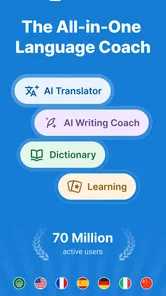
I reach for a translation app for two very different reasons: to get through a moment when I don’t understand something, and to make sure I remember the useful language afterward. Reverso Translate and Learn tries to serve both needs, pairing quick translations with reference and learning tools. That combination is the main reason I’d consider it over a bare-bones translator, especially if I want to build a habit of noticing how a phrase works instead of copying a result and moving on.
Choosing a translator that teaches as it helps
My first decision is whether I need a quick answer, a dependable reference, or ongoing practice. A general-purpose translator can be the simplest choice for one-off text, while a traditional dictionary is often better when I want a focused definition and a clearer sense of a word’s range. Reverso sits between those options: it is useful for looking up language in context, and it also gives me ways to return to words and phrases later. That makes it a better fit for curious learners than for someone who only wants the fewest possible steps between a question and an answer.
Before choosing, I’d ask myself what happens after the lookup. If I’m reading a menu or checking a quick message, speed matters most. If I’m trying to understand why a sentence is phrased a certain way, examples and reference tools matter more. Reverso is most appealing when I expect to make that second kind of lookup often enough for the extra learning options to earn their place on my phone.
The app comes from Reverso Technologies Inc. and belongs to the books and reference corner of language apps. It is free to install, rated for Everyone, and its average rating is 4.7 from around 276,000 ratings. More than 10 million installs suggest it has found a broad audience, but I’d still choose it based on how I actually work with language: the useful question is whether I want a translation to become a learning prompt.
What Makes It Stand Out?
The first thing you’ll notice about Reverso Translate and Learn is its incredibly user-friendly interface. It’s almost as if the app speaks to you, guiding you through every feature without breaking a sweat. You don’t need to be a tech wizard to navigate this app; everything is laid out in a way that’s intuitive and straightforward.
Translation Features
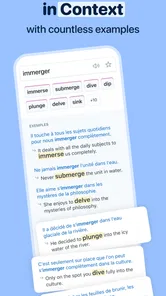
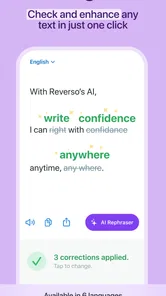
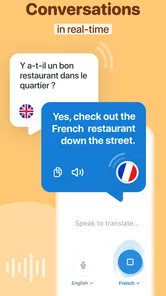
Let’s dive into the heart of the app – the translation feature. Whether you’re traveling abroad or just trying to understand a foreign film without subtitles, this app has got you covered. It offers translations in multiple languages, and what’s even cooler is that it provides contextual translations. This means it doesn’t just translate word for word but gives you the meaning based on the context, which is super helpful when dealing with idioms or phrases that don’t translate directly.
In practice, I’d use contextual results as a way to compare possible phrasing, not as a guarantee that every sentence is ready to send unchanged. A short phrase may have several natural equivalents depending on who is speaking and how formal the exchange is. Looking at examples can help me spot that difference, but it still takes judgment to choose wording that fits a particular person or situation.
More From Our News Desk

Weather by Xiaomi Review: Clear at a Glance, Less Clear Up Close

X Under Pressure: Can It Recover When Posting Goes Wrong?

Clash of Clans Is Won Between the Battles

Android Auto Makes the Case for Quieter Car Software

MobiOffice: Transforming Mobile Productivity with Seamless Integration

EA SPORTS FC™ Mobile Soccer: Redefining Mobile Sports Gaming
Using context without trusting it blindly
Context is most valuable when I use it to compare possibilities rather than treat the first result as universally correct. If I’m translating an idiom, a message, or a line from a show, I check whether the example fits the speaker, tone, and situation. For something important—such as a formal request or a delicate conversation—I’d read the wording carefully and, if possible, ask a fluent speaker to check it. This is a practical limit of translation apps in general: a plausible sentence can still miss nuance.
A useful everyday routine is to look up a phrase, choose the version that matches the situation, then save the expression I might need again. For example, before a trip I could collect greetings, polite questions, and phrases for asking someone to repeat themselves. That turns a last-minute lookup into a small personal reference set. It also helps answer a common concern: I don’t have to approach the app as a course or study for a long session; I can use it in short bursts around the language I’m already encountering.
Learning While Translating
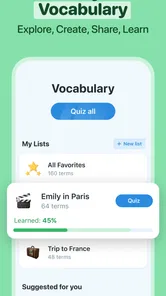
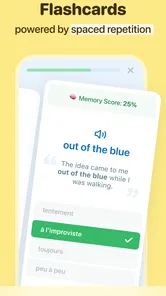
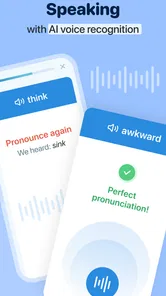
Now, here’s the fun part. While you're translating, you're also learning! The app isn’t just a translation tool; it’s also a language tutor. It offers examples, pronunciation guides, and even quizzes to test your knowledge. You can save your favorite phrases or words and revisit them anytime, making it a personalized learning experience.
One way to make those features more useful is to keep a small collection organized around an actual purpose rather than saving every interesting result. I might gather phrases for asking directions, or words I keep meeting in a book, then revisit that set before the next trip or reading session. That gives practice a clear context. It also makes the saved material easier to connect to real conversations than a long, miscellaneous list would be.
Saving a phrase is more useful when I add a little context in my own mind: where I saw it, what I wanted to say, or why one translation seemed more natural. Revisiting a short, relevant collection is less daunting than trying to memorize a long list of disconnected vocabulary. The trade-off is that saved items only help if I return to them; if I never review, the learning side becomes easy to ignore. I’d treat the quizzes and phrase collection as a supplement to real reading, listening, and conversation, not a replacement for them.
Handy Tools for Every Learner
Reverso doesn't stop at just translating and teaching. It also includes a conjugation feature for verbs, a dictionary for definitions, and a phrasebook. These tools are especially handy if you're in the middle of a conversation in a foreign language and need a quick reference. The app also offers offline access, so you can continue learning even without internet connectivity.
The verb tool is particularly helpful when I already know the meaning I want but need to check how the verb changes in a sentence. That is a different problem from translating a whole thought: it lets me focus on one grammatical choice instead of accepting a complete translated sentence without understanding its parts. For a learner who is starting to write, that narrower check can be a practical bridge between looking up a word and using it independently.
Those reference tools make it worth keeping around after the initial translation. If I’m writing a sentence and get stuck on a verb, checking its conjugation can be more useful than translating the whole sentence and hoping I notice the grammar. Offline access can also be reassuring when I’m preparing ahead for a place where connectivity may be unreliable. I’d still do any essential lookups before setting out, and I wouldn’t assume every function behaves identically without a connection; the safest approach is to test the material I plan to rely on while I’m online.
For a realistic travel day, I can imagine checking a phrase before leaving the hotel, saving a couple of useful expressions, and returning to them when I need to ask a question later. The benefit is not that an app removes the awkwardness of speaking another language; it gives me a chance to prepare instead of improvising every word. I’d keep important details—such as names, addresses, and the exact wording of a sensitive request—somewhere reliable as well, rather than trusting a translation result as the only record.
Language coverage is another reason to check whether it matches your plans. Reverso’s focus includes Spanish, French, German, Italian, and Arabic, so it can be a practical companion if one of those is the language you’re studying or using. If your priority is a language outside that set, or a highly specialized dictionary for a particular field, I’d compare dedicated options before settling on it. The app is most convincing when its translation, examples, and reference tools apply to the language and task in front of you.
When a different option makes more sense
For a traveler who needs quick help with a sign or a short exchange, a simpler translation tool may be easier to reach for. For a student who needs detailed grammar instruction, a structured course or textbook may provide a clearer sequence than a collection of lookups and practice. And for professional, legal, or medical wording, I would not rely on an app alone. Reverso’s strength is the middle ground: everyday understanding plus a route back to useful language, rather than specialized expertise in every situation.
The choice also depends on what kind of reference I trust. A conventional dictionary may be a better fit when I want to examine a definition in depth, while a course can provide a planned progression that lookups do not. A basic translator is usually the more direct option when I only want a quick conversion. Reverso’s particular trade-off is that it asks me to engage with examples and saved language; that extra step is worthwhile when I’m learning, but unnecessary friction when I’m in a hurry.
There is also a small cost decision. The app is free, with optional in-app purchases ranging from $1.99 to $40.99 per item. I’d start with the free experience and decide whether I use its tools regularly before paying for anything. That keeps the choice grounded in my own routine rather than assuming extra access is necessary from day one.
If I’m comparing it with another app I already use, I wouldn’t move everything at once. I’d test the same few phrases in both: one everyday sentence, one idiom, and one verb I’m unsure how to use. Then I’d compare not just the wording but how easily I can understand why a result fits. That little trial reveals whether Reverso’s contextual approach is genuinely useful to me or whether my existing tool already answers my questions with less effort.
If I already use another translator, switching does not need to mean abandoning it. I can keep the familiar app for fast, occasional checks and try Reverso when I want examples, verb forms, or a phrase worth saving. The learning curve should be modest for someone comfortable with reference apps, but any saved vocabulary or habits I’ve built elsewhere won’t automatically make the change worthwhile. I’d switch only if I find myself returning to Reverso’s contextual examples and learning tools often enough to justify making it part of my routine.
The current version is 14.9.0 and supports Android 6.0 or later. That is useful to know if I’m installing it on an older Android device, though I’d still check the relevant store page for the device I’m using. A strong average rating is reassuring, but it can’t tell me whether the app’s workflow suits my own study style; a few real lookups are a better test.
Voice input can be convenient when typing would slow me down, such as when I’m holding a bag or trying to capture a phrase I’ve just heard. I’d still check the recognized text before trusting the translation, because a mistaken transcription can send the lookup in the wrong direction. For a name, a noisy setting, or a sentence where each word matters, typing or reviewing the text first gives me more control.
That small check is worth making part of the workflow: speak or enter the phrase, inspect what the app understood, then compare the translation and examples. It prevents me from confusing a transcription problem with a translation problem. When I’m learning, it can also reveal which part I didn’t hear clearly, making the lookup more useful than simply accepting a result and moving on.
Who I’d recommend it to
I’d recommend Reverso to learners who regularly meet unfamiliar phrases and want to understand more than a rough equivalent, as well as travelers who prefer preparing a small set of useful expressions before they need them. It is also a sensible reference companion for someone who checks definitions or verb forms while reading or writing. I’d skip it if I only need an occasional instant translation, want a full step-by-step language course, or need authoritative wording for a high-stakes document. In those cases, a simpler translator, a dedicated learning program, or a qualified human translator is a better match.
It suits people who are comfortable learning in small, self-directed moments: a phrase from a conversation, a sentence in a book, or a verb that keeps causing trouble. It is less suitable for someone who needs a complete curriculum with a fixed sequence and regular instruction. If that structure is what keeps you motivated, I’d choose a course first and use Reverso as a supporting reference rather than expecting it to provide the whole learning plan.
Ending Thoughts
Overall, Reverso Translate and Learn is not just an app; it’s a companion for anyone eager to bridge language gaps. It’s perfect for travelers, students, or anyone curious about languages. The app’s ability to make learning engaging and accessible is what makes it truly unique. So, the next time you’re in a language pickle, you know which app to turn to!
My recommendation is to try it for a specific task rather than install it with a vague promise to study more: look up a phrase you’ve actually encountered, compare the context, and save it if you can imagine using it again. If that process feels helpful, Reverso earns a place alongside your other language tools. If you just want the fastest possible answer and never revisit what you searched, a more stripped-down alternative may suit you better.
Reverso Translate and Learn Frequently Asked Questions
Can Reverso Translate and Learn help me understand unfamiliar expressions, not just individual words?
Yes. Reverso Translate and Learn is a translation and dictionary app that uses context examples to help explain how words and phrases are used. This can be helpful when a direct translation alone does not make an expression’s meaning clear. You can use those examples to explore vocabulary and compare how a phrase works in context while studying or looking something up.
Is Reverso Translate and Learn suitable for beginners who want to study a new language?
Reverso Translate and Learn can be useful for beginners as well as people who already know some of a language. Alongside translation, it offers learning features such as flashcards and quizzes, while context examples can help show how words and phrases are used. These tools make it possible to explore vocabulary and practice at your own pace.
What is Reverso Translate and Learn and how does it work?
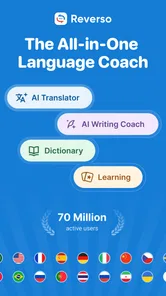
Reverso Translate and Learn is a comprehensive language translation app that offers users the ability to translate text, voice, and even images. It leverages advanced AI technology to provide translations in multiple languages. The app also includes language learning features, such as flashcards and quizzes, to help users improve their language skills. By using context-driven examples, it aids users in understanding and learning languages more effectively.
Is Reverso Translate and Learn free to use?
Reverso Translate and Learn offers a free version, with optional in-app purchases ranging from $1.99 to $40.99 per item. The free version provides basic translation features, while the premium version unlocks additional features such as offline mode, advanced learning tools, and an ad-free experience. Users can choose the version that best suits their needs, with the option to upgrade for enhanced functionality.
How accurate are the translations provided by Reverso Translate and Learn?
The translations offered by Reverso Translate and Learn are designed to be useful in context, with examples that help users understand words and phrases. While no translation tool can be perfect, Reverso aims to provide translations that are as close to human understanding as possible. Users can also view examples of words and phrases in context to better grasp their meanings.
Pros
- Accurate translation results.
- User-friendly interface design.
- Offline mode availability.
- Supports multiple languages.
- Includes pronunciation guide.
Cons
- Free version has ads.
- Limited features without subscription.
- Occasional translation delays.
- Pronunciation sometimes inaccurate.
- Requires internet for some features.











