Remind: School Communication
- 71.80K
- 4.3
- Installs
- 10.00M
- Price
- Free

Screenshots
Analysis by Reviewed
I judge a school communication app by a simple test: can it help a family turn a teacher’s message into the right next step without adding another confusing inbox? Remind: School Communication is built around that everyday handoff between school and home. In my view, it works best as a place to follow routine class updates and ask or answer practical questions, not as a replacement for every tool or conversation a school uses.
Where people can get stuck
The first hurdle is usually getting connected to the right class or school community. A parent may install the app and still have no useful messages to read until the relevant educator or school has invited them or shared a way to join. I would check that connection before judging the app: an empty feed can be a setup issue, not a sign that the service has nothing to offer.
There can also be a difference between receiving a notice and knowing what to do next. A brief message about a changed schedule may be easy to understand, while a longer instruction or attachment can require a careful read. I recommend opening school messages when you have a moment to act on them, then noting dates or tasks in the calendar or planning system your household already uses. That avoids treating a notification as a complete task-management solution.
Before the first important message
One detail worth settling early is who in a household is responsible for checking each school conversation. If two caregivers both assume the other has read an update, the app cannot resolve that coordination problem. I would agree on a simple arrangement—one person monitors a particular class, or both check but confirm who is handling any requested action. That small habit is more useful than turning on every alert and hoping the phone sorts out family responsibilities.
It also helps to decide how you will preserve information that matters beyond the day it arrives. A message about an event can be easy to find in its original conversation, but a date that needs to shape work or childcare plans belongs in the calendar your household already checks. I treat Remind as the source for the school’s wording and context, then move only the lasting action into a separate planner. This keeps the app focused instead of forcing it to become a second calendar.
What Remind is useful for
In practical terms, Remind: School Communication gives educators and families a shared route for school-related messages. The app is free, belongs to the education category, and is developed by Remind101. It has an average rating of 4.3 from around 228,000 ratings, with more than 10 million installs. Its Everyone age rating makes it suitable for a broad audience, though families should still follow their school’s own guidance about who should receive and manage messages.
The app’s value depends heavily on whether a school community actually uses it. When teachers send regular notes there, families have a more focused place to check than a parent group chat, where unrelated conversation can bury an announcement. If your school distributes important information through several channels, though, Remind will not automatically gather those other messages into one complete feed. I would first learn which channel is authoritative for each kind of update.
More From Our News Desk

 Bolt: Request a Ride
Bolt and the Shift from One-Tap Rides to More Legible Trips
Bolt shows how ride-hailing is shifting from a one-tap taxi request toward a more legible, choice-driven trip, while leaving the hardest questions of price and reliability unresolved.

 Farm Land - Farming life game
Farm Land Review: A Small Island Farm with a Satisfying Loop
A bright, breezy island farm turns a few quick chores into a satisfying cycle of planting, harvesting, expanding, and deciding what to build next.

 Android Auto
’s Community Takes Shape in the Passenger Seat
Its most valuable network is not a public feed but a shared set of routes, voice habits, app integrations, and advice that make driving less isolating—and sometimes more complicated.

 My Talking Angela
 Makes the Virtual Pet Feel Personal
A polished pet-raising game built on small rituals, playful customization, and a character who gives everyday screen time a surprisingly personal rhythm.

 Google Translate
 Review: A Pocket Tool for the Small Frictions of Travel
From menus and signs to quick conversations, Google Translate earns its place by cutting the little delays that make unfamiliar language feel like a barrier.

 Shazam: Find Music & Concerts
Shazam’s Best Trick Is Turning a Song Into a Night Out
A few seconds of recognition can settle an argument, rescue a half-remembered chorus, and point toward a live show. Shazam’s real trick is what happens after the match.
Latest News



Setup checks that make a difference
Before relying on it for a time-sensitive announcement, I would confirm that I joined the intended class and that the message thread is the one the school actually uses. If a family has more than one student, keeping each school or class context clear matters: a correct message in the wrong mental bucket can still be missed. It also helps to review the phone’s notification settings if alerts are not appearing, since a muted device or system-level setting can affect what reaches the screen.
Remind is a free education app from Remind101, and its broad reach—over ten million installs and an average rating of 4.3 from around 228,000 ratings—suggests it is familiar to many school communities. It is rated for Everyone, with version 15.6.4 listed and Android support starting at OS 9. Those details make it worth checking device compatibility before installing, especially on an older phone. The app has been around since 2012, but a long presence does not remove the need to check that your particular school uses it.
For a smoother start, I would check the invitation details carefully instead of guessing at a class or educator name. If the school has supplied a specific way to join, use that route and make sure the resulting conversation matches the student and class you expect. When a caregiver supports more than one child, a moment spent verifying each connection can prevent later confusion about which teacher sent an instruction.
What messages are good at—and what still takes judgment
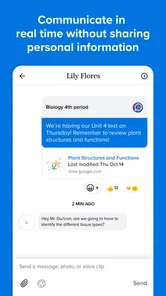
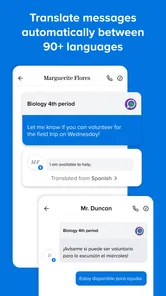
One of the coolest things about Remind is its ability to send messages in real-time. Imagine getting a quick ping about a last-minute schedule change or a reminder about tomorrow’s field trip. It’s like having the school’s office in your pocket! Plus, the app supports multiple languages, making it accessible for everyone, no matter where you're from.
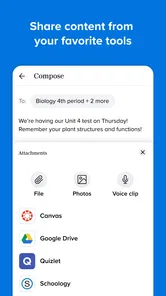
Another feature that I personally find useful is the ability to send attachments. Teachers can share class syllabi, project guidelines, or even fun photos from classroom activities. It brings an enhanced sense of community and engagement, bridging the gap between school and home.
Attachments also change how I would handle a message. A short alert can tell me that something needs attention, but the file or accompanying details may contain the actual instructions. I would open the attachment before forwarding a summary to another caregiver, rather than relying on memory or a cropped notification preview. If the attachment is unclear or appears to conflict with a teacher’s message, asking the school is safer than interpreting it on behalf of everyone.
Recovering a school communication workflow
For a practical routine, I would check school messages at a predictable point in the day rather than reacting to every alert immediately. A caregiver can read a teacher’s note after work, identify whether it asks for a reply or preparation, and then pass only the needed details to another family member. Attachments are especially useful when instructions are easier to revisit than to remember, but they are not a substitute for confirming a confusing or urgent point with the school.
If an expected update seems missing, I would first check the correct class, the conversation history, and the device’s notification settings. Then I would ask the teacher or school whether the message was sent through Remind or another channel. That small check prevents a common dead end: repeatedly reopening an app when the information was shared somewhere else.
When an alert is absent but a message is visible in the conversation, I would separate the two problems: the message exists, but the phone may not have surfaced it. Checking whether the device is muted and whether notifications are allowed is a sensible first step. If neither the conversation nor the alert is present, confirming the class and asking the school about its chosen channel is more productive than reinstalling immediately. I prefer this order because it checks the likely sources of confusion before changing anything on the phone.
A realistic busy-day routine could look like this: a caregiver checks the relevant class after work, sees a note about a change for the next morning, opens the attachment for the precise instructions, and sends the other caregiver one concise summary. The person responsible then adds the timing or needed item to the household’s existing plan. The useful part is not simply seeing a notification; it is creating a clear handoff so the right person acts.
How it fits beside email and group chats
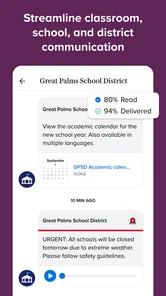
Compared with relying on email, paper notices, or a general family group chat, a school communication app can keep educator-to-family messages more focused and easier to find in their original context. A group chat may be better for informal coordination among parents, while email can be more convenient for long documents or conversations that need a detailed record. I would not expect Remind to replace a school’s official procedures, personal meetings, or emergency instructions. Families should continue using whichever channel the school designates for those situations.
The choice between Remind and email is not always either-or. Email can be easier for a long explanation that a family wants to search or save alongside other correspondence, while a school messaging channel can make short, class-specific updates easier to notice in context. Paper can still be useful when a school asks for a signed form or when a household wants a physical reminder at home. I would use each channel for the job the school assigns rather than forwarding everything into a single informal chat, where details can lose their original source.
It may also be the wrong fit if your school does not use it consistently, if you prefer to keep school communication out of phone notifications, or if you need a full planner for assignments and household calendars. In those cases, the app can add another inbox rather than reduce friction. A useful approach is to agree at home who will monitor school updates and how important dates will be recorded, instead of assuming every adult will see every alert.
Who benefits most from the routine
I think the clearest fit is a caregiver who wants a direct way to follow a participating teacher’s everyday updates, especially when several adults share responsibility for a student. It can also suit educators who need a channel for practical class communication and families who prefer messages to appear apart from social conversations. The advantage is strongest when everyone knows where to look and what kind of information belongs there.
I would be more cautious if a family already struggles with notification overload. Adding one more stream can make important messages harder to spot unless alerts and checking habits are managed deliberately. Someone who needs assignment tracking, a shared household calendar, or a comprehensive school portal should keep using a tool designed for those broader tasks. Remind can complement those systems, but it should not be mistaken for a full academic organizer.
For households with different schedules, a useful compromise is to designate one person to notice new updates and pass on only decisions or tasks that affect others. That avoids duplicating every message across several chats. It also makes it easier to see whether a school communication has been handled without turning the family’s informal conversation into a second copy of the entire class feed.
Why You’ll Love It
Now, if you’re anything like me, juggling between work, home, and school activities can be a bit overwhelming. But with Remind, it feels like a breeze. You can set reminders for important dates, and the app will nudge you just in time. No more forgetting about the parent-teacher meeting or the science fair!
What’s even better? You don’t need to worry about privacy. Remind ensures all communications are secure, so you can chat away without any concerns.
Everyday use and a balanced verdict
Picture a teacher sending a note that tomorrow’s activity needs a particular item. A parent sees the message between errands, opens the attachment for the details, and adds the item to the family’s evening checklist. That is where a direct school channel can genuinely help: it shortens the path from announcement to action. The trade-off is that families still need a dependable habit for checking messages and handling tasks after reading them.
Overall, I would recommend Remind to families and educators whose school already uses it for regular communication, especially when several people need to stay informed about class updates. I would skip it as a standalone solution for organizing all schoolwork or as a guaranteed route for urgent contact. Used for the job it is suited to, it can make routine updates easier to follow without pretending that every school communication problem is an app problem.
My practical advice is to try it first with one active class, learn how that school uses the conversation, and decide who in the household will follow through on messages. If the connection is useful, it can become a steady part of the school-day routine. If updates remain scattered across channels or the app creates more alerts than clarity, that is a sign to revisit the school’s communication plan rather than keep adding habits that nobody can maintain.
Final Thoughts
In a world where communication is key, Remind: School Communication stands out as a reliable friend. It’s intuitive, user-friendly, and a must-have for anyone involved in the school community. So, if you haven’t tried it yet, give it a go. Trust me, it’ll make your life a whole lot easier!
Ready to transform your school communication experience? Download the app today and see the difference for yourself. It’s time to stay connected, informed, and stress-free with Remind!
Remind: School Communication Frequently Asked Questions
Do I need an invitation or class code to join a school community on Remind?
Remind is most useful when you can connect with the teacher, class, or school you want to follow. Before downloading, check how your school or teacher invites families and students to join, since you will need a way to reach the relevant group. Once connected, the app provides a place to receive school messages and reminders.
Can I choose which school notifications I receive?
Remind sends notifications so users can keep up with messages and updates from their school community. Keeping notifications enabled can make it easier to notice time-sensitive information, while the messages themselves remain available in the app. Think about how you prefer to follow classroom communication and check your device’s notification settings after installing.
Is Remind suitable for students as well as parents and teachers?
Yes. Remind is designed for communication among teachers, students, and parents, and each can use it to stay connected with a school or classroom community. Teachers share updates, while students and families can follow messages and reminders. Its usefulness depends on whether the relevant class or school uses the app and how members are invited to participate.
Can I use Remind without creating a school or classroom group?
Remind is built around communication between teachers, students, and parents, so its usefulness depends on having a class or school community to connect with. Teachers can use group conversations to share messages and reminders, while families and students can receive those updates. Before downloading, consider whether your school or teacher uses Remind and how you will join the relevant communication group.
What kinds of updates can teachers share through Remind?
Teachers can use Remind to send messages, assignments, and reminders to students and parents. Notifications help users keep track of updates, and group conversations make it possible to communicate with a class community rather than relying only on individual messages. The app is focused on school communication, so it can be a convenient place to follow information related to classroom activities and schoolwork.
Pros
- Easy to use interface for all ages.
- Instant messaging with teachers and parents.
- Supports multimedia attachments.
- Real-time updates and notifications.
- Integrates with Google Classroom.
Cons
- Requires internet connection.
- Limited features in free version.
- Notifications can be overwhelming.
- No text formatting options.
- Privacy concerns with data sharing.