RC FPV
- 434.00
- 3.0
- Installs
- 5.00M
- Price
- Free
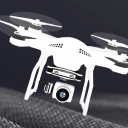
Screenshots
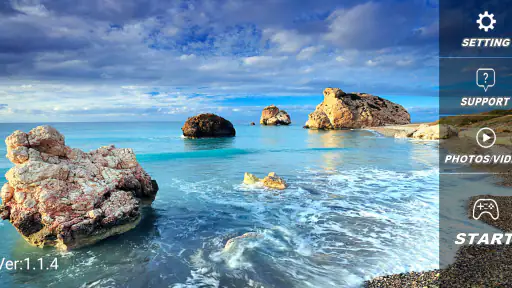
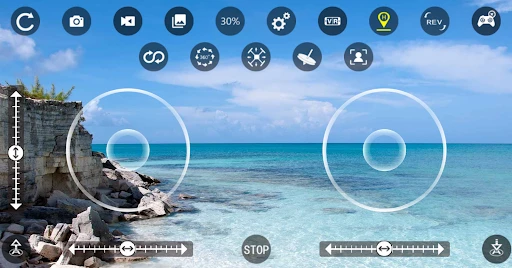

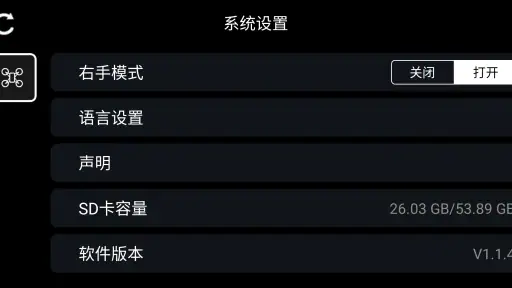
Analysis by Reviewed
I would treat a phone-based flight setup as a practical way to see what a compatible quadcopter camera sees, not as a promise of racing-level speed. In this kind of flying, the useful question is whether the picture and controls remain understandable while the aircraft moves. RC FPV is built around that connection, so its appeal is strongest for casual practice and close-in viewing rather than for anyone expecting a dedicated high-performance piloting system.
Speed is more than a quick response
A live view can make a small quadcopter feel immediate, but the aircraft, wireless link, and phone all shape the experience. I’d start with gentle movements in an open area, then learn how the image behaves before attempting fast turns or flying farther away. That approach helps separate a control mistake from a momentary delay or a change in the video feed. It is also a sensible way to decide whether this phone-based workflow feels responsive enough for your flying style.
For a beginner, the practical benefit is being able to watch the flight from the aircraft’s perspective without first buying into a more involved FPV setup. For an experienced pilot, the trade-off is that a phone app should not automatically be treated like purpose-built goggles or a dedicated controller. If low-latency racing is your main goal, specialist equipment may be a better fit; if you want a straightforward way to try aerial viewing, this app is more relevant.
When a session gets demanding
A useful everyday test is a calm afternoon in a park: connect the phone before takeoff, keep the quadcopter within a clear line of sight, and use the live picture to frame a short pass over an open patch of ground. I would avoid starting near trees, crowds, or busy paths, where attention can be split between the display and the surroundings. Looking up regularly matters even when the screen is clear; the camera view is not a substitute for watching the aircraft and its environment.
Longer sessions also make phone handling part of the setup. A bright screen can be harder to read outdoors, while keeping a camera feed open may use more battery than simply leaving the phone idle. I’d begin with a charged phone, close unrelated apps, and keep the handset secure rather than trying to adjust settings mid-flight. These are small habits, but they reduce distractions when the aircraft is moving.
Reliability and recovery habits
Wireless video can be affected by distance, obstacles, and interference, so I would not assume that a smooth view close by guarantees the same result farther away. Test the connection at short range first and bring the aircraft back if the image becomes unreliable. Before takeoff, it is worth checking the quadcopter’s own battery and control response, then confirming that the phone is still showing the expected view. A cautious return is a better plan than trying to recover a flight through a patchy picture.
RC FPV is a free photography app from cooingdv, released on October 12, 2020. Version 1.8.0 is rated for Everyone and requires Android 6.0 or later. It has an average rating of 3.0 from around 9,300 ratings, with more than 5 million installs and 434 reviews. Those figures suggest a widely tried app, but the modest average is a good reason to approach it with realistic expectations and check that it suits your particular quadcopter before relying on it for an important flight.
More From Our News Desk

Weather by Xiaomi Review: Clear at a Glance, Less Clear Up Close

X Under Pressure: Can It Recover When Posting Goes Wrong?

Clash of Clans Is Won Between the Battles

Android Auto Makes the Case for Quieter Car Software

MobiOffice: Transforming Mobile Productivity with Seamless Integration

EA SPORTS FC™ Mobile Soccer: Redefining Mobile Sports Gaming
If you are wondering whether it works with any drone, the sensible answer is to verify compatibility with your aircraft before planning a session; an app built for quadcopter control is not a universal camera viewer. It is best for someone who already has a compatible craft and wants a phone-based way to view its camera, rather than someone shopping for a general photo editor or a complete drone kit. Compared with ordinary photography apps, its job is not to edit pictures but to support the flying experience. Compared with more specialized FPV gear, its phone-first approach is simpler to try but less suited to demanding pilots.
I’d also keep the first flight deliberately ordinary: check the connection while grounded, take off only when the view is stable, and land before experimenting with unfamiliar controls. If the link drops, prioritize bringing the aircraft down safely using the controls and procedures intended for that model; don’t assume the app can restore a lost connection by itself. This habit is especially useful when lending the setup to a friend, since a quick explanation of the aircraft’s controls and safe landing plan is more valuable than handing over the phone without context.
There is a practical distinction between a useful live view and a dependable record of a flight. I would not choose this app on the assumption that it replaces dedicated flight logs, camera controls, or a polished editing workflow. If your goal is to capture footage for later, check what your particular quadcopter saves and how you can retrieve it; the viewing app and the camera’s recording process are not necessarily the same thing. That makes it a better companion for seeing where the aircraft is pointed than a complete solution for producing finished videos.
First Impressions of the Flight Setup
Downloading and installing the app felt straightforward. Its purpose is to connect a smartphone with a compatible quadcopter, so I would approach the first launch as the start of a setup check rather than expect it to behave like a camera editor. Before heading outside, I’d make sure the aircraft and phone are ready together and learn where the basic controls appear. That short preparation makes it easier to pay attention to the aircraft once it is airborne.
What the live view is for
The central appeal is seeing the camera’s perspective on a phone while operating the quadcopter. That can be useful for checking what the craft is pointed toward or framing a simple pass, especially when a beginner is still learning how aircraft movement changes the view. I would keep the first goal modest: establish a clear image, make small movements, and understand how the aircraft responds before trying to use the view for anything precise.
This is also where expectations matter. A live image can help with orientation, but it does not remove the need to watch the aircraft itself. For a short, open-area flight, the phone can be a convenient viewing surface; for precision flying or racing, a dedicated FPV arrangement is a more sensible comparison. I would not judge the app by whether it turns a basic setup into professional equipment, but by whether it makes a compatible aircraft’s view accessible in a simple way.
Making a phone-based session smoother
One useful habit is to arrange the phone before takeoff rather than holding it awkwardly while trying to launch. Find a comfortable position, check that the screen is readable, and avoid putting the handset somewhere it could be dropped if you need both hands for the aircraft’s controls. Outdoors, glare can be more troublesome than it first appears, so I’d choose a position where I can glance at the display without losing sight of the quadcopter.
It is also worth separating connection checks from actual flying. When grounded, take a moment to confirm that the picture is present and that the controls behave as expected. If anything seems inconsistent, pause and troubleshoot before lifting off instead of hoping it will settle in the air. This is a small workflow improvement, but it reduces the chance of turning a basic setup issue into a hurried landing.
Who will get the most from it
I see the best fit as a casual quadcopter owner who already has compatible hardware and wants to try a phone-based camera view without adding a more specialized FPV system. Someone practicing slow turns in a clear space can benefit from watching how the camera angle changes, then use that understanding to make more deliberate movements. It can also suit a family outing where the goal is simply to share a view from above, provided an adult remains attentive to the aircraft and local surroundings.
I would skip it if you are looking for a general photography app, a way to edit and organize finished footage, or a universal controller for whatever drone you own. It is also a poor match for a pilot whose priority is maximum responsiveness, long-range confidence, or a feature-rich flight workstation. In those cases, the aircraft maker’s recommended tools or purpose-built FPV gear are more appropriate starting points than assuming a phone app can cover every need.
Practical trade-offs before takeoff
The app’s simplicity has a trade-off: the phone becomes part of the flight equipment, and its screen, charge, and connection all matter. I’d avoid beginning a flight with a nearly depleted handset or a crowded phone session full of unrelated tasks. Closing background apps is a reasonable precaution, not a promise of better transmission, and I would still keep flights conservative if the picture begins to falter.
For footage, think through the workflow before flying. A live view helps you see the camera’s direction, but that is different from knowing whether the quadcopter stores a recording and how you will retrieve it afterward. If the purpose of the outing is a specific clip, test that process on the ground first with the aircraft’s own instructions in mind. Otherwise, you may get a useful flight view without the finished material you intended to keep.
A measured performance verdict
There is no reason to treat a phone display as a guarantee of speed or stability. In my view, the sensible expectation is a practical view for controlled, nearby flying, with the connection and aircraft setting the limits. A clean image at close range is encouraging, but it should not persuade a pilot to push farther or faster without first seeing how the setup behaves. Calm inputs, open surroundings, and a clear return plan matter more than trying to make the app feel exciting.
The app is free, and its Everyone content rating makes it broadly accessible, but that does not make flying risk-free or remove the need for supervision and careful choices. Its average rating of 3.0 is a reminder to keep expectations measured rather than assume every phone-and-aircraft combination will feel equally polished. I would try it first with a short, low-pressure flight, then decide whether the view and controls suit the particular craft I own.
Overall, I’d recommend this as a focused companion for compatible quadcopters, not as a replacement for all the tools a serious pilot might want. The most important question is whether your aircraft works with it and whether a phone screen meets your needs. If those answers are yes, it can make casual aerial viewing approachable; if not, a dedicated controller, FPV equipment, or a camera workflow designed for editing will be a better choice.
Features That Stand Out
The most relevant feature is the live image connection between the quadcopter and the phone. That is enough to make the app useful for checking the aircraft’s viewpoint during a flight, but I would avoid assuming it includes every tool found in a more comprehensive drone platform. Keeping the role narrow helps: use it for the connection it is meant to provide, and rely on the aircraft’s own documented controls and recording process for tasks outside that role.
Compared with the usual alternatives in photography, this is not trying to compete with phone editors that apply filters, crop images, or organize a camera roll. It is closer to a companion for a specific piece of flying equipment. That distinction is important before installing it: someone looking for polished photo adjustments should choose an editor, while a compatible quadcopter owner who wants a viewing connection has a more relevant reason to try this app.
Flying with realistic expectations
My practical recommendation is to treat each flight as a sequence: prepare the phone and aircraft, confirm the view while grounded, fly within a comfortable visual range, and land before changing the setup. If another person is helping, agree on who is watching the aircraft and who is handling the phone; trying to split attention without a plan can make a simple outing unnecessarily confusing. This approach works especially well for a first trial because it gives you a calm way to judge the connection without making ambitious maneuvers.
For a beginner, that measured process is more valuable than chasing speed. For an experienced pilot, the app may still be convenient for casual viewing, but I would not use it as the basis for a demanding flight without confirming that the aircraft and phone behave consistently together. I like the idea of a lightweight phone-based option, yet its usefulness depends on the equipment around it and the pilot’s expectations. It is worth trying for a compatible, modest setup; for demanding control or a full video-production workflow, I would look elsewhere.
RC FPV Frequently Asked Questions
What devices and operating systems can run RC FPV?
RC FPV is a photography app for viewing high-definition image transmission from a quadcopter. On Android, it requires version 6.0 or later, so check your device’s software version before installing. If you plan to use an iPhone or iPad, confirm that the app is available and compatible with your specific device in its app store before downloading.
Is RC FPV free to download, and what should I know before installing it?
RC FPV is free to download and is rated Everyone, making it suitable for a broad audience. It has been available since October 12, 2020, and its current version is 1.8.0. As with any app, review the permissions requested during installation and make sure you are comfortable with them before proceeding.
What is RC FPV and how does it enhance the drone flying experience?
RC FPV stands for Remote Control First Person View. It's an app that provides an immersive experience by streaming live video from your drone's camera directly to your smartphone or tablet. This feature allows you to see exactly what the drone sees in real-time, making it feel as if you're inside the cockpit. This enhanced perspective is not only exciting but also aids in more precise navigation and control. Its stated focus is high-definition image transmission for controlling a quadcopter, so the experience centers on viewing the aircraft’s camera feed while flying.
Is RC FPV compatible with all types of drones?
RC FPV is compatible with a wide range of drones, but it’s essential to check the specific compatibility with your drone model before downloading. The app generally supports most popular brands, but compatibility can depend on the drone's camera and transmitter capabilities. Always refer to the app's description or the developer's website for a detailed compatibility list. Since the app is described as working with a quadcopter, check that your aircraft’s camera and transmission setup are suitable before relying on it.
What features does RC FPV offer beyond live video streaming?
Beyond live video streaming, RC FPV offers features such as customizable on-screen display settings, real-time flight data (like altitude, speed, and battery life), and recording capabilities for capturing your flights. Some versions may include additional features like GPS tracking, geofencing, and waypoint navigation, enhancing both the safety and enjoyment of your drone flying activities. The core purpose described for the app is high-definition image transmission to control a quadcopter, so consider that the main feature when deciding whether it fits your needs.
Pros
- User-friendly interface for beginners
- Real-time video streaming feature
- Supports multiple drone models
- Customizable control settings
- High-quality video recording
Cons
- Requires high battery consumption
- Limited compatibility with older devices
- Occasional connection drops
- In-app purchases can be costly
- Complex setup for advanced features
- Category
- Photography
- Version
- 1.8.0












