Rate: Home, Finance & Wellness
- 239.00
- 4.5
- Installs
- 500.00K
- Price
- Free

Screenshots


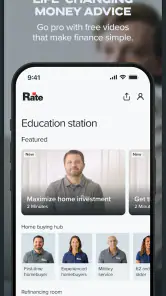
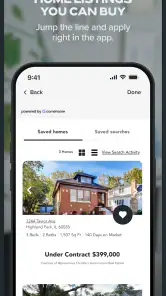
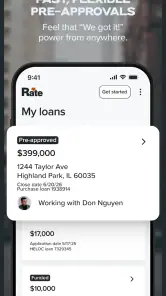



Analysis by Reviewed
I approached Rate: Home, Finance & Wellness as the kind of app you open when a financial decision is still taking shape, rather than as a replacement for every banking tool on your phone. It brings mortgage, refinancing, auto, home-equity and personal-loan topics into one finance-focused experience, while also extending into travel and wellness. That mix makes it more useful for planning than for routine account management.
My first impression is that its value depends on context. If you are comparing borrowing possibilities around a move, a vehicle purchase, a home project or a personal expense, having several related paths in one place can reduce the need to jump between unrelated services. If you only want to check a balance, transfer money or manage an existing everyday account, this is probably not the app I would reach for first.
The app is free, developed by Guaranteed Rate, Inc, and available to an Everyone audience. It has built a 4.5 average from around 1.9 thousand ratings, with more than 500 thousand installs. Those figures suggest that it has reached a meaningful audience without making the experience feel like a general-purpose social platform. I see it as a focused companion for people exploring financial choices, especially borrowing and home-related decisions.
How Rate feels during real financial planning
Quick enough for short visits, but not designed for rushed decisions
In normal use, I would expect most visits to be brief and purposeful: open the app, review a relevant option, think through the next step, and leave. That is an important distinction. A finance app can feel “fast” because it loads quickly, but the decision it supports may still require documents, comparisons and time away from the screen. Rate fits that slower decision-making rhythm better than a payment app built around instant actions.
The store short description is simply “Rate,” while the fuller positioning points toward mortgages, refinancing, auto loans, home equity, personal loans, travel and wellness. Because of that broad range, the first challenge is choosing the right direction. I would not treat the opening screen as a place to browse casually. I would arrive with a question, such as whether a home project belongs in a home-equity conversation or whether a personal loan is the more appropriate route.
That approach also helps the app feel less demanding. Instead of repeatedly opening it without a goal, I would use it as a checkpoint during a larger process. For example, before contacting a lender, I might use the mortgage or refinancing area to organize what I want to investigate. Before shopping for a car, I could use the auto-loan path to frame the financing question separately from the vehicle itself.
The practical speed advantage is reduced switching, not instant approval. Bringing several borrowing categories together can make the early research stage more orderly. It does not remove the need to read terms carefully, compare offers, or verify what applies to my own circumstances. Anyone expecting a one-tap answer to a complicated financial decision may find the experience slower than advertised in their imagination, even if the app itself feels responsive.
What happens when the workload becomes heavier
Light use should be straightforward, but financial apps become more demanding when a person moves from browsing into an application or a detailed review. A mortgage or refinancing journey naturally involves more information than a quick look at a general loan category. I would therefore judge the app in two stages: how comfortably it helps me orient myself, and how clearly it supports the more involved part of the process.
During a heavier session, I would avoid treating the phone as the only workspace. A larger screen, a note-taking app or a folder of documents can be helpful when comparing figures and questions. Rate can be the place where I identify the relevant route, but I would still keep a separate record of assumptions, requested information and follow-up items. That habit matters because loan decisions are easy to misunderstand when everything is held in memory.
The same applies to home equity. A home-related borrowing decision is not just another shopping category. It can affect a property and a long-term budget, so I would use the app to begin the conversation rather than to make a rushed choice. The ability to move between mortgage, refinance and home-equity topics is convenient, but it also creates a risk: the categories may look close enough that a user chooses based on a label instead of the actual purpose and cost of the borrowing.
My advice is to use one session for discovery and a later session for confirmation. First, identify the category that matches the situation. Then write down the questions that remain. On the next visit, check whether the same route still makes sense after considering income, existing obligations, the property or vehicle involved, and the length of the repayment period. This two-pass workflow is more reliable than trying to finish everything while distracted.
Stability matters more than visual polish in this category
For a finance app, reliability is not only about whether the screen opens. I also care about whether the app helps me maintain a consistent understanding of where I am in the process. A clean return to the right section, readable information and predictable navigation matter more than decorative effects. When money is involved, confusion is a performance problem even if the app technically responds quickly.
Rate is associated with a large enough user base to feel like an established option rather than an experimental utility. Its current version is 1.52-prod, and it was released on May 11, 2023. I would still keep the app updated through the normal store process, particularly before beginning an important application or reviewing a time-sensitive decision. Updates can change how a familiar screen behaves, so I would avoid starting a major task at the last moment.
Recovery is another part of reliability. If I am interrupted by a call, a low battery warning or a change of plans, I would not assume that every unfinished step has been preserved exactly as I left it. My safer habit would be to note the last completed action and keep important figures in a separate secure place. That is not a criticism unique to Rate; it is sensible practice whenever an app is involved in a consequential financial process.
I also would not confuse the app’s presence on my phone with official confirmation of a financial outcome. A screen can help me explore or continue a process, but final decisions depend on the relevant review and terms. Reading every confirmation page is essential, especially when moving between mortgage, refinance, auto, home-equity and personal-loan options.
Older devices and practical phone limitations
The minimum operating-system requirement is Android 7.0, which gives the app a relatively broad technical reach among Android users. That is useful for people who keep a dependable older phone instead of upgrading frequently. Still, operating-system compatibility does not guarantee an equally comfortable experience on every device. Screen size, available storage, battery health and the general condition of the phone can affect how pleasant a finance workflow feels.
On a smaller or older handset, I would be especially careful with long forms, dense explanations and document-related steps. Even if the app runs, reading financial details on a cramped display can encourage hurried scrolling. I prefer to pause, enlarge text when the device allows it, and move to a larger screen for careful comparison. The phone is convenient for access; it is not always the best environment for reviewing a complex commitment.
Resource demands are also best judged by the task. A short visit to inspect a category should be light enough for ordinary use, while a longer session involving several sections can be more tiring than technically heavy. I would close unrelated apps if the phone is older or already struggling, not because Rate is known to be unusually demanding, but because financial work benefits from a stable, uncluttered device.
iPhone users should approach the experience through the version available for their device and check compatibility before relying on it for an urgent task. Android users have the clearer operating-system reference, with Android 7.0 as the stated minimum. In either case, I would install it before the day I need it, open the main areas I expect to use, and make sure the phone is comfortable for reading rather than discovering those constraints during a deadline.
Where the app fits beside familiar alternatives
Compared with a conventional bank app, Rate appears more oriented toward lending exploration than daily money management. A bank app is usually the better choice for checking transactions, moving funds or viewing an existing relationship. Rate makes more sense when the question is “Which type of borrowing should I investigate?” rather than “What happened in my checking account today?”
Compared with a single-purpose mortgage tool, its wider set of loan categories can be a strength. A homeowner who is unsure whether to refinance, use home equity or consider a personal loan may appreciate having those directions close together. The trade-off is that a broader menu can require more self-guidance. A specialist tool may feel clearer when the decision is already known and narrowly defined.
Compared with generic financial calculators, the app’s usefulness is less about producing an isolated number and more about connecting a real-life need with a lending path. I would not use it as my only source for affordability planning. Instead, I would pair it with a household budget, a written list of recurring expenses and independent comparison of terms. The app can help organize the conversation, while my own records help test whether the decision fits daily life.
The travel and wellness elements make the product less narrowly financial, but they also create a question of focus. Some users may enjoy having those topics nearby; others may prefer a dedicated travel planner or wellness app with a deeper specialty. I would treat these sections as additional reasons to explore the app, not as a reason to replace purpose-built tools that I already trust.
A realistic use case: preparing for a home project
Imagine that I am planning a substantial repair and do not yet know whether refinancing, home equity or a personal loan is the sensible direction. I would start by writing down the project cost, the timing, the amount I could pay from savings and the monthly payment that would remain comfortable. Then I would open Rate and compare the relevant categories without assuming that the first one I see is automatically right.
Next, I would make a short question list: what information will be needed, which costs should be considered, how would repayment affect my existing budget, and what happens if the project costs more than expected? I would use the app to move the discussion forward, but I would not submit anything simply to see what happens. That distinction protects me from turning curiosity into an unnecessary application step.
After the first session, I would close the app and review the decision with the numbers in front of me. If the home-equity route seems relevant, I would investigate its implications separately from the project’s emotional urgency. If a personal loan appears more suitable, I would compare its overall cost and repayment period with other available choices. Rate is most useful here as a structured starting point, not as a substitute for financial judgment.
This workflow reveals one of the app’s less obvious strengths: it can help turn a vague money problem into a set of more specific questions. Its less obvious weakness is that convenience can make a serious decision feel like ordinary browsing. I would deliberately slow myself down whenever the choice could affect housing, monthly cash flow or a long repayment commitment.
Who will appreciate Rate, and who should skip it
I think the app is a good match for someone researching a mortgage, refinancing, auto financing, home equity or a personal loan and wanting those possibilities gathered in one place. It may also suit users who like to begin on a phone, revisit information in short sessions and organize their questions before speaking with a professional. The free price makes that exploratory stage easy to try.
I would recommend caution for anyone who wants a complete personal-finance dashboard. The app should not be mistaken for a universal replacement for a bank, budgeting service, investment platform or secure document system. It is also not ideal for a person who dislikes comparing categories or who tends to accept the first available option without checking the long-term consequences.
Someone with an immediate payment problem may be better served by the relevant bank or lender account rather than opening a broader finance app. Likewise, a user who already knows exactly which specialist service they need may find a dedicated mortgage, auto or budgeting tool more direct. Rate earns its place when the problem is still being defined.
My performance verdict after weighing speed, stability and effort
Rate: Home, Finance & Wellness feels best when I use it as a calm research companion. Its perceived speed is adequate for short, focused visits, while heavier financial work deserves more time and a larger planning context. I would not judge it by the standards of an instant-payment app because its purpose is different: it helps connect a situation with possible borrowing and related services.
The Android requirement of 7.0 keeps it accessible to many older devices, although comfort will still depend on the phone’s screen, battery and general condition. I would install it ahead of an important task, keep my notes outside the app, and verify every meaningful detail before proceeding. Those habits reduce the impact of interruptions and make recovery easier if a session ends unexpectedly.
My final view is positive but selective. The app is worth trying if you are at the beginning of a mortgage, refinance, auto, home-equity or personal-loan decision and want a single place to orient yourself. The travel and wellness additions may broaden its appeal, though they are not a reason for me to abandon specialist alternatives. I recommend it for organized exploration, not blind financial action.
Because it is free and rated for Everyone, the barrier to testing it is low. I would open it with a specific question, compare its route with my budget and other options, and treat any next step as a decision requiring careful review. Used that way, Rate: Home, Finance & Wellness is a practical starting point rather than an all-purpose answer—and that is exactly where it delivers the most value.
Pros
- Combines home management
- finances
- and wellness in one convenient app.
- Simple rate-based tools make tracking personal goals easy.
- Useful for spotting spending and lifestyle patterns over time.
- Clean interface helps users review information without feeling overwhelmed.
- Can support more informed decisions about daily habits and household costs.
Cons
- Some features may require regular manual data entry to stay accurate.
- Ratings can oversimplify complex financial or wellness situations.
- Personal recommendations may feel limited without enough usage history.
- Privacy-conscious users may hesitate to share household or wellness details.
- The app may offer less depth than dedicated finance or wellness platforms.

- Category
- Finance
- Version
- 1.52-prod











