Al Quran: Holy Quran offline
- 68.00
- 4.7
- Installs
- 1.00M
- Price
- Free

Screenshots

Analysis by Reviewed
When I’m choosing a Quran app to keep on my phone, I care less about a long feature list than whether I’ll still reach for it after the first few days. Al Quran: Holy Quran offline is aimed at readers who want the Quran close at hand, with both reading and audio listening as part of the experience. It belongs to the religious reference side of the Libraries & Demo category, rather than feeling like a general-purpose study or note-taking tool.
The first week: familiarity matters
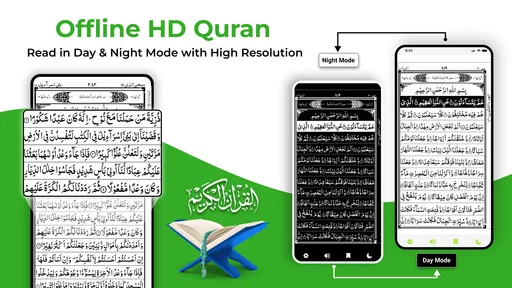
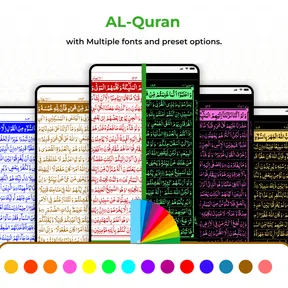
The appeal is immediate if you already like reading from a familiar printed-style page. The traditional 13-line layout feels different from a plain scrolling text view, and that can make a phone session feel more like opening a mushaf than browsing an ordinary reading app. I’d expect this format to be especially comfortable for someone who has learned to follow that page arrangement; a reader used to large, adjustable text may prefer a more flexible text-first app instead.
For a practical first-week routine, I’d use the bookmark to stop at a natural point, then return to that same place the next day rather than spending time searching again. Audio can also make a short session easier to fit in: listen while getting ready, then read a passage later when you have a quieter moment. If you rely on audio away from a stable connection, downloading recitations ahead of time is the sensible step, not something to leave until you are already travelling.
Small routines that make the format work
I’d give the fixed-page layout a fair test before deciding whether it suits me. Rather than judging it during a rushed glance at a small screen, I’d try one calm session in a comfortable position and notice whether my eyes naturally follow the lines. If they do, the familiar page can make resuming feel effortless. If I keep losing my place or wishing the text would reflow, that is a useful sign that a text-first alternative may serve me better.
Audio and reading also work best as separate choices rather than competing versions of the same session. I might use recitation when my hands are occupied, then return to the written page when I can give it attention. That distinction matters for a daily routine: audio can keep the app relevant on busy days without making every listening session feel like a substitute for focused reading.
A Traditional Experience with Modern Convenience
One of the first things you'll notice about the Quran Majeed - 13 Line Quran is its commitment to maintaining the traditional look and feel of the 13-line Quran. For those who have fond memories of reading this format, the app offers a sense of nostalgia. The pages are beautifully designed to mimic the printed version, making it easy for the eyes and familiar to navigate.
Features that Stand Out
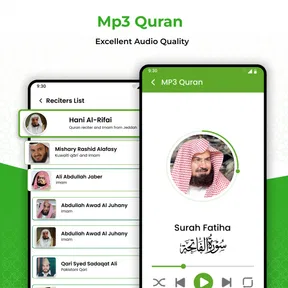
The app is loaded with features that cater to both beginners and seasoned readers. From multiple translations to audio recitations, it covers all the bases. You can choose from various reciters, which is a great way to find the voice that resonates with you. The audio playback is smooth, and you can even download the recitations for offline listening, which is perfect for those long commutes or when you're off the grid.
More From Our News Desk

Weather by Xiaomi Review: Clear at a Glance, Less Clear Up Close

X Under Pressure: Can It Recover When Posting Goes Wrong?

Clash of Clans Is Won Between the Battles

Android Auto Makes the Case for Quieter Car Software

MobiOffice: Transforming Mobile Productivity with Seamless Integration

EA SPORTS FC™ Mobile Soccer: Redefining Mobile Sports Gaming
Another highlight is the bookmarking feature. It lets you mark where you left off, so you can easily pick up your reading without any hassle. Plus, the app offers a night mode, reducing eye strain during late-night reading sessions. It's little things like these that make a huge difference in user experience.
Building a month-to-month habit
For recurring use, the most useful combination is a saved reading place and a repeatable time of day. For instance, I might read a few pages after breakfast, bookmark before putting the phone away, and use audio when the day gets too busy for focused reading. That small division of roles gives the app a better chance of becoming part of a routine than treating every session as a major study session.
Offline access changes the planning more than the reading itself. I’d check that the recitation I want is downloaded before leaving home, especially if I’m counting on it during a commute or in a place with unreliable reception. That avoids a common frustration: opening an app expecting audio to be ready and discovering that the listening part still depends on connectivity. It’s a useful trade-off for people who want fewer interruptions, though it does mean thinking ahead.
Navigation, search, and accessibility
The app's interface is designed with user-friendliness in mind. Even if you're not tech-savvy, navigating this app is a breeze. The developers have done a fantastic job at ensuring that all features are easily accessible. The search function is particularly useful if you're looking for specific verses or chapters. Just type in what you're looking for, and the app brings it right up.
Search is most valuable when you have a clear destination, such as returning to a passage you already know, rather than when you are trying to browse without a specific term in mind. I’d use it to complement page-by-page reading, not replace that slower rhythm. If I were studying closely and needed extensive note-taking, detailed cross-references, or a highly customizable text display, I’d compare it with a dedicated study-focused Quran app or a printed edition. This app’s appeal is the direct reading-and-listening experience, not a promise to serve every kind of scholarship.
Who will keep it installed?
It is a strong fit for someone who values the 13-line page style, wants a portable reading companion, or likes switching between reading and recitation. A beginner can benefit from having the text and audio together, but should take time to choose a translation or reciter that suits their needs rather than assuming one presentation works for everyone. Someone who mainly wants adjustable typography, detailed study tools, or a minimal app with no extra options may be happier elsewhere.
On a normal weekday, I can picture opening it during a quiet break, reading a short section, bookmarking my place, and listening later on the way home. That is a realistic pattern because it does not require a long uninterrupted session. The key is to make the app support a habit that already fits the day, rather than expecting an app alone to create one.
Maintenance without turning reading into a chore
The maintenance burden seems modest in everyday use: keep the app current, decide which recitations you actually want available offline, and avoid downloading audio just because it is offered. With a free app, it is also worth noticing that in-app purchases range from $4.99 to $13.99 per item; I would first use the basic reading and listening experience and only consider a purchase if a specific option matters to my routine. The app is free to install, rated for Everyone, and developed by Radiant Islamic Apps.
It has a 4.7 average from around 16,000 ratings and more than a million installs, which suggests it has found a substantial audience, though popularity is not a substitute for checking whether its page format suits your eyes. Version 1.8.1 runs on Android 7.0 and later. Those details make it a practical option for many Android users, while iPhone owners should look for an edition made for their device rather than assume this Android app is available there.
Where fatigue can set in
The traditional page presentation is also the main trade-off. It can feel reassuring and focused, but it may be less convenient than reflowing text when you need larger lettering or want to read in a narrow, quick glance. Audio choice can take a little trial and error too: the most familiar reciter is not automatically the one whose pace works best for a short commute or a longer listening session. I’d settle on one voice for regular use rather than repeatedly browsing options.
There is another small source of friction in keeping offline listening ready: downloaded audio needs some forethought and device storage. If you only listen occasionally, streaming may be simpler; if you often travel without dependable internet, downloads are more useful. The right approach depends on how you use your phone, so I would avoid treating offline preparation as an obligation for every reader.
How it compares with other Quran-reading choices
Compared with a basic Quran text app, this one puts more emphasis on a printed-page feeling and pairs reading with recitation. That makes it a sensible pick when page familiarity and listening matter more than tailoring every part of the display. A web page or streaming audio can be quicker for a one-off lookup, but neither is as convenient as a saved reading place when I want to return to the same spot day after day.
A dedicated study tool or a physical mushaf may be the better companion when the task is close analysis, extended annotation, or reading from a format that feels more comfortable to the eyes. I wouldn’t install this expecting it to replace those tools. Its value is narrower and more practical: it brings a familiar reading style and audio into a portable routine. That focus is a strength as long as it matches what I actually do.
Questions I’d settle before relying on it
Can I use it without an internet connection? The reading experience and downloaded recitations are the parts to prepare for offline use; I’d test the audio before leaving a reliable connection rather than assume every recitation is ready automatically. Does it suit a new reader? It can be a helpful starting point because text and listening sit together, but I’d take care to choose a translation and reciter that support the way I’m learning.
Will it replace a study app? For casual reading, returning to a saved place, and listening, it may be enough. For extensive notes, references, or more control over how text appears, I’d keep a study-oriented alternative in mind. And is it worth paying for anything? Since the app is free to install but offers paid items, I’d first identify a specific option I need; if the free routine already works, there is no reason to turn ordinary reading into a shopping decision.
Long-term verdict
If you're someone who values both tradition and technology, this app is a must-have. It's more than just a Quran reader; it's a comprehensive tool for anyone looking to deepen their understanding of the Quran. The added convenience of having it on your mobile device means you can take it anywhere, ensuring you never miss out on your daily recitation.
In conclusion, the Quran Majeed - 13 Line Quran app brilliantly bridges the gap between traditional Quran reading and modern technology. Its user-friendly design, combined with a wide range of features, makes it an excellent choice for anyone looking to enhance their religious practices. Whether you're a lifelong reader or new to the Quran, this app is sure to meet your needs and exceed your expectations.
My more measured recommendation is to try it if the page style feels familiar and you want reading, bookmarks, search, and recitation in one place. It earns lasting space when you actually return to the saved passage or use its audio in your ordinary routine. If you find yourself fighting the fixed-page approach, needing deeper study tools, or rarely using audio, a different Quran reader may be a better fit. For the right reader, its strongest quality is not novelty but the way it can make a small, repeatable reading moment easy to keep.
My practical test for lasting value
I’d judge whether it deserves a permanent place by looking at what I use after the initial curiosity fades. If I regularly return to the bookmark, search for a known passage, or listen to a recitation I chose deliberately, those are signs the app is supporting a real habit rather than simply occupying space. If I open it only to browse options, I’d simplify my routine: settle on a reading time, one reciter, and a modest offline selection.
That approach also keeps maintenance proportionate. I would review downloaded audio when storage feels tight, remove material I no longer use, and leave the rest alone. The point is not to manage the app constantly but to prepare it once in a way that reduces friction later. For someone who reads every day, that light setup can pay off; for someone who opens a Quran app only occasionally, a browser or a simpler reader may be enough.
Overall, I’d recommend Al Quran: Holy Quran offline to readers who genuinely like the traditional page presentation and want recitation close by. Its lasting appeal depends on fit, not on how many options a person explores during the first week. When the format matches your reading habits, the combination of a saved place, search, and prepared audio can make returning feel natural. When it doesn’t, choosing a more adjustable or study-centered alternative is a sensible decision, not a failure to use this one properly.
Al Quran: Holy Quran offline Frequently Asked Questions
Does Al Quran: Holy Quran offline need an internet connection to get started?
The app is intended for reading and listening to the Quran online or offline. An internet connection may be useful when first accessing content you want to use without a connection, so it is sensible to prepare any offline material before traveling or entering an area with limited service. Once the relevant content is available offline, you can use it without relying on a live connection.
Is Al Quran: Holy Quran offline free, or are there purchases inside the app?
Al Quran: Holy Quran offline is free to download, with optional in-app purchases priced from $4.99 to $13.99 per item. You can consider the free app before deciding whether any paid option is useful to you. The presence of purchases is worth keeping in mind if children or other family members will use the device, and purchase controls can help manage spending.
What devices can run Al Quran: Holy Quran offline?
Al Quran: Holy Quran offline is an Android app, and it requires Android 7.0 or later. Before downloading, check your device’s Android version and make sure there is enough storage for the app and any Quran content you want to access offline. Meeting the minimum requirement helps avoid compatibility issues and lets you use the app as intended.
Who develops Al Quran: Holy Quran offline, and is it suitable for children?
The app is developed by Radiant Islamic Apps and is rated Everyone, making it suitable for a broad audience, including families. Its focus is reading and listening to the Holy Quran, so it can be useful for people at different stages of learning and practice. As with any religious or educational resource, parents may wish to explore the available content with younger children.
What are the main features of Quran Majeed - 13 Line Quran app?
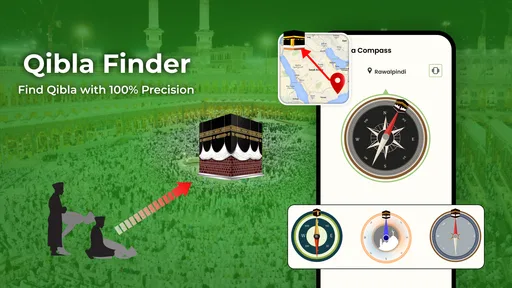
The Quran Majeed - 13 Line Quran app offers a comprehensive range of features designed for users who wish to read, listen, and understand the Quran. Key features include the 13-line format of the Quran for easier reading, audio recitations by various Qaris, translations in multiple languages, Tafsir for deeper understanding, and a Qibla direction finder. These features aim to enhance the overall experience for both novice and advanced users.
Pros
- Easy navigation through Quran pages.
- Comprehensive translation options.
- Audio recitations by renowned Qaris.
- Offline access to Quranic text.
- Bookmark and save favorite verses.
Cons
- In-app ads can be distracting.
- Limited free features available.
- Occasional app crashes reported.
- Audio recitations need internet.
- Large app size may affect storage.










