Quicken Simplifi: Budget Smart
- 1.27K
- 4.3
- Installs
- 500.00K
- Price
- Free

Screenshots





Analysis by Reviewed
Hey there! If you’ve ever found yourself struggling to keep track of your finances or just want to make budgeting a tad bit easier, then you might have heard about Quicken Simplifi: Budget Smart. I've spent some quality time with this app, and let me tell you, it’s like having a financial advisor right in your pocket.
First Impressions
When you first open Quicken Simplifi: Budget Smart, you’re greeted with a clean, intuitive interface. It’s like the app gets that managing money shouldn’t feel like rocket science. Right off the bat, it asks you to link your bank accounts, credit cards, and any other financial institutions you use. I know, I know, linking accounts can sound a bit scary, but rest assured, Simplifi uses bank-level security to keep your data safe. Plus, it’s a huge time-saver when you’re trying to get a comprehensive view of your finances.
Exploring Features
One of the standout features of Simplifi is its ability to automatically categorize your transactions. Gone are the days of manually logging every coffee purchase or online shopping spree. The app does this for you, and it’s surprisingly accurate. You can, of course, tweak these categories to better suit your spending habits, which I found super helpful.
The “Watchlist” feature is another gem. It lets you keep an eye on specific spending categories, so if you’re trying to cut back on dining out (guilty as charged), you can set a monthly limit and get alerts when you’re getting close to it. It’s like having a financial guardian angel whispering in your ear, "Hey, maybe skip that extra latte."
Budgeting Made Easy
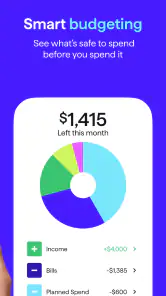
Let’s talk about the heart of the app: budgeting. Simplifi doesn’t just let you set up a budget; it helps you stick to it. The app’s "Spending Plan" is a dynamic tool that adjusts as your financial situation changes. Whether you get a surprise bonus or an unexpected bill, the app recalibrates to keep you on track.
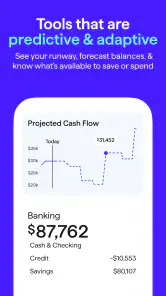
I also love the "Projected Cash Flow" feature. It’s like having a crystal ball for your bank account. It shows you how your finances will look in the future based on your current spending patterns. This was a game-changer for me in planning larger expenses or just making sure I’m not overspending.
Why I Keep Coming Back
So, what keeps me coming back to Simplifi every day? Honestly, it’s the little things. The app sends me daily insights that summarize my spending and saving. It’s a quick check-in that keeps me accountable without being overwhelming. Plus, there’s something oddly satisfying about seeing your savings grow over time.
And can we talk about the customization? I’ve personalized the app to show the info I care about most. Whether it’s focusing on debt reduction or building an emergency fund, Simplifi lets me tailor the dashboard to align with my financial goals.
Final Thoughts
In a nutshell, Quicken Simplifi: Budget Smart is a powerhouse for anyone looking to take control of their finances. It’s user-friendly, insightful, and actually makes budgeting kind of fun. Whether you’re a financial newbie or a seasoned budgeter, this app has something to offer. Give it a whirl, and you might just find yourself looking forward to managing your money. Imagine that!
So, have you tried Simplifi yet? If not, what are you waiting for? Happy budgeting!
Pros
- User-friendly interface for easy navigation.
- Real-time updates on spending and budgets.
- Customizable financial goals and alerts.
- Syncs with multiple bank accounts seamlessly.
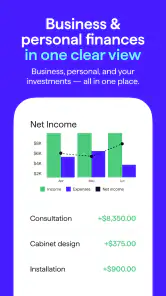
- Detailed spending reports for better insights.
Cons
- Subscription required for full features.
- Limited offline functionality.
- Some users report occasional sync issues.
- No investment tracking options.
- Lacks direct bill payment feature.

- Category
- Finance
- Version
- Varies with device











