Propel EBT & SNAP Benefits
- 122.94K
- 4.8
- Installs
- 10.00M
- Price
- Free

Screenshots
Analysis by Reviewed
When grocery money is tied to benefits, knowing what is available before you reach the checkout can make a real difference. I see Propel: EBT & Food Stamps as a practical finance app for people who want a clearer view of benefit balances and spending, rather than another general-purpose money manager. Propel Inc developed it, and its focus is on EBT, SNAP, and WIC benefits.
Trust starts with a clear purpose
The app has been around since its release in December 2015, and its current version is 8.10.0. It is free, rated for Everyone, and has a 4.8 average from around 661,000 ratings. Those figures suggest broad use, but they are not a substitute for deciding whether you are comfortable using an app to manage benefit-related information.
I would approach setup thoughtfully: check each screen as you create an account, read any permission prompts before accepting them, and use only the information needed to connect the benefits you want to track. If a permission or request does not make sense to you, pause rather than tapping through. That is sensible practice for any finance app, especially one you may open while shopping.
Getting Started with Propel
First things first, downloading the app is a breeze. It's available on both Android and iOS platforms, and installation takes just a few seconds. Once you open the app, you're greeted with a user-friendly interface. The aesthetic is simple but effective, which is precisely what you need when managing something as crucial as your benefits.
Features That Stand Out
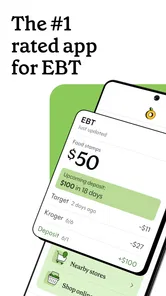
What makes Propel truly shine are its features. The app allows you to check your EBT balance instantly, which is a game-changer. No more calling customer service or waiting for a paper statement. Just open the app, and there it is—your balance, updated in real-time.
For me, the useful habit is to check the balance before making a list, not only at the register. If you shop for several days at once, that quick check can help you separate essentials from items you can postpone. I would still compare the displayed amount with your card’s official information if something looks unexpected, since an app view should not be your only reference when a purchase depends on an exact balance.
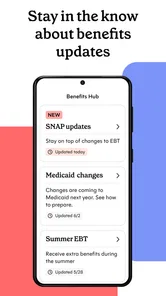
Another impressive feature is the transaction history. You can easily track where and when you've spent your benefits. This function is especially useful for budgeting and ensuring you’re on track for the month. Plus, it sends alerts for new deposits, so you’re never caught off guard.
More From Our News Desk

 Bolt: Request a Ride
Bolt and the Shift from One-Tap Rides to More Legible Trips
Bolt shows how ride-hailing is shifting from a one-tap taxi request toward a more legible, choice-driven trip, while leaving the hardest questions of price and reliability unresolved.

 Farm Land - Farming life game
Farm Land Review: A Small Island Farm with a Satisfying Loop
A bright, breezy island farm turns a few quick chores into a satisfying cycle of planting, harvesting, expanding, and deciding what to build next.

 Android Auto
’s Community Takes Shape in the Passenger Seat
Its most valuable network is not a public feed but a shared set of routes, voice habits, app integrations, and advice that make driving less isolating—and sometimes more complicated.

 My Talking Angela
 Makes the Virtual Pet Feel Personal
A polished pet-raising game built on small rituals, playful customization, and a character who gives everyday screen time a surprisingly personal rhythm.

 Google Translate
 Review: A Pocket Tool for the Small Frictions of Travel
From menus and signs to quick conversations, Google Translate earns its place by cutting the little delays that make unfamiliar language feel like a barrier.

 Shazam: Find Music & Concerts
Shazam’s Best Trick Is Turning a Song Into a Night Out
A few seconds of recognition can settle an argument, rescue a half-remembered chorus, and point toward a live show. Shazam’s real trick is what happens after the match.
Latest News



A small but useful routine is to review purchases after a shopping trip while the receipts are still easy to find. That makes it simpler to spot a transaction you do not recognize or notice that a planned grocery run used more of the month’s balance than expected. Alerts can draw attention to deposits, but I would not treat a notification as a replacement for checking the account itself before an important shop.
Simplifying the Complex
Managing benefits can often feel overwhelming, but Propel takes the stress out of the equation. It offers a budgeting tool that helps you allocate your benefits wisely. You can set spending goals and receive reminders, keeping you accountable and informed.
That kind of planning is most helpful when benefits need to cover more than one trip. For example, before a weekend shop, I would look at what has already been spent, set aside enough for planned meals, and use a goal as a reminder to leave room for the rest of the month. It is a lightweight way to organize food spending, not a replacement for a full household budget or a guarantee that every cost will fit neatly into a target.
The app also integrates useful resources. Need to find a store that accepts EBT near you? Propel has got you covered. It includes a map feature that pinpoints nearby locations, making your shopping trips more efficient.
The map is especially handy when you are away from your usual neighborhood or need to plan errands around a store that accepts benefits. I would use it to narrow down possible stops, then confirm the store’s current acceptance and which items qualify before relying on it for a particular purchase. That extra check matters because a location marker cannot explain every checkout exception or local rule.
Where it fits among other options
Compared with calling a card service or relying on paper notes, having balances and recent spending in one place can make routine checks quicker. A bank budgeting app may be better for someone who mainly wants to track wages, bills, and savings across accounts; this app’s appeal is its specific focus on food benefits and related shopping. If you prefer not to link benefit information to a mobile app, the usual official phone or card-based options may feel more comfortable, even if they involve extra steps.
I would particularly recommend trying it if you regularly need to check a balance before shopping, keep track of several grocery trips, or want a nearby-store map. It may be less useful if you rarely use a smartphone for money tasks, already have a reliable balance-check routine, or simply do not want benefit management on a phone. The app is free, so trying it does not require a purchase, but convenience is only worthwhile if its setup and account access feel right to you.
A Personal Touch
What I appreciate most is how the app makes you feel supported. It’s not just about numbers and transactions; it’s about helping you make the most of your benefits. The developers seem to genuinely care about the user experience, consistently updating the app based on user feedback.
In a world where technology can often feel cold and impersonal, Propel offers a refreshing change with its human-centric approach.
For a cautious first use, I would start with one simple task—checking a balance before a planned shop—then decide whether the transaction view, reminders, and map earn a place in my routine. Keep your phone’s lock screen and account sign-in habits in mind, and review your account if you change devices. Those small choices help you stay in control without assuming that any app can remove the need to protect sensitive information.
So, if you're someone who relies on EBT and food stamps, I highly recommend giving Propel: EBT & Food Stamps a try. It simplifies your life, offering peace of mind and control over your benefits.
When a quick check changes the shopping plan
A realistic use case is a parent planning dinner ingredients after work, with limited time to visit more than one shop. Before leaving, they can check the available benefit balance, look at recent spending, and use the map to identify a nearby possibility. That combination is more useful than any one feature alone: the balance frames the budget, the history helps explain what has already been spent, and the map can make the route easier to plan.
I would still treat the app as a planning aid rather than a promise that checkout will go exactly as expected. If the balance seems lower than anticipated, checking the recent transactions and comparing them with receipts gives a practical next step. If the map points to an unfamiliar store, confirming acceptance before making a special trip can save time. The value is in making better-informed choices before you are standing in line.
Small habits that make the tools more useful
One non-obvious way to use transaction history is as a short review of shopping patterns, not just a record of past purchases. After a few trips, you can notice whether one large shop is easier to manage than several small ones, or whether last-minute purchases are crowding out planned essentials. The app does not make those decisions for you, but its record can give you something concrete to work from instead of relying on memory.
For households that share shopping responsibilities, a simple routine can also prevent confusion: agree on who checks the balance, who keeps receipts, and when you review transactions together. I would avoid casually sharing account access just to make coordination easier. A short conversation about the plan can preserve privacy while still helping everyone understand how much of the benefit is available for the next trip.
Goals and reminders are best used as prompts, not strict rules. A reminder can bring a planned review to mind, while a goal can help you keep an eye on the month’s remaining food budget. But grocery needs change, and an unexpected household need may matter more than a target set earlier. I would adjust the plan when circumstances change rather than treating a missed goal as a failure.
What to expect from setup and day-to-day access
People often want to know whether this kind of app can replace their normal way of checking a benefits card. I would not make that assumption. Propel is useful as a convenient view for routine planning, while official card information remains a sensible cross-check when a balance or transaction looks unusual. Keeping a familiar fallback method in mind is especially helpful during the first few uses, before you know how well the app fits your routine.
Another fair question is whether it makes sense for someone who receives more than one type of food benefit. Its stated focus includes EBT, SNAP, and WIC, so it is aimed at people managing food benefits rather than general banking. Still, I would check the account setup carefully and confirm that the benefit information you personally need is available in your experience. The key is to judge it by the task you want it to handle, not by assuming every benefit program works identically.
Propel has more than ten million installs and around 115,000 written reviews, which helps explain why it is a familiar option in this niche. That reach may make it easier to find general user discussion, but popularity does not answer individual questions about account access or comfort with sharing benefit-related information. I would make the decision based on whether its balance checks, spending view, reminders, and map solve a real problem for you.
Where another approach may suit you better
Compared with keeping a handwritten balance note, the app can bring a balance view and transaction record together, but paper has an advantage if you want to keep account details off a phone. Compared with a bank’s budgeting tools, Propel is more directly centered on food benefits and shopping; a broader finance app may be the better fit if your main challenge is coordinating rent, bills, income, and savings. Neither approach is automatically right for everyone.
If your phone is shared, often unavailable, or not a device you feel comfortable using for sensitive tasks, I would skip app-based benefit management and use a method you trust. The same applies if you only need to check a balance occasionally and already have a dependable routine. On the other hand, people who regularly plan several grocery trips, want a clearer record of spending, or need help locating a possible EBT-accepting store are more likely to get practical value from it.
A cautious verdict for benefit management
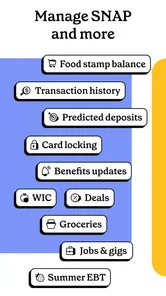
Propel’s strongest case is its focused set of tools: balance checking, transaction history, deposit alerts, budgeting prompts, and a store map in one finance app. It can make everyday planning less scattered, especially when grocery money needs to stretch across the month. The trade-off is that it asks you to bring benefit-related activity onto a phone, so setup choices and account habits deserve attention rather than an automatic yes.
Propel Inc’s app is free, has an Everyone age rating, and runs on Android 6.0 or later; its large audience and strong average rating make it a well-established option, not a personal guarantee of fit. I would recommend trying it carefully if the features address a recurring need, starting with a routine balance check and deciding afterward whether the rest earns your trust. If the setup feels uncomfortable, or if the app does not improve on your current method, choosing a more familiar way to manage benefits is a perfectly reasonable call.
Propel EBT & SNAP Benefits Frequently Asked Questions
Can I download Propel EBT & SNAP Benefits on an iPhone?
Propel EBT & SNAP Benefits is described as an Android finance app, so check the app store on your device to make sure you are viewing the version intended for your platform. The Android release requires Android 6.0 or later. Propel’s focus is on checking benefit balances, managing food assistance, and helping users keep track of benefit-related information.
Is Propel EBT & SNAP Benefits compatible with my Android device?
Propel EBT & SNAP Benefits is an Android finance app that requires Android 6.0 or later. If your device meets that requirement, you can check whether the current app version is available for it through your app store. The app is developed by Propel Inc and focuses on helping people check benefit balances and manage food assistance.
What benefits and money-management tools can I use in Propel?
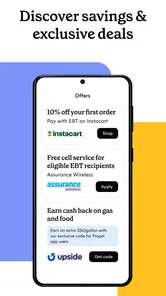
Propel’s store summary highlights checking EBT, SNAP, and WIC balances, managing food stamps, and saving money with benefits. It is designed as a practical place to keep an eye on benefit-related information. The exact tools you see may depend on your account and the benefits available to you, so check the app’s description and setup flow before relying on it for a particular task.
What is Propel: EBT & Food Stamps and how does it work?
Propel: EBT & Food Stamps is a mobile application designed to help users manage their Electronic Benefits Transfer (EBT) and food stamp accounts. It allows users to easily check their balance, view transaction history, and find participating retailers. The app simplifies the process of managing food assistance benefits by providing a user-friendly interface and timely notifications.
Is Propel: EBT & Food Stamps secure to use for managing my benefits?
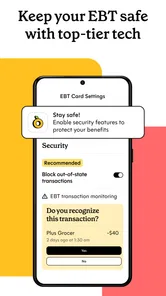
Yes, Propel prioritizes user security by employing advanced encryption methods to protect your personal information and benefit details. The app does not store your EBT card information on your device, and it requires authentication to access your account. Always ensure you download the app from a reputable source, like the official app stores, to maintain security.
Pros
- User-friendly interface
- Quick balance check
- Budgeting tools included
- Access to local discounts
- Secure and private
Cons
- Requires internet connection
- Limited customer support
- Ads in free version
- May drain battery
- Occasional bugs reported