Procare: Childcare App
- 9.98K
- 4.7
- Installs
- 1.00M
- Price
- Free

Screenshots
Analysis by Reviewed
Starting with a childcare app can feel like one more task on an already busy day, so I’d approach Procare: Childcare App with a simple goal: make one routine handoff easier. It is an education app from Procare Solutions LLC, aimed at connecting childcare operations with families through everyday tasks such as attendance, daily updates, and billing. I find that focus useful when a center and its families need a shared place for practical information, rather than another general-purpose messaging thread.
What to expect from the app
Procare is free to download, has an Everyone age rating, and has been available since February 28, 2018. Its 4.7 average from around 49,000 ratings and more than a million installs suggest that many families and childcare teams have found a reason to use it. Those numbers are reassuring, but they do not tell you whether your own provider uses the app or which parts of its service your family will rely on. That relationship matters: Procare works best when the childcare center has made it part of its daily routine.
Compared with a basic calendar, paper sign-in sheet, or a stream of texts, the appeal is having childcare-related details gathered in one place. That can make updates easier to find later and help keep attendance and billing conversations tied to the same service. It is not a replacement for talking to a teacher about a sensitive concern, though. I would use the app for routine coordination and still speak directly with staff when an issue needs nuance or a quick back-and-forth.
Getting Started with Procare
So, what makes Procare: Childcare App stand out in the crowded market of childcare apps? First off, the setup is a breeze. You can download it from your typical app store, whether you’re an Android enthusiast or an iOS devotee. Once installed, the app guides you through a simple registration process. Before you know it, you’re ready to dive into its features.
Make the first setup useful
Before signing up, ask your childcare provider which invitation or account details families should use. This small check can prevent the common frustration of installing an app and then reaching a dead end because the center has not connected your account yet. After registration, confirm that you can see the information your provider expects families to use. If something looks missing, ask the center whether it is a setup issue or simply not part of its workflow.
For a first-time user, I would avoid trying to learn every section at once. Start with the task that will matter tomorrow morning: knowing how attendance is handled, where a daily update appears, or how to locate a billing item. If another caregiver in your household also needs access, agree on who checks messages and who handles account-related questions. A shared routine is more dependable than assuming everyone will notice every update at the same time.
User-Friendly Interface
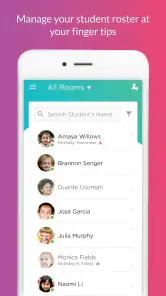
One of the first things you'll notice is the user-friendly interface. It’s clean, intuitive, and let’s be real, even if you’re not tech-savvy, you’ll find your way around without breaking a sweat. The dashboard is designed to provide a quick snapshot of what’s happening—be it attendance, billing, or class schedules.
More From Our News Desk

Clash of Clans Is Won Between the Battles

Android Auto Makes the Case for Quieter Car Software

MobiOffice: Transforming Mobile Productivity with Seamless Integration

EA SPORTS FC™ Mobile Soccer: Redefining Mobile Sports Gaming

How Microsoft OneDrive Became a Mobile Productivity Giant

How Google Translate Breaks Language Barriers Effortlessly
The dashboard is most helpful when you treat it as a starting point, not as proof that every detail has been entered or reviewed. If attendance or a payment question matters that day, open the relevant area and check the actual entry instead of relying on a quick glance. That habit is especially useful when more than one adult is coordinating pickups or handling household payments; it helps avoid a confident assumption based on an old notification.
Features That Make Life Easier
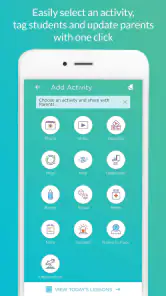
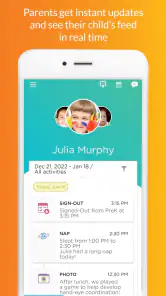
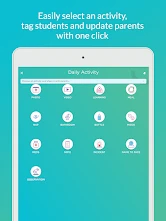
Now, onto the juicy bits—the features! Procare comes packed with tools that handle everything from attendance tracking to daily activity logs. It’s like having a digital nanny that keeps everyone in the loop. Need to send an update to parents? Done. Want to manage tuition payments? Easy peasy. The app even allows for photo sharing, so you can keep those precious moments documented and shared with parents.
A realistic first success could be a parent checking a daily activity update after pickup and then using the same app to follow up on a billing detail later, rather than searching through texts and paper notices. For staff, the value is different: keeping routine records together can reduce the mental load of switching between separate tools. Those benefits depend on the childcare team entering information consistently, so I would treat the app as a shared workflow, not a magic fix for incomplete updates.
One practical tip is to separate “I need to know this now” from “I may need to find this later.” Attendance and time-sensitive messages deserve prompt attention; photos and routine notes can usually be reviewed when you have a calmer moment. This is a small distinction, but it makes a stream of childcare information easier to manage without checking the phone constantly.
Families comparing options should also consider how much coordination happens through the center. A generic family calendar can track pickup plans, but it will not automatically become the provider’s record. Text messages can feel faster for a one-off question, yet details may be scattered across different conversations. Procare makes more sense when the center already uses it to connect routine communication with operational tasks; if your provider relies on a different system, adding this app may create duplication rather than convenience.
What about using it for every conversation? I would not. It is suited to structured, day-to-day coordination, while a complicated concern about a child’s wellbeing is better raised directly with the staff member who can respond in context. And if you are a provider evaluating it for a small operation, the key question is not only whether the app looks straightforward, but whether families and staff will consistently use the same process. A tool only saves effort when it replaces a fragmented routine instead of sitting beside it.
The current version is 6.4.3, and the minimum operating-system requirement is version 11. If you are setting it up on an older device, check compatibility before planning to rely on it for daily handoffs. Procare is also not the right choice for someone who only wants a personal childcare calendar or who has no connection to a center using the service. In that situation, a simple calendar or the provider’s established communication method may be less work.
Features That Make Life Easier
Now, onto the juicy bits—the features! Procare comes packed with tools that handle everything from attendance tracking to daily activity logs. It’s like having a digital nanny that keeps everyone in the loop. Need to send an update to parents? Done. Want to manage tuition payments? Easy peasy. The app even allows for photo sharing, so you can keep those precious moments documented and shared with parents.
What I particularly love about this app is its robust communication tools. It ensures that parents and providers are always on the same page. No more missed messages or forgotten updates. It’s all there, organized and accessible at your fingertips.
Security and Reliability
In today’s digital age, security is paramount, especially when it involves our little ones. Procare doesn’t skimp in this department. It employs top-notch security measures to ensure that all your data is safe and sound. Plus, it’s reliable; I haven’t experienced any crashes or major bugs, which is crucial for an app you rely on daily.
Moreover, the app provides a comprehensive support system. Whether you’re facing a technical glitch or need help navigating a feature, their support team is just a message away. It’s reassuring to know that help is available whenever you need it.
Before you make it part of the routine
As a first-time user, I would give the app a few ordinary days before deciding whether it is genuinely helping. Notice whether the center posts updates when you need them, whether sign-in information is easy to locate, and whether billing details reduce rather than add questions. If an expected item is absent, ask the provider which features it actively uses; families and staff may not have identical day-to-day needs.
That quick conversation is also the best way to clear up common confusion: an empty area does not necessarily mean you have missed a step, and a notification is not always a substitute for opening the relevant record. I would keep the provider’s usual contact method available while learning the app, especially during the first few handoffs. Once the routine is clear, Procare can become a useful place to check rather than another source of uncertainty.
Who benefits most from a shared childcare workflow
I see the strongest fit for families whose childcare center already relies on Procare for the practical rhythm of the day. A parent who wants to check an update after work, another caregiver who needs to confirm an attendance detail, and a household member tracking a billing item can all benefit from having those tasks connected to the center’s process. It is less compelling for families who only need to coordinate privately among themselves, because a normal calendar or shared note may be simpler.
For a provider, the trade-off is about consistency. A center that keeps attendance, family communication, and billing information current can give parents a clearer place to look. But if staff enter only some details, families may still need texts, paper reminders, or calls to fill the gaps. Before adopting it as the main channel, I would agree internally on which updates belong there and who is responsible for keeping them current. That decision matters more than asking families to install another app.
A practical day with Procare
Picture a busy morning when one parent is dropping off and another is handling pickup. The first caregiver can use the center’s established attendance process, while the second can check the relevant information later rather than relying on a message passed between adults. After the child is home, the family can look for the day’s update and keep a billing question in the same childcare context. The useful part is not that every task disappears; it is that routine details have a more obvious home.
To make that work, I would agree on a simple household rule: decide who checks time-sensitive information and who follows up on account or payment questions. That avoids two people assuming the other has seen an update. If the center communicates something urgent through a different channel, follow that instruction rather than assuming the app is the only route. Procare is most helpful when the family and provider share expectations about where each kind of information will appear.
Where it differs from everyday alternatives
A paper sign-in sheet is immediate at the door, but it does not offer the same convenience for looking back at family updates or handling related administrative details. Texts are familiar and quick, yet they can be hard to search once several caregivers and staff members are involved. A standard calendar is useful for household plans, but it is not a substitute for a center’s attendance record. Procare’s advantage is the connection to childcare operations; its drawback is that the benefit depends on the center actually using it.
That makes the choice less about which app has the longest feature list and more about whether it fits the provider’s real routine. If your center already uses another platform reliably, moving to Procare just because it is available may create duplicate notifications and competing records. I would not ask a family to maintain two systems unless the center has a clear reason for the split. One dependable channel is usually easier than a theoretically complete setup that nobody checks consistently.
Questions worth settling before relying on it
If registration does not immediately show the expected childcare information, I would first contact the provider and confirm that the family account has been connected correctly. That is more useful than repeatedly reinstalling or trying random account details. If you are unsure whether a particular update should appear, ask which parts of the app the center uses with families. The app’s usefulness depends on that local arrangement, so the provider is the best person to clarify the intended workflow.
For a household with more than one caregiver, decide who will monitor updates and how important information will be shared with the other adult. Do not assume that installing the app on several phones automatically creates a clear family routine. And if you are a provider wondering whether families will adopt it, explain the first task they should complete and where they should look for everyday information. A concrete first step is far more reassuring than asking people to explore every section on their own.
When something looks out of date, treat the app as a record of what has been entered, not as an independent confirmation that a handoff or payment has been processed. Check the relevant entry and contact the center if it still raises a question. That cautious habit is especially worthwhile during the first days, when families are learning what the center records and how promptly it updates information.
Final Thoughts
If you’re in the market for a childcare management app, the Procare: Childcare App should definitely be on your radar. It’s a powerhouse of features wrapped in a user-friendly package. Whether you’re a parent trying to keep track of your child’s day or a provider managing a bustling daycare, this app could be the solution you’ve been looking for. It’s not just an app; it’s your trusty sidekick in the world of childcare management.
My recommendation is conditional but straightforward: start with the workflow your center actually uses, and judge Procare by whether it makes that routine clearer. For an enrolled family whose provider relies on it, the mix of attendance, updates, and billing can be more convenient than juggling separate channels. For someone without that connection, or for a center unwilling to keep its information current, the app is unlikely to earn a regular place on the phone. The best first step is a short check with the provider, followed by one successful task—such as finding an attendance record or locating a routine update—before you depend on it for everything.
Procare: Childcare App Frequently Asked Questions
What should I know about Procare’s age rating and availability before downloading?
Procare: Childcare App is an Education app rated Everyone, so its content rating is suitable for a broad audience. It is free to download and is available for Android and iOS devices. The app is designed to support communication between childcare providers and families, but its usefulness depends on whether your child’s center or program uses Procare and provides family access.
What does Procare help childcare providers manage?
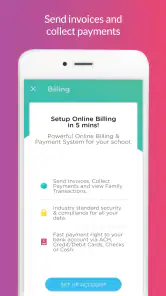
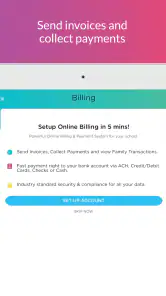
Procare is a childcare management app and software designed to support tasks such as daily sheets, sign-in and sign-out, and billing. It can be relevant to families as well as childcare providers, since parents may use the app to stay informed about information their program shares. The features available to each family depend on the provider’s Procare setup and the services it uses.
Can parents use Procare if their childcare provider does not use it?
Procare is intended to connect families with childcare providers that use its management tools. Its usefulness for a parent depends on the center or program using Procare and setting up access for families. If you are considering downloading it, check with your childcare provider first so you know whether they use the app and how they invite parents to participate.
What should I check before setting up a Procare account?
Before creating an account, confirm with your childcare provider that it uses Procare and ask which email address or phone number should be associated with your family’s access. The provider’s setup determines which child and center information appears in the app. This quick check can help avoid signing in with details that do not match the account your childcare program created.
What is Procare: Childcare App and who is it for?
Procare: Childcare App is a comprehensive tool designed for childcare providers, parents, and educators. It streamlines administrative tasks like attendance tracking, billing, and parent communication. The app is ideal for daycare centers, preschools, and after-school programs looking to enhance their operational efficiency and improve parent engagement.
Pros
- User-friendly interface for easy navigation
- Secure communication with childcare providers
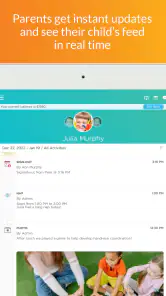
- Real-time updates on child's activities
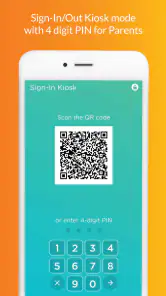
- Digital check-in/check-out for convenience
- Comprehensive child profile management
Cons
- Limited offline functionality
- Occasional sync issues with updates
- Subscription required for premium features
- Notifications can be overwhelming
- Initial setup can be time-consuming
- Category
- Education
- Version
- 6.4.3











