Principal®
- 2.32K
- 4.7
- Installs
- 1.00M
- Price
- Free

Screenshots
Analysis by Reviewed
For people who want to keep financial goals in view without always sitting down at a computer, Principal® is built around a useful idea: bring investment and retirement information into a mobile app. In my experience, that kind of access is most valuable when it helps me check where I stand and decide what deserves attention, rather than encouraging constant market-watching. Principal is a free finance app from Principal Financial Group, Inc.; it has a 4.8 average from around 38,000 ratings and more than a million installs. Those figures suggest it has found a substantial audience, but the more important question is whether its focus fits the way you manage money.
A mobile view of investments and retirement goals
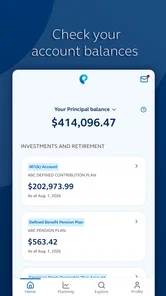
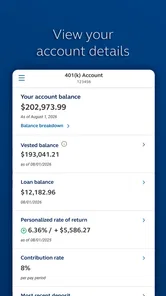
The app’s central appeal is having investment information and retirement planning in the same place. Instead of treating long-term saving as something to review only during an annual paperwork session, you can use a phone to revisit your position when you have a spare moment. I find that particularly useful for turning a vague goal into a routine: check in, understand what the account is showing, and decide whether anything actually needs attention.
That is different from a general budgeting app, where the main job is usually to categorize spending and help you plan the next month. Principal is more relevant when your questions concern investments or retirement rather than whether last week’s grocery bill ran over budget. It can complement a household budget, but I would not treat it as a substitute for one. If your immediate priority is controlling everyday expenses, a dedicated spending tracker may be a better first download.
There is also a useful distinction between seeing financial information and acting on it. A mobile overview can make it easier to notice that you should revisit a goal, but a displayed balance is not, by itself, a recommendation to buy, sell, or change your plan. I use an app like this as a prompt for a thoughtful review, not as a reason to react to every movement. That restraint matters especially when retirement is the goal: frequent checking can make ordinary fluctuations feel more urgent than they are.
Using Principal as a steady check-in, not a trading screen
I use Principal as a deliberate check-in point, not a screen to refresh whenever markets move. That distinction helps me get more value from its investment and retirement focus: I can arrive with a question, review what matters, and leave without turning a long-term plan into a source of constant alerts. The next section looks at how to make that routine useful in an ordinary week.
What the everyday workflow is good for
A practical way to use Principal is to attach it to an existing habit. I might check it after reviewing my monthly bills or when I am setting aside time to think about longer-term plans. That gives the account information context: I am not opening the app just because I have a minute to spare, but because I am doing a broader financial check-in. A quick look can then lead to a useful question, such as whether a goal still feels realistic or whether I need to learn more before making a decision.
For example, imagine someone who has just changed jobs and is trying to get a clearer picture of retirement saving. Rather than attempting to make a major decision in the middle of a busy workday, they could use a quiet moment to review the information available in the app, note what they want to understand, and follow up when they have time to compare options carefully. The benefit is not a magical answer; it is having a convenient place to begin that review. I would still read any relevant plan details and ask for help when a decision has consequences I do not understand.
More From Our News Desk

 Bolt: Request a Ride
Bolt and the Shift from One-Tap Rides to More Legible Trips
Bolt shows how ride-hailing is shifting from a one-tap taxi request toward a more legible, choice-driven trip, while leaving the hardest questions of price and reliability unresolved.

 Farm Land - Farming life game
Farm Land Review: A Small Island Farm with a Satisfying Loop
A bright, breezy island farm turns a few quick chores into a satisfying cycle of planting, harvesting, expanding, and deciding what to build next.

 Android Auto
’s Community Takes Shape in the Passenger Seat
Its most valuable network is not a public feed but a shared set of routes, voice habits, app integrations, and advice that make driving less isolating—and sometimes more complicated.

 My Talking Angela
 Makes the Virtual Pet Feel Personal
A polished pet-raising game built on small rituals, playful customization, and a character who gives everyday screen time a surprisingly personal rhythm.

 Google Translate
 Review: A Pocket Tool for the Small Frictions of Travel
From menus and signs to quick conversations, Google Translate earns its place by cutting the little delays that make unfamiliar language feel like a barrier.

 Shazam: Find Music & Concerts
Shazam’s Best Trick Is Turning a Song Into a Night Out
A few seconds of recognition can settle an argument, rescue a half-remembered chorus, and point toward a live show. Shazam’s real trick is what happens after the match.
Latest News



Notifications can support this routine, but I would keep them in perspective. An alert is useful when it brings a relevant change or action to my attention; it is less helpful if it turns long-term saving into a series of interruptions. I recommend checking the notification settings and choosing a level that helps you stay informed without prompting impulsive decisions. If an alert raises a question, use it as a cue to investigate rather than assuming it tells the whole story.
Where it differs from familiar finance apps
Compared with a bank app, Principal is a more focused place to think about investments and retirement rather than a general front door for checking a current account or paying bills. Compared with a market-news app, its appeal is that financial information sits alongside personal goals instead of being only a stream of headlines. And compared with a spreadsheet, a mobile app is easier to revisit in short sessions, though a spreadsheet can be better for people who want to build their own calculations and control every assumption.
Those comparisons also show where I would not rely on it alone. Someone who wants one dashboard for every account, a detailed monthly budget, or a custom retirement model may prefer a broader financial organizer or their own spreadsheet. Principal makes most sense when its investment and retirement focus matches the task in front of you. Before depending on any finance app as a complete picture, check which accounts and information you can actually access in your own situation; the right fit depends on what you need to review, not just how tidy the screen looks.
Who is likely to get the most from it
I would point a current Principal customer toward the app if they want a convenient way to check their financial information and keep retirement goals from fading into the background. It may also suit someone who is comfortable using a phone for occasional financial reviews and prefers a guided, account-centered view to maintaining every detail manually. The app is rated for Everyone, and it is free to download, so trying it does not require an upfront purchase; financial choices made after opening it still deserve care and judgment.
On the other hand, I would skip it if you are looking for a standalone investment marketplace, a full household budget, or an independent adviser who will make personal decisions for you. A mobile interface can help organize attention, but it cannot replace understanding the terms of a plan or seeking qualified guidance when the stakes are high. It is also worth asking yourself whether you want another finance notification on your phone. If alerts make you anxious or encourage you to check balances repeatedly, a less frequent review routine may be healthier than keeping every prompt switched on.
Small habits that make the app more useful
One non-obvious benefit of reviewing a retirement account on a phone is that it can make preparation easier, even when you do not complete a task there. I suggest keeping a short note of questions that come up as you review: what a particular figure represents, whether a goal still matches your circumstances, or what information you need before changing anything. That turns a quick glance into a more deliberate conversation with yourself, your plan documents, or a support representative, instead of relying on memory later.
Another sensible habit is to separate observation from action. If you open the app after a headline about markets or a stressful day, give yourself time before making a consequential change. A retirement plan is a long-horizon decision, while a phone encourages quick taps; that mismatch is a real trade-off of mobile finance tools. I find the app most useful when I decide in advance what I am checking and close it once I have answered that question.
What to expect before installing
Principal was released on March 1, 2019, and its current version is 4.0.88. It requires Android or iOS 10 or later, so an older device may not be suitable. The app has around 2,100 written reviews as well as its broader rating count, but individual experiences can differ depending on what a person needs to access and how they use the service. If you are choosing between mobile and desktop, I see the phone version as a convenient check-in tool; for careful comparisons or complex decisions, a larger screen and time to read plan information may be more comfortable.
A likely question is whether it will replace every other finance app. I would not expect that: its strongest role is helping you stay connected to investment and retirement information, while budgeting, bill management, and broad account aggregation may call for other tools. Another reasonable question is whether it is suitable for a beginner. I think it can help a beginner become more engaged with long-term goals, but it should not be mistaken for a lesson in investing or a personal recommendation. Start by learning what each figure means, and do not make a change simply because the app makes it easy to reach the relevant screen.
Getting Started with Principal®
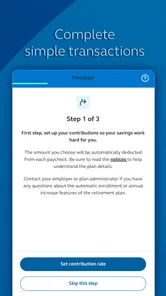
Okay, first things first, downloading and setting up Principal® was a breeze. The app is available on both Android and iOS, so you can grab it from the Google Play Store or the Apple App Store. Once installed, setting up your account is straightforward. You’ll need to provide some basic information, but nothing too intrusive.
After logging in, the app's interface is sleek and user-friendly. It doesn’t bombard you with too many options at once, which I appreciate because who needs more stress when dealing with finances, right?
Features That Stand Out
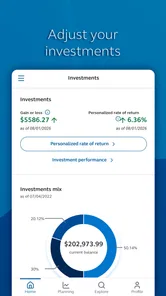
One of the standout features for me is the investment tracking. The app allows you to monitor your investments in real time, which is super handy. You can see your portfolio's performance at a glance and get detailed reports on individual investments, all in one place.
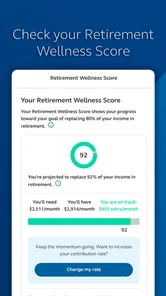
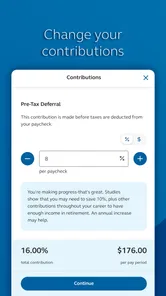
Another cool feature is the retirement planning tool. It provides personalized insights and tips on how to reach your retirement goals. I found this particularly useful as it helped me understand where I stand and what I need to do to secure my financial future.
For those of us who like to be in the know, the app also offers regular updates and news related to financial markets. This keeps you informed without having to scour through tons of financial news websites.
User Experience
Using Principal® feels like having a personal financial advisor right in your pocket. The app is responsive and I haven't experienced any crashes or bugs, which is always a plus. The support section is pretty comprehensive too, with FAQs and customer service options if you run into any issues.
One thing I particularly like is the notification system. It alerts you to important changes in your investments or any actions you might need to take. It’s like having a little financial guardian angel watching over your shoulder.
The Final Verdict
So, would I recommend Principal®? Absolutely! Whether you’re just starting out on your financial journey or you’re a seasoned investor, this app offers a range of features that cater to different needs. It’s intuitive, informative, and quite frankly, a must-have for anyone looking to better manage their finances.
In a world where financial stability is more important than ever, having a tool like Principal® at your disposal is invaluable. So why not give it a try and see how it can help you take control of your financial future?
Principal® Frequently Asked Questions
Is Principal® free to download, and is it suitable for everyone?
Principal® is free to download and has an Everyone content rating, so it is intended for a broad audience. The app focuses on helping users keep up with financial goals while on the go. Keep in mind that a free download does not automatically mean every financial product or service available through Principal is free; review any terms that apply before signing up or making a decision.
What operating system does Principal® support?
Before downloading Principal®, check that your device meets its operating-system requirements. The Android version requires Android 10 or later, so devices running an earlier version may not be compatible. If you are using an iPhone or iPad, check the app’s compatibility details in the Apple App Store before installing, and keep your operating system up to date for the best chance of a smooth experience.
Who develops Principal®, and what should I know before installing it?
Principal® is a finance app developed by Principal Financial Group, Inc. Its focus is helping users keep up with financial goals while on the go. It is free to download and is rated for Everyone, making it suitable for a broad audience. Before installing, check that your device meets the app’s operating-system requirements.
What is Principal® and what services does it offer?
Principal® is a comprehensive financial management app designed to help users manage their investments, savings, and insurance needs all in one place. The app provides tools for tracking spending, setting financial goals, and planning for retirement. It also offers personalized financial advice and insights, making it easier for users to make informed financial decisions.
Is Principal® available for both Android and iOS devices?
Yes, Principal® is available for download on both Android and iOS devices. Users can find the app on the Google Play Store for Android devices and the Apple App Store for iOS devices. The app is designed to provide a seamless experience across different platforms, allowing users to access their financial information anytime, anywhere.
Pros
- User-friendly interface
- Comprehensive financial tools
- Secure data protection
- Multiple account management
- Real-time updates
Cons
- Limited free features
- Requires stable internet
- Complex initial setup
- Occasional app crashes
- Limited customer support