PLAY-DOH Create ABCs
- 83.00
- 3.4
- Installs
- 1.00M
- Price
- Free
Screenshots
Analysis by Reviewed
For a child who is curious about letters but not ready to sit down with a workbook, PLAY-DOH Create ABCs offers a more playful starting point. I like the idea behind it: give preschool alphabet practice the look and feel of shaping dough, then connect each letter with a recognizable object or animal. That makes it easier to turn a short stretch of screen time into a shared activity rather than simply handing over a device.
Where the app stands today
This is an educational app from PlayDate Digital Inc., and its focus is deliberately narrow: exploring the alphabet through virtual modeling and letter practice. It is free to install, with optional in-app purchases ranging from $1.99 to $3.99 per item. The audience rating is Everyone, while the average rating is 3.4 from around two thousand ratings; that mixed response is a reason to approach it as a specific learning activity, not as a guaranteed favorite for every child.
The current version is 1.3, and the app was released on November 19, 2019. Those details help set expectations: I would judge it as a compact alphabet tool, not assume it has recently gained new material or a broader curriculum. It has over one million installs, so many families have tried it, but popularity alone does not tell me whether its particular style will suit your child.
Making letters feel like play
The first thing that caught my attention was how PLAY-DOH Create ABCs brilliantly integrates learning with play. As soon as you dive into the app, it’s like opening a virtual box of dough, with endless possibilities awaiting. Kids can learn the alphabet in a way that feels more like a game than a lesson. And let's be real—anything that can make learning fun is a win in my book.
Molding Letters with a Twist
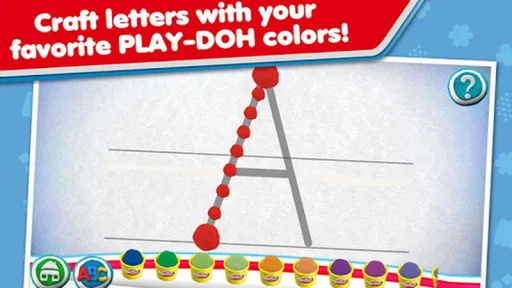
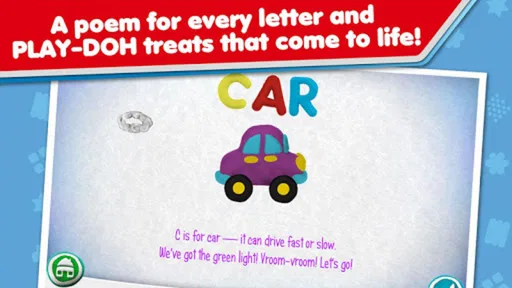
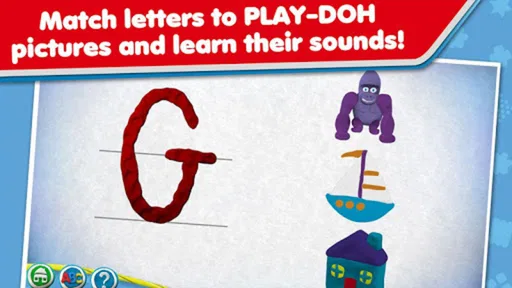
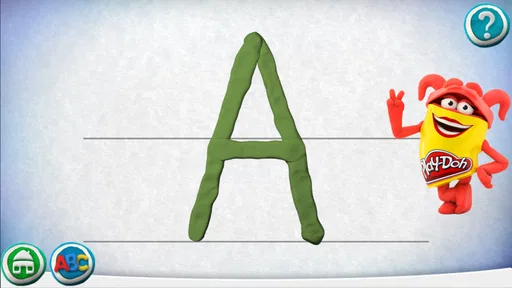
The app takes you through the alphabet, letter by letter, with each character coming to life through animations. Each letter is paired with a fun object or animal starting with that letter, and the app guides kids through the process of creating these shapes with virtual Play-Doh. It’s as if the letters are jumping off the page, eager to be part of the next masterpiece!
The interface is super intuitive, which means even the youngest of users will find it easy to navigate. I was impressed by how the app balances guidance and creativity—kids are shown how to form each letter but also encouraged to experiment with their creative flair.
Tracing and sharing at home
One feature that deserves a shoutout is the interactive tracing. Kids can trace each letter with their finger, and the app rewards them with cheerful animations and sounds. It’s a simple yet effective way to reinforce letter recognition and writing skills.
More From Our News Desk

 Bolt: Request a Ride
Bolt and the Shift from One-Tap Rides to More Legible Trips
Bolt shows how ride-hailing is shifting from a one-tap taxi request toward a more legible, choice-driven trip, while leaving the hardest questions of price and reliability unresolved.

 Farm Land - Farming life game
Farm Land Review: A Small Island Farm with a Satisfying Loop
A bright, breezy island farm turns a few quick chores into a satisfying cycle of planting, harvesting, expanding, and deciding what to build next.

 Android Auto
’s Community Takes Shape in the Passenger Seat
Its most valuable network is not a public feed but a shared set of routes, voice habits, app integrations, and advice that make driving less isolating—and sometimes more complicated.

 My Talking Angela
 Makes the Virtual Pet Feel Personal
A polished pet-raising game built on small rituals, playful customization, and a character who gives everyday screen time a surprisingly personal rhythm.

 Google Translate
 Review: A Pocket Tool for the Small Frictions of Travel
From menus and signs to quick conversations, Google Translate earns its place by cutting the little delays that make unfamiliar language feel like a barrier.

 Shazam: Find Music & Concerts
Shazam’s Best Trick Is Turning a Song Into a Night Out
A few seconds of recognition can settle an argument, rescue a half-remembered chorus, and point toward a live show. Shazam’s real trick is what happens after the match.
Latest News



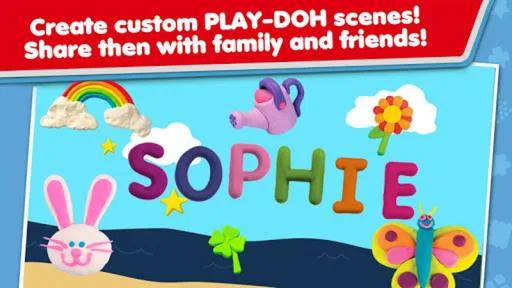
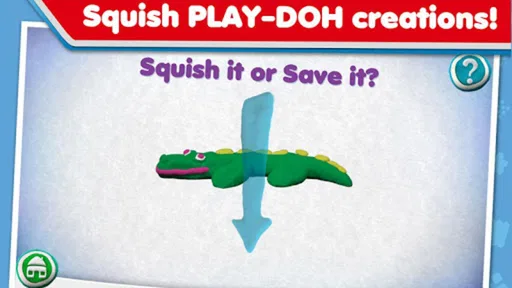
And for those little artists who love to show off their creations, there's an option to save and share their virtual masterpieces. Whether it's a proud parent or a delighted grandparent, everyone can be part of the fun!
What I found particularly endearing was the app’s ability to adapt to different learning paces. Some kids might zip through the alphabet, while others take their time exploring every nook and cranny of each letter. The app accommodates both, ensuring that every child has a personalized learning journey.
A good fit for a short learning session
I would use the modeling activity as a prompt for conversation, not just a sequence to finish. When a child makes a letter, ask them to name it, say its sound, and think of another familiar word that begins the same way. That small pause turns a visual task into a chance to connect the symbol with spoken language. It also gives an adult a useful way to notice whether the child recognizes the letter or is mainly following the animation.
For example, a caregiver waiting for dinner to finish could sit beside a child and explore a few letters together, then stop while the child is still interested. There is no need to push through the entire alphabet in one sitting. A short, repeatable routine is often more comfortable for young learners, and the app’s letter-by-letter structure makes it easy to pick up practice in manageable pieces.
How it compares with other alphabet activities
Compared with a printed alphabet book or flashcards, this app adds movement, sound, and the playful idea of shaping a letter. That can be appealing to a child who responds better to interaction than to looking at a page. Compared with physical modeling dough, though, the screen cannot offer the same hands-on sensory experience or the chance to build finger strength by pressing and rolling real material. I would treat the digital version as a convenient complement, not a replacement for craft time, conversation, or pencil-and-paper practice.
It is also more focused than a broad early-learning app that mixes numbers, stories, and puzzles. That focus can help when the immediate goal is alphabet familiarity, but families looking for a varied collection of activities may prefer a wider educational app. Likewise, if a child needs careful instruction in handwriting, a caregiver-led tracing sheet or a teaching resource designed specifically for letter formation may be a better next step.
Small choices that make it work better
One practical approach is to let the child choose a letter they already know before moving to a less familiar one. Starting with confidence can make the activity feel inviting, while asking the child to explain what they are making gives the adult a better sense of what has stuck. I would also alternate app practice with drawing the same letter on paper; the screen offers immediate visual engagement, while paper helps connect the activity to the marks children will eventually make with a pencil.
The saving and sharing option can turn a completed creation into a low-pressure conversation with family, but I would keep the focus on the child describing it rather than on collecting a large gallery. A useful trade-off is that virtual creations are tidy and easy to revisit, while they do not produce the tactile, open-ended mess that makes real dough play appealing. If a child enjoys the app but wants more sensory exploration, setting out physical dough afterward makes a natural companion activity.
Making it fit a family routine
For a practical routine, I would keep the device nearby but stay involved rather than treating the app as a substitute for a shared lesson. A few minutes before a meal, during a quiet stretch at home, or while waiting for an appointment can be enough to revisit one or two letters. If the child gets absorbed in shaping, I would follow that interest; if they start tapping quickly just to reach the next screen, I would pause and ask them to name the letter or find something nearby that begins with its sound.
This also helps answer a common question: does a child need to know the alphabet before starting? I would not make that a requirement. A beginner can explore familiar letters first, while an adult supplies names and sounds along the way. For a child who already recognizes most letters, the better use may be a brief review or a chance to talk about letter shapes, rather than expecting the app to introduce a full new stage of reading instruction.
Who is likely to enjoy it—and who may not
I think the strongest match is a preschool-age learner who likes making things, responds to visual prompts, and is beginning to notice letters. It can also suit a caregiver who wants a focused activity to do together without preparing craft materials. The virtual dough makes the experience neat and ready to start, which is handy when there is little time to set up a table or clean afterward.
On the other hand, I would skip it as a main learning tool for a child who needs structured handwriting lessons, detailed phonics instruction, or a broad range of educational challenges. It may also be a poor fit for a child who quickly loses interest in guided, letter-by-letter activities or who mainly wants open-ended play with real materials. In those cases, paper tracing, physical dough, storybooks, or a more varied learning app can serve the child better.
Limits to keep in mind
This is best suited to early alphabet exploration, not a complete reading course. A child who already knows the letters may find the repeated practice too simple, while one who is learning to write may need more direct feedback and practice on paper. The app’s playful guidance can support recognition, but an adult still has an important role in connecting what appears on screen with letter sounds, names, and everyday words.
The optional purchases are worth considering before a child starts exploring, especially if you want to keep the experience free. I would check the purchase choices with the adult in control of the device and make the boundary clear before handing it over. The app’s age rating is Everyone, but that does not mean every child will use it independently in the same way; a younger learner may benefit from a parent nearby to explain the activity and keep the session purposeful.
What I would look for next
For families who already use it, the sensible question is whether the existing letter activities continue to hold a child’s attention and fit their current learning stage. I would not assume the version number signals a particular feature change; instead, I would judge the app by what it offers when opened and by whether the child is still learning from it. If your child moves from recognizing letters to writing them, you can keep the app as a light warm-up while adding more hands-on or paper-based practice.
If you are deciding whether to install it now, I would start by thinking about the child’s next small learning goal. Is the aim to make letter shapes feel familiar, encourage conversation about beginning sounds, or add a playful change from books and worksheets? The app makes the most sense for the first two. It is less suitable if you need a program that tracks progress, teaches a sequence of reading skills, or takes a child from recognition through independent writing; I would choose a resource built around that broader goal instead.
Final Thoughts
In a world where screen time often gets a bad rap, PLAY-DOH Create ABCs stands out as a shining example of how digital play can be both entertaining and educational. It’s a delightful blend of creativity, learning, and nostalgia, wrapped up in a colorful, user-friendly package.
So, if you're on the hunt for an app that not only entertains but also educates, look no further. This app is a charming way to introduce kids to the alphabet, all while keeping them engaged and smiling. Trust me, it’s as much fun for the adults as it is for the kids!
PLAY-DOH Create ABCs Frequently Asked Questions
Is PLAY-DOH Create ABCs free to download, and does it include paid content?
PLAY-DOH Create ABCs is free to download, so families can try the app without paying upfront. It also offers optional in-app purchases priced from $1.99 to $3.99 per item. If a child will use the app, it is sensible to check purchase settings on the device and decide whether buying additional content is appropriate before handing it over.
Who develops PLAY-DOH Create ABCs, and what do users think of it?
PLAY-DOH Create ABCs is made by PlayDate Digital Inc. Its store profile shows an average rating of 3.4 from around 2,000 ratings, alongside 83 written reviews. Those figures offer a quick snapshot of user feedback, but individual experiences can differ. Parents may find it helpful to read recent reviews and consider whether the app’s alphabet-focused approach suits their child.
What is PLAY-DOH Create ABCs?
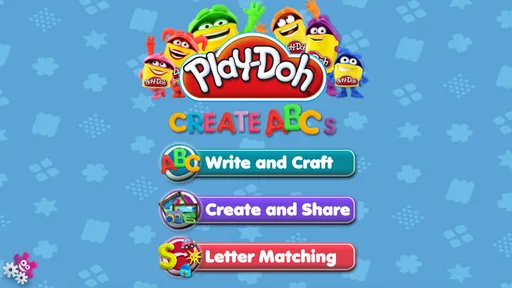
PLAY-DOH Create ABCs is an interactive mobile application designed for young children to learn the alphabet through creative play. The app combines the tactile experience of modeling clay with digital play, allowing kids to shape letters and objects in a vibrant, engaging environment. It’s a fun educational tool that encourages creativity while promoting literacy skills in preschoolers.
Is PLAY-DOH Create ABCs suitable for all age groups?
PLAY-DOH Create ABCs is primarily designed for preschool-aged children, typically between the ages of 2 to 5 years old. The app focuses on early literacy skills, making it most appropriate for this age group. However, older children who enjoy creative play might also find the app entertaining, though the educational content is tailored towards younger users.
Does PLAY-DOH Create ABCs require an internet connection to function?
No, PLAY-DOH Create ABCs does not require an active internet connection to play. Once the app is downloaded and installed on your device, all features are accessible offline. This makes it a convenient option for parents who want to keep their children engaged during travel or in areas with limited internet access.
Pros
- Engaging graphics for children.
- Teaches letters and sounds effectively.
- Interactive and fun learning experience.
- User-friendly interface for kids.
- Encourages creativity and imagination.
Cons
- Limited free content available.
- In-app purchases can be pricey.
- Requires internet for some features.
- Not suitable for older children.
- Ads can be distracting.