Planta: Plant & Garden Care
- 1.94K
- 4.2
- Installs
- 1.00M
- Price
- Free

Screenshots
Analysis by Reviewed
I find Planta: Plant & Garden Care most useful when plant care feels like a collection of small, easy-to-forget decisions. Instead of relying on memory for every pot, I can use it to organize care around individual plants and get a clearer sense of what to do next. It’s a House & Home app from Planta AB, and its 4.2 average from around 20,000 ratings suggests plenty of people find that approach worthwhile.
What to expect from your first visit
The app is free to download, though in-app purchases range from $7.99 to $49.99 per item, so I’d start by seeing how the basic experience fits your routine before paying for anything. It’s rated for Everyone and has over a million installs. The current version is 2.42.5, and it supports Android 8.1 and up. Those details make it easy to judge whether it’s a practical option for your device and budget before you begin.
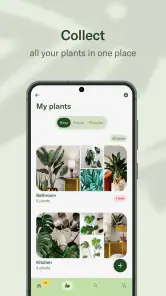
The main idea is personal plant care rather than a general gardening encyclopedia. You build a collection, then use the app’s guidance and reminders to keep track of what each plant may need. That can be a real help if your plants have different needs, but it still works best when you treat its advice as a starting point, not an automatic verdict. Indoor conditions vary from home to home, and a schedule can’t see every change in a plant’s soil or environment.
Getting Started with Planta
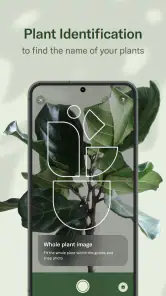
First things first, installing Planta - Care for your plants is a breeze. Available on both Android and iOS, the app is user-friendly and designed with a clean interface that even my grandma could navigate. Once you open it up, you're greeted with a welcoming vibe that makes you feel like you're about to embark on a plant adventure. The app asks you to add your plants, and guess what? It even helps you identify them if you're not quite sure what that mystery plant in the corner is.
Features That Make You Go "Wow"
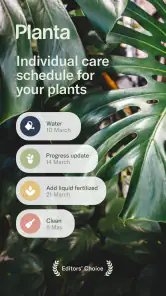
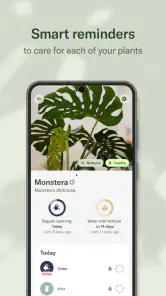
Now, let's talk about features because this app is packed with them. One of my favorites is the smart care reminders. Planta personalizes a care schedule for each of your plants based on their species, location, and even the current season. No more guessing when to water or fertilize; Planta's got your back.
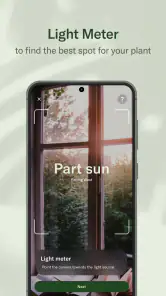
Another cool feature is the light meter. Ever wondered if your plant is getting enough sunlight? Just use the app's light meter to check the brightness levels in different spots around your home. It's like giving your plant its own personal sun consultant!
Making the first successful check-in
Once you’ve added a plant, the most useful first step is to check its care entry against what you can observe at home. If a reminder comes up, look at the soil and the plant before acting; a calendar prompt is a nudge to inspect, not a command to water. This small habit helps you learn how the app’s schedule relates to your room, pot, and routine, and can prevent overwatering when the surface looks dry but the soil below is still damp.
More From Our News Desk

Weather by Xiaomi Review: Clear at a Glance, Less Clear Up Close

X Under Pressure: Can It Recover When Posting Goes Wrong?

Clash of Clans Is Won Between the Battles

Android Auto Makes the Case for Quieter Car Software

MobiOffice: Transforming Mobile Productivity with Seamless Integration

EA SPORTS FC™ Mobile Soccer: Redefining Mobile Sports Gaming
A practical example: if you’re leaving for a busy weekend and have several plants on different windowsills, use the collection and reminders to see which ones need attention before you go. Then check each pot rather than watering them all in one pass. The value is not just remembering a task; it’s having a reason to pause and make a plant-by-plant decision.
Helping You Diagnose Plant Problems
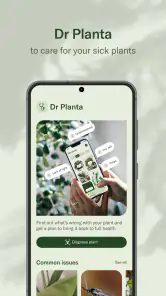
We've all been there – your plant starts looking a bit under the weather, and panic sets in. But with Planta's Plant Doctor feature, you can diagnose issues quickly. Whether it's yellowing leaves or mysterious spots, just snap a pic, and Planta will provide you with possible causes and solutions. It's like having a plant expert in your pocket.
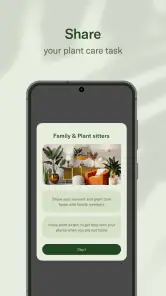
Plus, the app offers a community section where you can connect with fellow plant lovers, share tips, and even brag about your flourishing indoor jungle. It's a great way to learn and grow alongside your plants.
Where the guidance needs a human check
Photo-based diagnosis is handy for narrowing down possibilities, but I wouldn’t treat one image as a definitive answer. Leaf damage can have several causes, and a photo may not show the soil, roots, recent watering, or changes in light. I’d use the result to decide what to inspect next, then make one change at a time. That makes it easier to tell whether the plant improves instead of changing watering, placement, and feeding all at once.
The light meter is also most helpful as a comparison tool. Try checking a few possible spots at roughly the same time, rather than treating one reading as a permanent measure of a plant’s needs. Light changes with windows, weather, and the season, so the best place in one part of the year may not stay ideal. This is a useful way to choose between locations, but it doesn’t remove the need to watch how the plant responds.
How it fits alongside other plant-care habits
Compared with a notes app or a handwritten calendar, Planta brings plant-specific schedules and care prompts together, which is more convenient when you have a growing collection. A general gardening guide may offer broader explanations, while the app’s value is in keeping individual plants visible in your routine. The trade-off is that a reminder system can feel like extra administration if you only own one or two low-maintenance plants. In that case, a simple note or a quick weekly check may be all you need.
I’d especially recommend trying it if you’re new to houseplants, often forget care tasks, or want a more organized way to notice patterns across several plants. If you already know your plants well and prefer to make every decision from direct observation, you may not need a schedule app. And if you’re caring for outdoor beds or a vegetable garden, a houseplant-focused collection may not match the broader planning you want.
Building a routine that stays useful
Once your collection is in place, I’d avoid trying to make the app perfect in one sitting. Add the plants you most often forget first, and use a few days of reminders to see whether the timing suits your real routine. This keeps setup manageable and gives you a chance to notice whether a prompt arrives when you can actually check the plant. If the list becomes a chore, start with the plants that need closer attention rather than cataloguing every pot immediately.
A helpful habit is to pair a reminder with a quick observation, not just mark the task complete automatically. Notice whether the soil is still moist, whether leaves look different, and whether the plant has recently moved. Over time, those small observations can make the schedule more meaningful: you’re using Planta to remember what to inspect, while your own notes and judgement help interpret what you see. That distinction matters most for plants in rooms with changing heat or light.
When expert help and community advice differ
The app’s community and plant-care guidance can be useful when you’re unsure what to look at, but I’d be careful about treating another person’s successful fix as a guaranteed solution for your plant. Two plants can show similar leaf symptoms for different reasons, especially if their watering habits or locations differ. When asking for advice, include useful context such as when the problem began, how the plant is positioned, and what you recently changed. That makes a discussion more practical than posting a close-up alone.
If a plant is declining quickly, a reminder schedule is not a substitute for investigating the conditions around it. Check the soil, drainage, and light before adding extra water or fertilizer just because a diagnosis suggests those possibilities. I like the app best as a way to narrow the next question: “What should I inspect?” It is less reliable as a reason to make several changes at once, which can make it difficult to learn what helped.
Choosing Planta over simpler alternatives
For a small collection with predictable needs, a recurring phone reminder may be enough, and it asks less of you than maintaining a plant catalogue. Planta becomes more appealing when you want care prompts attached to individual plants and would otherwise keep separate notes about what sits where. Compared with reading general articles, it is more oriented toward ongoing organization; compared with a paper log, it can bring reminders and plant details into one place. Neither approach is automatically better: choose the one you’ll keep using.
It may also be a poor fit if you prefer not to receive prompts or if a scheduled task makes you feel you must act even when the plant looks fine. In that case, use reminders as inspection cues—or choose a simpler system that you control entirely. For balcony containers, garden beds, or a broader growing plan, a dedicated gardening journal or resource may suit your needs better than a houseplant-centred app. Planta’s strongest use case is keeping indoor plants from disappearing from an otherwise busy routine.
What a good first week can look like
Imagine you have a few plants in different rooms and are about to start a busy workweek. Rather than watering everything on Sunday, add the plants you tend to overlook, check their care entries, and use the next prompts as reasons to inspect them. If one is still damp, wait; if another needs attention, handle that one and leave the rest alone. The useful outcome is not a perfectly completed checklist. It’s learning which plants need a closer look and building a routine that fits your home.
That gradual approach also helps answer a common first-time question: do you need to be an experienced plant owner to benefit? I don’t think so. Beginners can use the structure to remember what to check, while experienced growers may appreciate having a single overview of different plants. But if you already have a reliable system and rarely forget care, the app may add more tracking than value. Start small, and keep it only if it makes decisions easier.
Wrapping It Up
So, why should you download Planta? Well, if you want to turn your home into a thriving oasis, this app is a game-changer. It's not just about keeping your plants alive; it's about making them thrive. With its intuitive design, personalized care tips, and diagnostic features, Planta is like a plant whisperer that fits in your pocket.
In conclusion, Planta - Care for your plants is more than just an app; it's your plant's new best friend and your co-pilot on the journey to becoming a plant maestro. So, go ahead, give it a whirl, and watch your green companions flourish like never before!
Planta: Plant & Garden Care Frequently Asked Questions
Can Planta help me keep track of several plants in one place?
Planta is built around organizing care by plant, with tailored schedules, reminders, and tips to help you keep routine tasks in view. That can be useful if you have several plants with different needs, since you can follow their care rather than relying on one general timetable. Its watering, fertilizing, and repotting tracking can make a growing collection easier to manage.
Does Planta provide advice beyond automated care schedules?
Yes. Planta’s store summary highlights smart AI plant care schedules, support from real plant experts, and a thriving community. These options give the app a broader role than simply sending reminders: you can use its care guidance for routine tasks and look to expert or community support when you want additional input. This mix may suit plant owners who prefer having several kinds of help in one app.
Is Planta suitable for beginners who have never cared for plants before?
Yes. Planta is designed to help both novice and experienced plant owners, so you do not need to arrive with a lot of gardening knowledge. Its care schedules, reminders, and tips can make everyday tasks easier to follow, while guidance tailored to individual plants gives beginners a practical place to start. You can build a routine as you learn what your plants need.
What is Planta and how does it help with plant care?
Planta is a user-friendly app designed to assist both novice and experienced plant owners in taking better care of their plants. It offers tailored care schedules, reminders, and tips based on each plant's specific needs, ensuring they thrive in their environment. Users can track watering, fertilizing, and repotting schedules, making plant care more organized and efficient. Its smart AI plant care schedules are intended to make it easier to keep those tasks on track.
Does Planta offer identification features for unknown plants?
Yes, Planta includes a plant identification feature that allows users to take a picture of an unknown plant and get information about it. This feature is particularly useful for plant enthusiasts who encounter unidentified plants, providing access to care tips and detailed information to support proper maintenance. Planta also promotes access to real plant experts, alongside its plant-care guidance.
Pros
- User-friendly interface
- Comprehensive plant database
- Customizable reminders
- Plant health diagnosis
- Offline access
Cons
- Limited free features
- Requires in-app purchases
- Occasional app crashes
- No community forum
- Limited plant care tips
- Category
- House & Home
- Version
- 2.42.5