Shuffles by Pinterest
- 559.00
- 4.7
- Installs
- 1.00M
- Price
- Free

Screenshots

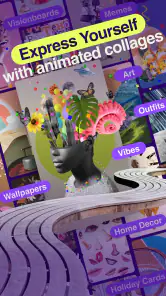
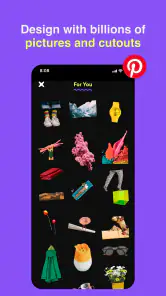
Analysis by Reviewed
I like Shuffles best when I treat it as a playful visual workshop rather than a full design studio. It gives me a quick way to turn saved images into an expressive collage, and its connection to Pinterest makes finding material feel natural. That focus is also its boundary: if I need precise layout controls or a polished, print-ready result, I would reach for a more traditional design tool.
Why the Pinterest connection matters
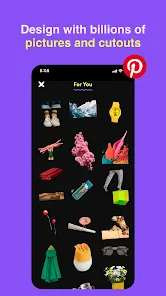
The most useful part of the workflow is being able to start with images I have already collected on Pinterest, instead of rebuilding an inspiration folder from scratch. For a small project, I can gather references on a board, bring a few into a collage, then move pieces around until the mood feels right. That makes Shuffles handy for exploring a room refresh, outfit combinations, party ideas, or a personal mood board before committing time or money to anything.
A practical tip is to decide what the collage is for before adding too much. When I keep one clear question in mind—such as “which colors work together?”—the result is easier to read and more useful later. If I add every appealing image, the board can become visually noisy; a small, deliberate selection often communicates an idea better than a crowded canvas.
Where it fits among creative apps
Compared with a general-purpose graphics editor, Shuffles feels more immediate and less formal. I can experiment with image layers, text, and stickers without first setting up a complicated document. Compared with simply saving pins to a board, it gives me a more active way to combine references and see how they relate. The trade-off is that it is best suited to visual play and inspiration, not detailed graphic production or organizing a project through written notes and task lists.
Collaboration can make a shared idea more lively, but it is most useful when everyone is contributing visual references or reactions. For a group that needs careful version tracking, long written feedback, or a step-by-step plan, I would pair the collage with another tool rather than expect it to handle the whole project. That distinction helps set expectations before inviting friends into a creative session.
Shuffles by Pinterest is a free lifestyle app from Pinterest, and its Teen age rating makes it a reasonable option for younger users exploring visual creativity. It has a 4.7 average from around 26,000 ratings and over a million installs. I would recommend it to people who already enjoy collecting ideas on Pinterest and want a more hands-on way to remix them; someone who rarely works with images may find the Pinterest-centered workflow less compelling.
Shuffles by Pinterest is like a creative playground for those who love to express themselves visually. Imagine having a digital canvas where you can craft mood boards, collages, and inspirational art pieces all in one place. Whether you're a seasoned designer or just someone who loves dabbling in the arts, this app offers something unique.
More From Our News Desk

Clash of Clans Is Won Between the Battles

Android Auto Makes the Case for Quieter Car Software

MobiOffice: Transforming Mobile Productivity with Seamless Integration

EA SPORTS FC™ Mobile Soccer: Redefining Mobile Sports Gaming

How Microsoft OneDrive Became a Mobile Productivity Giant

How Google Translate Breaks Language Barriers Effortlessly
Unleashing Creativity with Shuffles by Pinterest
From the moment I opened Shuffles by Pinterest, I felt like a kid in a candy store. The interface is sleek and intuitive, making it incredibly easy to navigate. You don't have to be tech-savvy to get the hang of it, which is a huge plus in my book. The app offers a wide array of templates and design elements that cater to all sorts of creative whims. Whether you're putting together a vision board for your next project or just playing around with ideas, Shuffles gives you the freedom to explore and create without boundaries.
Features That Spark Joy
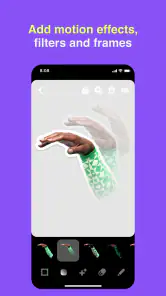
One of the standout features of Shuffles is its integration with Pinterest. You can easily pull images from your Pinterest boards or search for new ones, making the app a seamless extension of the Pinterest ecosystem. The drag-and-drop functionality is a dream come true, allowing you to move elements around with ease. Plus, the ability to layer images, text, and stickers makes each creation uniquely yours.
Another feature that caught my eye is the collaborative aspect. You can invite friends to join in on your projects, which makes it perfect for group brainstorming sessions or just a fun creative outlet with pals. Sharing your work is a breeze, too. Whether you want to post your masterpiece on social media or keep it within the app's community, Shuffles has got you covered.
The Perfect Tool for Inspiration
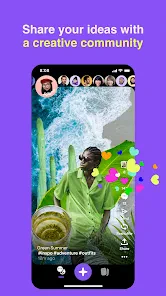
Shuffles isn't just about creating; it's about inspiring. The app is filled with a vibrant community of like-minded individuals who share their creations, offering endless inspiration for your own projects. It's fascinating to see the diverse range of styles and ideas, and it often sparks new concepts that I hadn't considered before. The app's community aspect adds a layer of connection that makes the creative process even more rewarding.
In my experience, Shuffles by Pinterest is more than just an app; it's a tool for self-expression and collaboration. Whether you're using it to unwind after a long day or to plan your next big project, it offers a space where creativity knows no bounds. So, if you're looking for an app that combines functionality with fun, Shuffles is definitely worth checking out. Trust me, once you start, you'll find it hard to stop experimenting with all the possibilities it offers!
A low-pressure way to test an idea
One everyday use I especially like is planning something with a strong visual element before making a decision. If I am considering a different look for a room, I can bring together colors, furniture references, and small decorative details, then compare the overall feeling instead of judging each image in isolation. For a weekend gathering, the same approach can help me settle on a palette and atmosphere before I start shopping or sending invitations. The collage is not a checklist, but it can make a vague idea concrete enough to discuss.
It also works well as a shared starting point when friends have different tastes. Rather than trading a long stream of separate images, we can contribute to one visual direction and notice where preferences overlap. I would keep the goal modest: use the shared canvas to collect possibilities, then make final decisions elsewhere if the project involves schedules, budgets, or detailed instructions.
Small choices that improve the result
When I am building a collage, I try to vary the scale of the images and leave some breathing room. If every element competes for attention, the mood gets lost; a few strong references usually make a better starting point. I also find it useful to separate “inspiration” from “decision”: a board can hold playful possibilities without pretending that every item belongs in the final plan. That makes the app more enjoyable and keeps a visual brainstorm from turning into a cluttered commitment.
Because the work is image-led, it is less suited to ideas that depend on detailed explanation. A collage can show a color direction or style, but it may not capture why a choice matters, what needs to happen first, or which option is practical. I would add a short note in a separate planning app when those details matter, rather than forcing the visual canvas to serve as a document.
What to expect before installing
The app is listed as version 0.43.83 and requires Android 8.0 or later, so I would check device compatibility before expecting to use it on an older Android phone. The rating and install figures suggest it has found an audience, but those numbers do not tell me whether its particular style suits every user. Its free price makes trying the visual workflow low-risk, while the Teen content rating is worth keeping in mind for families choosing apps together.
Shuffles is most appealing if you enjoy collecting visual references and want to do more with them than save them for later. If you mainly need precise typography, structured project management, or a simple place to write plans, a conventional design or notes app will be a better fit. I see its strength in the middle ground: it is more hands-on than a Pinterest board, yet less demanding than building a finished design from a blank canvas.
Making a collage useful beyond the moment
I get more value from a finished shuffle when I give it a clear label or purpose in my own mind before sharing it. “Ideas for a bedroom” is broad enough to invite exploration, while “warm colors with lighter wood” gives the images a direction without turning the exercise into a rigid brief. This small distinction matters if I return to the collage later: I can tell whether I was collecting inspiration, comparing options, or trying to communicate a preference to someone else.
For an everyday example, imagine I have a few minutes while waiting for a friend and want to plan a casual birthday table. I can pull together a handful of visual references for colors, flowers, and serving pieces, then see whether they feel coherent as a group. The useful outcome is not a final shopping list; it is a stronger sense of the look I want. I would still check practical details elsewhere, especially quantities, timing, and cost, because the collage is better at showing atmosphere than managing logistics.
Choosing the right creative starting point
The choice between Shuffles, a Pinterest board, and a conventional design app comes down to what I want to do with the images. A board is the simpler option when I only need to save and sort references. Shuffles makes more sense when I want to actively rearrange those references into a visual argument or mood. A full design editor is the better choice when alignment, exact dimensions, repeatable layouts, or a finished professional asset matter more than spontaneous experimentation.
That middle position is genuinely useful, but it also explains why Shuffles will not replace every creative tool. If I am preparing a presentation, a business graphic, or anything that must follow strict brand rules, I would rather use software built for those constraints. If I am still figuring out what I like, though, the freedom to move images around can help me make decisions before I commit to a more demanding workflow.
Questions I would settle before sharing
People often want to know whether they need to be good at design to enjoy an app like this. I do not think so: the basic appeal is trying combinations, not producing a technically perfect layout. A little restraint helps more than formal training. Starting with a small group of images, then adding only what supports the idea, makes the result easier to understand and keeps the process from feeling like a design assignment.
Another practical consideration is whether it works for a project that involves other people. I find it suitable when friends are swapping visual ideas and reacting to a shared direction, but not as the only place to coordinate a complicated plan. If contributors need to explain decisions in detail or track who is responsible for each step, a separate chat, document, or task tool will make the collaboration clearer. Shuffles can contribute the visual reference point without carrying the whole conversation.
I would also think about the audience before posting a collage publicly. A personal mood board and a finished shareable creation do not have to serve the same purpose; one can be messy and exploratory, while the other benefits from a final pass that removes distracting elements. Taking a moment to review what the composition communicates can prevent a collection of unrelated favorites from being mistaken for a deliberate recommendation.
In my experience, Shuffles by Pinterest is more than just an app; it's a tool for self-expression and collaboration. Whether you're using it to unwind after a long day or to plan your next big project, it offers a space where creativity knows no bounds. So, if you're looking for an app that combines functionality with fun, Shuffles is definitely worth checking out. Trust me, once you start, you'll find it hard to stop experimenting with all the possibilities it offers!
Shuffles by Pinterest Frequently Asked Questions
What devices can I download Shuffles by Pinterest on?
Shuffles is a mobile app for Android and iOS, so you can use it on a compatible phone or tablet. On Android, the minimum requirement is version 8.0. Before downloading, make sure your device meets that requirement and has enough available space for the app and the images you want to use in your collages.
Is Shuffles by Pinterest free to download?
Shuffles is free to download. Its average rating is 4.7 from around 26,000 ratings, and it has over 1 million installs. Those figures can help you understand its reach, but the best way to judge whether its creative tools suit you is to try the app and explore its collage-making experience.
Do I need a Pinterest account to use Shuffles?
Shuffles is a Pinterest creative app, so having a Pinterest account is a natural way to connect your ideas and creations with the platform. If you already use Pinterest, the app fits into that creative routine; otherwise, you can check the sign-in options when you open it and follow the prompts. Once you are in, you can explore the collage-making tools and start arranging visuals.
Is Shuffles by Pinterest suitable for teenagers?
Shuffles has a Teen content rating, making it relevant for users and families who want to check age guidance before installing. The app centers on making and sharing visual collages, so it is worth considering how a young person uses social and creative apps, including what they choose to post and share. Parents can review the app together with their teen and discuss comfortable sharing habits.
What is Shuffles by Pinterest and how does it work?
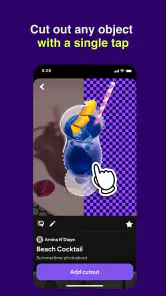
Shuffles by Pinterest is a creative collage-making app designed to help users express their creativity by combining images, text, and effects into unique visual compositions. Users can import images from Pinterest or their own device, use an array of editing tools to customize their creations, and share their collages within the app or on social media platforms. The app aims to provide a seamless and fun experience for both amateur and professional designers alike.
Pros
- User-friendly interface and design.
- Seamless Pinterest integration.
- Wide range of creative tools.
- High-quality content sharing.
- Strong community engagement.
Cons
- Limited offline functionality.
- Occasional app crashes.
- In-app purchases required.
- Ads can be intrusive.
- Data privacy concerns.
- Category
- Lifestyle
- Version
- 0.43.83