phyphox
- 305.00
- 4.7
- Installs
- 1.00M
- Price
- Free
Screenshots
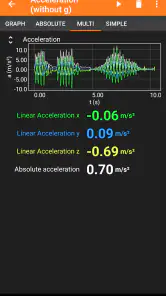
Analysis by Reviewed
I like apps that give a phone a job beyond filling spare moments, and phyphox has a clear purpose: it lets you explore physical phenomena using sensors built into your device. Made by RWTH Aachen University, it sits in the education category, but it feels less like a course to work through and more like a practical set of tools for asking questions about the world around you.
Trust starts with what the app actually does
That practical focus matters when deciding whether to use a sensor app. The core activity is observing measurements from your phone, then making sense of them through experiments, graphs, and, when useful, exported data. I would treat the readings as a way to investigate and learn, not as laboratory-grade evidence: phones differ, sensor readings can be affected by how you hold the device, and a measurement is only as useful as the setup behind it.
The app is free, rated for Everyone, and has a 4.7 average from around 7.8 thousand ratings. Those details make it easy to try, but they do not tell me how any particular experiment will behave on my phone. I’d start with a simple activity and check that the relevant sensor is available before relying on the app for a lesson or demonstration.
Using phone sensors with care
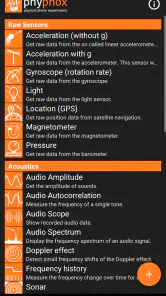
The magic behind phyphox lies in its ability to utilize the sensors already embedded in your smartphone. From the accelerometer to the gyroscope, this app taps into the powerful tools your phone already has. You can measure acceleration, magnetic fields, sound intensity, and even light intensity. It’s quite incredible how much data your phone can collect, and phyphox makes it super accessible.
From a quick experiment to a useful result
Now, I know what you might be thinking – “Isn’t this going to be complicated?” Not at all! The app is designed with a user-friendly interface that guides you through various experiments. Whether you’re a science enthusiast or just curious, phyphox provides simple, step-by-step instructions for each experiment. It’s almost like having a personal science teacher who's always ready to dive into exciting experiments with you.
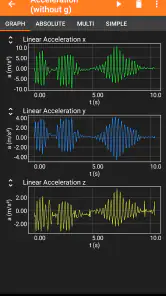
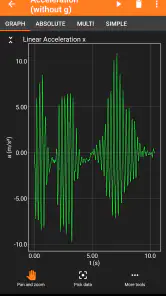
But don’t let the simplicity fool you. Beneath its easy-to-navigate interface, phyphox offers a depth of information. You can delve into the raw data, analyze graphs, and even export the data for further exploration. It’s perfect for students or anyone keen on understanding the science behind everyday phenomena.
One useful habit is to repeat an experiment with the phone in a slightly different position, then compare the graphs rather than trusting a single result. For example, a student could place the phone on a steady surface, record a short motion-related test, and export the readings to examine how a change in setup affects the pattern. That small comparison can teach more than collecting a long stream of numbers without a question in mind.
More From Our News Desk

Clash of Clans Is Won Between the Battles

Android Auto Makes the Case for Quieter Car Software

MobiOffice: Transforming Mobile Productivity with Seamless Integration

EA SPORTS FC™ Mobile Soccer: Redefining Mobile Sports Gaming

How Microsoft OneDrive Became a Mobile Productivity Giant

How Google Translate Breaks Language Barriers Effortlessly
Choosing it over a general science app
For a typical school assignment, a video or textbook is often faster when the goal is simply to learn a definition. This app earns its place when you want to observe something directly and connect it to a graph or measurement. A dedicated instrument may be the better choice when accuracy, calibration, or consistent results are essential; a phone is convenient, but its sensors and placement are part of the experiment, not a guarantee of precision.
In an everyday setting, I can imagine using it to explore why a lift ride feels different at the start and stop, or to compare how a phone responds when moved smoothly versus abruptly. I’d secure the phone and keep the test controlled, then look at the shape of the data before drawing conclusions. That approach makes the app useful for a curious learner without turning an informal observation into a claim it cannot support.
Making a small investigation manageable
Before opening an experiment, I’d decide what I want to find out in one sentence. “Does the pattern change when I move the phone faster?” is more useful than “What can this sensor show me?” A focused question helps me choose a short recording, keep the phone’s position consistent, and notice whether the graph actually answers the question. It also makes the result easier to explain to someone else.
A practical classroom workflow is to have students predict what a graph might look like, collect a brief sample, and then compare the prediction with the observed trace. The prediction gives the exercise a point; the graph gives the class something concrete to discuss. If results differ between devices, that can become part of the lesson about orientation, sensor variation, and experimental setup rather than a reason to assume one phone must be broken.
Exporting is most helpful when it serves a specific next step, such as comparing two trials or examining values outside the immediate display. I would name or otherwise keep track of which run used which setup before exporting several files. Without that small bit of organization, a collection of measurements can quickly become hard to interpret. The app can help collect evidence, but the user still has to preserve the context that makes the evidence meaningful.
Where it fits in everyday learning
The strongest use is not necessarily a formal lesson. At home, I could use a short motion experiment to turn a child’s question about a moving object into a conversation about changing readings. On a walk, a curious learner might compare a steady pace with a brief change in movement, while taking care not to handle the phone unsafely. These are modest investigations, not definitive tests, but they make familiar experiences easier to discuss in scientific terms.
It can also suit someone revising physics who already understands the basic concepts but wants a more tangible way to connect them with observations. A graph can prompt questions that a page of notes may not: what changed between trials, which part of the setup stayed constant, and whether the same pattern appears on a repeat run? For a beginner who needs a structured explanation from first principles, though, I’d pair the app with a textbook or teacher rather than expect measurements alone to teach the topic.
For teachers, the trade-off is between convenience and consistency. A roomful of phones makes it possible for learners to collect observations directly, but the devices may not behave identically and students need clear instructions about placement and handling. I’d test the chosen activity on the actual devices first, then plan a backup explanation or demonstration. That simple rehearsal reduces the chance that a lesson depends on a sensor behaving exactly as expected.
Sharing ideas and checking the details
One of the coolest features of phyphox is its community aspect. Users from all over the world share their experiments and findings. It’s like a global science fair at your fingertips! You can learn from others, share your own discoveries, and get inspired by the creative ways people use their smartphones to explore the world.
Moreover, the developers are pretty active in updating the app and adding new features, so there’s always something new to try out. They listen to user feedback and continuously work on making the app even better, which is always a big plus in my book.
For privacy-conscious use, I would separate what is visible in the experiment from assumptions about data handling. The measurements are the point of the app, but that alone does not establish what permissions are requested or how information is handled. Before a sensitive demonstration, I’d review the phone’s permission controls and the app’s available settings, and avoid recording material I would not want to keep or share. That is a sensible precaution for any app that works with device sensors.
What I would check before using it with others
When using a phone for a demonstration, I’d consider both the experiment and the people around it. A sound-related activity, for example, can make a room’s noise part of the observation, so I’d keep the purpose clear and avoid treating a reading as a judgment of an individual. For any activity involving other people or a shared space, I’d explain what is being measured and keep the phone pointed and placed in a way that feels appropriate.
Permissions and privacy choices are managed in the context of the device and the app’s visible controls. I would look at those controls directly rather than infer a policy from the fact that the app uses sensors. If I am not comfortable with a requested access for a particular activity, I can choose not to use that activity or change the permission where the phone allows it. That is a practical check, not a claim about how every version or device handles data.
Users also retain an important kind of control over the experiment itself: they choose what to measure, how long to collect readings, and whether the result is useful enough to export. I’d keep recordings limited to the question at hand, review an exported file before sharing it, and avoid including personal context that is irrelevant to the science. These habits make the workflow clearer and help prevent casual measurements from becoming material shared without thought.
What it can and cannot replace
Compared with a conventional educational app, which often presents lessons, quizzes, or reference material, this one is strongest when learning depends on observation. It is not a substitute for a structured course if I need a planned sequence, nor is it the right replacement for a calibrated instrument when a result must meet a professional standard. Its distinctive advantage is that the measuring device is already in a pocket, so a quick question can become a small experiment without setting up specialist equipment.
Compared with using a separate sensor or a dedicated measuring tool, the phone-based approach is convenient but less controlled. A dedicated instrument is preferable when repeatability and known performance matter more than ease of access. A video or explanation is preferable when I simply need a clear answer quickly. I’d choose this app when the process of collecting and interpreting a reading is itself part of what I want to learn.
That distinction also helps set expectations about accuracy. A clean-looking graph can feel authoritative, but it does not automatically mean the experiment was well controlled. I’d repeat a result, keep the phone’s orientation steady where relevant, and describe the conditions alongside the observation. When the result has real-world consequences, I would verify it with an appropriate instrument or a qualified source instead of relying on a phone sensor alone.
Who will get the most from it
I’d recommend it to students, teachers, and curious people who enjoy testing an idea instead of only reading about it. It is less suited to someone looking for a polished course with a fixed learning path, or anyone who needs dependable professional measurements. If you only want a quick explanation, a lesson or reference app may be simpler; if you want to investigate motion, sound, light, or magnetic fields using a phone, this gives you a hands-on starting point.
The app has more than a million installs, and its current version is 1.2.0, with Android 5.0 as the minimum requirement. I’d still check how a chosen experiment works on the device in hand: sensor availability and results can vary between phones. That is not a reason to avoid it, but it is a reason to try a small test before planning a classroom activity around one specific measurement.
It is also a sensible choice for a learner who likes exploring independently and is willing to question a result instead of accepting every number at face value. Someone who dislikes troubleshooting, wants polished explanations without experimentation, or needs one consistent reading across different devices may find the experience frustrating. The best fit is a person who sees variation as something to investigate, while understanding that not every variation has a useful explanation in the app alone.
A cautious recommendation
If you’ve ever had a curiosity about how things work or wanted to explore the scientific side of your smartphone, phyphox is the app for you. It’s educational, fun, and incredibly innovative. Plus, it’s a great way to make the most out of your smartphone’s capabilities. Whether you’re a student, teacher, or just someone who loves to learn, it will definitely spark your curiosity and keep you engaged.
So, why not give it a try and unleash the potential of your smartphone? You might just discover a hidden scientist in you!
My careful takeaway
I’d start with one low-stakes experiment, keep the setup simple, and ask whether the graph supports the idea I began with. That is where this education app feels most convincing: not as a magic measuring device, but as an accessible prompt to observe, compare, and think. With 305 written reviews and a broad audience reflected in its store presence, it is clearly established, though popularity does not remove the need to check the phone and experiment for yourself.
For me, the most useful decision is knowing what I need before opening it. If I want a hands-on starting point for exploring a physical question, I’d be happy to try it; if I need a reliable measurement for a consequential decision or a complete course that teaches in a fixed order, I’d choose a different tool. Used with that boundary in mind, it is an inviting way to turn an ordinary phone into a reason to ask better questions.
phyphox Frequently Asked Questions
Is phyphox free, and who is it designed for?
phyphox is a free education app from RWTH Aachen University. It is suitable for students, teachers, and curious learners who want to explore physics through experiments with a phone. Its content rating is Everyone, and the guided activities make it approachable for a range of ages and levels of experience.
What devices can run phyphox?
phyphox is available for Android and iOS, and the Android version requires Android 5.0 or later. The experiments rely on sensors built into the phone, so the specific activities available and the quality of their readings can vary from one device to another. Checking your device’s sensors can help you understand which experiments it can support.
What is Phyphox and what are its main features?
Phyphox, short for 'Physical Phone Experiments,' is a sophisticated app designed to utilize the sensors in your smartphone to conduct various physics experiments. It offers a range of experiments like acceleration, sound spectrum analysis, and magnetic field measurement. The app provides detailed instructions and real-time data visualization, making it a valuable educational tool for students and teachers alike.
Is Phyphox user-friendly for beginners in physics?
Yes, Phyphox is designed to be user-friendly, even for those new to physics. It offers a simple interface with step-by-step instructions for each experiment. This makes it accessible for both students and educators who may not have a deep background in physics, allowing them to easily conduct experiments and understand the underlying principles.
Does Phyphox require an internet connection to function?
Phyphox does not require an internet connection to perform experiments, as it utilizes the smartphone's built-in sensors. However, an internet connection may be necessary to download additional experiment configurations or to share your results online. This offline capability makes it convenient for use in locations without reliable internet access.
Pros
- User-friendly interface for all skill levels.
- Wide range of sensor compatibility.
- Real-time data visualization.
- Customizable experiments.
- Free for educational use.
Cons
- Requires sensors present on the device.
- Steep learning curve for advanced features.
- Limited offline functionality.
- Occasional data sync issues.
- No built-in tutorial for beginners.
- Category
- Education
- Version
- 1.2.0











