Phone File Recovery
- 83.00
- 4.0
- Installs
- 1.00M
- Price
- Free

Screenshots
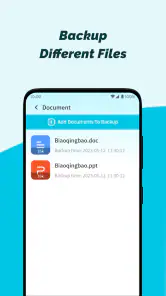
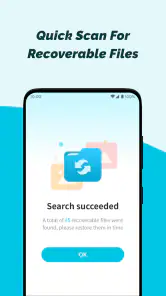
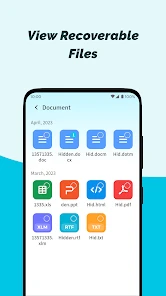
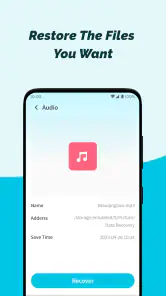
Analysis by Reviewed
I tend to judge recovery tools by what they do after the initial panic has passed. A file-recovery app can feel reassuring on day one, but lasting value depends on whether it fits a sensible routine—and on whether it can help with the particular loss you face. Phone File Recovery is aimed at people who want a straightforward place to start when files disappear, not at replacing careful backups or guaranteeing that every deleted item can be restored.
The first-week appeal: a simple place to start
In the first few days, the appeal is easy to understand: you have lost something, and the app offers a focused recovery workflow rather than asking you to begin with a complicated desktop utility. Phone File Recovery is a free Android tools app from Dream Tools. It is rated for Everyone, and its current version is 1.1.8. Those details make it approachable for ordinary phone users, though they do not change the basic uncertainty of file recovery: success depends on whether the file is still recoverable on the device.
The app’s store figures suggest it has reached a broad audience, with more than a million installs and an average rating of 4.0 from around 4,200 ratings. I treat that as a sign of familiarity, not proof that it can retrieve every photo or document. Recovery apps are especially easy to misunderstand in a stressful moment. A scan can identify candidates, but seeing an item in a result list is not the same as having a complete, usable copy safely restored.
What the recovery workflow is good for
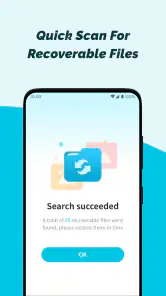
The described flow—choose a file type, scan, review the results, then select what to recover—makes sense for a person who wants to narrow a search instead of sorting through unrelated material. If I had accidentally removed a photo from a recent outing, I would start with photos, inspect the candidates, and check the preview before choosing anything. That last step is practical: it helps distinguish the image I actually want from a similar thumbnail or an old file with a vague name.
Previewing results is also a useful safeguard when the goal is one particular document or memory rather than a full device clean-up. I would recover only the files I recognize, then open them in their usual apps to confirm they work. If the restored item matters, I would copy it somewhere separate afterward. That extra check keeps the recovery attempt from becoming a second source of worry.
Month-to-month value is mostly about readiness
A recovery tool is not something most people need to open every day. Its value is more occasional: it can be a convenient first step when a deletion catches you off guard. That makes it different from a cloud backup service, which is designed to preserve copies continuously, and from a file manager, which helps organize items that are already present. I would not rely on a recovery app as my regular protection plan; I would pair it with backups and use recovery only when something has slipped through.
For a realistic example, imagine deleting a batch of pictures while clearing space before a trip, then realizing later that one was the only shot of a useful sign or a family moment. The sensible response is to stop making unnecessary changes, try a focused scan, preview likely matches, and save any recovered copy somewhere safe. The useful habit is not repeatedly scanning out of anxiety; it is knowing where the tool fits and having a separate backup routine for files I cannot afford to lose.
More From Our News Desk

Weather by Xiaomi Review: Clear at a Glance, Less Clear Up Close

X Under Pressure: Can It Recover When Posting Goes Wrong?

Clash of Clans Is Won Between the Battles

Android Auto Makes the Case for Quieter Car Software

MobiOffice: Transforming Mobile Productivity with Seamless Integration

EA SPORTS FC™ Mobile Soccer: Redefining Mobile Sports Gaming
Where it fits—and where it doesn’t
Compared with the usual alternatives, this app’s strength is its phone-first, guided approach. A desktop recovery program may offer a different route when a phone-based attempt does not help, while a cloud or computer backup is the better choice when a clean copy already exists. Those options solve different problems. I would try this app when I want to check for recoverable files directly on my phone, but I would not treat it as equivalent to a backup or as a substitute for professional help with especially valuable data.
Maintenance, limits, and the point where I would stop
Keeping the app installed has a small but real trade-off: it occupies space and may be useful only rarely. Since it is free, the decision is less about a purchase and more about whether I prefer having a recovery option ready or keeping my phone lean. I would keep it only if the occasional convenience feels worthwhile, and I would still review my photos and documents periodically so that important files exist in a separate location.
My main caution is to manage expectations. A recovery scan cannot promise that deleted content will return, and hurriedly installing tools, saving new files, or repeatedly changing what is on the phone may complicate a recovery attempt. If the missing item is irreplaceable, I would avoid experimenting with multiple recovery apps and first check existing cloud, computer, messaging, or shared copies. If those routes fail, a specialist may be more appropriate than casual trial and error.
Who should keep it in mind
I can see this being useful for someone who occasionally deletes photos or documents by mistake and wants an uncomplicated recovery attempt on an Android phone running version 6.0 or later. It is also a reasonable option for a less technical family member, provided they understand that the app offers a chance to search rather than a guarantee. The broad Everyone age rating fits that accessible role, but I would still help a child or inexperienced user decide which files to restore and where to save them.
I would skip it as a primary solution if my real need were automatic protection, dependable archiving, or recovery from a damaged device. In those situations, a backup service, a computer copy, or qualified repair support is a better match. I would also avoid installing it simply to feel protected if I am not prepared to keep separate copies of important files; reassurance is not the same as prevention.
Making the habit useful without making it a chore
After the novelty fades, the best routine is modest: keep important photos and documents backed up, and remember the app as a possible first check after an accidental deletion. If I do need it, I would narrow the search by file type, inspect previews carefully, restore only the items I recognize, and verify them in their normal apps. I would then make a separate copy instead of assuming the recovery result is now protected for good.
That workflow also answers the practical questions that tend to arise in a stressful moment. The app is free to try, works as an Android tool, and gives you a way to inspect possible results before selecting files. Whether a particular item can be recovered is a separate question, so I would check existing backups first and avoid treating a scan as proof that the original is safely back. For anything exceptionally important, I would choose the least risky recovery path rather than keep testing tools.
My long-term verdict
Ever had that moment of panic when you accidentally delete an important file on your phone? Or maybe your device just randomly decides to lose your data? Yeah, we’ve all been there. That’s where Phone File Recovery steps in as a lifesaver. It’s like having a digital detective on your phone, ready to recover those lost files and memories.
Phone File Recovery is your go-to app when disaster strikes. It’s designed to help you retrieve lost files from your Android or iOS devices. Be it photos, videos, or documents, this app promises to bring them back from the abyss. It's not just about recovery; it’s about peace of mind, knowing that your data is never truly gone.
Diving into the Features
First off, the app is incredibly user-friendly. You don’t need to be a tech whiz to navigate through it. The interface is intuitive, guiding you step by step through the recovery process. Just a few taps and you’re on your way to recovering lost data. Plus, it supports a wide range of file formats, so whether it’s that important PDF or a cherished photo, you’re covered.
Another standout feature is its compatibility. No matter what device you’re using, Phone File Recovery works seamlessly across various platforms. And let’s not forget about its speed. The app quickly scans your device, finding and recovering files faster than you can say "oops."
How Does It Work?
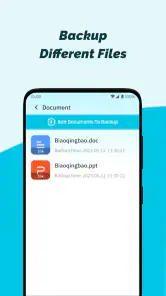
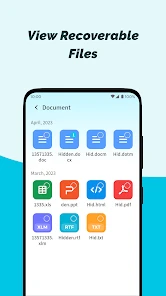
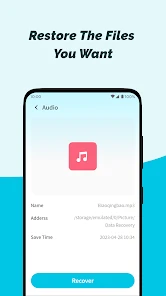
The process is as straightforward as it gets. Once you download and install the app, it pretty much takes you by the hand. You start by selecting the type of files you want to recover. The app then scans your device thoroughly, identifying files that can be recovered. After the scan, it presents you with a list of files, and you can choose which ones you want back. Simple, right?
In addition, it also offers a preview option. This means you can preview the files before recovering them, ensuring you’re rescuing exactly what you need. It’s little details like these that make the app stand out in a crowded market.
Ending on a High Note
In a world where our phones are essentially our lifelines, losing data can feel catastrophic. But with Phone File Recovery, you’ve got a reliable partner to help you bounce back from such mishaps. It’s fast, efficient, and most importantly, it’s easy to use. So next time you find yourself in a data-loss crisis, remember there’s an app for that. And it’s just a download away.
Phone File Recovery Frequently Asked Questions
Is Phone File Recovery easy to set up and use?
Phone File Recovery is intended as a practical tool for people who want to look for missing files without navigating a complicated recovery process. After installing it, users can open the app and start exploring its recovery options. As with any file-recovery tool, the results depend on the condition of the storage and whether deleted data has been overwritten, so it is sensible to review any found files before restoring them.
What should I do to improve the chances of recovering a deleted file?
If a file has just been deleted, avoid saving new files or installing additional apps on the same device before attempting recovery. New data can overwrite the storage space where deleted information was located, making it harder to restore. Open Phone File Recovery and scan as soon as practical, then check the results carefully. Recovery is not guaranteed, but limiting further storage activity may help.
What is Phone File Recovery and how does it work?
Phone File Recovery is an application designed to help users recover lost or deleted files from their mobile devices. It works by scanning the device's storage for traces of deleted files and attempts to restore them to their original state. This can include photos, videos, documents, and more, making it an invaluable tool for those who have accidentally deleted important data.
Is Phone File Recovery compatible with all devices?
Phone File Recovery is compatible with most Android and iOS devices. However, compatibility may vary depending on the device model and the operating system version. It is advisable to check the app's specifications on the download page to ensure it will function properly on your specific device. Regular updates are provided to expand compatibility.
Are there any costs associated with using Phone File Recovery?
While Phone File Recovery offers a free version with limited functionality, users may need to purchase a premium version to unlock all features. The premium version provides a more comprehensive recovery process with additional options for file types and enhanced scanning capabilities. Pricing details can be found within the app or on the developer's website.
Pros
- Recovers lost files effortlessly
- Supports various file types
- User-friendly interface
- Quick scanning process
- No need for technical skills
Cons
- Limited free version features
- May not recover all files
- Requires in-app purchases
- Occasional ads
- Needs internet connection
- Category
- Tools
- Version
- 1.1.8









