PDF File Reader
- 140.00
- 3.4
- Installs
- 10.00M
- Price
- Free
Screenshots
Analysis by Reviewed
When I need to check a document quickly on my phone, I want a reader that gets me to the page without turning the task into a project. PDF File Reader is aimed at that straightforward job: opening PDFs for reading. It’s a free productivity app from Dream Tools, and its appeal is clearest if you want a simple place to view documents rather than a full document-editing workspace.
Choose it for the job you actually need
Before switching readers, I’d ask how I use PDFs day to day. If most of your time is spent opening a handout, checking a form, or finding a passage in a document, a dedicated reader can be more convenient than a broad office suite. If you need to revise text, sign forms, organize a large archive, or collaborate on files, a more specialized document tool may suit you better. The important distinction is whether you mainly need to read or to work on the PDF itself.
That narrow focus also makes this a reasonable choice for someone who doesn’t want to learn a complicated interface. A quick check of a timetable or a page in a course document should not require hunting through editing controls. I’d still test your own regular files before relying on any reader for an important task: PDFs can vary considerably, and a file that is easy to read on one phone may be awkward on another screen.
A practical fit for quick checks and short reading sessions
Picture a student heading to class who needs to check a reading assignment while waiting for a bus. A reader that opens the document without a detour can make that small task less frustrating. The same applies to someone checking a digital receipt or looking up a page in a household instruction booklet. These are modest jobs, but they are exactly where a lightweight PDF app can earn a place on a phone.
For longer documents, I’d use a little care rather than assume every page will be equally comfortable to read on a small display. Zooming and moving around can interrupt the flow, particularly in files with dense layouts or wide tables. If you regularly study or review lengthy reports, try a representative document first and decide whether the phone experience works for you; a larger screen or a desktop reader may be the better option for sustained reading.
There is also a useful habit that makes any mobile PDF workflow smoother: keep the file in a place you can find again, and open it from the same route you normally use. That helps you tell whether a problem comes from the document, the file location, or the reader. For a document you need offline, check that it is available on your device before leaving home rather than discovering on the way that you cannot reach it.
Unpacking the User Experience
From the moment you launch PDF File Reader, you're greeted with a sleek and intuitive interface. It’s like meeting someone who just gets you. Navigating through the app is a breeze, even if you’re not particularly tech-savvy. No overwhelming options, no clutter – just what you need, right where you need it.
More From Our News Desk

Weather by Xiaomi Review: Clear at a Glance, Less Clear Up Close

X Under Pressure: Can It Recover When Posting Goes Wrong?

Clash of Clans Is Won Between the Battles

Android Auto Makes the Case for Quieter Car Software

MobiOffice: Transforming Mobile Productivity with Seamless Integration

EA SPORTS FC™ Mobile Soccer: Redefining Mobile Sports Gaming
Opening documents is a snap. Whether you’re dealing with hefty PDFs or smaller files, the app handles them with impressive speed. I particularly love how it doesn’t lag, even when flipping through pages of a particularly image-heavy document. It’s like having a fast-forward button for your PDFs!
Features That Stand Out
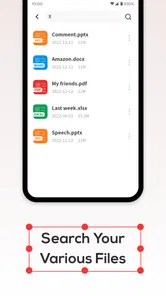
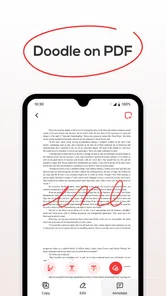
What’s a good app without some standout features, right? PDF File Reader doesn’t disappoint. It’s packed with features that make managing your PDFs a walk in the park. You can easily search for text within documents, making it super handy for those last-minute meeting notes or study sessions. And let's not forget the annotation tools – I’ve lost count of how many times I’ve used the highlight feature to mark important points.
Another feature that’s pure gold is the night mode. Trust me, your eyes will thank you during those late-night reading sessions. It's little touches like these that make this app feel like it’s been tailor-made just for you.
Seamless Integration and Accessibility
One of the things I appreciate most about this app is its seamless integration with cloud services. Whether you’re a Google Drive loyalist or a Dropbox devotee, PDF File Reader plays nicely with all of them. Uploading and downloading files is a cinch, which keeps your documents accessible wherever you are.
The app also supports multiple languages, which is a huge plus if you’re dealing with documents in different tongues. It’s like having a personal translator at your fingertips!
And did I mention it’s free? It’s almost too good to be true, but here we are. A full-featured PDF reader without the price tag.
Final Thoughts
In the world of document management, PDF File Reader truly stands out as a reliable and user-friendly app. Whether you’re a student, a professional, or just someone who likes to stay organized, this app has got you covered. Its combination of speed, functionality, and accessibility makes it a standout choice in a crowded market.
So, if you haven’t already, give it a try! You might just find it becomes an indispensable part of your digital toolkit. Happy reading!
How it compares with other PDF options
Compared with the PDF viewer that comes with a phone or file manager, this app is worth considering when you want a reader-focused place to open documents. A built-in viewer may be enough if PDFs are rare in your routine; moving to another app only makes sense if it makes frequent reading easier. On the other hand, people who need to edit pages, convert files, or manage signatures should look at a PDF editor or office suite instead of expecting a reading app to cover those jobs.
When deciding whether to make it your default, consider how you receive files. If you usually tap a document in a message or cloud storage, try opening it that way and see whether the handoff feels natural. If the app’s handling of a particular file is inconvenient, you can keep another viewer available for that case rather than forcing every PDF through one tool. That small bit of flexibility is often more practical than switching your entire workflow.
Details worth knowing before installing
The app has an average rating of 3.3 from around 3,400 ratings, alongside about 72 written reviews, so I’d treat it as a modestly reviewed option rather than assume it will suit every device and document. It has over 5 million installs, is rated for Everyone, and its current version is 1.2.0. It was released on October 13, 2024, and requires Android 6.0 or later. That makes it relevant to a broad range of Android users, while iPhone users should choose a reader made for iOS.
If you are wondering whether it costs anything, it is free. I’d still judge it by the task you need it for rather than by price alone: a free reader is useful only if it opens your own documents comfortably and fits the way you handle them. For sensitive work, also follow your usual document-handling habits and avoid sending files through any service unless you are comfortable doing so.
Who should choose it—and who should pass
I’d recommend trying it if you mostly need to read PDFs on an Android phone, want a straightforward interface, and value quick access over advanced document production. Students checking class materials, commuters reading short files, and anyone who occasionally needs to consult a saved document are the clearest fit. Search and highlighting, as described in the app experience, can also help when you need to locate a phrase or mark a passage for later review.
I would skip it as my only PDF tool if my routine depended on editing text, filling complex forms, signing documents, or carefully organizing a substantial library. Those needs call for tools built around editing or file management. My practical recommendation is to install it only if reading is the main job, then test a typical document and the way you normally open files. If that feels easy, it can be a useful everyday reader; if you spend more time changing PDFs than reading them, choose a more capable alternative.
Make a quick test part of your decision
Rather than judge a reader by a polished sample file, I’d use one document that reflects an actual task: a handout with small print, a form with several pages, or a report containing a table. Check whether you can get to the relevant passage comfortably, then close it and reopen it through the route you normally use. This simple trial can reveal whether the app fits your habits better than a generic PDF viewer, without requiring you to move your whole collection first.
Search is especially useful when you know a word or phrase but not the page where it appears. For a meeting document, for instance, I’d search for the topic I need before scrolling through pages one by one. Highlighting can support a different kind of return visit: mark a passage while reading, then use that visual cue when you revisit the document. I’d keep these actions focused, though. If you need to make extensive notes or revise the actual content, a reader is not a substitute for an editor.
Small-screen trade-offs that matter
On a phone, a PDF’s original layout can be as important as the reader. A narrow page of plain text is usually easier to consult than a landscape spreadsheet squeezed into a portrait display. With a wide table, I’d rotate the phone if that helps, zoom only enough to read the needed cells, and avoid treating the screen as a comfortable replacement for a laptop when comparing many columns. That is a practical limitation of mobile reading, not a reason to expect every file to behave alike.
Night mode can make an evening reading session more comfortable, but it does not solve every visibility issue. Small type, diagrams, and color-coded material may still be easier to inspect in the document’s original appearance or on a larger screen. I’d switch modes based on the file rather than leave one setting on automatically. That is particularly useful when a document relies on color or has a design where altered contrast makes distinctions harder to see.
Keeping a dependable document routine
If you receive a PDF through a message or cloud storage, open a nonessential file first and see whether the transition into the reader feels clear. For important documents, keep track of the original location so you can return to it if you need another app for editing or sharing. This is a modest habit, but it prevents confusion about which copy you are viewing, especially when a document appears in more than one place.
For travel or an unreliable connection, I’d check the document while still online and make sure the copy is available on the phone before setting off. A cloud-based file may be easy to reach at home but less convenient when you cannot connect. This app’s role is to help with reading; preparing the file in advance is still part of making that reading dependable. If the document is sensitive, I’d also think carefully about where I store it and which services I use to move it.
When a different kind of app makes more sense
The usual alternatives serve different jobs. A phone’s built-in viewer is sensible for occasional opening when it already handles your files well. A full PDF editor is a better match for changing pages, completing demanding forms, or signing paperwork. An office suite can be useful if PDFs are only one part of a wider routine involving other document formats. I would not install a separate reader simply because it has a longer feature list; I’d switch only when it removes a recurring annoyance.
For people who read on a tablet or computer for hours, a larger-screen reader may be the stronger everyday choice even if this app works well for quick phone checks. Conversely, someone who only needs to confirm an appointment time or look up a paragraph may not need a heavyweight suite at all. The best fit depends less on a universal ranking and more on the point where your task changes from viewing a document to modifying or managing it.
A sensible recommendation for Android readers
With an average rating of 3.3 from around 3,400 ratings and about 72 written reviews, I’d approach this as an option to test against your own needs rather than a guaranteed fit. Its over 5 million installs show that many people have tried it, but popularity alone cannot tell you how your particular PDFs will look or how naturally it will fit your routine. It is free, rated for Everyone, and the current version is 1.2.0; it was released on October 13, 2024, and supports Android 6.0 or later.
For me, the decision is straightforward: if your regular need is opening and reading PDFs on Android, try it with a typical file and see whether the experience feels comfortable. If you need a dependable editing, signing, or archive-management workflow, choose a tool designed around those tasks instead. I’d keep the app as a focused reader when it makes quick checks simpler, and I wouldn’t force it into jobs that belong to a more capable document tool.
PDF File Reader Frequently Asked Questions
Is PDF File Reader compatible with my Android device?
PDF File Reader is a productivity app for opening PDF documents, and its listed minimum Android requirement is Android 6.0. If your device runs that version or a newer one, it meets the stated operating-system requirement. The app is free to download and is rated for Everyone, so it may be worth trying if you need a straightforward way to open PDFs.
Who makes PDF File Reader, and what is the app intended to do?
PDF File Reader is developed by Dream Tools. Its purpose is simple: it lets you open PDF documents, making it a productivity option for people who need to view this file type on a mobile device. The app has been available since October 13, 2024, and its short description identifies it as a PDF file app.
What features does the PDF File Reader app offer?
The PDF File Reader app provides a robust set of features designed to enhance your document viewing and editing experience. Users can easily open and view PDF files, annotate documents with comments and highlights, and fill out forms. Additionally, the app supports text search, bookmarking, and offers a night mode for comfortable reading in low light environments.
Is the PDF File Reader app free to use?
The PDF File Reader app is free to download. The published app information identifies it as free, so you can install it without paying an upfront price. Its main purpose is opening PDF documents, making it an accessible option if you want a mobile PDF reader. As with any app, check the current app-store screen before installing for the latest details about availability and terms.
How user-friendly is the PDF File Reader app?
The PDF File Reader app is designed with user-friendliness in mind. It features an intuitive interface that facilitates easy navigation and document management. New users will find the app easy to use, with comprehensive tutorials and a help section to guide them through its functionalities. Its simplicity does not compromise its functionality, making it suitable for both beginners and advanced users.
Pros
- Fast document loading and rendering.
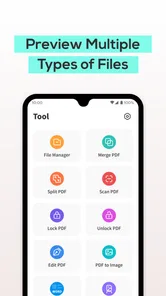
- Supports various file formats.
- User-friendly interface.
- Offline access to documents.
- Annotation tools available.
Cons
- Contains ads in free version.
- Limited cloud storage options.
- Some features require premium.
- Occasional crashes reported.
- Large files may load slowly.













