All Document Hub
- 40.00
- 4.3
- Installs
- 1.00M
- Price
- Free
Screenshots
Analysis by Reviewed
When I need to find a document quickly, the frustrating part is often remembering which service or folder holds it. That is the problem All Document Hub is meant to address: it brings everyday document handling into one place, with a particular focus on PDFs. I see it as a practical organizer for people who move between files often, rather than a replacement for every tool used to create or edit them.
A useful fit for everyday document work
As a productivity app from Dream Tools, it is aimed at a broad audience, and its Everyone age rating reflects that accessibility. It is free, has reached over a million installs, and holds an average rating of 4.3 from around 3,400 ratings. Those figures suggest that it has found an audience, but they do not tell me whether it suits a particular workflow; that depends on how you handle files day to day.
A realistic use might be preparing for an appointment: I could gather a form, a receipt, and a reference PDF before leaving home, then check that the documents I expect to need are available on the device. The useful habit is to organize files before I am in a hurry. I would also keep important originals in their usual storage locations rather than treating any single organizer as my only copy.
What to check before relying on it
One question worth answering early is whether the app fits the services and file habits you already use. The published account of the experience describes linking cloud services, including Google Drive, Dropbox, and OneDrive, but I would test my own routine with a few non-sensitive files before moving a large archive into it. That small trial can reveal whether the way files appear and the search terms you use work well for you.
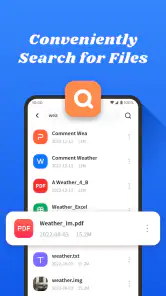
Search is most helpful when I give files names I will remember. A receipt called “travel expense” is easier to find later than one left with a vague scan name, regardless of the app. For documents I need offline, I would check availability before a commute or appointment instead of assuming every cloud file is ready without a connection. These habits make a document hub more dependable, while also keeping expectations realistic.
Getting Started with All Document Hub
First things first, downloading and setting up All Document Hub was a breeze. Available on both Android and iOS, the app swiftly installs and greets you with a clean and intuitive interface. It feels like a breath of fresh air compared to the clutter I’ve experienced with similar apps. Upon launching, syncing your accounts is as easy as pie. The app supports a variety of cloud services like Google Drive, Dropbox, and OneDrive, among others. The beauty of it lies in its simplicity; you can link all your accounts without jumping through hoops.
Features That Stand Out
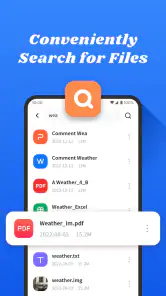
What I absolutely love about this app is its ability to consolidate all my documents into one central hub. No more switching between apps or searching for where I stored that elusive PDF. The search functionality is top-notch, allowing you to find documents swiftly using keywords. Oh, and did I mention the offline access? It’s an absolute game-changer for those moments when you're off the grid but need your documents on hand.
More From Our News Desk

Clash of Clans Is Won Between the Battles

Android Auto Makes the Case for Quieter Car Software

MobiOffice: Transforming Mobile Productivity with Seamless Integration

EA SPORTS FC™ Mobile Soccer: Redefining Mobile Sports Gaming

How Microsoft OneDrive Became a Mobile Productivity Giant

How Google Translate Breaks Language Barriers Effortlessly
The user interface is another highlight. It’s sleek, modern, and most importantly, user-friendly. Whether you’re a tech guru or someone who just learned how to download apps, navigating through All Document Hub feels intuitive. The app also offers a dark mode for those late-night document reviews. And if you’re someone who loves keeping things organized, the folder management system will be your best friend. You can create, edit, and delete folders with ease, making document organization a breeze.
Choosing it for the right reasons
In today’s digital age, having a reliable document management system is crucial. All Document Hub not only offers a centralized location for all your files but also enhances productivity with its user-friendly design and robust features. Whether you’re a student, a professional, or just someone who loves staying organized, this app is a must-try.
For people who mainly need a common view of files and quick retrieval, that convenience may be enough to justify adding another app to the phone. If your priority is detailed PDF editing, collaboration, or strict control over a company archive, I would compare it with the dedicated tools you already use before switching. A hub can reduce app-hopping, but it also becomes one more place to learn and maintain.
Speed, stability, and device fit
The current release is version 1.1.7, and it supports Android 6.0 and later. That broad Android baseline makes it accessible to many older devices, though actual responsiveness can still depend on the phone, network, and size of the files being handled. I would expect lightweight browsing to feel different from searching a large collection or opening several substantial PDFs; keeping folders focused can make everyday retrieval less cumbersome.
I would also separate perceived speed from reliability. A clean screen and simple navigation can make a task feel quick, but cloud access still depends on a working connection and the account being available. For important travel or appointment documents, my safer routine is to open them ahead of time, confirm offline access, and keep a backup where appropriate. If something does not appear, checking the source service first is a sensible recovery step before repeating account setup or changing files.
There is a trade-off in using one hub for several sources: it can make browsing easier, but it does not remove the need to understand where a file is stored or which copy is current. I would avoid making simultaneous edits in multiple places unless I can clearly tell which version is authoritative. For casual personal paperwork, that is manageable; for a team with formal document controls, the original cloud service or a dedicated records system may be the better home.
Making a document hub work in practice
I would set up a small, deliberate structure rather than trying to reproduce every folder on a laptop. A few broad categories—such as household, study, and travel—are usually easier to scan on a phone than a deep tree of folders. The point is not to create a perfect archive; it is to make the documents I need most likely to be found with a short search or a couple of taps.
There is also a useful distinction between finding a file and deciding what to do with it. A hub can help surface a PDF, but I would still open the document and check its date or contents before acting on it. That matters when several similar forms or statements live in different cloud accounts. A descriptive filename that includes a plain-language subject and an identifying date can prevent a quick search from returning the wrong version.
For a student, the practical benefit may be keeping reading PDFs and administrative forms accessible without remembering which storage app holds each one. For someone handling household paperwork, it may mean having a bill or insurance document ready during a phone call. I would not use the same approach for every file, though: documents that are sensitive, legally important, or governed by workplace rules should remain under the storage and backup practices required for them.
Where it differs from familiar alternatives
The usual alternative is to open each cloud provider’s own app, or to rely on the phone’s file manager. Those options can be better when I work almost entirely in one service, because there is no extra layer to learn and the source app remains the clearest place to manage its files. All Document Hub makes more sense when I regularly move between sources and value a single browsing point more than having every provider’s full set of controls in front of me.
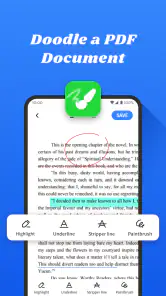
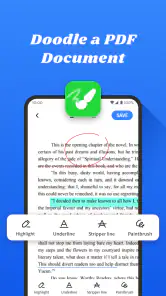
It also sits in a different role from a PDF editor or office suite. If I need to annotate a contract, build a spreadsheet, or collaborate on a document, I would choose a tool designed for that specific job. I would treat this app as a way to organize and retrieve documents, then use a specialist app when the task moves beyond locating and viewing them. That division keeps expectations sensible and avoids choosing a hub just because it can show a file.
One trade-off of a combined view is that it can make the source of a document less obvious at a glance. I would pay attention to which account a file belongs to before moving, replacing, or sharing it, especially if similar copies exist in several places. A little care at the start is worthwhile: try a harmless test file, confirm how it appears, and learn the route back to its original service before relying on the app for important work.
My performance verdict
To wrap it up, if you’re tired of the hassle of managing multiple cloud accounts and want a one-stop solution, give it a shot. It’s like having a personal assistant for your documents, and trust me, once you start using it, you’ll wonder how you ever managed without it.
I would temper that enthusiasm for anyone expecting an all-purpose office suite or a guaranteed fix for every sync problem. The app’s strongest case is straightforward access and organization, especially for people who routinely look across more than one cloud service. Its average rating and sizable audience offer useful context, while my practical advice remains simple: try a small set of files, check your offline routine, and decide whether the central view genuinely saves you time. If it does, the free app is easy to keep in the toolkit; if you rarely switch between document sources, your existing file manager may be simpler.
My overall recommendation is therefore conditional rather than universal. I would try it if the repeated task of switching between cloud apps is genuinely slowing me down, and I would judge it on whether it helps me retrieve a handful of real documents more easily. If the benefit is only cosmetic, keeping files in their existing services is probably the cleaner choice. The app is most convincing when the central view solves a recurring, ordinary annoyance—not when I expect it to replace the tools that store, edit, or formally manage my documents.
All Document Hub Frequently Asked Questions
Is All Document Hub suitable for everyday productivity tasks?
All Document Hub is a productivity app intended to help with everyday document needs. Its focus is reflected in its description as an effortless, intuitive option for daily PDF tasks. It may be useful if you regularly need to work with documents on your device, while the exact tools you need will depend on your preferred workflow and the features available in the app.
What is All Document Hub and what does it offer?
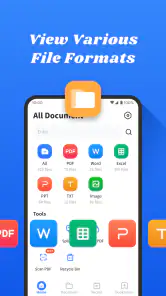
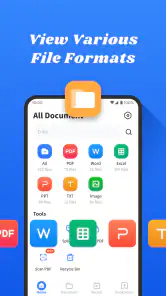
All Document Hub is a comprehensive document management app that allows users to create, edit, and organize various types of documents all in one place. It supports a wide range of file formats including PDFs, Word documents, Excel spreadsheets, and more. This app is designed to enhance productivity by providing tools for document editing, sharing, and collaboration, making it ideal for both personal and professional use.
Is All Document Hub available for both Android and iOS devices?
Yes, All Document Hub is available for download on both Android and iOS platforms. The app is designed to provide a seamless experience across different devices, ensuring that users have access to their documents anytime, anywhere. Whether you're using a smartphone or a tablet, All Document Hub offers a user-friendly interface and robust features compatible with both operating systems.
Does All Document Hub support cloud integration?
All Document Hub supports cloud integration, allowing users to sync their documents across multiple devices effortlessly. With cloud integration, you can access your documents from services like Google Drive, Dropbox, and OneDrive. This feature ensures that your files are always backed up and accessible, providing peace of mind and convenience whether you're at home, in the office, or on the go.
Are there any subscription fees or in-app purchases in All Document Hub?
All Document Hub is free to download. It offers both free and premium versions. The free version includes a range of basic features suitable for most users, while the premium version unlocks additional advanced tools and functionalities. Users can choose to subscribe to the premium version through in-app purchases, which is ideal for those seeking enhanced capabilities such as advanced editing tools, extra storage, and priority support.
Pros
- User-friendly interface enhances productivity
- Supports multiple file formats seamlessly
- Cloud sync ensures data safety
- Offline access available for all files
- Collaborative features boost team efficiency
Cons
- Limited free storage compared to competitors
- Occasional sync issues with large files
- Some features locked behind paywall
- Requires stable internet for cloud features
- Interface can be overwhelming for new users
- Category
- Productivity
- Version
- 1.1.7













