Perfect Viewer
- 3.31K
- 4.1
- Installs
- 5.00M
- Price
- Free

Screenshots

Analysis by Reviewed
I judge a comic reader less by how many buttons it offers than by whether it lets me settle into a story without turning file management into a second hobby. Perfect Viewer is at its best when I bring my own comics and want control over how they appear on screen. It feels more like a flexible reading tool than a place to browse a catalog, which is a useful distinction to make before installing it.
Best when your comics are already yours
My main reason to recommend this kind of reader is simple: it puts the page, rather than a stream of recommendations or a social feed, at the center. That makes it a better fit for people who already have comic files and want a comfortable way to read them than for someone looking for a place to discover and buy new series. Perfect Viewer is a free comics app from Rookie001, and its long-running presence is reflected in its 5M+ installs and 4.1 average rating from around 58,000 ratings. It is rated for Everyone, so the age label is broad; the content you choose to open still matters.
That focus also affects the first few minutes. If your files are already in a folder, the task is mainly choosing how to browse and read them. If you expect an app to recommend a series, sell individual volumes, or explain where to begin with a long-running franchise, this is not the role I would expect it to fill. I would decide first whether I want a reader for a collection I manage myself or a service that supplies and curates the collection.
A Hub for All Your Comics
First off, Perfect Viewer is incredibly versatile. It's like having a virtual library in your pocket, supporting a wide range of formats like CBZ, CBR, PDF, and even EPUB. This means you don’t have to worry about converting files or finding multiple apps to read different types of comics. Everything you need is right here, making it super convenient to switch between your favorite reads without a hitch.
That format range is most useful when a collection has grown over time from different sources. Instead of sorting comics away from ebooks or opening a separate PDF reader for every file, you can try keeping them together and see whether one familiar viewer suits your routine. In practice, I would still test an unfamiliar file before relying on it for a long reading session: supported formats do not guarantee that every file is arranged or rendered exactly as its creator intended. If a page appears oddly, trying another view mode is a sensible first step before assuming the file itself is damaged.
Adjust the page to suit the material
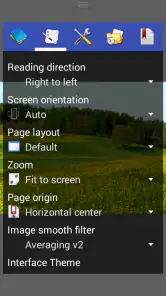
What really sets this app apart is the level of customization it offers. Seriously, the developers have thought of everything. You can adjust brightness, contrast, and even apply filters to make your reading experience just right. Want to change the page background or tweak the color scheme to your liking? No problem. It’s all about making sure the viewer suits your personal taste, which is something I truly appreciate.
These controls matter most when the source pages are inconsistent. A scan that looks washed out beside a darker chapter can be tiring to read, and adjusting the display can help without altering the original file. I suggest making small changes rather than pushing contrast or filters too far; heavy adjustments may make lettering clearer but can also flatten tones in artwork. Once a setting feels comfortable, keep it for ordinary pages and only tweak again when a particular scan calls for it.
More From Our News Desk

Weather by Xiaomi Review: Clear at a Glance, Less Clear Up Close

X Under Pressure: Can It Recover When Posting Goes Wrong?

Clash of Clans Is Won Between the Battles

Android Auto Makes the Case for Quieter Car Software

MobiOffice: Transforming Mobile Productivity with Seamless Integration

EA SPORTS FC™ Mobile Soccer: Redefining Mobile Sports Gaming
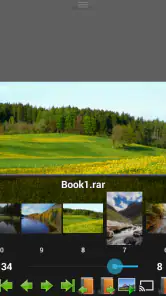
And for those who love a tailored reading experience, the app offers multiple view modes. You can choose from single page, dual page, or even a continuous scroll, depending on what works best for you. Personally, I find the dual-page view perfect for getting that authentic comic book feel.
There is a useful trade-off here: a two-page spread can preserve the sense of a printed book, but it can make text too small on a phone. I switch to single-page reading when dialogue is dense, and use a larger screen for spreads where the artwork clearly depends on seeing both pages together. Continuous scrolling can be convenient for manga or long files, but it is not automatically the best choice for every comic; page-by-page navigation gives a clearer pause between scenes and makes it easier to return to a specific page.
Reading comfort depends on your device and files
Another highlight is how smoothly Perfect Viewer runs. It’s lightweight, meaning it doesn’t hog your device’s resources, which is a blessing if you’re running it on an older smartphone or tablet. I’ve experienced zero lag or crashes, even when loading massive files or flipping through pages rapidly. It’s a breeze to navigate, ensuring you can focus more on the story and less on technical hiccups.
For a practical test, I would open a large file while connected to the same storage location I plan to use for regular reading, then check how it feels to move between pages and resume later. This is more useful than judging a reader by one quick sample: a smooth experience depends on the file and the device as well as the app. If your collection is stored on a computer or removable storage, consider how you want to browse it before importing or organizing everything. A little structure up front can save repeated searching later.
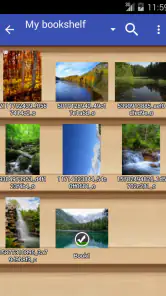
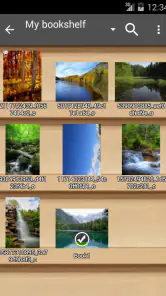
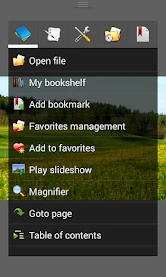
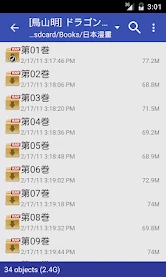
Moreover, the app supports a bookshelf view, allowing you to organize your reads neatly. It’s like having a mini-library where you can categorize your comics and manga collections, making it easier to pick up right where you left off. Trust me, once you get your comics sorted, it’s hard to go back to the clutter!
The bookshelf is especially helpful if you read several series at once: grouping files in a way that matches how you think about your collection can make the next choice obvious. I would keep the organization simple rather than trying to create a perfect catalog immediately. If you share a device or often move between devices, a tidy local bookshelf is not the same thing as a synchronized collection, so check how your own setup handles files and reading progress before depending on it as your only library record.
Plugins bring flexibility, with extra setup
Now, let’s talk about some extra features that are worth mentioning. The app includes a network plugin, which allows you to access comics from various online sources, directly fetching them into your library. Plus, if you’re into reading at night, there’s a night mode to protect those precious eyes from strain. And for the tech-savvy users, it supports plugins for cloud services, letting you sync your library across devices. Pretty neat, right?
Plugins add flexibility, but they also make the setup less immediate than opening a file in a basic reader. If you only read comics saved on your device, you can ignore network and cloud options and keep the workflow straightforward. If you do want to use them, treat each plugin as a separate part of the setup: confirm that the source or service works for your needs, and test a small collection before building your whole routine around it. Night mode is similarly best judged on your own screen and in your own lighting; it can make late reading more comfortable, but it is not a substitute for taking breaks.
For a simple routine, I would start with a couple of files saved locally and learn the page controls before exploring plugins. That makes it easier to tell whether a problem comes from a file, a viewing choice, or a connection workflow. It also avoids spending time configuring network access when all I really need is a dependable way to read a chapter on the train. Readers who enjoy tuning their setup may find the extra options worthwhile; someone who wants everything ready instantly may find them unnecessary friction.
Who will get the most from it
I would point a friend with an existing folder of manga, scanned comics, or mixed reading files toward Perfect Viewer if they want control over how pages look and how they turn. A realistic use is downloading a few chapters before a commute, arranging them on the bookshelf, then switching between single-page reading on a phone and a wider view at home on a tablet. The appeal is that the same reading habit can accommodate different page shapes and file types without requiring a separate app for each one.
On the other hand, I would steer someone toward a dedicated comics store or subscription service if their priority is finding new titles, managing purchases, or getting a guided catalog. A typical gallery app may be simpler for a handful of image files, while a basic PDF reader may be enough for someone who only opens occasional documents. Perfect Viewer makes more sense when the collection is large enough that formats, page presentation, and organization matter. It is a reader, not a reason by itself to expect a polished discovery service.
A useful everyday test is to imagine arriving home with a few chapters you want to continue on a tablet after reading part of them on your phone. The app’s adjustable layouts and bookshelf can make that collection feel easier to browse, but the files still need to be available where you want to read them. I would check the practical path from storage to screen before assuming a cloud plugin will make every part of that handoff seamless. If moving between devices is central to your routine, try that workflow with a small set first.
It is also a good fit for readers who have scans with different page proportions. Rather than forcing every book into the same presentation, I can choose a view that suits the page and change it when a chapter is laid out differently. The trade-off is that this freedom asks me to make decisions: a store-based app may feel easier when I want to tap a title and begin, while this reader rewards a bit of organization and experimentation.
Perfect Viewer is on version 5.0.4.4, and its listed minimum operating system is Android 4.0, which makes it relevant to people using older Android hardware as well as newer devices. That does not mean every device will feel equally convenient: screen size, file storage, and personal preferences still shape the experience. The app was released on Oct 2, 2010, and its continued use suggests a tool with a clear purpose rather than a trend-driven reading feed. I see that focus as a strength, provided it matches what you want.
One question I would settle before moving a large collection is how I want to keep the files themselves organized. The bookshelf can make browsing more manageable, but a clear folder structure outside the app is still useful if I later switch readers or need to locate a particular file. I would also check a sample from each kind of material I read most, because an image-heavy scan, a PDF, and an EPUB can behave differently in practice even when they are all readable in one place.
Another practical consideration is reading posture. A dual-page layout may be comfortable on a tablet held in landscape, yet cramped on a phone held upright; I would not judge the app’s page handling from a single setup. Trying the same page in single-page and continuous modes takes little effort and quickly shows which choice keeps text legible without losing the composition. For long sessions, that small adjustment can matter more than turning on every available enhancement.
The app is free, which makes it easy to try without committing to a new comics service, but the value still depends on whether you have material to open. A reader with no files and no interest in managing them may get little from its flexibility. Someone with a growing personal archive, by contrast, can benefit from having one place to test formats, tweak display settings, and pick up the next chapter.
In conclusion, Perfect Viewer is a must-have for any comic lover. Its versatility, customization options, and seamless performance make it a standout choice for both casual readers and die-hard comic fans. Whether you’re diving into the latest manga or revisiting classic graphic novels, this app ensures you're doing so in the most enjoyable way possible. So, give it a try and transform your reading experience today!
My recommendation is a little more specific: choose it if you value flexible viewing and already have comics to read, and give yourself a short setup session to learn which layout and bookshelf arrangement suit you. Skip it if you want a ready-made storefront or prefer an app that does all the organizing for you. For readers who enjoy shaping their own library, its mix of file support and adjustable presentation makes the effort worthwhile; for everyone else, a simpler reader may be the more comfortable choice.
Perfect Viewer Frequently Asked Questions
Does Perfect Viewer work on iOS as well as Android?
Perfect Viewer is an Android app, so it is intended for use on Android devices rather than as an iOS app. If you use an iPhone or iPad, check that the version you are considering is available for your device before downloading. Android users can also check their operating system version and device compatibility before installing.
Who makes Perfect Viewer, and what kind of app is it?
Perfect Viewer is developed by Rookie001 and is a comics app for viewing comic books, manga, and images. Its stated purpose is to provide a fast, capable way to view images and comics. That makes it a reader for files you bring to the app, rather than a comics catalog or a place to discover and purchase stories.
What does Perfect Viewer cost, and is it appropriate for a general audience?
Perfect Viewer is free to download and has an Everyone content rating. That rating applies to the app itself; the comics and images you open determine what you actually see. If a child will use the app, parents or caregivers should consider the files available on the device and choose material that is appropriate for them.
Can I read comics offline with Perfect Viewer?
Perfect Viewer is an image and comics viewer, so it can be useful for reading files already available on your device without relying on a connection while you read. You can browse your stored comic files through the app and use its viewing options to suit your reading style. Make sure the files you want are accessible on your device before starting.
Which comic and image file formats does Perfect Viewer support?
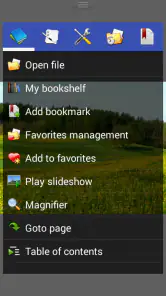
Perfect Viewer is a versatile comic book, manga, and image viewer application designed for Android devices. It supports various file formats including JPEG, PNG, GIF, BMP, CBZ, CBR, RAR, and ZIP. The app also offers bookshelf management, bookmarking, page scaling, and viewing modes such as single page, double page, and continuous scroll, making it a comprehensive solution for comic enthusiasts.
Pros
- Highly customizable interface
- Supports multiple file formats
- Fast and lightweight
- Offline reading mode
- Regular updates
Cons
- No built-in store for comics
- Limited cloud integration
- Steep learning curve
- No social sharing features
- Ads in free version
- Category
- Comics
- Version
- 5.0.4.4