Translator Woman's Voice - TTS
- 1.10K
- 4.0
- Installs
- 10.00M
- Price
- Free

Screenshots
Analysis by Reviewed
When I need to turn a short message into something I can hear, or share with someone who would rather listen than read, I want a quick path from text to spoken audio. Translator Woman's Voice - TTS is built around that practical job. I find it most useful when I treat it as a pocket tool for preparing a phrase, checking how it sounds, and passing the audio along—not as a replacement for every kind of translation service.
When prepared audio is more useful than typing
I reach for a tool like this when I have a clear message in mind but don’t want to rely on my own pronunciation or ask someone to read from my screen. That could mean preparing a simple request before an appointment, making a short note accessible to someone who prefers listening, or keeping a familiar phrase ready for later. The key is that I can decide what to say before the interaction begins.
That makes the app less suited to spontaneous conversation than to a small, deliberate handoff. I would not choose it as my only help for a complicated medical discussion, a legal matter, or any situation where a misunderstood detail could have serious consequences. For routine messages, though, the ability to prepare and hear a phrase can be a useful middle ground between silent text and trying to speak unfamiliar words myself.
From a line of text to something you can use
My starting point might be a sentence I need to understand, a note I want read aloud, or a phrase I expect to use away from home. The app is in the comics category, which is an unusual store placement for a tool whose everyday value is text and audio. Escolha Tecnologia is the developer, and the app is free to install, with in-app purchases listed from $0.99 to $199.99 per item. That wide range is a reason to check purchase details carefully before choosing anything paid.
Putting a phrase through the app
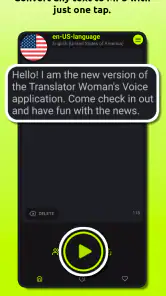
The basic workflow is simple: enter text, choose a target language, then listen to the spoken result. In a real situation, I would prepare a complete, short sentence rather than type a fragment while someone waits. That gives me a chance to catch an awkward word, listen again, and make the message easier to follow. For directions, food requests, or a brief greeting, this preparation can make the handoff smoother than trying to speak a language I barely know.
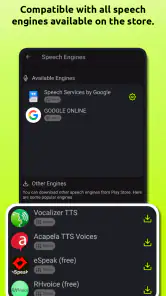
The app’s central idea is voice generation from text, with offline voice generation and audio that can be shared. Those details matter at different points in the process: offline use can help when a connection is unavailable, while sharing lets the audio leave the app and reach another person. I would still test an important phrase before relying on it, especially if the wording has more than one possible meaning.
Listening, adjusting, and sharing
Once a translation is ready, hearing it gives me a different way to assess it than simply reading the words on screen. It can help with a message I want to play aloud, or with material I find easier to process by listening. The female-voice focus is part of the app’s identity, but a spoken output should not be mistaken for proof that every translation sounds natural in context. I’d keep sentences direct and avoid idioms, jokes, or technical wording when the listener needs to understand me quickly.
More From Our News Desk

Weather by Xiaomi Review: Clear at a Glance, Less Clear Up Close

X Under Pressure: Can It Recover When Posting Goes Wrong?

Clash of Clans Is Won Between the Battles

Android Auto Makes the Case for Quieter Car Software

MobiOffice: Transforming Mobile Productivity with Seamless Integration

EA SPORTS FC™ Mobile Soccer: Redefining Mobile Sports Gaming
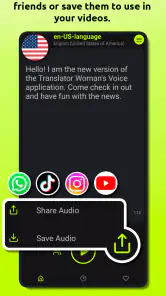
Sharing audio is a useful handoff when showing someone a phone screen would be inconvenient. I can imagine preparing a short instruction before leaving home, then sharing or playing it when needed. A practical tip is to keep each recording focused on one request: separate clips are easier to replay and less likely to bury the important point in a long paragraph. For anything sensitive or consequential, I would verify the wording through another reliable source before sending it.
A small workflow for a busy day
Imagine I’m heading to an appointment in a place where I don’t speak the local language confidently. Before leaving, I write a concise sentence explaining what I need, select the language, and listen to the result in a quiet moment. If the wording sounds confusing, I simplify it instead of adding more explanation. I can then keep the audio ready to play, rather than trying to compose a translation at the counter while people are waiting.
If the other person’s response matters, I plan for that separately. A prepared spoken request does not turn their answer into a translation, so I may need a text-based translation tool, an interpreter, or another way to clarify. This is a small but important distinction: the app can make my prepared message easier to deliver, while the rest of the exchange still depends on what the other person says and how I understand it.
Who will get the most from it
This is best suited to people who regularly turn written text into spoken language, want audio they can share, or need voice generation when they are offline. It may also help someone who prefers listening to a sentence before using it in conversation. The Everyone age rating makes the audience broad, though younger users should still have an adult’s help with purchases and with messages that require careful interpretation.
If I mainly need live conversation, camera-based translation, or a detailed explanation of grammar, I would look at a broader translation app instead. Those tools may fit better when the task starts with speech or an image rather than text. Translator Woman's Voice has a narrower, more focused appeal: prepare words, turn them into audio, and pass that audio on. That distinction is useful when choosing between it and a general-purpose translator.
It may also suit someone who wants a repeatable spoken version of a small set of messages, rather than a new translation every time. I’d skip it if I need a natural back-and-forth, if I mostly translate signs with a camera, or if I want a tutor to explain why a phrase is written a certain way. Those jobs call for tools built around conversation, image recognition, or language learning rather than prepared audio.
Where the workflow can stumble
Text-to-audio tools are only as helpful as the text you give them. A misspelled name, an ambiguous sentence, or a long message can produce audio that is difficult to interpret even if the voice itself is clear. I’d use short clauses, check names and numbers, and listen once before handing the phone to someone. Offline generation is handy, but I would prepare the language and content I need before stepping into a place where connectivity may be unreliable.
There is also a difference between having audio and having a natural conversation. A shared clip can deliver a prepared message, but it cannot automatically handle a follow-up question or clarify a misunderstanding. If I expect a back-and-forth, I’d keep a translation service open as a companion or choose a tool designed around live dialogue. That is the main trade-off: convenience for prepared speech, rather than a complete interpreter experience.
Another point I would check before relying on a clip is whether the listener can replay it comfortably. In a quiet setting, audio can be an easier handoff than passing around a phone; in a noisy public place, the same clip may be hard to hear. I’d keep the written sentence available as a backup and avoid assuming that sharing audio alone solves every accessibility or communication need.
A familiar interface, with practical caveats
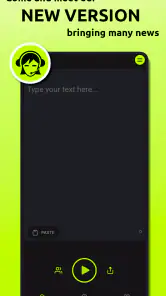
So, let's dive into the user interface. Honestly, it's as intuitive as it gets. Right from the moment you open the app, you're greeted with a clean and straightforward layout. The navigation is a breeze, with all the options neatly laid out. Even if you're not tech-savvy, you'll find yourself at home within minutes. The developers have done a fantastic job ensuring that even the least experienced users can maneuver through the app without any hassle.
The app has a 4.0 average from around 460,000 ratings, with about 1,100 written reviews and over 10 million installs. It first appeared on February 1, 2015, and its current version is 9.0.2; Android users need version 7.0 or later. I see that reach as a sign that many people have tried it, not a guarantee that every language or phrase will suit my needs. The interface may feel approachable, but I would still spend a minute checking how language selection, saved material, and audio sharing work on my own device before depending on them.
Features worth using carefully
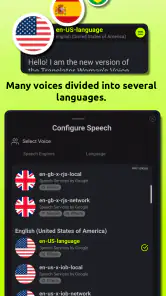
Now, onto the features. The app supports a wide range of languages, which is a massive plus. You can type in your text, select the language you want it translated to, and voilà - the app does its magic. One of my favorite things is how you can adjust the speed and pitch of the voice output, allowing for a more personalized experience. It's these little touches that really make Translator Woman's Voice stand out from the crowd.
For a useful test, I’d try one ordinary sentence in the language I expect to need, then adjust the playback until it is easy to follow. Slower speech can make a phrase easier to catch, while changing pitch is a personal preference rather than a fix for inaccurate wording. I would not assume every voice adjustment is appropriate for every language; the safest check is to listen to the exact sentence I plan to use.
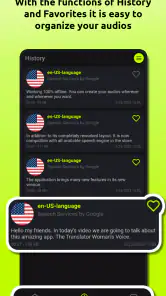
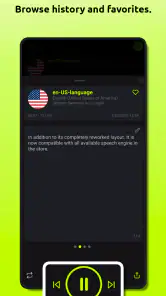
Another neat feature is the ability to save your favorite translations. Whether it's a frequently used phrase or something you just want to keep handy, saving translations allows you to access them anytime without having to retype everything. Trust me, this feature alone saves a ton of time, especially if you're someone who needs translations on a regular basis.
I’d use saved phrases as a small, organized phrasebook for repeat situations: a greeting, a common request, or a short instruction. Keeping one thought per entry makes it quicker to find the right item under pressure. Before a trip or a busy day, I’d also listen to the saved audio once, rather than discover at the moment of need that I chose the wrong language or kept an outdated version of a sentence.
A useful habit is to label or phrase saved entries so their purpose is obvious at a glance, if the app’s available organization makes that possible. I would also review repeat phrases when circumstances change; a request that worked in one context may be too vague in another. Treating saved items as drafts to verify, rather than unquestionable answers, keeps convenience from turning into misplaced confidence.
Using it outside the app
Picture this: You're traveling to a new country and you need to ask for directions. Pull out your phone, type in your query, and let the app do the talking. The woman's voice is clear and articulate, making it easy for locals to understand. It's like having a personal translator right in your pocket, ready to help out whenever needed. This real-world application is where the app truly shines, providing assistance when you need it the most.
I’d make that scenario more reliable by preparing two short versions of the request: the direct question and a simple follow-up such as asking the person to point the way. I would keep the phone ready to replay the audio, then use gestures or a map if the answer is difficult to understand. The app can help me deliver my side of an exchange, but I should not expect it to interpret every reply automatically.
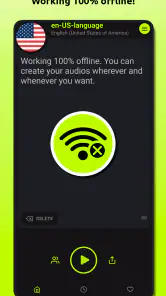
Furthermore, the app's ability to function offline is a game-changer. No more fumbling for a Wi-Fi connection just to get a quick translation. You can download languages and access them anytime, which is perfect for travelers or anyone on the go.
Offline use is most valuable when it is part of preparation, not a last-minute assumption. I’d create and test the phrases I need while connected, then confirm that the relevant language works without a connection before leaving. That small check helps avoid a frustrating gap between having an app installed and having the right audio ready. It is also sensible to keep essential information in another form if being understood is important.
For a trip, I would prepare only the phrases I’m likely to use, rather than trying to build a complete script for every possibility. A compact set is easier to find and less likely to include wording that no longer fits the situation. If my plans change, I’d make a fresh phrase instead of relying on a saved line whose context I may have forgotten.
My take after following the whole flow
All in all, Translator Woman's Voice - TTS is a solid choice for anyone in need of quick and reliable translations. Its user-friendly interface, coupled with a host of features like offline access and customizable voice settings, make it a standout in the crowded world of translation apps. Whether you're a frequent traveler or just someone looking to communicate more effectively, this app is definitely worth checking out.
So, next time you find yourself lost in translation, give this app a try. It might just make your life a whole lot easier.
My recommendation is to think of it as a prepared-audio helper: write a clear line, check the language, listen to the result, and share or play it when the moment comes. That workflow suits routine requests and repeat phrases better than spontaneous, complicated discussions. If that matches what I need, the focused approach is appealing; if I need live interpretation or careful guidance through a high-stakes conversation, I’d choose a more comprehensive option.
Translator Woman's Voice - TTS Frequently Asked Questions
What device requirements should I check before downloading Translator Woman's Voice - TTS?
Translator Woman's Voice - TTS requires Android 7.0 or later, so check your device’s operating system before installing it. The app is free to download, although it offers optional in-app purchases. If you use an iPhone or iPad, check the app’s availability and compatibility in the Apple App Store for your particular device.
Who develops Translator Woman's Voice - TTS, and is it widely used?
Translator Woman's Voice - TTS is developed by Escolha Tecnologia. It has more than 10 million installs and an average rating of 4.0, reflecting a substantial user base. Those figures can help you gauge its reach, but your experience may depend on what you need from a text-to-speech app and how well its features fit your routine.
Can I use Translator Woman's Voice - TTS without an internet connection?
Yes, the app offers offline voice generation, so you can turn text into audio without needing an internet connection for that feature. This is useful when you are traveling or have limited connectivity. Keep in mind that offline voice generation refers to speaking text aloud; it does not necessarily mean that every translation feature works offline.
Can I save or share the audio created in Translator Woman's Voice - TTS?
The app supports shareable audio, making it easier to pass along spoken text after generating it. This can be handy for sending a pronunciation example to someone, sharing a spoken message, or keeping audio for later use. The exact sharing options may depend on your device and the apps you use to receive or store audio.
What is Translator Woman's Voice - TTS, and how does it work?
Translator Woman's Voice - TTS is an app that converts text into speech using a female voice, making it easier to understand translations or read aloud any written content. Users can input text in various languages, and the app will vocalize it in a woman's voice, providing an engaging and clear auditory experience. It's particularly useful for language learners and those needing assistance with pronunciation.
Pros
- Easy-to-use interface.
- High-quality voice output.
- Supports multiple languages.
- Customizable voice settings.
- Fast translation speed.
Cons
- Limited free features.
- Ads can be intrusive.
- Requires internet connection.
- No offline mode available.
- Occasional voice lag.
- Category
- Comics
- Version
- 9.0.2