Perfect Viewer Donation 2
- 53.00
- 4.7
- Installs
- 10.00K
- Price
- $5.00

Screenshots
Analysis by Reviewed
Before installing Perfect Viewer Donation 2, it helps to know what kind of app you’re choosing: this is a paid companion for Perfect Viewer, not a comic library or a standalone reader. I’d think of it as a way for people who already use the main app to support its developer, Rookie001. It costs $5.00, is rated for Everyone, and has a 4.7 average from around 500 ratings. The app has passed 10,000 installs, but those figures matter less than one practical question: do you already rely on Perfect Viewer?
Who this purchase is really for
I’d put this companion on the shortlist only after trying the main reader. It suits someone who already has a collection of comics, knows they enjoy reading them in Perfect Viewer, and wants to enable its donated-user functionality while supporting Rookie001. It is not a good first download for someone expecting a shelf of comics, a discovery feed, or a reader that works independently.
That distinction is especially useful if you are comparing it with the usual options in the comics category. A self-contained reader is often the simpler choice when you want to install one app and immediately explore its own library or service. A file-based reader such as Perfect Viewer makes more sense when you already manage your own files and care about how they are displayed. This paid companion is a further step for people who have already chosen that particular reading workflow.
What to expect from the donation app
The key distinction is easy to miss: the donation app itself is not where you browse or read comics. Its purpose is to enable donated-user functionality in Perfect Viewer, so the reading experience depends on having the main app as well. If you expected a separate comic reader to open after purchase, that setup may feel confusing. I’d approach it as an add-on for an existing workflow, rather than as a first comic app.
That also changes how I’d judge the price. If Perfect Viewer is already your regular reader and you want to support its creator, the purchase has a clear role. If you are still deciding which reader to use, it makes more sense to try the main app first and see whether its way of handling your collection suits you. The donation app is a poor shortcut for someone who simply wants comics ready to read immediately.
Getting Cozy with Comics
First off, Perfect Viewer Donation 2 is a top-notch comic book reader. What sets it apart is its ability to support a wide array of file formats. We're talking about CBZ, CBR, ZIP, RAR, and even PDFs. It's like having a universal remote for all your comic books, and who doesn't love that? The interface is sleek and intuitive, making it super easy to navigate through your collection.
A Visual Treat
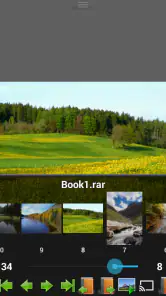
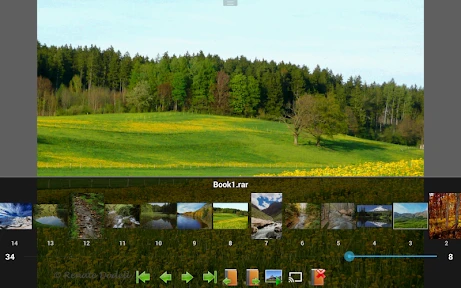
One of the standout features of this app is its display quality. The crisp and clear rendering of images is simply stunning. Whether you're diving into the colorful world of superheroes or the gritty tones of noir comics, the visuals are always on point. Plus, the app offers various viewing modes, like single page, double page, and even a night mode for those late-night reading sessions. It's all about giving you the best reading experience possible.
More From Our News Desk

Weather by Xiaomi Review: Clear at a Glance, Less Clear Up Close

X Under Pressure: Can It Recover When Posting Goes Wrong?

Clash of Clans Is Won Between the Battles

Android Auto Makes the Case for Quieter Car Software

MobiOffice: Transforming Mobile Productivity with Seamless Integration

EA SPORTS FC™ Mobile Soccer: Redefining Mobile Sports Gaming
For a new reader, the best way to judge those options is with a comic you know well. I’d use a page with clear lettering and a spread that crosses the center fold, then compare single-page and double-page viewing on the device I actually plan to use. A setting that looks impressive on one screen can make text feel cramped on another, so a quick side-by-side check is more useful than changing several display options at once.
Customizable to Your Heart's Content
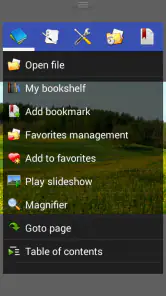
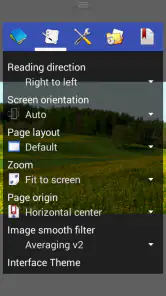
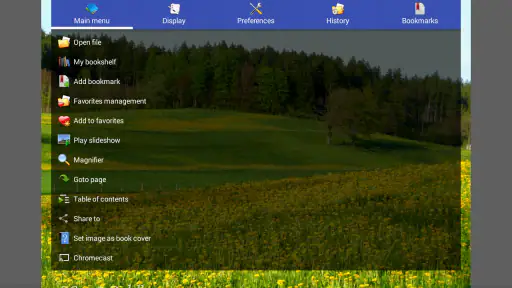
Customization is key, and this app gets it. From adjusting brightness and contrast to tweaking the page layout, Perfect Viewer Donation 2 offers a plethora of options. You can even set up gesture controls for a more personalized experience. This level of customization ensures that every user can tailor their reading experience to their own liking, making it truly personal.
I’d treat customization as a second step, not a prerequisite. First make sure the pages open and turn as expected; then adjust brightness or contrast if a particular scan is hard to read. Gesture controls can be helpful when you read one-handed, but changing them before learning the default controls can make the first session harder to troubleshoot. A small, deliberate change is easier to keep or undo than a full round of tweaking.
For a first-time user, I’d keep the first session simple. Install the donation app only if you already have Perfect Viewer, then open the reader and check whether its donated-user functions are enabled. From there, pick one comic file you already have and read a few pages before changing settings. That gives you a clear baseline: you can tell whether the app recognizes your library and whether the page presentation feels comfortable, without trying to configure everything at once.
Effortless Library Management
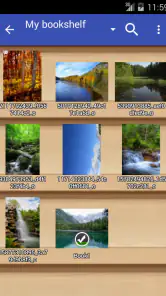
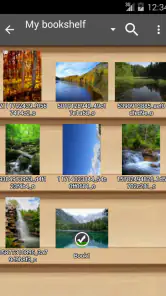
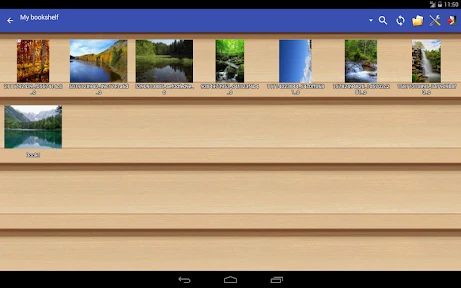
Managing your comic library has never been easier. The app allows you to organize your books into different shelves, so finding your next read is a breeze. You can sort your collection by name, date, or even by series. And if you're like me, who loves to keep things tidy, you'll appreciate the ability to view your comics in a grid or list format.
A useful habit is to settle on a naming pattern before your collection grows: consistent series and issue names make sorting more helpful than a folder full of files with vague titles. For a quick commute, I’d choose a short, familiar comic and confirm the reading direction and page layout in the main viewer before settling in. For a longer session at home, a double-page view may suit wide artwork, while single-page viewing can be easier on a smaller screen. Those choices are made in the reader; the donation app is not a library organizer in its own right.
Where the setup can feel confusing
The most likely snag is treating the purchase as if it installs the reader or unlocks a separate collection. It doesn’t replace Perfect Viewer, and you still need comic files that you can access. If donated-user functions do not appear straight away, I’d first make sure the main app is installed and opened, then revisit its available options. The roles are different: one app handles reading, while this one is the donation companion.
If you are wondering whether the donation companion should be opened every time you read, I would not build your routine around it. The practical reading steps happen in Perfect Viewer; the reason to install this separate app is its connection to donated-user functionality. For a first check, open the main reader after installing both and see whether that functionality is available there. Keeping the two roles straight prevents the understandable but frustrating assumption that the companion itself should contain your collection.
There is also a trade-off in paying before you know whether you enjoy the reader. Unlike a typical free comic app that may bring its own browsing experience or catalog, this purchase is most meaningful when you have already chosen Perfect Viewer and want to support it. If you prefer a hosted service where comics are discovered and read within one place, or want a reader that requires no companion app, this is probably not the right starting point.
Now, I know what you're thinking, "What about the performance?" Well, I've got good news. This app runs smoothly, even with large files. There's no lag, no fuss, just seamless reading, which is exactly what you want when you're engrossed in an epic storyline.
For a realistic everyday test, I’d open a CBZ or PDF I already own, read a few pages on the device I plan to use most, and see whether the controls and page fit work for me. That simple check answers the questions that matter before committing to a routine: can I get to my files, does the layout suit this screen, and do I actually want to keep using Perfect Viewer? If the answer is yes, the donation purchase has a practical context rather than being a blind bet.
Supporting the Developers
By purchasing Perfect Viewer Donation 2, you're not just getting an excellent app, but you're also supporting the developers. It's a win-win situation. You get to enjoy all the premium features and, at the same time, contribute to the ongoing development of the app. It's always nice to know that your money is going towards something worthwhile.
The app dates back to September 9, 2011, and its current version is 1.4.2; it supports Android 1.6 and later. That long history may appeal if you use an older device, though I’d still check that the main reader works well on the device you plan to use. The donation companion’s limited job is also its main limitation: it won’t solve a poorly organized collection, provide comics, or make someone enjoy the reader’s interface if it does not suit them.
When another route makes more sense
If you read comics occasionally and do not already keep files on your device, I’d choose a service that combines browsing and reading instead. That avoids the extra step of finding and managing your own material. Likewise, if you are committed to a different reader and its controls already feel natural, there is little reason to buy a companion for Perfect Viewer just to see what it does. The value here depends on a preference you have already established, not on a promise that every reader will benefit from an add-on.
On the other hand, people with a personal archive may appreciate having a reader that works with familiar file types and lets them shape the display around the material. A mixed collection can include scans with different page proportions and contrast, so being able to adjust the main reader’s presentation may matter more than a built-in storefront. The trade-off is that you take responsibility for keeping your own files accessible and organized. This donation app does not remove that work; it supports a chosen way of reading.
In conclusion, if you're on the hunt for a reliable and versatile comic book reader, Perfect Viewer Donation 2 should definitely be on your radar. With its robust features and user-friendly interface, it makes reading comics a delightful experience. So, go ahead, give it a try, and dive into the world of comics like never before!
My recommendation is more specific: start with Perfect Viewer if you’re new to it, make sure your own files open comfortably, and then decide whether supporting Rookie001 is worth the $5.00 to you. If you already use the reader and want to enable its donated-user functionality, this companion makes sense. If you only want a place to find comics, prefer a fully self-contained app, or haven’t settled on a reader yet, I’d wait. That small distinction is the difference between a useful purchase and an add-on that feels like it does nothing.
Perfect Viewer Donation 2 Frequently Asked Questions
Who develops Perfect Viewer Donation 2, and what kind of app is it?
Perfect Viewer Donation 2 is a comics app developed by Rookie001. It is intended to work alongside Perfect Viewer rather than replace the main reading app: its purpose is to enable the donated-user-only function in Perfect Viewer. If you are looking for a standalone comic reader, keep in mind that this app’s stated role is tied to Perfect Viewer.
What does Perfect Viewer Donation 2 cost, and when was it released?
Perfect Viewer Donation 2 costs $5.00 and was released on September 9, 2011. It is a paid donation app for people who want to enable the donated-user-only function in Perfect Viewer. Before downloading, consider whether you already use Perfect Viewer and want that additional function, since the app is designed to work in conjunction with it rather than serve as a separate reader.
What is Perfect Viewer Donation 2 and how does it differ from the free version?
Perfect Viewer Donation 2 is a paid version of the popular Perfect Viewer app, designed for users who want to support the developers and enjoy an ad-free experience. While the core features are similar to the free version, this donation version offers a seamless reading experience without interruptions, making it ideal for heavy users who seek both functionality and convenience.
Is Perfect Viewer Donation 2 available for both Android and iOS devices?
Perfect Viewer Donation 2 is specifically tailored for Android devices. Unfortunately, iOS users won't be able to download this app. Android users can easily find it on the Google Play Store, where they can enjoy all the features offered by this premium version. Always check compatibility with your device before purchasing.
What file formats does Perfect Viewer Donation 2 support for reading?
Perfect Viewer Donation 2 supports a wide range of file formats, making it a versatile choice for comic and eBook enthusiasts. It can handle CBZ/ZIP, CBR/RAR, 7Z/CB7, LZH, EPUB, and PDF files, among others. This extensive format support ensures that users can enjoy a diverse collection of reading materials without needing separate apps for different file types.
Pros
- Ad-free experience for seamless reading
- Supports a wide range of file formats
- User-friendly interface and navigation
- Customizable settings for personal preferences
- Regular updates with new features
Cons
- No built-in store for comics purchase
- Limited cloud storage integration
- May require a steep learning curve
- Occasional bugs in new updates
- Lacks social sharing features
- Category
- Comics
- Version
- 1.4.2