Draw Cartoons 2
- 16.39K
- 4.6
- Installs
- 10.00M
- Price
- Free

Screenshots
Analysis by Reviewed
I usually think of animation as something that asks for patience before it gives anything back: learn a complicated editor, draw every pose, then wrestle with a timeline. Draw Cartoons 2 takes a friendlier route, letting me build short cartoon scenes from characters and objects and see an idea move without first mastering professional tools. It is a free comics app from Zaliv Armenia, and its appeal is less about replacing a full animation workstation than making animated storytelling approachable on a phone.
That ease has a trade-off worth considering. A playful creative app can involve choices about what you create, what you record, and whether you spend money on extra content. I prefer to judge those questions by what I can actually see and control, rather than assume that a polished interface tells me everything about privacy or data handling. The practical question for me is whether the app suits the way you want to make cartoons, and whether its limits feel acceptable once you begin.
Getting Started with Animation
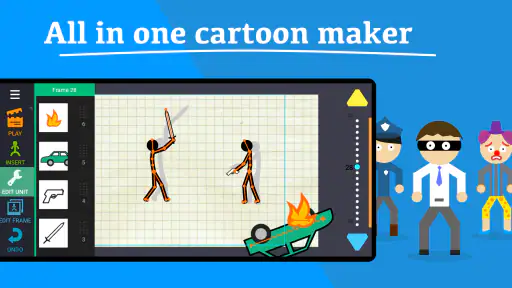
Jumping into Draw Cartoons 2 is like opening a door to a world where your creative ideas can come to life. The app is user-friendly, making it easy for beginners to start without feeling intimidated. It's like having a mini animation studio right in your pocket. The interface is clean and intuitive, which I really appreciate because who likes fumbling around confusing menus, right?
For a first session, I’d keep the goal small: make one character cross a room, wave, or react to something. A tiny scene teaches you more about timing and movement than a long script that never gets finished. It also gives you a chance to see whether the editing style feels comfortable on your device before investing time in a bigger project. The app is rated Everyone 10+, so I’d still make choices about children’s use with their age and comfort in mind, especially if they plan to record voices or share anything outside the app.
Features That Make It Shine
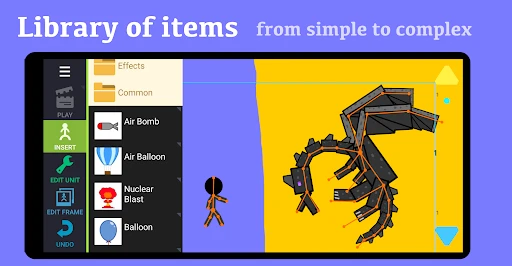
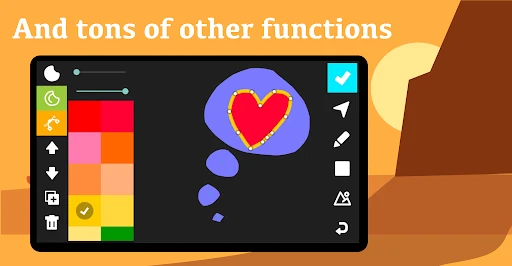
The app comes packed with features that make animation a breeze. First off, there's a huge collection of pre-made characters and objects, so you don't have to start from scratch unless you want to. It's as simple as selecting your character, setting the scene, and you're off to the races!
That ready-made material is useful when you’re testing a story rather than designing a finished character. I’d use a supplied figure to block out who enters, where they stand, and what happens next, then spend time customizing only the character that matters most. This keeps a short project moving and avoids turning every idea into a drawing task. If your main goal is detailed illustration, though, a dedicated drawing app will usually give you more room to refine a single image; this one makes more sense when the image needs to act.
The app has a 4.6 average from around 376,000 ratings, and it has passed 10 million installs. That kind of reach makes it easy to find other people who have tried it, but popularity alone doesn’t tell me whether a creative workflow will suit you. I’d treat those figures as a sign of broad interest, not a promise that every tool or control will match your preferences.
More From Our News Desk

Weather by Xiaomi Review: Clear at a Glance, Less Clear Up Close

X Under Pressure: Can It Recover When Posting Goes Wrong?

Clash of Clans Is Won Between the Battles

Android Auto Makes the Case for Quieter Car Software

MobiOffice: Transforming Mobile Productivity with Seamless Integration

EA SPORTS FC™ Mobile Soccer: Redefining Mobile Sports Gaming
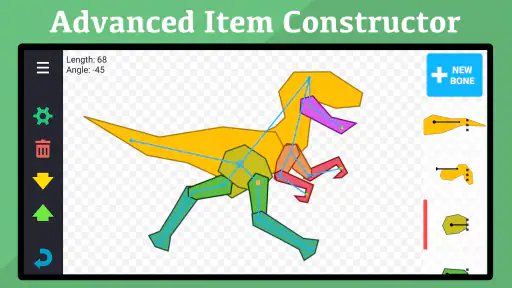
One of the standout features is the ability to create custom characters. You can adjust everything – from the shape of the eyes to the clothes they wear. This really allows for a personal touch, making your animations truly unique. It’s like playing dress-up, but with cartoons!
A useful approach is to make a simple character design you can recognize at a glance, then keep it consistent from scene to scene. Distinctive clothing or a strong silhouette can do more for readability on a small screen than tiny decorative details. Customizing is enjoyable, but it can also become a time sink: if you’re making a quick joke or a rough story idea, a few clear choices are often enough. The current version is 0.22.99, and the app has been around since November 13, 2015; I’d focus less on those milestones than on whether the available editing feels right for your project.
Smooth and Easy Animation Process
Animating in Draw Cartoons 2 is straightforward. The app uses a frame-by-frame approach, which might sound daunting, but it's actually quite fun. You move your characters around, adjust their positions, and the app fills in the gaps to create smooth transitions. It's like magic watching your characters move seamlessly across the screen.
The practical trick is to think in poses, not in tiny movements. Set a clear starting position, make the key change, and check how the transition reads before adding more action. This makes it easier to spot a character sliding or moving too quickly, and it saves effort when a scene needs adjusting. For a school project, a quick explainer, or a small story to share with family, that focused workflow is more realistic than aiming for a polished short film in one sitting.
For example, if I had a few minutes after dinner to make a birthday greeting, I’d start with a character, a simple setting, and one clear action. I’d check the movement before recording a line, then add voice only if it improves the joke or message. Keeping the scene compact makes revisions manageable: if the character’s entrance feels awkward, I can adjust that beat without rebuilding a complicated sequence. This is a better fit for quick, personal animation than for a project that needs elaborate camera work or a carefully polished visual style.
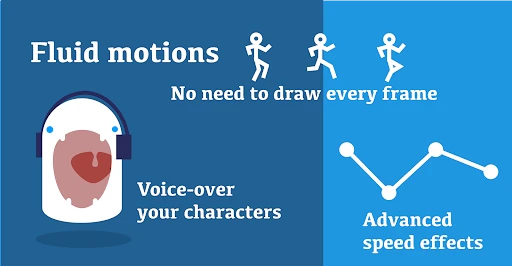
Plus, the app includes a voice-over feature. This means you can add dialogues or sound effects to your cartoons, making them even more engaging. Imagine your characters not only moving but also talking – it adds a whole new dimension to your creations!
Voice recording is also the point where I’d pause and make a deliberate choice. If a scene is just for personal practice, spoken lines can make it feel alive; if other people might see it, consider what names or personal details end up in the audio. I wouldn’t assume a voice-over stays private or is handled in a particular way without checking the app’s visible options and the platform’s current permission prompts. A silent scene with captions or expressive movement can be a better choice when you want to avoid recording speech.
Creative Use Without Losing Control
Animation can gradually collect details that feel harmless on their own: a familiar voice, a recognizable name, or a story based on someone’s real life. I try to separate the fun of making a scene from the decision to share it. Before a child records a voice or uses personal details, I’d agree together on what belongs in the cartoon and who should see the result. That small habit makes creative play more thoughtful without turning it into a lecture.
For a classroom or family activity, I’d keep the premise fictional and give each person a clear role: one chooses the action, another positions the characters, and someone else checks whether the movement makes sense. This encourages collaboration while keeping the project focused. It also gives an adult a natural moment to supervise recording and any sharing decisions, rather than handing over the device and hoping the choices are obvious.
When a permission prompt appears, I’d read what it asks for and decide based on the task at hand instead of accepting automatically. If I only want to plan a silent scene, I can avoid recording a voice; if a permission choice is unclear, I’d pause and review the device settings or leave that feature unused. These are practical ways to make choices, not proof of any particular data policy. I find that distinction important: visible controls can help me manage access, but they don’t answer every question about how information is handled.
Perfect for All Ages
Whether you're a kid wanting to animate your doodles or an adult experimenting with storytelling, this app caters to all. It's educational too; kids can learn the basics of animation while having a blast. And for adults, it's a great way to unwind and let those creative juices flow.
For a child, I’d make the first project together: choose a simple scene, talk through what should happen, and let them handle the character positions. That turns the app into a hands-on way to explore sequence and cause-and-effect, while an adult can help decide what to record or share. A commuter or busy parent could use the same small-project approach during a spare stretch of time, saving a big idea for later rather than expecting a phone session to produce a finished film.
The app’s Everyone 10+ age rating is a useful cue, but it doesn’t replace a parent’s judgment about a particular child, the content they create, or whether they should record and share anything. I’d set expectations before starting: keep scenes fictional, don’t include personal details, and ask before posting a finished cartoon. For an adult who wants a quiet creative break, the same tools can be a low-pressure way to turn a passing idea into something visible without needing to learn a desktop editor.
It is not the best fit for everyone. If you want precise control over every drawn frame, a traditional animation editor may suit you better; if you mainly want to sketch, a drawing-focused app is a more direct choice. This app’s strength is the middle ground: arranging characters, shaping them, and giving them motion without treating every project like a professional production. The free price makes it easy to try, but in-app purchases range from $0.99 to $19.99 per item, so I’d check what an optional purchase offers before paying and keep spending choices clear when a child is using the device.
Compared with flipbook-style apps, where the central task is drawing each pose, this approach asks less of your drawing hand and more of your scene planning. That makes it approachable when you want to tell a story with ready-made pieces, but less satisfying if the pleasure for you is crafting every line yourself. A full desktop animation suite is a better choice when you need extensive control and a larger production workflow; a simple drawing tool wins when the end product is a still image. I’d choose based on the work I actually want to make, not on the broad promise of animation alone.
There is also a practical question about how much time you want to spend refining. A short scene can be rewarding because a few character movements communicate an idea quickly. A longer story brings more decisions: whether the action reads clearly, whether the characters remain recognizable, and whether the audio helps rather than distracts. I’d make a rough version first and watch it through once before adding detail. If the basic action is confusing, extra customization is unlikely to fix it.
When evaluating trust, I look for specific choices I can make rather than guessing from the app’s purpose. Before recording or granting any permission, I’d read the prompt, allow only what seems necessary for the task I’m doing, and revisit device settings if I change my mind. Those steps don’t establish how a developer handles data, but they do help me stay intentional about access and about what I put into a creative project. If visible controls or permission choices don’t feel clear enough for your comfort, it’s reasonable to keep use limited or choose another tool.
That caution matters most when the app is used by someone else in the family. I’d explain which actions are creative choices and which involve the device, such as recording audio or sharing a finished scene. I would not treat an age rating, a large audience, or an easy interface as a substitute for checking those decisions together. If your main requirement is a clearly documented privacy setup or tightly managed child account controls, compare the available choices on your device and consider whether another tool gives you the reassurance you need.
One question people often have is whether they need to be good at drawing before they can make something worthwhile. I don’t think so: the supplied characters and objects give you a way to focus on staging and movement first. The more useful question is whether you enjoy arranging a scene and adjusting poses. If you would rather draw every image from scratch, the ready-made approach may feel limiting rather than helpful.
Another is whether voice-over is essential. I’d treat it as an optional layer, not a requirement: a clear movement can carry a short gag or greeting on its own, while speech can make a character’s intention easier to understand. Likewise, trying the free app before deciding about purchases is sensible. I’d only pay when I know what I want to add and can see that the specific item supports that goal, rather than buying simply because a project feels unfinished.
In conclusion, Draw Cartoons 2 is a delightful app that opens up the world of animation to everyone. It's packed with features that make creating cartoons fun and easy. So if you're looking to explore your artistic side or just want to have fun creating animations, give this app a whirl. Who knows? You might just discover a hidden passion for animation!
My recommendation is cautious but positive: try it if you want to turn a small story into moving characters without beginning with professional software. Start with a short, fictional scene, decide whether you want audio, and keep purchases and sharing deliberate. If the controls suit you, it can be a satisfying creative companion; if you need frame-by-frame drawing precision, advanced production tools, or stronger visible safeguards than you can establish yourself, another option will be a better fit.
Draw Cartoons 2 Frequently Asked Questions
Can I create an animation from scratch in Draw Cartoons 2?
Draw Cartoons 2 is built around making cartoons, and it gives you drawing tools alongside characters and templates you can customize. That makes it possible to start with ready-made elements or shape your own ideas as you work. If you enjoy hands-on creative projects, the app offers a way to explore cartoon animation without requiring you to begin with a blank canvas every time.
Does Draw Cartoons 2 need an internet connection to make animations?
The app focuses on creating cartoons with drawing tools, characters, and templates, so it is intended as a creative workspace rather than simply a place to watch videos. Your experience will depend on the features and content you want to use, but the central appeal is making and customizing animations. If you plan to share finished work, you can use the export and sharing options described below.
Can I use Draw Cartoons 2 on a tablet as well as a phone?
Yes, Draw Cartoons 2 is designed to work across smartphones and tablets, so you can choose the screen size that feels more comfortable for drawing and arranging cartoon elements. A tablet may offer a roomier workspace, while a phone can be convenient for quick creative sessions. In either case, check that your device meets the app’s operating-system requirement before installing.
Is Draw Cartoons 2 suitable for beginners who have never animated before?
Yes. Draw Cartoons 2 is designed to make getting started approachable, with a simple interface and drawing tools that beginners can explore as they create. You can work with characters and templates and customize them rather than needing to build every element from scratch. Its focus is cartoon animation, so it can also appeal to more experienced animators looking for a convenient creative tool.
What is Draw Cartoons 2?
Draw Cartoons 2 is a user-friendly animation app designed for both beginners and experienced animators. It allows users to create their own cartoons using a simple interface and a variety of drawing tools. The app provides templates and characters that can be customized, making it easy for anyone to start animating without any prior experience.
Pros
- User-friendly interface for beginners.
- Wide variety of pre-made characters.
- Smooth animation playback.
- Regular updates with new features.
- Export animations in multiple formats.
Cons
- Limited advanced editing features.
- Occasional app crashes reported.
- Ads can be intrusive at times.
- Some features require in-app purchases.
- Limited sound effects library.
- Category
- Comics
- Version
- 0.22.99